https://github.com/afeiship/ngrok-tunnel
ngrok tunnel to vaiwan.com.
https://github.com/afeiship/ngrok-tunnel
ding dingtalk ngrok pierced proxy tunel
Last synced: 5 months ago
JSON representation
ngrok tunnel to vaiwan.com.
- Host: GitHub
- URL: https://github.com/afeiship/ngrok-tunnel
- Owner: afeiship
- Created: 2016-05-03T05:48:35.000Z (about 10 years ago)
- Default Branch: master
- Last Pushed: 2023-08-24T03:15:58.000Z (almost 3 years ago)
- Last Synced: 2025-02-07T12:30:57.543Z (over 1 year ago)
- Topics: ding, dingtalk, ngrok, pierced, proxy, tunel
- Language: Dockerfile
- Homepage:
- Size: 46.6 MB
- Stars: 4
- Watchers: 3
- Forks: 3
- Open Issues: 0
-
Metadata Files:
- Readme: README.md
Awesome Lists containing this project
README
# ngrok-tunnel
> 钉钉内网穿透(deprecated,钉钉已经下线,所以这个无法访问).
> https://github.com/open-dingtalk/dingtalk-pierced-client
> https://developers.dingtalk.com/document/resourcedownload/http-intranet-penetration
~~~
鉴于很多开发者在临时体验开发时往往没有公网域名或者公网IP,本工具提供了一个公网代理服务,目的是方便开发测试。
注意 本工具不保证稳定性,仅适用于开发测试阶段,禁止当作公网域名使用。如线上应用使用本工具造成稳定性问题,后果由自己承担。如使用本工具传播违法不良信息,钉钉将追究法律责任。
~~~
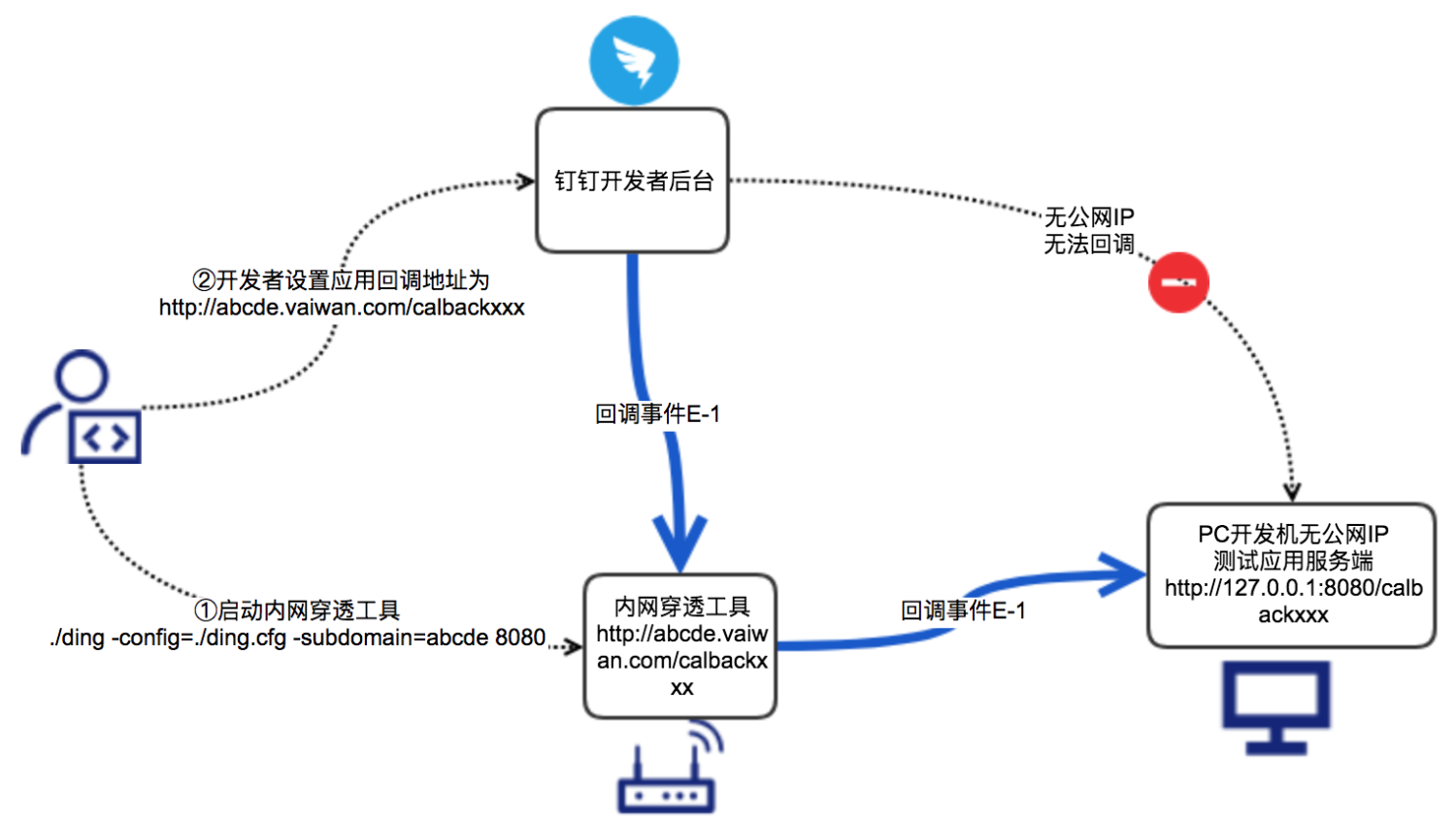
1. 启动内网穿透, 下载工具。
```shell
git clone git@github.com:afeiship/ngrok-tunnel.git
git clone https://github.com/afeiship/ngrok-tunnel.git
# 或者这个
git clone https://github.com/open-dingtalk/pierced.git
```
2. 执行以下命令,启动工具。
> Windows执行以下命令:
```shell
# 说明 Windows需使用cmd工具打开命令行。
cd windows_64
ding -config=ding.cfg -subdomain=abcde 8080
```
> MAC执行以下命令:
```shell
cd mac
chmod 777 ./ding
./ding -config=./ding.cfg -subdomain=abcde 8080
```
3. 启动完客户端后,你访问 `http://abcde.vaiwan.com/xxxxx` 都会映射到 `http://127.0.0.1:8080/xxxxx`

### 参数说明
| 参数 | 说明 |
| ---------- | -------------------------------------------------------------------------------------------------------------------------- |
| -config | 内网穿透的配置文件,按照命令示例固定为钉钉提供的./ding.cfg,无需修改 |
| -subdomain | 您需要使用的域名前缀,该前缀将会匹配到“vaiwan.com”前面,例如你的subdomain是abcde,启动工具后会将abcde.vaiwan.com映射到本地 |
| 端口 | 您需要代理的本地服务http-server端口,例如你本地端口为8080等 |
## issues
1. 无法支持新版 Mac: https://github.com/golang/go/wiki/MacOS12BSDThreadRegisterIssue
2. 考虑在 docker 下可以方便使用这个命令