https://github.com/agallardol/kaivm
KAIVM is a multiplatform Command Line Interface (CLI) designed to simplify the process of downloading, managing, configuring, and running different versions of Shinkai Node
https://github.com/agallardol/kaivm
ai cli rust version-manager
Last synced: 9 months ago
JSON representation
KAIVM is a multiplatform Command Line Interface (CLI) designed to simplify the process of downloading, managing, configuring, and running different versions of Shinkai Node
- Host: GitHub
- URL: https://github.com/agallardol/kaivm
- Owner: agallardol
- License: mit
- Created: 2024-03-18T02:43:03.000Z (over 2 years ago)
- Default Branch: main
- Last Pushed: 2024-03-24T21:11:44.000Z (over 2 years ago)
- Last Synced: 2024-04-26T04:03:58.868Z (about 2 years ago)
- Topics: ai, cli, rust, version-manager
- Language: Rust
- Homepage: https://crates.io/crates/kaivm
- Size: 4.55 MB
- Stars: 5
- Watchers: 1
- Forks: 0
- Open Issues: 0
-
Metadata Files:
- Readme: README.md
- Funding: .github/FUNDING.yml
- License: LICENSE
Awesome Lists containing this project
README
# KAIVM - Shinkai Version Manager

KAIVM is a multiplatform Command Line Interface (CLI) designed to simplify the process of downloading, managing, configuring, and running different versions of Shinkai Node. It provides a seamless way to switch between Shinkai Node versions, ensuring developers can test their applications against multiple versions with ease. For more information on getting started with Shinkai Node, visit [Shinkai Documentation](https://docs.shinkai.com/getting-started).
## Getting Started
Getting started with KAIVM is very straightforward.
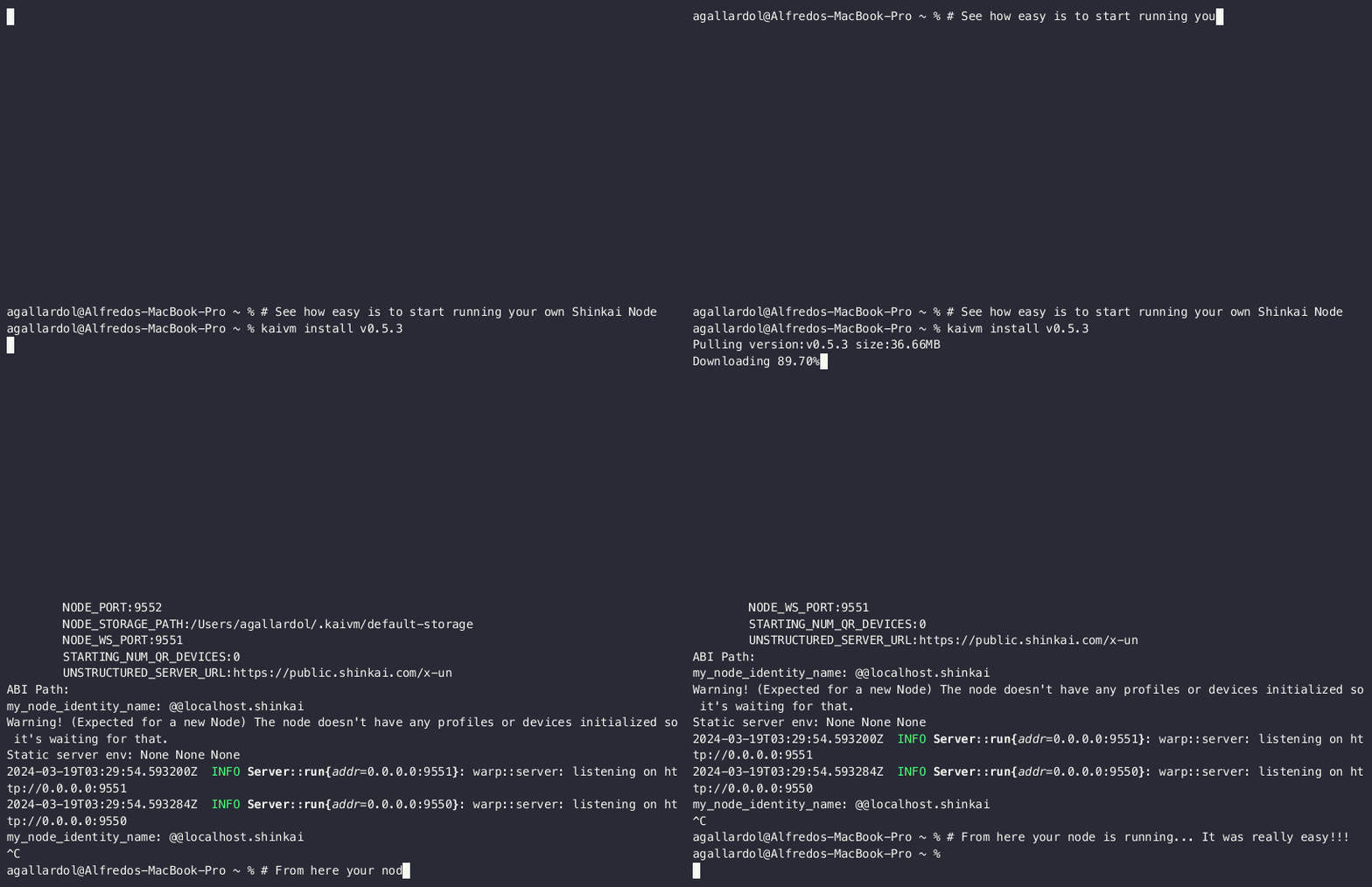
Follow these steps to install, run, and customize a specific version of Shinkai Node:
### 1. Install KAIVM
There are two primary methods to install KAIVM:
#### Option 1: Install using Cargo
If you have Rust's package manager, Cargo, already installed, you can easily add KAIVM by running:
```sh
cargo install kaivm
```
#### Option 2: Install using binary
For macOS Apple Silicon users, the installation process involves a few simple steps. Please follow the instructions below:
```sh
curl -L https://raw.githubusercontent.com/agallardol/kaivm/main/temp-release/kaivm-aarch64-apple-darwin -o kaivm
chmod +x kaivm
mv kaivm /usr/local/bin/
```
For users on other platforms, installation instructions are coming soon.
### 2. Install and run Shinkai Node
1. **Install a Shinkai Node Version**
To install a specific version of Shinkai Node, use the `install` command followed by the version number. For example, to install version 0.5.3, you would run:
```
kaivm install v0.5.3
```
2. **Run Shinkai Node**
After installing the desired version, you can run it using the `kaivm node run` command. This will start the Shinkai Node with the currently set version:
```
kaivm node run
```
3. **Customize Shinkai Node**
You can customize your Shinkai Node instance by passing environment variables using the `--var=value` syntax. For example, to set the API port and the storage path, you can use:
```
kaivm node env --node_api_port=9550 --node_storage_path=~/.kaivm/data
```
By following these steps, you can easily manage, switch between different versions, and customize Shinkai Node for your development needs.
## Configuration and Assets
KAIVM stores its configuration files and downloaded Shinkai Node versions in the `~/.kaivm` directory. This centralized storage makes it easy to manage and access all KAIVM-related assets.
## Available Commands
KAIVM offers a variety of commands to manage Shinkai Node versions:
- **list**: Lists all installed Shinkai Node versions.
```
kaivm list
```
- **install **: Downloads and installs a specific version of Shinkai Node.
```
kaivm install 1.2.3
```
- **use **: Sets a specific version of Shinkai Node as the current version.
```
kaivm use 1.2.3
```
- **version**: Displays the current Shinkai Node version.
```
kaivm version
```
- **node run**: Runs the currently set version of Shinkai Node.
```
kaivm node run
```
- **node reset**: Reset your Shinkai Node.
```
kaivm node reset
```
- **node env**: Sets environment variables for the current Shinkai Node session. Available options include:
- `--node_api_port`: Specifies the port on which the Shinkai Node API will run.
- `--node_storage_path`: Defines the file system path where Shinkai Node will store its data.
- `--unstructured_server_url`: The URL of the unstructured server that Shinkai Node will communicate with.
- `--embeddings_server_url`: The URL of the embeddings server used by Shinkai Node for processing data.
- `--first_device_needs_registration_code`: Determines whether the first device connecting to the Shinkai Node requires a registration code for authentication. Accepts 'true' or 'false'.
- `--initial_agent_names`: A comma-separated list of initial agent names to be registered with the Shinkai Node.
- `--initial_agent_urls`: A comma-separated list of URLs for the initial agents, corresponding to the names provided.
- `--initial_agent_models`: A comma-separated list of models for the initial agents, corresponding to the names provided.
- `--initial_agent_api_keys`: A comma-separated list of API keys for the initial agents, corresponding to the names provided.
- `--starting_num_qr_devices`: The initial number of QR devices that should be supported by the Shinkai Node.
- `--node_port`: Specifies the port on which the Shinkai Node will run.
- `--node_ws_port`: Specifies the WebSocket port for the Shinkai Node.
- `--unstructured_server_api_key`: The API key for the unstructured server that the Shinkai Node will communicate with.
- `--embeddings_server_api_key`: The API key for the embeddings server used by the Shinkai Node for processing data.
- `--job_manager_threads`: The number of threads to be used by the job manager within the Shinkai Node.
- `--global_identity_name`: The global identity name for the Shinkai Node.
```
kaivm node env --node_api_port 9550 --node_storage_path ~/.kaivm/data
```
With KAIVM, managing Shinkai Node versions becomes a breeze, allowing developers to focus on building and testing their applications.