https://github.com/agility/agility-days-website
https://github.com/agility/agility-days-website
Last synced: about 1 year ago
JSON representation
- Host: GitHub
- URL: https://github.com/agility/agility-days-website
- Owner: agility
- License: mit
- Created: 2020-02-06T19:30:30.000Z (over 6 years ago)
- Default Branch: master
- Last Pushed: 2020-03-06T14:48:54.000Z (over 6 years ago)
- Last Synced: 2025-02-14T04:51:16.178Z (over 1 year ago)
- Language: CSS
- Size: 1.36 MB
- Stars: 2
- Watchers: 2
- Forks: 0
- Open Issues: 0
-
Metadata Files:
- Readme: README.md
- License: LICENSE
- Code of conduct: CODE_OF_CONDUCT.md
Awesome Lists containing this project
README


Gatsby + Agility CMS Starter


This repo is a great starting point to get a Gatsby project up and running quickly with Agility CMS as the Content Management System.
This site uses the [Agility CMS Gatsby Source Plugin](https://github.com/agility/gatsby-source-agilitycms) and it meant to be used with the **Blog Template** in Agility CMS
This is currently a work in-progress. Please see [Issues](https://github.com/agility/agility-gatsby-starter/issues) for a list of features that need to be implemented.
# Table of contents
- [What is Agility CMS? What makes it different?](#what-is)
- [Getting up and running](#start)
- [How to build a production version of your project and test it](#build)
- [Deploy](#deploy)
- [How to format all project code with Prettier](#format)
- [Customizing your Agility Gatsby project further](#customizing)
- [What is Agility CMS? What makes it different?](#what-is)
- [Resources](#resources)
- [Roadmap](#roadmap)
- [Contributing](#contributing)
- [Code of conduct](#code-of-conduct)
- [License](#license)
# Getting up and running
## Pre-requisite: Install the Gatsby CLI
```
npm install -g gatsby-cli
```
[Additional information for getting started with Gatsby](https://www.gatsbyjs.org/tutorial/)
## Pre-requisite: Get a free Agility CMS account
Navigate to [https://account.agilitycms.com/sign-up?product=agility-free](https://account.agilitycms.com/sign-up?product=agility-free).
Fill out the form and ensure you select `JavaScript` as your Development Stack.
On step 2, give your project a name and ensure to select `Blog Template` as your template.
## Save your Agility CMS credentials
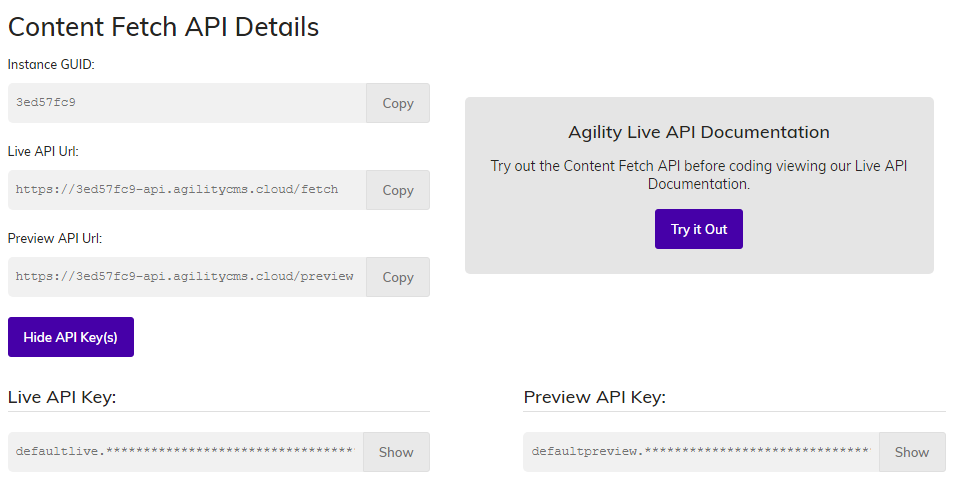
After going through the sign up process, you'll come to your Agility CMS `Getting Started` screen which has **Content Fetch API Details**. Save your `GUID` and then click the **Show API Key(s)** button to reveal your `Live API Key` and `Preview API Key`. Click the **Show** buttons beside both to unmask the credentials and copy these somewhere temporarily, or refer back to this screen when you begin to [Configure your local environment](#configure-local).
## Clone this repo to your local machine
```
git clone https://github.com/agility/agility-gatsby-starter
```
## Install Node dependencies
With [Yarn](https://yarnpkg.com/en/docs/install)
```
cd agility-gatsby-starter
yarn
```
With [NPM](https://www.npmjs.com/get-npm)
```
cd agility-gatsby-starter
npm install
```
## Configure your local environment
Rename `./.env.development.example` to `./.env.development`
```
cp .env.development.example .env.development
```
Add your development `AGILITY_GUID` and `AGILITY_API_KEY` variable values in `.env.development`
```
# Your Instance Id
AGILITY_GUID=
# Your Preview API Key (recommended) - you can get this from the Getting Started Page in Agility CMS. It starts with defaultpreview.
AGILITY_API_KEY=
# If using your Preview API Key, set this to true
AGILITY_API_ISPREVIEW=true
```
Rename `./.env.production.example` to `./.env.production`
```
cp .env.production.example .env.production
```
Add your production `AGILITY_GUID` and `AGILITY_API_KEY` variable values in `.env.production`
```
# Your Instance Id
AGILITY_GUID=
# Your Live API Key (recommended) - you can get this from the Getting Started Page in Agility CMS. It starts with defaultlive.
AGILITY_API_KEY=
# Since you won't want to preview here, set this to false
AGILITY_API_ISPREVIEW=false
```
## Start the Gatsby development server
Once the above steps are done, you can launch your local development server:
With [Yarn](https://yarnpkg.com/en/docs/install)
```
yarn start
```
With [NPM](https://www.npmjs.com/get-npm)
```
npm start
```
# How to build a production version of your project and test it
It's good practice to build a production version and test it locally before publishing it or doing a pull request into `master`. Here's how to do it:
With [Yarn](https://yarnpkg.com/en/docs/install)
```
yarn build
yarn serve
```
With [NPM](https://www.npmjs.com/get-npm)
```
npm run build
npm run serve
```
# Deploy
[](https://app.netlify.com/start/deploy?repository=https://github.com/agility/agility-gatsby-starter)
☝️ Deploy this starter repo in just minutes with [Netlify](https://www.netlify.com/). You'll need to add your Agility CMS `AGILITY_GUID`, `AGILITY_API_KEY`, and `AGILITY_API_ISPREVIEW` variables in Netlify's **Site settings > Build & deploy > Environment** section.
# How to format all project code with Prettier
If you care about code formatting and keeping it consistent across your projects and/or among your team, you can utilize an opinionated code formatter like [Prettier](https://prettier.io/). This repo contains a `./.prettierrc` file which you can modify to suit your formatting tastes/needs.
[Documentation on Prettier Options](https://prettier.io/docs/en/options.html)
With [Yarn](https://yarnpkg.com/en/docs/install)
```
yarn format
```
With [NPM](https://www.npmjs.com/get-npm)
```
npm run format
```
# Customizing your Agility Gatsby project further
## gatsby-config.js
You'll want to take a peek under the hood at some point and take the starter's configuration for Gatsby further. To get a better understanding of the `options`, please visit [GatsbyJS Source Plugin for Agility CMS](https://github.com/agility/gatsby-source-agilitycms) on GitHub for documentation.
# What is Agility CMS? What makes it different?
[Agility CMS](https://agilitycms.com/) is a headless Content Management System (CMS) that lets you define your custom content types and relationships. This is called Content Architecture, and you can reuse this content for your websites and apps.
In addition, Agility CMS provides a page routing API, which allows you to offload control of the sitemap to the content editors.
All content is available through the Agility CMS [Fetch](https://help.agilitycms.com/hc/en-us/sections/360006070691-Content-Fetch-API) or Preview API.
# Resources
## Agility CMS
- [Official site](https://agilitycms.com)
- [Documentation](https://help.agilitycms.com/hc/en-us)
- [Guides](https://agilitycms.com/resources)
- [Sourcing from Agility CMS](https://www.gatsbyjs.org/docs/sourcing-from-agilitycms/)
- [Help/Support](https://help.agilitycms.com/hc/en-us)
## GatsbyJS
- [Official site](https://www.gatsbyjs.org/)
- [Documentation](https://www.gatsbyjs.org/docs/)
- [GatsbyJS Source Plugin for Agility CMS](https://github.com/agility/gatsby-source-agilitycms)
## Prettier
- [Get started](https://prettier.io/docs/en/install.html)
- [Prettier Options](https://prettier.io/docs/en/options.html)
- [Interactive demo](https://prettier.io/playground/)
## Community
- [Official Slack](https://join.slack.com/t/agilitycommunity/shared_invite/enQtNzI2NDc3MzU4Njc2LWI2OTNjZTI3ZGY1NWRiNTYzNmEyNmI0MGZlZTRkYzI3NmRjNzkxYmI5YTZjNTg2ZTk4NGUzNjg5NzY3OWViZGI)
- [Podcast](https://agilitycms.com/community/agileliving)
- [Blog](https://agilitycms.com/resources/posts)
- [GitHub](https://github.com/agility)
- [Forums](https://help.agilitycms.com/hc/en-us/community/topics)
- [Facebook](https://www.facebook.com/AgilityCMS/)
- [Twitter](https://twitter.com/AgilityCMS)
# Roadmap
See the [open issues](https://github.com/agility/agility-gatsby-starter/issues) for a list of proposed features (and known issues).
# Code of conduct
See [CODE OF CONDUCT](CODE_OF_CONDUCT.md) for more information.
# Contributing
Contributions are what make the open source community such an amazing place to be learn, inspire, and create. Any contributions you make are **greatly appreciated**.
1. Fork the Project
2. Create your Feature Branch (`git checkout -b feature/AmazingFeature`)
3. Commit your Changes (`git commit -m 'Add some AmazingFeature'`)
4. Push to the Branch (`git push origin feature/AmazingFeature`)
5. Open a Pull Request
Thank you to all of you who have [contributed to agility-gatsby-starter](https://github.com/agility/agility-gatsby-starter/graphs/contributors)!
## 🎉🤘💖🖖
# License
Distributed under the MIT License. See [LICENSE](LICENSE) for more information.