https://github.com/agility/agilitycms-dotnet-core
Agility package for page management and URL redirects.
https://github.com/agility/agilitycms-dotnet-core
Last synced: about 1 year ago
JSON representation
Agility package for page management and URL redirects.
- Host: GitHub
- URL: https://github.com/agility/agilitycms-dotnet-core
- Owner: agility
- License: gpl-3.0
- Created: 2021-07-16T13:01:27.000Z (almost 5 years ago)
- Default Branch: main
- Last Pushed: 2024-03-12T15:57:40.000Z (about 2 years ago)
- Last Synced: 2025-02-14T04:51:14.976Z (over 1 year ago)
- Language: C#
- Size: 21.5 KB
- Stars: 0
- Watchers: 4
- Forks: 0
- Open Issues: 1
-
Metadata Files:
- Readme: README.md
- License: LICENSE
Awesome Lists containing this project
README
# agilitycms-dotnet-core
Agility package for page management and URL redirects. Agility CMS .NET Core uses Agility CMS .NET Core behind the scenes and is a dependency.
# Setup
1. Clone Agility CMS .NET Core repo at https://github.com/agility/agilitycms-dotnet-fetch-api
2. Clone and configure Agility CMS .NET 5 Starter at https://github.com/agility/agilitycms-dotnet-starter
3. Clone and configure Agility CMS .NET Fetch API repo at https://github.com/agility/agilitycms-dotnet-fetch-api
5. Open Agility CMS .NET 5 Starter and add the project Agility CMS .NET Core to your solution
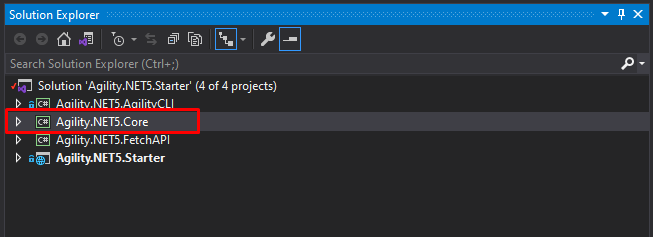
4. Add a dependency to the Agility.NET.Starter for Agility CMS .NET Core by right clicking 'Dependencies' under Agility.NET.Starter
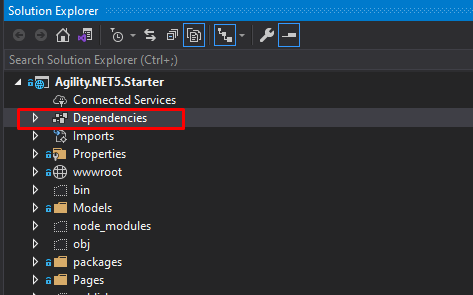
5. Select 'Add Project Reference' and check Agility.NET.Core

6. Add a dependency to the Agility.NET.Core for Agility CMS .NET Fetch API by right clicking 'Dependencies' under Agility.NET.Core
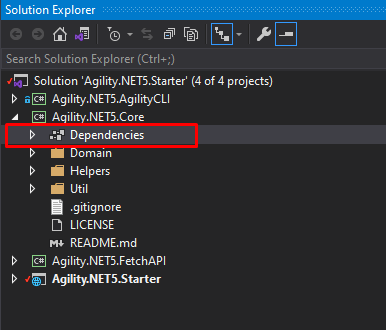
7. Select 'Add Project Reference' and check Agility.NET.FetchAPI

# Core
## Page Management
To add page management to your project (_Agility CMS .NET Starter or empty project_) you need to update ```Startup.cs``` with the following.
In ```ConfigureServices(IServiceCollection services)``` add ```services.AddSingleton();```
and in ```Configure(IApplicationBuilder app, IWebHostEnvironment env)``` add
```
app.UseEndpoints(endpoints =>
{
endpoints.MapRazorPages();
endpoints.MapDynamicPageRoute("/{**slug}");
});
```
You can change ```AgilityRouteTransformer.cs``` to fit your needs or you can create your own Route Transformer. Keep in mind to use the ```AgilityRouteTransformer.cs``` it requires having the AgilityPage.cshtml in your Pages folder.
## URL Redirects
To add URL redirects to your project (_Agility CMS .NET Starter or empty project_) you need to update ```Startup.cs``` with the following.
In ```Configure(IApplicationBuilder app, IWebHostEnvironment env)``` add
```
app.UseMiddleware();
```
You can change to ```AgilityRedirectMiddleware.cs``` to fit your needs or you can create your own Redirect Middleware.