https://github.com/agnt-gg/slop
The place for SLOP
https://github.com/agnt-gg/slop
Last synced: 3 months ago
JSON representation
The place for SLOP
- Host: GitHub
- URL: https://github.com/agnt-gg/slop
- Owner: agnt-gg
- License: mit
- Created: 2025-03-08T00:38:40.000Z (over 1 year ago)
- Default Branch: main
- Last Pushed: 2025-03-22T03:31:47.000Z (over 1 year ago)
- Last Synced: 2025-03-22T04:24:11.371Z (over 1 year ago)
- Language: HTML
- Size: 548 KB
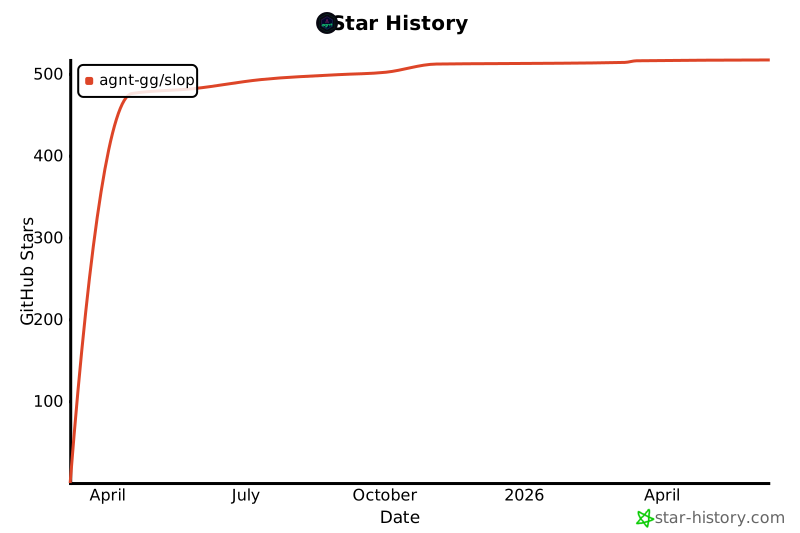
- Stars: 449
- Watchers: 9
- Forks: 36
- Open Issues: 2
-
Metadata Files:
- Readme: README.md
- License: LICENSE
Awesome Lists containing this project
- awesome-ccamel - agnt-gg/slop - The place for SLOP (HTML)
README
# SLOP: Simple Language Open Protocol
> **Because AI shouldn't be complicated**
### 🎯 WHAT SLOP IS:
- A pattern for AI APIs with 6 basic endpoints
- Regular HTTP(S) requests with JSON data
- A standard way to talk to any AI service
- Based on REST: GET and POST what you need
### 🚫 WHAT SLOP IS NOT:
- A framework or library you install
- A new technology or language
- A specific company's product
- An additional abstraction in any way
> 💡 **SLOP simply says:** "AI services should work through plain web requests using patterns we've used for decades."
That's it. Just a pattern. ✨
---
---
## 1. CORE BELIEFS
- Everything is an HTTP request
- Every tool is an API endpoint
- Every AI is accessible
- Every developer is welcome
## 2. CORE ENDPOINTS (ALL OPTIONAL)
SLOP is modular - implement only what you need. A server is SLOP-compliant if it implements *any one* of these endpoints following the standard format.
| Endpoint | Method | Purpose | Implementation |
|----------|--------|---------|----------------|
| `/chat` | POST | Talk to AI | Optional |
| `/tools` | GET, POST | Use AI tools | Optional |
| `/memory` | GET, POST, PUT, DELETE | Store and retrieve data | Optional |
| `/resources` | GET, POST | Access knowledge and files | Optional |
| `/pay` | POST | Handle payments | Optional |
| `/info` | GET | Expose server metadata | Optional |
> 💡 **Note:** You don't need to implement all endpoints - just the ones your application requires.
> Even a single endpoint following SLOP conventions makes your service SLOP-compliant.
> 🔍 **Pro Tip:** Implementing the `/info` endpoint is highly recommended as it allows your SLOP server to self-document its capabilities.
> This makes it much easier for others to discover and integrate with your service without needing external documentation.
## 3. CONNECTION TYPES
- Standard HTTP/REST Interface For Most Things
- WebSocket Support for Persistent Real-Time Connections
- Server-Sent Events (SSE) for One-Way Real-Time Streaming
## 4. MULTI-AGENT CAPABILITIES
- Route Queries to Specialized Agents Based on Content
- Create Agent Networks with Different Skills and Roles
- Support for Multiple Execution Patterns (Sequential, Parallel, Branching)
- Persistent Memory Allows Seamless Agent Collaboration
- Works for Simple to Complex Use Cases:
- [Advanced Streaming AI Chat Platform](https://github.com/agnt-gg/slop/tree/main/examples/javascript/advanced-examples/pdf-bot-with-stream)
- Customer Service Bots with Specialist Routing
- Research Assistants with Domain-Specific Agents
- Creative Workflows with Multiple AI Collaborators
- Game Development with Dynamic NPCs
- Smart Home Management with Coordinated AI Agents
- Personal Finance Management with Adaptive Advisors
- Educational Platforms with Adaptive Learning Agents
- Multi-Agent Disaster Response Coordination
- Marketing Automation with Targeted Campaign Agents
- Health Monitoring Systems with Specialized Health Agents
- Travel Planning Assistants with Itinerary Optimization
- E-commerce Platforms with Personalized Shopping Assistants
- Content Moderation Systems with Specialized Review Agents
---
## 🤝 THE SLOP PROMISE:
### 1. OPEN
- Free to use
- Open source
- No vendor lock
- Community driven
- Use any LLM model
### 2. SIMPLE
- REST based
- JSON only
- Standard HTTP
- Zero dependencies
### 3. FLEXIBLE
- Any AI model
- Any tool
- Any platform
---
## ⚡ Quick Start
Get started with the SLOP repo of tools in minutes:
```bash
# Clone the repository
git clone https://github.com/agnt-gg/slop
cd slop
# Check out the examples
cd examples/javascript
# Install dependencies
npm install
# Start the server
npm start
# Your SLOP server is now running at http://localhost:3000
# Try a simple SLOP request:
curl -X POST http://localhost:3000/chat \
-H "Content-Type: application/json" \
-d '{"messages":[{"role":"user","content":"Hello SLOP!"}]}'
```
Or test any SLOP API with our endpoint inspector:
```bash
# Go to the endpoint inspector utility
cd slop/utilities/slop-inspector/server
# Install and run
npm install
npm start
# Open http://localhost:4000 in your browser
# Enter any SLOP API URL to inspect it
```
---
## 📖 ENDPOINT OPERATIONS (v0.0.1)
### 💬 CHAT
- `POST /chat` - Send messages to AI
- `POST /chat` - Create or continue a thread (with thread_id)
- `GET /chat/:id` - Get a specific chat
- `GET /chat/thread_:id` - Get all messages in a thread
- `GET /chat` - List recent chats
- `GET /chat?type=threads` - List all threads
### 🛠️ TOOLS
- `GET /tools` - List available tools
- `POST /tools/:tool_id` - Use a specific tool
- `GET /tools/:tool_id` - Get tool details
### 🧠 MEMORY
- `POST /memory` - Store a key-value pair
- `GET /memory/:key` - Get value by key
- `GET /memory` - List all keys
- `PUT /memory/:key` - Update existing value
- `DELETE /memory/:key` - Delete a key-value pair
- `POST /memory/query` - Search with semantic query
### 📚 RESOURCES
- `GET /resources` - List available resources
- `GET /resources/:id` - Get a specific resource
- `GET /resources/search?q=query` - Search resources
- `POST /resources` - Create a new resource
- `PUT /resources/:id` - Update an existing resource
- `DELETE /resources/:id` - Delete a resource
- `GET /resources/prefix/:prefix` - List resources with a specific prefix
### 💳 PAY
- `POST /pay` - Create a payment
- `GET /pay/:id` - Get payment status
### ℹ️ INFO
- `GET /info` - Get server metadata, capabilities, and documentation
---
## 🚀 API EXAMPLES - ALL ENDPOINTS
### 💬 CHAT ENDPOINTS
#### POST /chat
```json
// REQUEST
POST /chat
{
"messages": [
{"role": "user", "content": "Hello, what's the weather like?"}
],
"model": "any-model-id"
}
// RESPONSE
{
"id": "chat_123",
"message": {
"role": "assistant",
"content": "I don't have real-time weather data. You could check a weather service for current conditions."
}
}
```
#### GET /chat/:id
```json
// REQUEST
GET /chat/chat_123
// RESPONSE
{
"id": "chat_123",
"messages": [
{"role": "user", "content": "Hello, what's the weather like?"},
{"role": "assistant", "content": "I don't have real-time weather data. You could check a weather service for current conditions."}
],
"model": "any-model-id",
"created_at": "2023-05-15T10:30:00Z"
}
```
#### Creating a Thread
```json
// REQUEST
POST /chat
{
"thread_id": "thread_12345", // Thread identifier
"messages": [
{"role": "user", "content": "Let's discuss project planning"}
],
"model": "any-model-id"
}
// RESPONSE
{
"thread_id": "thread_12345",
"message": {
"role": "assistant",
"content": "Sure, I'd be happy to discuss project planning. What aspects would you like to focus on?"
}
}
```
#### Adding to a Thread
```json
// REQUEST
POST /chat
{
"thread_id": "thread_12345",
"messages": [
{"role": "user", "content": "What's our next milestone?"}
],
"model": "any-model-id"
}
// RESPONSE
{
"thread_id": "thread_12345",
"message": {
"role": "assistant",
"content": "To determine the next milestone, we should review your project timeline and priorities. What's the current state of your project?"
}
}
```
#### Listing All Threads
```json
// REQUEST
GET /chat?type=threads
// RESPONSE
{
"threads": [
{
"id": "thread_12345",
"title": "Project Planning",
"last_message": "What's our next milestone?",
"created_at": "2023-05-15T10:30:00Z",
"updated_at": "2023-05-15T11:45:00Z"
},
{
"id": "thread_67890",
"title": "Bug Fixes",
"last_message": "Let's prioritize the login issue",
"created_at": "2023-05-14T14:20:00Z",
"updated_at": "2023-05-14T16:30:00Z"
}
]
}
```
#### Getting Thread Messages
```json
// REQUEST
GET /chat/thread_12345
// RESPONSE
{
"thread_id": "thread_12345",
"title": "Project Planning",
"messages": [
{
"id": "msg_001",
"role": "user",
"content": "Let's discuss project planning",
"created_at": "2023-05-15T10:30:00Z"
},
{
"id": "msg_002",
"role": "assistant",
"content": "Sure, what aspects of the project would you like to plan?",
"created_at": "2023-05-15T10:30:05Z"
},
{
"id": "msg_003",
"role": "user",
"content": "What's our next milestone?",
"created_at": "2023-05-15T11:45:00Z"
}
],
"model": "any-model-id",
"created_at": "2023-05-15T10:30:00Z",
"updated_at": "2023-05-15T11:45:00Z"
}
```
#### Storing Thread Metadata
```json
// REQUEST
POST /memory
{
"key": "thread:thread_12345",
"value": {
"title": "Project Planning",
"participants": ["user_1", "user_2"],
"tags": ["project", "planning", "roadmap"],
"status": "active"
}
}
// RESPONSE
{
"status": "stored"
}
```
#### Searching for Threads
```json
// REQUEST
POST /memory/query
{
"query": "project planning threads with user_1",
"filter": {
"key_prefix": "thread:"
}
}
// RESPONSE
{
"results": [
{
"key": "thread:thread_12345",
"value": {
"title": "Project Planning",
"participants": ["user_1", "user_2"],
"tags": ["project", "planning", "roadmap"],
"status": "active"
},
"score": 0.95
}
]
}
```
#### Updating Thread Metadata
```json
// REQUEST
PUT /memory/thread:thread_12345
{
"value": {
"title": "Project Planning",
"participants": ["user_1", "user_2", "user_3"], // Added new participant
"tags": ["project", "planning", "roadmap", "active"],
"status": "in_progress" // Updated status
}
}
// RESPONSE
{
"status": "updated",
"previous_value": {
"title": "Project Planning",
"participants": ["user_1", "user_2"],
"tags": ["project", "planning", "roadmap"],
"status": "active"
}
}
```
#### GET /chat
```json
// REQUEST
GET /chat
// RESPONSE
{
"chats": [
{
"id": "chat_123",
"snippet": "Hello, what's the weather like?",
"created_at": "2023-05-15T10:30:00Z"
},
{
"id": "chat_456",
"snippet": "Tell me about Mars",
"created_at": "2023-05-14T14:20:00Z"
}
]
}
```
### 🛠️ TOOLS ENDPOINTS
#### GET /tools
```json
// REQUEST
GET /tools
// RESPONSE
{
"tools": [
{
"id": "calculator",
"description": "Performs mathematical calculations",
"parameters": {
"expression": "string"
}
},
{
"id": "weather",
"description": "Gets current weather",
"parameters": {
"location": "string"
}
}
]
}
```
#### POST /tools/:tool_id
```json
// REQUEST
POST /tools/calculator
{
"expression": "15 * 7"
}
// RESPONSE
{
"result": 105
}
```
#### GET /tools/:tool_id
```json
// REQUEST
GET /tools/calculator
// RESPONSE
{
"id": "calculator",
"description": "Performs mathematical calculations",
"parameters": {
"expression": {
"type": "string",
"description": "Mathematical expression to evaluate"
}
},
"example": "15 * 7"
}
```
### 🧠 MEMORY ENDPOINTS
#### POST /memory
```json
// REQUEST
POST /memory
{
"key": "user_preference",
"value": {
"theme": "dark",
"language": "en"
}
}
// RESPONSE
{
"status": "stored"
}
```
#### GET /memory/:key
```json
// REQUEST
GET /memory/user_preference
// RESPONSE
{
"key": "user_preference",
"value": {
"theme": "dark",
"language": "en"
},
"created_at": "2023-05-15T10:30:00Z"
}
```
#### GET /memory
```json
// REQUEST
GET /memory
// RESPONSE
{
"keys": [
{
"key": "user_preference",
"created_at": "2023-05-15T10:30:00Z"
},
{
"key": "search_history",
"created_at": "2023-05-14T14:20:00Z"
}
]
}
```
#### PUT /memory/:key
```json
// REQUEST
PUT /memory/user_preference
{
"value": {
"theme": "light",
"language": "en"
}
}
// RESPONSE
{
"status": "updated",
"previous_value": {
"theme": "dark",
"language": "en"
}
}
```
#### DELETE /memory/:key
```json
// REQUEST
DELETE /memory/user_preference
// RESPONSE
{
"status": "deleted"
}
```
#### POST /memory/query
```json
// REQUEST
POST /memory/query
{
"query": "What theme settings do I have?",
"limit": 1
}
// RESPONSE
{
"results": [
{
"key": "user_preference",
"value": {
"theme": "dark",
"language": "en"
},
"score": 0.92
}
]
}
```
### 📚 RESOURCES ENDPOINTS
#### GET /resources
```json
// REQUEST
GET /resources
// RESPONSE
{
"resources": [
{
"id": "mars-101",
"title": "Mars: The Red Planet",
"type": "article"
},
{
"id": "document-123",
"name": "project_plan.pdf",
"type": "file"
}
]
}
```
#### GET /resources/:id
```json
// REQUEST
GET /resources/mars-101
// RESPONSE
{
"id": "mars-101",
"title": "Mars: The Red Planet",
"type": "article",
"content": "Mars is the fourth planet from the Sun and the second-smallest planet in the Solar System...",
"metadata": {
"source": "astronomy-db",
"last_updated": "2023-05-10"
}
}
```
#### POST /resources
```json
// REQUEST
POST /resources
{
"id": "notes/hello",
"title": "Hello Notes",
"type": "note",
"content": "This is a new resource",
"metadata": {
"created_by": "user_123",
"tags": ["notes", "hello"]
}
}
// RESPONSE
{
"status": "created",
"resource": {
"id": "notes/hello",
"title": "Hello Notes",
"type": "note",
"content": "This is a new resource",
"metadata": {
"created_by": "user_123",
"tags": ["notes", "hello"],
"created_at": "2023-06-15T10:30:00Z"
}
}
}
```
#### PUT /resources/:id
```json
// REQUEST
PUT /resources/notes/hello
{
"title": "Updated Hello Notes",
"content": "This content has been updated",
"metadata": {
"tags": ["notes", "hello", "updated"]
}
}
// RESPONSE
{
"status": "updated",
"resource": {
"id": "notes/hello",
"title": "Updated Hello Notes",
"type": "note",
"content": "This content has been updated",
"metadata": {
"created_by": "user_123",
"tags": ["notes", "hello", "updated"],
"created_at": "2023-06-15T10:30:00Z",
"updated_at": "2023-06-15T11:45:00Z"
}
}
}
```
#### DELETE /resources/:id
```json
// REQUEST
DELETE /resources/notes/hello
// RESPONSE
{
"status": "deleted",
"id": "notes/hello"
}
```
#### GET /resources/prefix/:prefix
```json
// REQUEST
GET /resources/prefix/notes
// RESPONSE
{
"resources": [
{
"id": "notes/hello",
"title": "Hello Notes",
"type": "note"
},
{
"id": "notes/todo",
"title": "To-Do List",
"type": "note"
}
]
}
```
> **Note on Hierarchical Resource IDs**: SLOP supports hierarchical resource IDs using path segments (e.g., `notes/hello`). When using hierarchical IDs:
>
> 1. The full path is treated as a single ID when using `GET`, `PUT`, or `DELETE` operations on `/resources/:id`
> 2. Use the `/resources/prefix/:prefix` endpoint to retrieve all resources under a specific prefix
> 3. Hierarchical IDs enable organizing resources in a folder-like structure
> 4. The hierarchy is purely logical - implementations may store resources however they prefer
#### GET /resources/search
```json
// REQUEST
GET /resources/search?q=mars
// RESPONSE
{
"results": [
{
"id": "mars-101",
"title": "Mars: The Red Planet",
"type": "article",
"score": 0.98
},
{
"id": "solar-system",
"title": "Our Solar System",
"type": "article",
"score": 0.75
}
]
}
```
### 💳 PAY ENDPOINTS
#### POST /pay
```json
// REQUEST
POST /pay
{
"amount": 5.00,
"currency": "USD",
"description": "API usage - 1000 tokens",
"payment_method": "card_token_123"
}
// RESPONSE
{
"transaction_id": "tx_987654",
"status": "success",
"receipt_url": "https://api.example.com/receipts/tx_987654"
}
```
#### GET /pay/:id
```json
// REQUEST
GET /pay/tx_987654
// RESPONSE
{
"transaction_id": "tx_987654",
"amount": 5.00,
"currency": "USD",
"description": "API usage - 1000 tokens",
"status": "success",
"created_at": "2023-05-15T10:30:00Z",
"receipt_url": "https://api.example.com/receipts/tx_987654"
}
```
### ℹ️ INFO ENDPOINT
#### GET /info
```json
// REQUEST
GET /info
// RESPONSE
{
"name": "Example SLOP Server",
"version": "1.0.0",
"description": "A SLOP-compliant AI assistant API",
"endpoints": [
{
"path": "/chat",
"methods": ["GET", "POST"],
"description": "Chat with the AI assistant"
},
{
"path": "/tools",
"methods": ["GET"],
"description": "List available tools"
}
],
"creator": {
"name": "SLOP Community",
"website": "https://slop.ai",
"email": "hello@slop.ai"
},
"links": {
"documentation": "https://slop.ai/docs",
"github": "https://github.com/agnt-gg/slop"
},
"capabilities": {
"streaming": true,
"websockets": true,
"models": ["default-model"]
}
}
```
### 🔐 AUTH EXAMPLES
Authentication in SLOP uses standard HTTP headers. Here are examples in both JavaScript and Python:
#### JavaScript Example
```javascript
// Using fetch
const callSlop = async (endpoint, data) => {
const response = await fetch(`https://api.example.com${endpoint}`, {
method: 'POST',
headers: {
'Authorization': 'Bearer your-token-here',
'Content-Type': 'application/json'
},
body: JSON.stringify(data)
});
return response.json();
};
// Using axios
const axios = require('axios');
const api = axios.create({
baseURL: 'https://api.example.com',
headers: {
'Authorization': 'Bearer your-token-here'
}
});
// Make authenticated requests
await api.post('/chat', {
messages: [{ content: 'Hello!' }]
});
```
#### Python Example
```python
import requests
# Using requests
headers = {
'Authorization': 'Bearer your-token-here',
'Content-Type': 'application/json'
}
# Function to make authenticated requests
def call_slop(endpoint, data=None):
base_url = 'https://api.example.com'
method = 'GET' if data is None else 'POST'
response = requests.request(
method=method,
url=f'{base_url}{endpoint}',
headers=headers,
json=data
)
return response.json()
# Make authenticated requests
chat_response = call_slop('/chat', {
'messages': [{'content': 'Hello!'}]
})
```
Remember: SLOP uses standard HTTP auth - no special endpoints needed! 🔑
### 🛡️ SCOPE HEADERS FOR LIMITING AI SCOPE
SLOP uses standard HTTP headers to control AI safety and permissions:
```http
X-SLOP-Scope: chat.read,tools.calculator,memory.user.read
```
#### Common Scopes
chat.read # Read chat history
chat.write # Send messages
tools.* # Access all tools
tools.safe.* # Access only safe tools
memory.user.* # Full user memory access
memory..read # Read-only memory access
#### Examples
```http
# Safe: Calculator within scope
POST /tools/calculator
X-SLOP-Scope: tools.calculator.execute
{
"expression": "2 + 2"
}
# Blocked: No execute permission
POST /tools/system-cmd
X-SLOP-Scope: tools.calculator.execute
{
"cmd": "rm -rf /"
}
// RESPONSE
{
"error": "Scope violation: tools.execute-code requires explicit permission",
"permitted": false
}
```
Remember: Security through simplicity! 🔒
---
## 🔄 SSE STREAMING IN SLOP
SLOP supports streaming responses through Server-Sent Events (SSE) - perfect for token-by-token AI outputs:
### Adding SSE to Your SLOP Implementation
#### JavaScript Example
```javascript
// Add this streaming endpoint to your SLOP implementation
app.post('/chat/stream', async (req, res) => {
const { messages } = req.body;
const userQuery = messages[0].content;
// Set SSE headers
res.setHeader('Content-Type', 'text/event-stream');
res.setHeader('Cache-Control', 'no-cache');
res.setHeader('Connection', 'keep-alive');
// Create streaming response
const stream = await openai.chat.completions.create({
model: "gpt-4",
messages: [
{ role: "system", content: "You are a helpful assistant." },
{ role: "user", content: userQuery }
],
stream: true
});
// Send tokens as they arrive
for await (const chunk of stream) {
const content = chunk.choices[0]?.delta?.content || '';
if (content) {
res.write(`data: ${JSON.stringify({ content })}\n\n`);
}
}
res.write('data: [DONE]\n\n');
res.end();
});
```
#### Python Example
```python
@app.route('/chat/stream', methods=['POST'])
def chat_stream():
data = request.json
user_query = data['messages'][0]['content']
def generate():
stream = openai.chat.completions.create(
model="gpt-4",
messages=[
{"role": "system", "content": "You are a helpful assistant."},
{"role": "user", "content": user_query}
],
stream=True
)
for chunk in stream:
content = chunk.choices[0].delta.content or ''
if content:
yield f"data: {json.dumps({'content': content})}\n\n"
yield "data: [DONE]\n\n"
return Response(generate(), content_type='text/event-stream')
```
#### Client Consumption
```javascript
// Browser JavaScript to consume the stream
const eventSource = new EventSource('/chat/stream');
eventSource.onmessage = (event) => {
if (event.data === '[DONE]') {
eventSource.close();
return;
}
const data = JSON.parse(event.data);
// Append incoming token to UI
document.getElementById('response').innerHTML += data.content;
};
```
### Why SSE is SLOP-Friendly:
- Uses standard HTTP - no new protocols
- Works with existing authentication
- Simple implementation - minimal code
- Compatible with all HTTP clients
- Lower overhead than WebSockets
Remember: Add `/stream` suffix to endpoints that support streaming! 🚿
## 🔌 WEBSOCKET STREAMING IN SLOP
SLOP also supports WebSocket for bidirectional streaming - ideal for real-time AI interactions:
### Adding WebSocket to Your SLOP Implementation
#### JavaScript Example (Node.js with ws)
```javascript
// Server-side WebSocket implementation
const WebSocket = require('ws');
const wss = new WebSocket.Server({ port: 8080 });
wss.on('connection', (ws) => {
ws.on('message', async (message) => {
try {
const data = JSON.parse(message);
const { messages } = data;
const userQuery = messages[0].content;
// Create streaming response
const stream = await openai.chat.completions.create({
model: "gpt-4",
messages: [
{ role: "system", content: "You are a helpful assistant." },
{ role: "user", content: userQuery }
],
stream: true
});
// Send tokens as they arrive
for await (const chunk of stream) {
const content = chunk.choices[0]?.delta?.content || '';
if (content && ws.readyState === WebSocket.OPEN) {
ws.send(JSON.stringify({ content }));
}
}
if (ws.readyState === WebSocket.OPEN) {
ws.send(JSON.stringify({ status: "complete" }));
}
} catch (error) {
if (ws.readyState === WebSocket.OPEN) {
ws.send(JSON.stringify({ error: error.message }));
}
}
});
});
```
#### Python Example (with FastAPI and websockets)
```python
from fastapi import FastAPI, WebSocket
import json
import openai
app = FastAPI()
@app.websocket("/chat/ws")
async def websocket_endpoint(websocket: WebSocket):
await websocket.accept()
try:
while True:
data = await websocket.receive_text()
data_json = json.loads(data)
user_query = data_json['messages'][0]['content']
stream = openai.chat.completions.create(
model="gpt-4",
messages=[
{"role": "system", "content": "You are a helpful assistant."},
{"role": "user", "content": user_query}
],
stream=True
)
for chunk in stream:
content = chunk.choices[0].delta.content or ''
if content:
await websocket.send_text(json.dumps({"content": content}))
await websocket.send_text(json.dumps({"status": "complete"}))
except Exception as e:
await websocket.send_text(json.dumps({"error": str(e)}))
```
#### Client Consumption
```javascript
// Browser JavaScript to connect to WebSocket
const socket = new WebSocket('ws://localhost:8080');
let responseText = '';
// Send a message when connection is open
socket.onopen = function(event) {
socket.send(JSON.stringify({
messages: [{ role: 'user', content: 'Tell me about SLOP protocol' }]
}));
};
// Listen for messages
socket.onmessage = function(event) {
const data = JSON.parse(event.data);
if (data.content) {
responseText += data.content;
document.getElementById('response').innerText = responseText;
}
if (data.status === 'complete') {
console.log('Response complete');
}
if (data.error) {
console.error('Error:', data.error);
}
};
// Handle errors
socket.onerror = function(error) {
console.error('WebSocket Error:', error);
};
// Clean up on close
socket.onclose = function(event) {
console.log('Connection closed');
};
```
### Why WebSockets for SLOP:
- Bidirectional communication for complex interactions
- Persistent connection for multiple exchanges
- Real-time feedback and typing indicators
- Supports advanced features like user interruptions
- Ideal for chat applications and interactive AI assistants
Remember: Use `/ws` suffix to indicate WebSocket endpoints in your SLOP implementation! 🔌
---
## 🔄 RESOURCE MANAGEMENT IMPLEMENTATION EXAMPLE
Here's a simple JavaScript implementation of the resource management endpoints:
```javascript
// In-memory resource store
const resources = {};
// GET /resources - List all resources
app.get('/resources', (req, res) => {
res.json({ resources: Object.values(resources) });
});
// GET /resources/:id - Get a specific resource
app.get('/resources/:id', (req, res) => {
const resourceId = req.params.id;
if (!resources[resourceId]) {
return res.status(404).json({ error: 'Resource not found' });
}
res.json(resources[resourceId]);
});
// POST /resources - Create a new resource
app.post('/resources', (req, res) => {
const { id, title, content, type, metadata = {} } = req.body;
if (!id || !title) {
return res.status(400).json({ error: 'Resource ID and title are required' });
}
if (resources[id]) {
return res.status(409).json({ error: 'Resource with this ID already exists' });
}
const now = new Date().toISOString();
const resource = {
id,
title,
type: type || 'document',
content: content || '',
metadata: {
...metadata,
created_at: now
}
};
resources[id] = resource;
res.status(201).json({
status: 'created',
resource
});
});
// PUT /resources/:id - Update an existing resource
app.put('/resources/:id', (req, res) => {
const resourceId = req.params.id;
const { title, content, type, metadata = {} } = req.body;
if (!resources[resourceId]) {
return res.status(404).json({ error: 'Resource not found' });
}
const now = new Date().toISOString();
const existingResource = resources[resourceId];
const updatedResource = {
...existingResource,
title: title || existingResource.title,
content: content !== undefined ? content : existingResource.content,
type: type || existingResource.type,
metadata: {
...existingResource.metadata,
...metadata,
updated_at: now
}
};
resources[resourceId] = updatedResource;
res.json({
status: 'updated',
resource: updatedResource
});
});
// DELETE /resources/:id - Delete a resource
app.delete('/resources/:id', (req, res) => {
const resourceId = req.params.id;
if (!resources[resourceId]) {
return res.status(404).json({ error: 'Resource not found' });
}
delete resources[resourceId];
res.json({
status: 'deleted',
id: resourceId
});
});
// GET /resources/prefix/:prefix - List resources with a specific prefix
app.get('/resources/prefix/:prefix', (req, res) => {
const prefix = req.params.prefix;
const matchingResources = Object.values(resources)
.filter(resource =>
resource.id.startsWith(prefix + '/')
);
res.json({ resources: matchingResources });
});
// GET /resources/search - Search resources
app.get('/resources/search', (req, res) => {
const query = req.query.q?.toLowerCase() || '';
if (!query) {
return res.status(400).json({ error: 'Search query is required' });
}
const results = Object.values(resources)
.filter(resource =>
resource.title.toLowerCase().includes(query) ||
(resource.content && resource.content.toLowerCase().includes(query))
)
.map(resource => ({
id: resource.id,
title: resource.title,
type: resource.type,
score: 0.9 // In a real implementation, you would calculate a relevance score
}));
res.json({ results });
});
```
This implementation provides:
- Full CRUD operations for resources
- Support for hierarchical resource IDs
- Prefix-based resource listing
- Simple text search functionality
For production use, you would replace the in-memory store with a database and add proper authentication and error handling.
---
Let's collab! SLOP Discord: https://discord.com/invite/nwXJMnHmXP
🎉 **Enjoy using SLOP!** 🎉
SLOP is an open sourced protocol launched under the MIT license by [@NathanWilbanks](https://discord.com/invite/nwXJMnHmXP) of the AGNT.gg open source agent building platform.