https://github.com/ahmedkhan1/ngx-ai-devtools
Floating DevTools panel that intercepts OpenAI, Anthropic, Gemini, Mistral, Groq, and Cohere calls in your Angular app and shows you the prompt, response, tokens, cost, and tool use.
https://github.com/ahmedkhan1/ngx-ai-devtools
Last synced: 26 days ago
JSON representation
Floating DevTools panel that intercepts OpenAI, Anthropic, Gemini, Mistral, Groq, and Cohere calls in your Angular app and shows you the prompt, response, tokens, cost, and tool use.
- Host: GitHub
- URL: https://github.com/ahmedkhan1/ngx-ai-devtools
- Owner: ahmedkhan1
- License: mit
- Created: 2026-06-15T14:13:49.000Z (about 1 month ago)
- Default Branch: main
- Last Pushed: 2026-06-15T15:23:42.000Z (about 1 month ago)
- Last Synced: 2026-06-15T16:29:12.379Z (about 1 month ago)
- Language: TypeScript
- Size: 1.39 MB
- Stars: 0
- Watchers: 0
- Forks: 0
- Open Issues: 0
-
Metadata Files:
- Readme: README.md
- License: LICENSE
Awesome Lists containing this project
- awesome-angular - ngx-ai-devtools - See every prompt, response, token, and dollar your app spends without leaving the browser tab. (Development Utilities / AI)
- fucking-awesome-angular - ngx-ai-devtools - See every prompt, response, token, and dollar your app spends without leaving the browser tab. (Development Utilities / AI)
README
# ngx-ai-devtools
> Network-tab-style DevTools for LLM calls in Angular apps. See every prompt, response, token, and dollar your app spends — without leaving the browser.
[](https://www.npmjs.com/package/ngx-ai-devtools)
[](LICENSE)
[](https://angular.dev)
[](https://bundlephobia.com/package/ngx-ai-devtools)
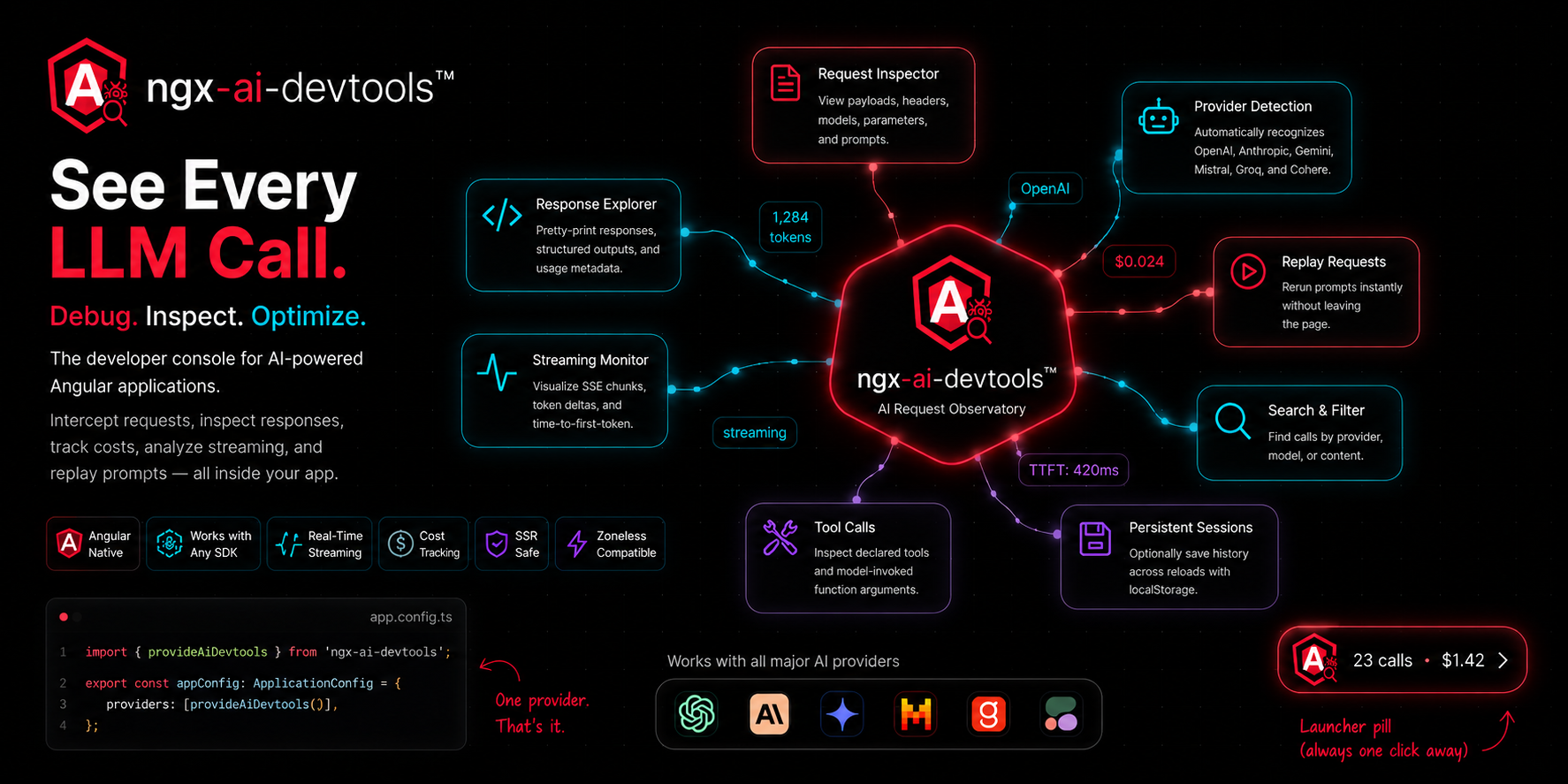
A floating DevTools panel that intercepts every LLM call your Angular app makes — fetch, HttpClient, OpenAI SDK, Anthropic SDK, anything. Shows the prompt, response, tokens, cost, tool calls, and streaming deltas in real time. One provider call to install. Works in dev, staging, and production behind a feature flag.
---
## Install
```bash
npm install ngx-ai-devtools
```
Requires **Angular 18.1+** (signals, standalone components, `@let`).
---
## Setup in 3 steps
### Step 1 — Add the provider
```ts
// app.config.ts
import { ApplicationConfig } from '@angular/core';
import { provideAiDevtools } from 'ngx-ai-devtools';
import { environment } from './environments/environment';
export const appConfig: ApplicationConfig = {
providers: [
provideAiDevtools({
enabled: !environment.production,
}),
],
};
```
### Step 2 — Run your app
A floating launcher pill appears in the bottom-right corner. That's it.
### Step 3 — ⚠️ If your app uses a backend proxy, you MUST configure it
**This is the most important step. Most Angular apps don't call OpenAI/Anthropic/Google directly from the browser** — they go through a backend like `/api/chat`. The library doesn't know about your custom paths until you tell it:
```ts
provideAiDevtools({
enabled: !environment.production,
additionalEndpoints: [
{ path: '/api/chat', provider: 'anthropic' },
{ path: '/api/stream', provider: 'openai' },
],
});
```
If you skip this step, your calls go through but **nothing shows up in the panel**. The library only intercepts URLs it recognizes.
The `provider` field tells the library which response shape to parse. Supported values: `'openai'`, `'anthropic'`, `'google'`, `'mistral'`, `'groq'`, `'cohere'`.
**No route renames required.** Your existing paths stay exactly as they are.
If you'd rather keep the old string form (and your URL contains a provider keyword like `/api/anthropic/...`), that still works for backward compatibility.
If you call OpenAI/Anthropic/Google directly from the browser (no proxy), you can skip Step 3 — those URLs are auto-detected.
---
## Backend requirements for cost calculation
The library reads token counts from the provider's `usage` block. **If your backend strips or reshapes the response, tokens and cost will be blank in the panel.** The call, prompt, response, and latency still show — but cost depends on the provider's `usage` block surviving the round trip.
Your backend must forward these fields untouched:
| Provider | Required fields |
|---|---|
| OpenAI | `model`, `choices[0].message`, `choices[0].finish_reason`, `usage` |
| Anthropic | `model`, `content`, `stop_reason`, `usage` |
| Google | `candidates`, `usageMetadata` |
The simplest pattern is to forward the provider response untouched:
```ts
// Express / Node backend
app.post('/api/openai/chat', async (req, res) => {
const upstream = await fetch('https://api.openai.com/v1/chat/completions', {
method: 'POST',
headers: { Authorization: `Bearer ${process.env.OPENAI_KEY}` },
body: JSON.stringify(req.body),
});
res.json(await upstream.json()); // ← forward as-is
});
```
### OpenAI streaming gotcha
By default, OpenAI's **streaming** responses omit the `usage` block. Text streams correctly, but token counts and cost never arrive. To get usage on streams, pass `stream_options` in the request:
```ts
{
model: 'gpt-4o-mini',
stream: true,
stream_options: { include_usage: true }, // ← required for token counts on streams
messages: [...]
}
```
Anthropic and Google include usage on streaming responses by default.
---
## All configuration options
| Option | Type | Default | What it does |
|---|---|---|---|
| `enabled` | `boolean` | `true` | When `false`, no patching, no UI, no overhead. Gate on `!environment.production`. |
| `additionalEndpoints` | `string[]` | `[]` | URL substrings to treat as LLM endpoints. Required for proxy/custom backends. |
| `maxCalls` | `number` | `100` | Maximum calls retained in memory. Older drop FIFO. |
| `persist` | `boolean` | `false` | Persist call history to `localStorage` across reloads. |
| `autoMount` | `boolean` | `true` | Auto-inject the UI into `document.body`. Set `false` to place `` manually. |
| `position` | `'bottom-right' \| 'bottom-left' \| 'top-right' \| 'top-left'` | `'bottom-right'` | Launcher position. |
| `redact` | `boolean` | `false` | Hide request/response bodies in the UI (still recorded). Useful for screenshots. |
Full example:
```ts
provideAiDevtools({
enabled: !environment.production,
additionalEndpoints: ['/api/openai', '/api/anthropic'],
maxCalls: 200,
persist: true,
position: 'bottom-left',
redact: false,
});
```
---
## Usage examples
```ts
// OpenAI SDK
import OpenAI from 'openai';
const openai = new OpenAI({ baseURL: '/api/openai', apiKey: 'unused' });
await openai.chat.completions.create({
model: 'gpt-4o',
messages: [{ role: 'user', content: 'Hello' }],
});
// Anthropic SDK
import Anthropic from '@anthropic-ai/sdk';
const anthropic = new Anthropic({ baseURL: '/api/anthropic', apiKey: 'unused' });
await anthropic.messages.create({
model: 'claude-sonnet-4-5',
max_tokens: 1024,
messages: [{ role: 'user', content: 'Hello' }],
});
// Raw fetch
await fetch('/api/openai/chat', {
method: 'POST',
body: JSON.stringify({ model: 'gpt-4o-mini', messages: [...] }),
});
// Angular HttpClient
this.http.post('/api/anthropic/messages', payload).subscribe();
```
All of these get intercepted automatically once the path is in `additionalEndpoints`.
---
## Programmatic API
The store is a public signal-based service. Use it in your own components, dashboards, or budget alerts.
```ts
import { Component, computed, inject } from '@angular/core';
import { AiDevtoolsService } from 'ngx-ai-devtools';
@Component({
selector: 'app-cost-badge',
template: `Spent today: ${{ totalCost() | number:'1.4-4' }}`,
})
export class CostBadge {
private svc = inject(AiDevtoolsService);
totalCost = computed(() => this.svc.stats().totalCost);
}
```
The service exposes:
| Member | Type | Purpose |
|---|---|---|
| `calls` | `Signal` | All recorded calls, newest first. |
| `filtered` | `Signal` | Current filtered view (matches the search box). |
| `selected` | `Signal` | Currently selected call in the detail pane. |
| `stats` | `Signal<{ count, totalCost, totalTokens, avgLatency }>` | Running aggregates over the call list. |
| `ui` | `Signal<{ open, selectedId, filter }>` | UI state of the panel. |
| `clear()` | `() => void` | Drop all calls. |
| `setOpen(b)` | `(boolean) => void` | Open or close the panel. |
| `select(id)` | `(string \| null) => void` | Select a call programmatically. |
| `setFilter(s)` | `(string) => void` | Set the search filter. |
| `replay(id)` | `(string) => Promise` | Re-issue a recorded call. |
All call records conform to the `LlmCall` type, exported from the package root.
---
## Provider support
| Provider | Request parsing | Response parsing | Streaming | Cost |
|---|---|---|---|---|
| OpenAI | ✅ | ✅ | ✅ SSE deltas | ✅ |
| Anthropic | ✅ | ✅ | ✅ named events + JSON deltas | ✅ |
| Google Gemini | ✅ | ✅ | partial | ✅ |
| Mistral | ✅ (OpenAI shape) | ✅ | ✅ | ✅ |
| Groq | ✅ (OpenAI shape) | ✅ | ✅ | ✅ |
| Cohere | detected only | partial | — | — |
Pricing data is in `src/lib/pricing.ts` and ships with current rates for the major models. If a model isn't in the table, the call still records — cost just stays blank rather than guessing. PRs welcome to keep prices fresh.
---
## How it works
At bootstrap, the library monkey-patches `window.fetch`. Calls to any URL matching a known provider (or your `additionalEndpoints`) are recorded into a signal store; everything else passes through untouched. For streaming responses, the body is `tee()`'d so the consumer still receives the original stream while the devtools consume a copy, parsing SSE events as they arrive.
The library doesn't tokenize anything itself. Token counts come from the provider's `usage` block (`prompt_tokens` / `completion_tokens` for OpenAI, `input_tokens` / `output_tokens` for Anthropic, `usageMetadata` for Google). Cost is `tokens × price_per_million / 1_000_000` against the local price table. If `usage` is missing, tokens and cost stay blank rather than guessing.
The UI mounts itself into `document.body` (or anywhere you place ``) and renders directly from the signal store with `OnPush` change detection. No global state library, no zone.js dependency, no extra runtime. In production builds where `enabled: false`, neither the patch nor the UI is installed.
---
## Demos
Two runnable demos ship in this repo. Use whichever fits your needs.
### Mock demo — `projects/demo/`
Simulated LLM calls with canned responses. **No API keys, no setup, no cost.** Best for seeing the UI in action and exploring the panel features.
```bash
git clone https://github.com/ahmedkhan1/ngx-ai-devtools.git
cd ngx-ai-devtools
npm install
npm start
```
Open `http://localhost:4200`. Click the buttons. Click the launcher pill. This is what's running at [ngx-ai-devtools.vercel.app](https://ngx-ai-devtools.vercel.app/).
### Real API demo — `projects/real-api-demo/`
Real calls to OpenAI, Anthropic, and Google through a local Node proxy that holds your API keys server-side. Verifies real response shapes, real streaming chunks, real cost calculation.
```bash
# Terminal 1 — start the proxy
cd proxy
cp .env.example .env
# Edit .env with your API keys
npm start
# Terminal 2 — start the Angular app
cd projects/real-api-demo
npm install
npm start
```
Each click costs real money (typically fractions of a cent on `gpt-4o-mini` or `claude-haiku-4-5`). Use this when you want to verify the library works end-to-end with your own provider account.
See `projects/real-api-demo/README.md` for full setup details.
---
## Why this exists
Debugging LLM calls in the browser is genuinely painful. You make a call, something goes wrong, and now you're three tabs deep: Network panel for the request, a JSON viewer for the body, a calculator for the cost. Ten minutes later you tweak the prompt and do it all over again.
`ngx-ai-devtools` puts all of that in one floating panel inside your app. Every call your code makes — prompt, response, tokens, cost, tool use, streaming — recorded as it happens, structured the way you'd structure it if you wrote the logger yourself. Which you probably have, twice, in two different projects.
Use it in development to iterate on prompts. Use it in staging to verify what your app actually sends to the model. Use it in production behind a feature flag to debug live issues without redeploying. The library is one provider call, signal-based, zero RxJS, tree-shakeable to nothing when disabled.
---
## Roadmap
Open issues for what would help you most:
- Cost budgets and alerts
- Diff view between two calls
- Tool-call result piping (showing what the tool returned to the model on the next turn)
- Prompt-caching discount awareness (OpenAI's `cached_tokens` field)
- Persistent storage beyond `localStorage`
---
## Development
```bash
git clone https://github.com/ahmedkhan1/ngx-ai-devtools.git
cd ngx-ai-devtools
npm install
npm start # serves the mock demo
npm run build:lib # produces dist/ngx-ai-devtools
npm run pack # produces a .tgz you can install in another project
```
To test a local build inside another Angular app:
```bash
npm run build:lib && npm run pack
# In the other project:
npm install /absolute/path/to/dist/ngx-ai-devtools/ngx-ai-devtools-0.1.4.tgz
```
---
## Contributing
Issues and pull requests welcome. Adding a new provider:
1. Add a parser in `src/lib/providers/.parser.ts` exporting `is`, `parseRequest`, `parseResponse`, and (if streamed) `accumulateStream`.
2. Wire it into `src/lib/providers/index.ts`.
3. Add the model's pricing to `src/lib/pricing.ts`.
4. Add a card to `projects/demo/` so it can be tested in the browser.
Keep the public surface small — every new option is one more thing to maintain.
---
## License
MIT © [Ahmed Khan](https://github.com/ahmedkhan1)
If this saved you a frustrating afternoon, a star is a kind way to say thanks.