https://github.com/ahs12/thoth-blueprint
Free visual database design tool with drag-and-move editing, multi-format export, and migration generation for popular frameworks.
https://github.com/ahs12/thoth-blueprint
database-design database-visualization indexeddb offline pwa-app reactjs sql typescript zustand
Last synced: 3 months ago
JSON representation
Free visual database design tool with drag-and-move editing, multi-format export, and migration generation for popular frameworks.
- Host: GitHub
- URL: https://github.com/ahs12/thoth-blueprint
- Owner: AHS12
- License: gpl-3.0
- Created: 2025-09-07T19:17:59.000Z (10 months ago)
- Default Branch: main
- Last Pushed: 2025-09-21T20:06:54.000Z (10 months ago)
- Last Synced: 2025-09-21T22:08:08.214Z (10 months ago)
- Topics: database-design, database-visualization, indexeddb, offline, pwa-app, reactjs, sql, typescript, zustand
- Language: TypeScript
- Homepage: https://thoth-blueprint.vercel.app
- Size: 1.91 MB
- Stars: 119
- Watchers: 1
- Forks: 16
- Open Issues: 1
-
Metadata Files:
- Readme: README.md
- Contributing: CONTRIBUTING.md
- License: LICENSE.md
- Code of conduct: CODE_OF_CONDUCT.md
Awesome Lists containing this project
README
Thoth Blueprint


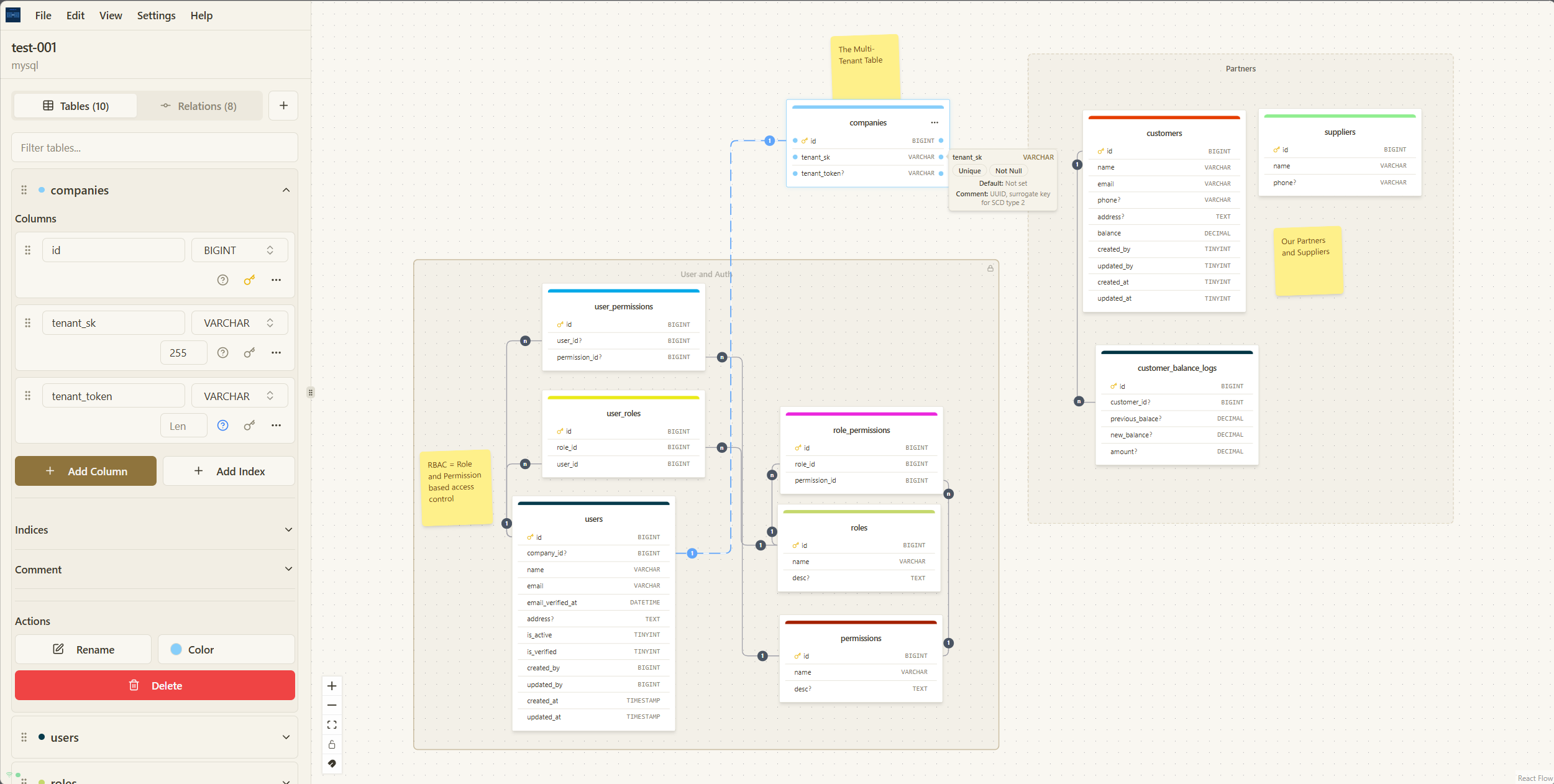
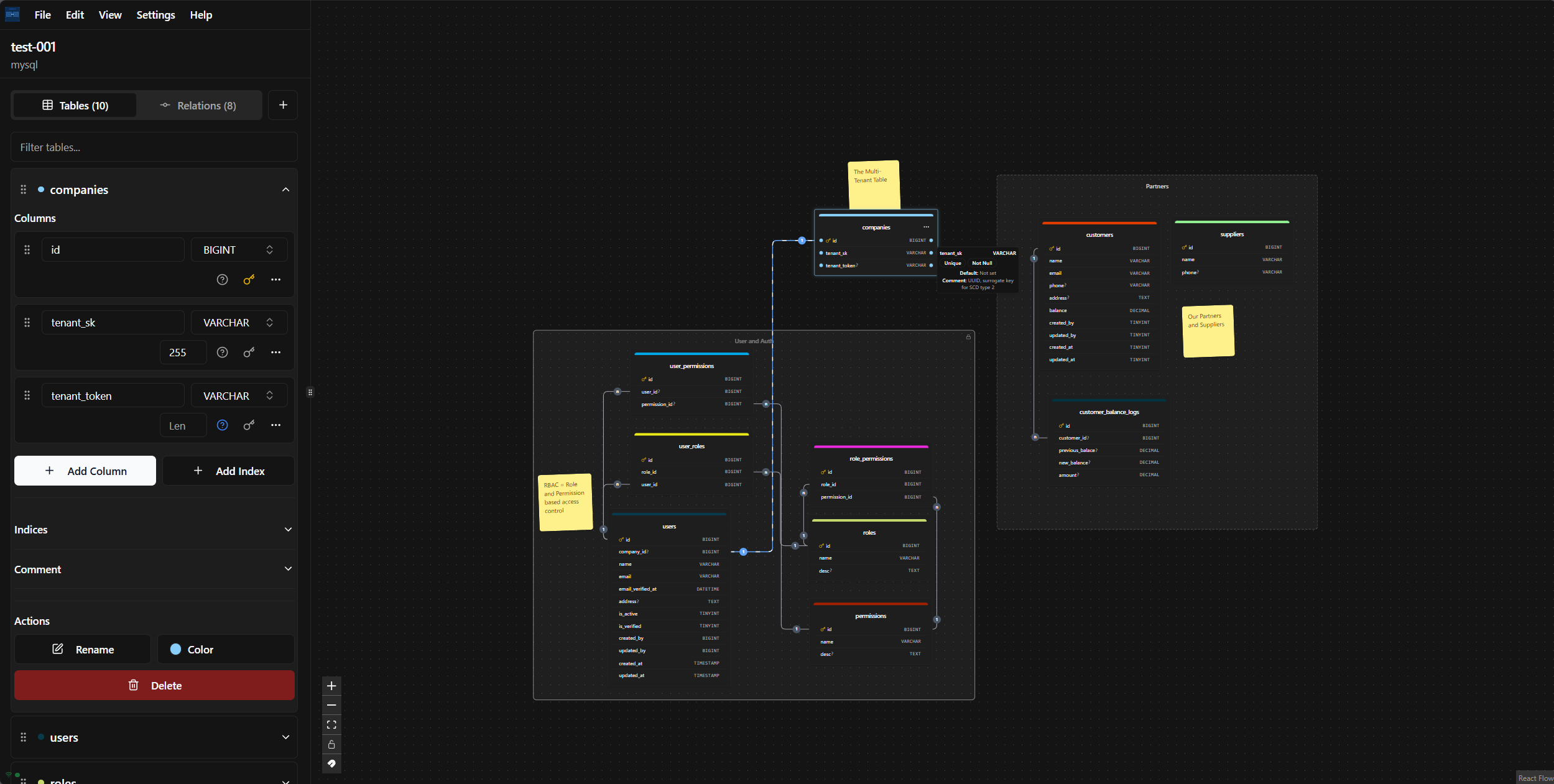
Thoth Blueprint is a free, powerful database design tool that allows you to visualize your database schema with an intuitive drag-and-drop editor. Create, edit, and export your database designs to various formats, including SQL, DBML, JSON, and SVG. Generate migration files for popular frameworks/ORM like Laravel, TypeORM, and Django.
## Features
- 🎨 **Visual Database Design** - Intuitive drag-and-drop interface for creating database schemas
- 🧩 **Complete DBML Workflow** - Import DBML, edit/write DBML in a dedicated editor with diagram sync, and export back to DBML
- 🔄 **Multiple Export Formats** - Export to SQL, DBML, JSON, SVG
- 🚀 **Framework Migration Generation** - Generate migration files for Laravel, TypeORM, and Django
- 🔧 **Offline First** - Work on your diagrams anytime, anywhere, with or without an internet connection
- ⚡ **No Limits** - Create and manage as many diagrams as you need, with no restrictions
- 🔐 **Your Data is Yours** - All your data is stored locally on your computer, ensuring complete privacy
- 📱 **Progressive Web App** - Install as an app on your device for a native-like experience
- 📝 **Notes & Zones** - Add notes and organize tables in zones for better diagram management
- 💾 **Checkpoint** - Save and restore diagram snapshots so you can safely experiment and roll back changes
- 🔒 **Zone Lock/Unlock** - Lock zones to prevent accidental modifications
- 📋 **Copy/Paste** - Easily duplicate tables and elements
- ⌨️ **Keyboard Shortcuts** - Speed up your workflow with keyboard shortcuts
## Quick Start
### Prerequisites
- Node.js 20+
- pnpm (recommended) or npm
### Development Setup
1. **Clone the repository**
```bash
git clone https://github.com/AHS12/thoth-blueprint.git
cd thoth-blueprint
```
2. **Install dependencies**
```bash
pnpm install
```
3. **Start development server**
```bash
pnpm dev
```
### Production Build
1. **Build for production**
```bash
pnpm build
```
2. **Preview production build**
```bash
pnpm preview
```
### Docker Deployment
Alternatively, you can run ThothBlueprint using Docker for easy deployment:
1. **Build and run with Docker**
```bash
docker build -t thothblueprint .
docker run -d -p 8080:80 --name thothblueprint thothblueprint
```
2. **Or use Docker Compose**
```bash
docker-compose up -d
```
ThothBlueprint will be available at `http://localhost:8080`
## Usage
1. **Create a new diagram** - Click the "New Diagram" button to start a new database design
2. **Add tables** - Drag table components from the sidebar or right-click to add new tables
3. **Define columns** - Click on tables to add and configure columns with appropriate data types
4. **Create relationships** - Drag from one table to another to create relationships
5. **Organize with zones** - Create zones to group related tables and lock them to prevent changes
6. **Add notes** - Add notes to document your database design decisions
7. **Export your design** - Use the export functionality to generate SQL, DBML, JSON, SVG, or framework migrations
## Advanced Features
### Notes & Zones
ThothBlueprint allows you to organize your database diagrams using zones and notes:
- **Add Notes** - Document your design decisions by adding notes to your diagram
- **Create Zones** - Group related tables together in zones for better organization
- **Lock/Unlock Zones** - Lock zones to prevent accidental modifications to tables within them
- **Add Elements to Zones** - Right-click within a zone to add new tables or notes directly to that zone
### Copy/Paste Functionality
Speed up your workflow by copying and pasting elements:
- **Copy Tables/Notes** - Select one or more tables or notes and copy them (Ctrl+C/Cmd+C)
- **Paste Elements** - Paste copied elements at your cursor position (Ctrl+V/Cmd+V)
- **Duplicate Elements** - Quickly duplicate tables with all their column definitions
### Keyboard Shortcuts
ThothBlueprint includes several keyboard shortcuts to speed up your workflow:
- `Ctrl+A` / `Cmd+A` - Add Table
- `Ctrl+B` / `Cmd+B` - Toggle Sidebar
- `Ctrl+Z` / `Cmd+Z` - Undo Delete Table
- `Ctrl+C` / `Cmd+C` - Copy Selection
- `Ctrl+V` / `Cmd+V` - Paste Selection
- `Ctrl+Click` / `Cmd+Click` - Select Multiple Nodes
- `Delete` - Delete Elements
## Contributing
Please see our [Contributing Guide](CONTRIBUTING.md) for details on how to contribute to this project.
## License
This project is open source and available under the GNU General Public License v3.0. Please see [License File](LICENSE.md) for more information.