https://github.com/ahtn/keyplus
An easy to use, wired and wireless modular keyboard firmware
https://github.com/ahtn/keyplus
Last synced: 2 months ago
JSON representation
An easy to use, wired and wireless modular keyboard firmware
- Host: GitHub
- URL: https://github.com/ahtn/keyplus
- Owner: ahtn
- License: mit
- Created: 2017-08-01T13:14:44.000Z (over 8 years ago)
- Default Branch: master
- Last Pushed: 2019-06-15T00:42:48.000Z (over 6 years ago)
- Last Synced: 2024-11-08T18:18:11.825Z (over 1 year ago)
- Language: C
- Homepage:
- Size: 13.5 MB
- Stars: 246
- Watchers: 25
- Forks: 40
- Open Issues: 57
-
Metadata Files:
- Readme: README.md
- Changelog: CHANGELOG.md
- License: LICENSE
Awesome Lists containing this project
- awesome-repositories - ahtn/keyplus - An easy to use, wired and wireless modular keyboard firmware (C)
README

[](https://travis-ci.org/ahtn/keyplus)
Keyplus aims to be an easy to use keyboard firmware with support for wireless
and wired split keyboards.
Currently in beta so lots of stuff still might change.
# Download
[Stable releases (recommended)](https://github.com/ahtn/keyplus/releases)
[Latest builds on Keyplus CI](https://ci.keyplus.io/)
# Keyplus Flasher GUI
## Setup instructions
### Windows
Just download the EXE file.
### Linux
Clone the repository and submodules:
```bash
git clone https://github.com/ahtn/keyplus
git checkout v0.3.3 # or master for the latest version
cd keyplus
git submodule update --init --recursive
```
Next install the packages `avr-gcc`, `avr-libc`, `avr-binutils`, `make`,
`libhidapi-dev`, `libevdev-dev`, `libudev-dev`, `python3`, `python3-pip`,
`python3-pyqt5`.
Next install python dependencies by running:
```bash
pip3 install -U keyplus
```
Now you should be able to run the program:
```bash
cd host-software
sudo ./keyplus_flasher.py
```
NOTE: if you are having issues with missing python dependencies, make sure that
they were installed with `pip3` because python2.7 is not supported.
#### Flashing without sudo on Linux
To connect USB devices on Linux without using sudo, you need to add the
appropriate udev rules to set their permissions. To do this run the following
commands from the keyplus directory:
```
sudo cp host-software/etc/udev/rules.d/50-keyplus.rules /etc/udev/rules.d/50-keyplus.rules
sudo udevadm control --reload-rules
sudo udevadm trigger
```
You also will need to unplug and reconnect the USB device you want to use.
## Using the GUI
When starting with a new keyplus mini board, flash the latest firmware, configure the device and RF, and configure the layout, in that order.
### Flashing the firmware
Download the latest firmware from [the releases page](https://github.com/ahtn/keyplus/releases). In the drop down box at the top of the window, select "Firmware Update". Then, click the "Browse" button and select the firmware file you downloaded. Plug in your keyplus mini (or other compatible board), and you should see it appear in the bottom box.
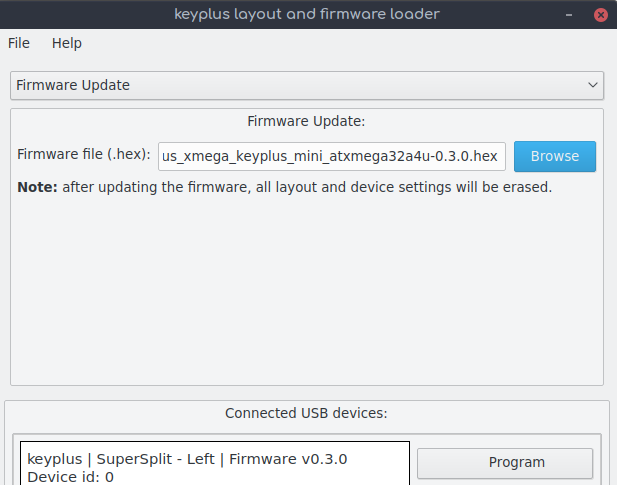
Click the "Program" button, and it should flash the firmware onto the board. If it gives an error, try again.
### Configure the device and RF
In the drop down box at the top of the window, select "Device and RF". Then, click "Generate new RF settings", and save the file somewhere. Click the "Browse" button next to the "Layout settings file" box, and select your layout YAML file. Input your device ID, and click the program button that is next to the board you want to program. If it doesn't work, try again.
To make the layout file, see [here](https://github.com/ahtn/keyplus/tree/master/layouts).
### Configure the layout
In the drop down box at the top of the window, select "Layout". Click the "Browse" button next to the "Layout settings file" box, and select your layout YAML file. Click the program button that is next to the board you want to program. If it doesn't work, try again.
# Keyplus CLI
## Setup instructions
TODO
## Building
Currently building of the firmware has been tested on Linux.
* [`ports/xmega/`](ports/xmega/README.md)
## Layout files
For more information about layout file format [see here](https://github.com/ahtn/keyplus/tree/master/layouts/README.md).
## Hardware files
For more information about the hardware [see this link](https://github.com/ahtn/keyboard_pcb/tree/master/keyplus_mini).
## License
The keyplus source code is released under the MIT software.
Although the code in this project can be used with Logitech products it is in
no way endorsed by or affiliated with Logitech.