https://github.com/aicage/aicage
Runs agentic coding assistants in Docker containers
https://github.com/aicage/aicage
agentic agentic-code agentic-coding claude claude-code cli-wrapper cline codex docker docker-container droid fence llm
Last synced: 3 months ago
JSON representation
Runs agentic coding assistants in Docker containers
- Host: GitHub
- URL: https://github.com/aicage/aicage
- Owner: aicage
- License: apache-2.0
- Created: 2025-11-08T01:26:44.000Z (9 months ago)
- Default Branch: main
- Last Pushed: 2026-04-27T22:42:29.000Z (3 months ago)
- Last Synced: 2026-04-28T00:24:11.102Z (3 months ago)
- Topics: agentic, agentic-code, agentic-coding, claude, claude-code, cli-wrapper, cline, codex, docker, docker-container, droid, fence, llm
- Language: Python
- Homepage:
- Size: 2.28 MB
- Stars: 4
- Watchers: 0
- Forks: 0
- Open Issues: 0
-
Metadata Files:
- Readme: README.md
- Changelog: CHANGELOG.md
- License: LICENSE
- Agents: AGENTS.md
Awesome Lists containing this project
README
# aicage
Run your favorite AI coding agents comfortably in Docker.
## Why use `aicage`?
Agents need deep access (read code, run shells, install deps).
Their built-in safety checks are naturally limited.
Running agents in containers gives a hard boundary - while the experience stays the same.
See [Why cage agents?](#why-cage-agents) for the full rationale.
## First-time quick start
- Prerequisites:
- Docker
- Python 3.10+ and `pipx`
- Install:
```bash
pipx install aicage
```
- Navigate to your project directory and run:
```bash
aicage --yes
```
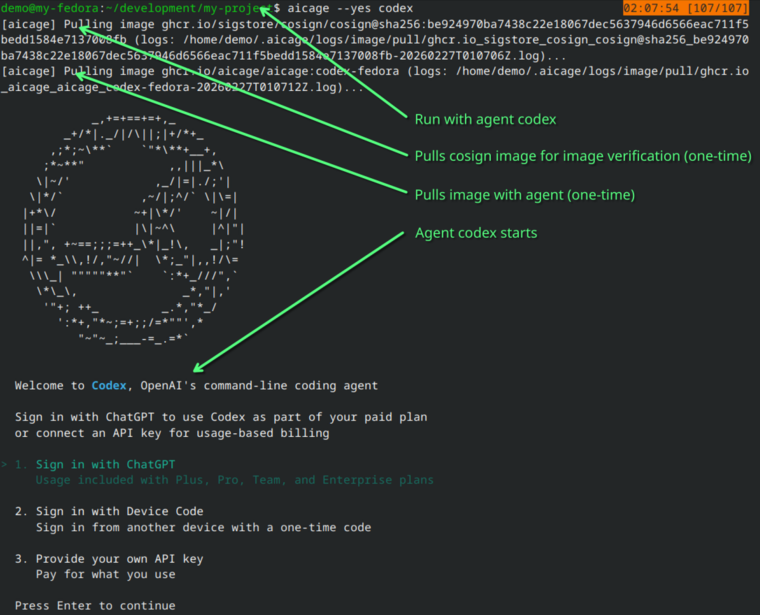
`--yes` accepts suggested defaults and skips setup prompts. This is the fastest first run.
- Built-in agent examples:
```bash
aicage --yes claude
aicage --yes codex
aicage --yes copilot
aicage --yes crush
aicage --yes droid
aicage --yes gemini
aicage --yes goose
aicage --yes opencode
aicage --yes qwen
```
Example output of first run with agent `codex`:
[](https://raw.githubusercontent.com/wiki/aicage/aicage/screenshots/01-quickstart-with-yes.png)
## Full setup (optional)
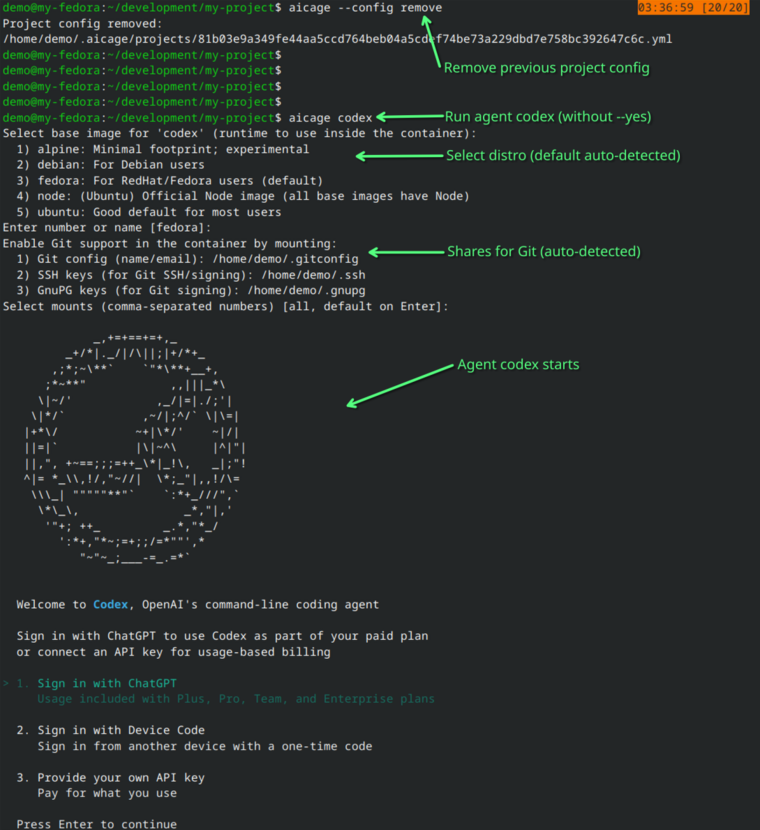
If you want full interactive setup instead of defaults:
1. Show project config path and contents:
```bash
aicage --config info
```
2. Remove config if needed:
```bash
aicage --config remove
aicage --config remove
```
3. Run again without `--yes`:
```bash
aicage
```
Example output of full setup prompt flow:
[](https://raw.githubusercontent.com/wiki/aicage/aicage/screenshots/02-full-config-start.png)
## Full documentation
The complete user documentation lives in the wiki:
[aicage.wiki](https://github.com/aicage/aicage/wiki)
## Common scenarios
- Pass arguments to the agent:
- `aicage resume `
- Share additional host folders:
- `aicage --share ~/.m2 `
- `aicage --share /path/to/data:ro `
- Extensions can also define extra shares (host mounts).
- Let the agent use Docker:
- `aicage --docker `
- Set environment variables:
- `aicage -e FOO=bar -- `
- Use proxies:
- `aicage` forwards `HTTP_PROXY`, `HTTPS_PROXY`, `ALL_PROXY`, and `NO_PROXY`.
- See [CLI options](https://github.com/aicage/aicage/wiki/CLI-Options).
- Use host networking or custom networks:
- See [Host networking](https://github.com/aicage/aicage/wiki/Host-Networking).
- On Windows with a Linux container/WSL workspace:
- set `git config --global core.autocrlf true` on the Windows host to avoid line-ending diffs.
- Run into first-use setup issues:
- See [Known hiccups](https://github.com/aicage/aicage/wiki/Known-Hiccups).
- Add custom tools/agents/base images:
- [Extensions](https://github.com/aicage/aicage/wiki/Customization-Extensions)
- [Custom agents](https://github.com/aicage/aicage/wiki/Customization-Agents)
- [Custom base images](https://github.com/aicage/aicage/wiki/Customization-Base-Images)
## Built-in agents
| CLI | Agent | Homepage |
|----------|--------------------|------------------------------------------------------------------------------------|
| claude | Claude Code | [https://claude.com/product/claude-code](https://claude.com/product/claude-code) |
| codex | Codex CLI | [https://developers.openai.com/codex/cli](https://developers.openai.com/codex/cli) |
| copilot | GitHub Copilot CLI | [https://github.com/features/copilot/cli](https://github.com/features/copilot/cli) |
| crush | Crush | [https://github.com/charmbracelet/crush](https://github.com/charmbracelet/crush) |
| droid | Factory CLI | [https://factory.ai/product/cli](https://factory.ai/product/cli) |
| gemini | Gemini CLI | [https://geminicli.com](https://geminicli.com) |
| goose | Goose CLI | [https://goose-docs.ai](https://goose-docs.ai) |
| opencode | OpenCode | [https://opencode.ai](https://opencode.ai) |
| qwen | Qwen Code | [https://qwenlm.github.io/qwen-code-docs](https://qwenlm.github.io/qwen-code-docs) |
Your existing CLI config for each agent is mounted inside the container so you can keep using your
preferences and credentials.
## Customization
`aicage` lets you customize images at three levels: extensions, agents, and base images. The sample repo is a fast
way to see working examples and copy a template.
Quick start:
```bash
git clone https://github.com/aicage/aicage-custom-samples.git $HOME/.aicage-custom
```
Then run any agent:
```bash
aicage
```
These are only samples. Use them to learn the structure, then replace or edit them with your own definitions.
`aicage` detects whatever you place under `~/.aicage-custom` and offers it during selection.
Extensions can install tools and request additional host mounts.
After adding or changing custom definitions, restart `aicage`.
If your project is already configured for an agent, `aicage` will keep using the saved config. To reconfigure (and
see new bases/agents/extensions), run `aicage --config remove` and start `aicage` again. To reset only one agent
entry, use `aicage --config remove `. Use `aicage --config` to inspect the current config.
- Extensions: [Customization-Extensions](https://github.com/aicage/aicage/wiki/Customization-Extensions)
- Custom agents: [Customization-Agents](https://github.com/aicage/aicage/wiki/Customization-Agents)
- Custom base images: [Customization-Base-Images](https://github.com/aicage/aicage/wiki/Customization-Base-Images)
Image updates are handled automatically; see [Updates](https://github.com/aicage/aicage/wiki/Updates).
## aicage options
- `--dry-run` prints the composed `docker run` command without executing it.
- `-y`, `--yes` applies default answers for all prompts and suppresses prompt output.
- `--docker` mounts `/run/docker.sock` into the container to enable Docker-in-Docker workflows.
- `--share ` mounts a host path into the container at the same path. Repeatable; add `:ro` for read-only.
- Extensions can also request grouped host mounts during setup.
- `--config` prints the project config path and its contents.
- `--config remove []` removes the full project config or only one agent entry.
Configuration file formats are documented in [CONFIG.md](CONFIG.md). Extension authoring is documented in
[doc/extensions.md](doc/extensions.md).
## Why cage agents?
AI coding agents read your code, run shells, install packages, and edit files. That power is useful,
but granting it directly on the host expands your risk surface.
Where built-in safety is limited:
- Allow/deny lists only cover known patterns; unexpected commands or attack paths can slip through.
- Some agents work fully only after relaxing their own safety modes, broadening what they can touch.
- “Read-only project” features are software rules. Other projects and files still sit alongside them
on the same host.
How aicage mitigates this:
- Containers create a hard boundary: the agent can access only what you explicitly mount. Day-to-day
use stays familiar—just with the host kept out of reach.