https://github.com/aiko-chan-ai/discordbotclient
A patched version of discord, with bot login & Vencord support
https://github.com/aiko-chan-ai/discordbotclient
css discord discord-api discord-bot discord-bot-client discord-client html javascript nodejs
Last synced: 6 months ago
JSON representation
A patched version of discord, with bot login & Vencord support
- Host: GitHub
- URL: https://github.com/aiko-chan-ai/discordbotclient
- Owner: aiko-chan-ai
- License: gpl-3.0
- Created: 2022-11-29T16:56:15.000Z (over 3 years ago)
- Default Branch: electron-v3
- Last Pushed: 2026-01-23T05:04:56.000Z (6 months ago)
- Last Synced: 2026-01-23T22:41:10.599Z (6 months ago)
- Topics: css, discord, discord-api, discord-bot, discord-bot-client, discord-client, html, javascript, nodejs
- Language: TypeScript
- Homepage:
- Size: 20.1 MB
- Stars: 1,250
- Watchers: 16
- Forks: 87
- Open Issues: 20
-
Metadata Files:
- Readme: readme.md
- Funding: .github/FUNDING.yml
- License: LICENSE
Awesome Lists containing this project
README
DiscordBotClient
**DiscordBotClient** allows you to use your bot, just like any other user account, except for Friends and Groups.
## Overview
- [Installation](#installation)
- [Windows](#windows)
- [Using prebuilt binaries](#using-prebuilt-binaries)
- [Building from source](#building-from-source)
- [Login](#login)
- [Features](#features)
- [Version](#version)
- [Troubleshooting](#troubleshooting)
- [FAQ](#faq)
- [About anti-virus detection](#about-anti-virus-detection)
- [Similar projects](#similar-projects)
- [Star History](#star-history)
- [How to update to the latest Discord version ?](#how-to-update-to-the-latest-discord-version-)
- [Credits](#credits)
- [Disclaimer](#disclaimer)
> [!WARNING]
>
> **Third party clients are discouraged and against the Discord TOS.**
DiscordBotClient is a custom [Discord](https://discord.com/app) client that aims to
support bot accounts and be aimed at power-users.
The application only uses the official Discord API and doesn't send data to
third parties. However, this application is not an official product by
Discord Inc.

---
## Installation
### Windows
DiscordBotClient can be installed in Windows via [Winget](https://learn.microsoft.com/en-us/windows/package-manager/):
```
winget install aiko-chan-ai.DiscordBotClient
```
### Using prebuilt binaries
If you don't want to build the application yourself or use some kind of
package management system, you can get the latest binaries for the three
major systems in the release overview:
> [!TIP]
>
> 
Platform
Binary Type
Download Link
Windows
NSIS installer

Linux
.AppImage

Mac arm64 (Apple Silicon)
.dmg

Mac x64 (Intel)
.dmg

> [!WARNING]
>
> The application is not signed with a valid certificate on macOS or Windows.
>
> As a result, on Windows, SmartScreen or Windows Defender may be triggered — you can simply bypass or whitelist it.
>
> On macOS, you may see a warning that says:
>
> > “DiscordBotClient” is damaged and can’t be opened. You should move it to the Trash.
>
> You can safely ignore this warning by following the instructions in this link: https://github.com/aiko-chan-ai/DiscordBotClient/issues/194#issuecomment-2555817658
>
> See: [About anti-virus detection](#about-anti-virus-detection) for more information.
### Building from source
In order to execute the following commands, you need to install **NodeJS v24 or**
higher. You can find Node.JS packages at https://nodejs.org/en.
On top of that, you need to have **git** installed. It can be found at
https://git-scm.com/downloads.
**~~UPDATES MUST BE INSTALLED MANUALLY~~**[^6]
Open a command line and execute the following commands:
```shell
git clone https://github.com/aiko-chan-ai/DiscordBotClient.git
cd DiscordBotClient
npm run requirement
npm run vencord
npm run build:ts
npm run build
```
This will create an executable called `DiscordBotClient` or `DiscordBotClient.exe` in the `dist` folder, depending on whether you are using Windows or not.
---
### Login
Logging in works via the UI on first startup of the application.

> [!NOTE]
> Enable `MessageContent` intent, other intents are optional.
> [!TIP]
> If you want a list of members and their status, enable all intents.

---
## Features
- **Sharding**
- **View Guilds** _(Lazy load them)_
- **Manage Guilds, Channels**
- **Messages** (Send, View History, Embeds, Reactions, Manage)
- **~~Create a Guild~~**[^1]
- **Voice**[^2]
- **Nitro**[^3]
- **Direct Message**[^4]
- **Vencord Built-in**
[^1]: See https://discord.com/developers/docs/change-log?topic=HTTP+API#deprecating-guild-creation-by-apps
[^2]: Except for features related to streams.
[^3]: Nitro features are reduced: Unable to use stickers everywhere, cannot send files larger than 10 MB, and cannot set avatar decorations.
[^4]: Implemented with restrictions on the client.
---
## Version
- Currently, I will only support the latest version of this application; other versions will not receive bug fixes.
- The versions removed from the table were unstable and did not work properly.
| Discord Build | Hash | Vencord | Client version | Release Status | App Status |
| ----------------- | ------- | ------- | -------------- | -------------- | ---------- |
| Latest | ? | ? | v3.8.? | ~~Beta~~ | ℹ |
| Stable 491153[^6] | 496afea | v1.14.1 | v3.8.3 | Latest | ✔ |
| Stable 479219 | 582c5bf | v1.13.8 | v3.8.2 | Deprecated | ✔ |
| Stable 453248 | 0a497ab | v1.13.1 | v3.8.1 | Deprecated | ✔ |
| Stable 415772 | 0c81c46 | v1.12.5 | v3.7.4 | EOL | ✔ ⚠ |
| Stable 403437 | fa5cfe9 | v1.12.2 | v3.7.2 | EOL | ✔ ⚠ |
| Stable 394055 | f598231 | v1.11.9 | v3.7.1 | EOL | ✔ ⚠ |
| Stable 391738 | 51404a7 | v1.11.9 | v3.7.0 | EOL | ⛔ ⚠ |
| Stable 360320 | 38aca73 | v1.10.9 | v3.6.2 | EOL | ✔ ⚠ |
| Stable 355624 | 8dc6074 | v1.10.9 | v3.6.1 | EOL | ✔ ⚠ |
| Stable 204762 | 78f82ba | v1.2.8 | v2.4.2 | EOL[^5] | ✔ ⚠ |
- ✔ – Fully functional and expected to be free of critical bugs.
- ℹ – Supports at least basic functionality, but is still under development. Minor issues may occur.
- ⛔ – This version has major issues (e.g., related to app startup). It is not recommended for use.
- ⚠ – This version has reached its end of support.
[^5]: Latest version that supports Windows 7 / 8 / 8.1 is 2.4.2. However, you can build this application with an older version of Electron and Node.js, and expect it to work correctly.
[^6]: Testing the automatic update feature for Windows and Linux. macOS is not supported because the application lacks a valid certificate.
---
## Troubleshooting
If you happen to encounter a crash or a bug, please submit a bug report via
the project's GitHub issue tracker.
## FAQ
In order to find answers to common questions, check out the FAQ in the [wiki](https://github.com/aiko-chan-ai/DiscordBotClient/issues/8):
## About anti-virus detection
Sometimes, DiscordBotClient will be flagged as malware by several anti-virus programs (Avast, AVG, Norton, McAfee, Windows Defender, etc.). However, this is a false positive.
The reason for this is that the application is not signed.
If downloaded from my GitHub, the program is safe to use (I cannot give this promise if you download it from somewhere else!).
It is okay if you do not trust me; you can always go ahead and compile it yourself.
For a tutorial on how to exclude this program from your antivirus so it can run anyway, check out these links:
Windows Defender: https://support.microsoft.com/en-us/windows/add-an-exclusion-to-windows-security-811816c0-4dfd-af4a-47e4-c301afe13b26
Avast: https://support.avast.com/en-ww/article/Antivirus-scan-exclusions#pc
AVG: https://support.avg.com/SupportArticleView?l=en&urlName=avg-antivirus-scan-exclusion
Norton: https://support.norton.com/sp/en/us/home/current/solutions/v3672136
McAfee: https://www.mcafee.com/support/?page=shell&shell=article-view&articleId=TS102056
For other antiviruses, try searching for " add exception"
## Similar projects
Here is a list of similar projects:
- [Discord Bot Client](https://github.com/SamuelScheit/discord-bot-client)
- [BotClient](https://github.com/DarkGuy10/BotClient)
- [ChrisEric1.GitHub.io](https://github.com/ChrisEric1/ChrisEric1.GitHub.io)
- [LiveBot](https://github.com/SebOuellette/LiveBot)
- [BetterDiscordPanel](https://github.com/SanjaySunil/BetterDiscordPanel)
Hit me up if you have a similar project, and I'll gladly add it to the list.
## Star History
[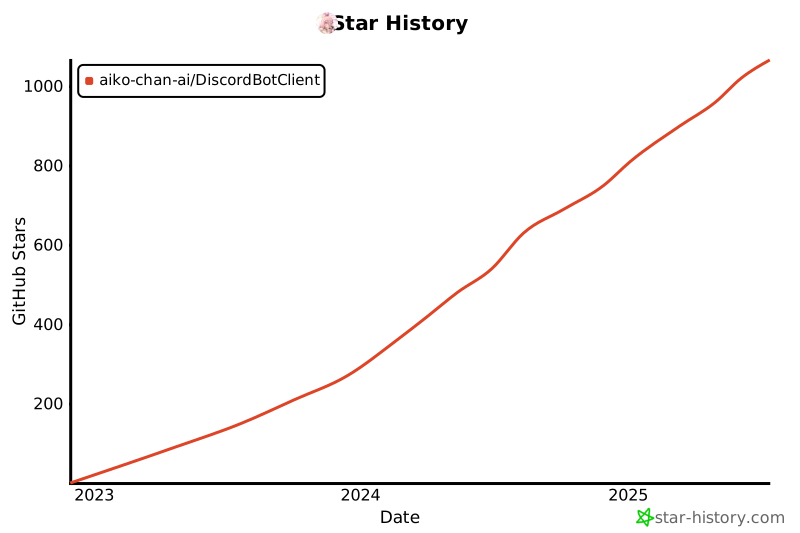](https://star-history.com/#aiko-chan-ai/DiscordBotClient&Date)
---
## How to update to the latest Discord version ?
> [!TIP]
> This is a general guide for building from source, including downloading the latest scripts from Discord, obtaining the newest versions of Vencord and VencordDBCPlugin.
1. Clone this repository and navigate into its directory (skip this step if you have already done so).
```sh
git clone https://github.com/aiko-chan-ai/DiscordBotClient.git
cd DiscordBotClient
```
2. Install dependencies and fetch the latest Vencord & VencordDBCPlugin
> [!NOTE]
> If you've done this before, just run “npm install” here and “git pull” for both the Vencord and VencordDBCPlugin repositories.
```sh
npm run requirement
```
3. Generate a snapshot for the latest version of Discord Web
```sh
npm run core:update
```
## Credits
Thanks to [ChrisEric](https://github.com/CE1CECL) for the source code that uses a local proxy to emulate a different version of Discord.
This project was mainly inspired by [SamuelScheit](https://github.com/SamuelScheit)
[Discord Bot Client](https://github.com/SamuelScheit/discord-bot-client), which he sadly didn't
develop any further.
And a big thank you to [Vencord](https://github.com/Vendicated/Vencord) developers for making it easier for me to create this app.
## Disclaimer
Discord is trademark of Discord Inc. and solely mentioned for the sake of descriptivity.
Mention of it does not imply any affiliation with or endorsement by Discord Inc.