https://github.com/aiovin/lazy-vps
A bash script to configure fresh VPS
https://github.com/aiovin/lazy-vps
bash debian ubuntu vps
Last synced: 3 months ago
JSON representation
A bash script to configure fresh VPS
- Host: GitHub
- URL: https://github.com/aiovin/lazy-vps
- Owner: aiovin
- License: agpl-3.0
- Created: 2025-03-10T19:18:45.000Z (over 1 year ago)
- Default Branch: main
- Last Pushed: 2025-07-20T17:04:59.000Z (12 months ago)
- Last Synced: 2025-07-20T19:05:40.306Z (12 months ago)
- Topics: bash, debian, ubuntu, vps
- Language: Shell
- Homepage:
- Size: 7.42 MB
- Stars: 4
- Watchers: 1
- Forks: 2
- Open Issues: 0
-
Metadata Files:
- Readme: README.md
- License: LICENSE
Awesome Lists containing this project
README
# lazy vps setup
Bash script for basic and secure VPS setup.
Just run on a newly created VPS:
```
bash -c "$(curl -Ls https://raw.githubusercontent.com/aiovin/lazy-vps/refs/heads/main/setup-ba.sh)"
```
For **systemd-based systems** (tested on Ubuntu 22.04, 24.04 and Debian 11, 12).
Video example of how the script works
https://github.com/user-attachments/assets/61b1e4ea-09e6-4562-98b9-301dd51dbe98
### What it does:
- System update.
- Creation of a new user with sudo privileges.
- Basic SSH and UFW setup (allow SSH key only, changing SSH port, root login disabled, limit connection attempts, block all ports except SSH).
- Timezone and hostname configuration.
- Adds useful shell aliases (`cls` for clearing the terminal, `act` for activating Python virtual environments and `x` for the `exit` and more).
- Set the congestion control algorithm to BBR.
- Optional ntfy.sh notifications (server startup and disk space alerts).
- Generates ready-to-use SSH connection command.
### What exactly it does:
After running the cript, it will first update your system, then it will guide you through entering required configuration details such as new user credentials, SSH port, timezone, and other settings. After that script will perform the server setup using provided parameters. At the end, the script will verify the changes made and display your new SSH connection command with all the updated settings.
### Installed packages:
Will be instaled: sudo, nano, ufw, curl, htop, gzip, logrotate, bash-completion, jq, neofetch. Most of them are typically pre-installed in modern distributions.
No additional or unnecessary packages beyond these will be installed.
---
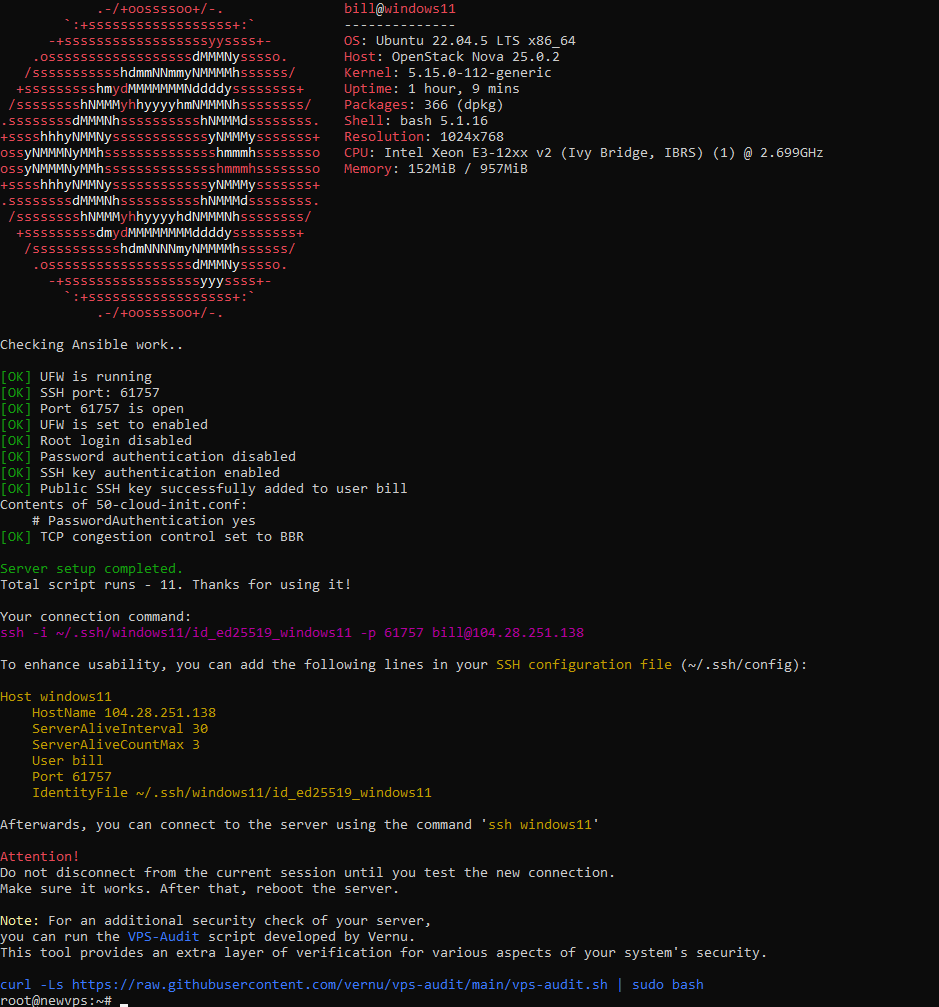
Script finish
---
# lazy vps setup (rus)
Bash скрипт для базовой настройки чистого VPS.
Запустить и следовать инструкциям:
```
bash -c "$(curl -Ls https://raw.githubusercontent.com/aiovin/lazy-vps/refs/heads/main/setup-ba.sh)"
```
Для **систем на основе systemd** (протестировано на Ubuntu 22.04, 24.04 и Debian 11, 12).
Видео-демонстрация
https://github.com/user-attachments/assets/61b1e4ea-09e6-4562-98b9-301dd51dbe98
### Что делает скрипт:
- Обновление системы.
- Создание нового пользователя с правами sudo.
- Базовая настройка SSH и UFW (вход только по SSH-ключам, изменение порта SSH, отключение входа для root, ограничение попыток подключения и закрытие всех портов кроме SSH).
- Установку временной зоны и имени хоста.
- Добавление полезных алиасов (`cls`/`сды` для очистки терминала, `act` для активации виртуального окружения Python, `x` для `exit` и другие).
- Установка алгоритма управления перегрузкой на BBR.
- Опциональные уведомления через ntfy.sh (старт сервера и контроль дискового пространства).
- Генерацию готовой команды для SSH-подключения.
### Что именно он делает?
После запуска скрипта, он обновит вашу систему затем он предложит вам ввести требуемые параметры для настройки, такие как учетные данные нового пользователя, порт SSH, временная зона и т.п. Затем скрипт выполнит настройку сервера с использованием предоставленных параметров. В конце работы скрипт проверит сделанные изменения и выведет команду для SSH-подключения с учетом всех новых настроек.
### Устанавливаемые пакеты:
Будет установлено: sudo, nano, ufw, curl, htop, gzip, logrotate, bash-completion, jq, neofetch. Большинство этих утилит обычно предустановлены в современных дистрибутивах.
Никаких дополнительных или ненужных пакетов помимо этих установлено не будет.