https://github.com/aj-white/piplexed
Find outdated packages installed with pipx or uv tool
https://github.com/aj-white/piplexed
cli pipx pypi python
Last synced: 4 months ago
JSON representation
Find outdated packages installed with pipx or uv tool
- Host: GitHub
- URL: https://github.com/aj-white/piplexed
- Owner: aj-white
- License: mit
- Created: 2023-01-06T13:41:57.000Z (over 3 years ago)
- Default Branch: main
- Last Pushed: 2025-06-02T22:49:24.000Z (about 1 year ago)
- Last Synced: 2025-11-07T05:25:20.887Z (8 months ago)
- Topics: cli, pipx, pypi, python
- Language: Python
- Homepage: https://aj-white.github.io/piplexed/
- Size: 1.15 MB
- Stars: 4
- Watchers: 2
- Forks: 1
- Open Issues: 0
-
Metadata Files:
- Readme: README.md
- Changelog: CHANGELOG.md
- License: LICENSE.txt
Awesome Lists containing this project
README
# Piplexed
### Find outdated packages installed with pipx or uv
[](https://pypi.org/project/piplexed)
[](https://pypi.org/project/piplexed)
**Piplexed** is a command line tool to identify outdated python packages, installed from [PyPI](https://pypi.org/), via [pipx](https://pypa.github.io/pipx/) or [uv](https://docs.astral.sh/uv/) (using the `uv tool` command).
**Documentation**: [https://aj-white.github.io/piplexed/](https://aj-white.github.io/piplexed/)
## ⛳ Table of Contents
- [Usage](#usage)
- [Installation](#installation)
- [Why piplexed ?](#why-piplexed)
- [Caveats](#caveats)
- [License](#license)
## 🔧 Usage
### Show Outdated Packages (Tools)
Ignores prelease and dev releases by default.
#### Installed with Pipx
```console
piplexed list --outdated
```

#### Installed with uv
```console
piplexed list --outdated --tool uv
```
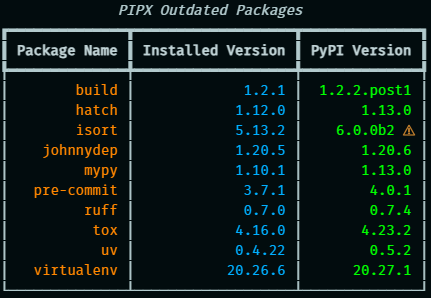
### Show outdated packages (include pre or dev releases)
#### Installed with pipx
```console
piplexed list --outdated --pre
```
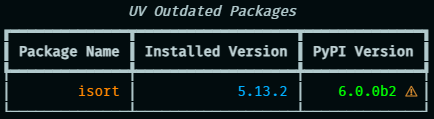
#### Installed with uv
```consle
piplexed list --outdated --pre --tool uv
```
### List Installed Packages
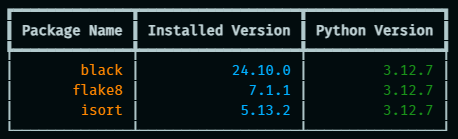
#### With pipx
```console
piplexed list
```
Outputs similar information to `pipx list`, albeit minus the names of the binaries, in a rich table format.
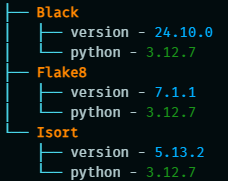
```console
piplexed list --tree
```
An optional tree flag can be passed for a tree view (less useful if there are a lot of packages)
#### With UV
```console
piplexed list --tool uv
```
## 👷♀️ Installation
**Piplexed** is designed to be installed globally via **pipx** or **uv**.
To install **piplexed**:
```console
pipx install piplexed
```
or
```console
uv tool install piplexed
```
Alternatively you can run it wihtout installation, supplying the required arguments shown below
```console
pipx run -- piplexed
```
or
```console
uv tool run piplexed
```
## ❓ Why piplexed
The name **piplexed** is a play on words, it contains the letters for pipx and I was also mildly perplexed trying to find a simpler way to identify outdated pipx installed packages, only to discover it didn't exist. Put the two together and well.... you get the idea (naming things is hard after all!).
For a longer answer see the [documentation](https://aj-white.github.io/piplexed/Why-piplexed/).
## 🩹 Caveats
**Piplexed** is a project that I built for my workflow, but it may not work for everyone.
It is only intended to work for packages that are installed from [PyPI](https://pypi.org), so will not work for local packages or git/url etc.
## 📝 License
**Piplexed** is distributed under the terms of the [MIT](https://spdx.org/licenses/MIT.html) license.