https://github.com/ajaxbarcelonacruyff/ga4_create_custom_dimensions
Batch creation of custom dimensions for multiple GA4 properties.
https://github.com/ajaxbarcelonacruyff/ga4_create_custom_dimensions
ga4 gas googleanalytics
Last synced: about 1 month ago
JSON representation
Batch creation of custom dimensions for multiple GA4 properties.
- Host: GitHub
- URL: https://github.com/ajaxbarcelonacruyff/ga4_create_custom_dimensions
- Owner: ajaxbarcelonacruyff
- Created: 2024-12-02T23:05:14.000Z (over 1 year ago)
- Default Branch: main
- Last Pushed: 2024-12-23T07:24:12.000Z (over 1 year ago)
- Last Synced: 2025-02-22T05:25:53.632Z (over 1 year ago)
- Topics: ga4, gas, googleanalytics
- Language: JavaScript
- Homepage:
- Size: 7.81 KB
- Stars: 0
- Watchers: 1
- Forks: 0
- Open Issues: 0
-
Metadata Files:
- Readme: README.md
Awesome Lists containing this project
README
> [!Note]
> This article contains information as of July 2022. Please refer to the official website for the latest updates.
# Bulk Creating Custom Dimensions Across Multiple GA4 Properties
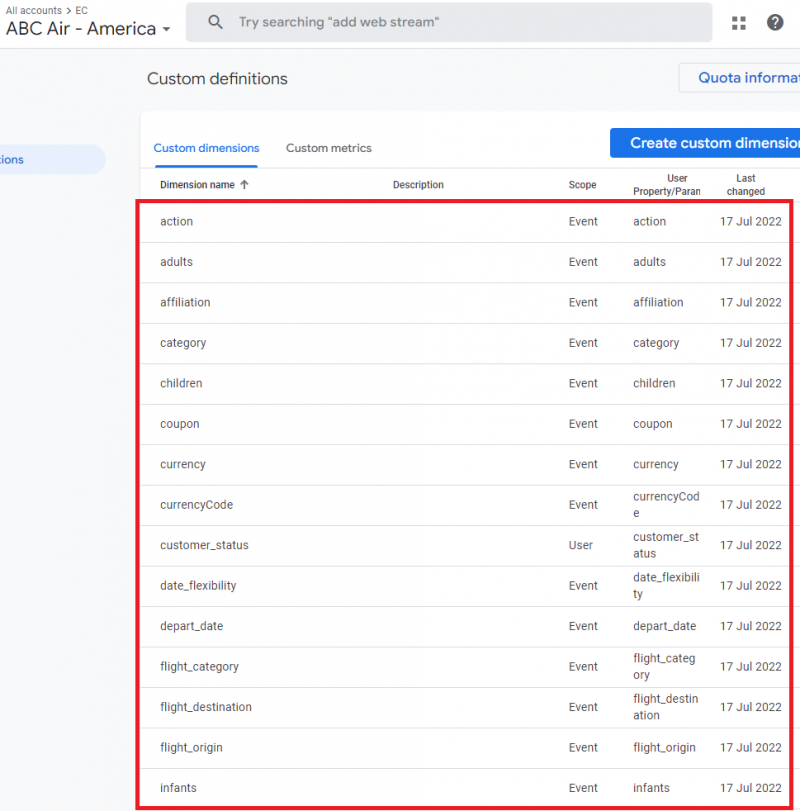
In the [previous article](https://github.com/ajaxbarcelonacruyff/ga4_create_multi_properties), we discussed how to bulk create GA4 properties. This time, we will extend that process to create custom dimensions for each property in bulk.
## Steps
1. Create a list of custom dimensions.
2. Read the list of target GA4 properties (skipped in this guide).
3. Read the custom dimensions list and create them in bulk.
# Creating a List of Custom Dimensions
Prepare a list of custom dimensions in Google Sheets.
- **Sheet Name:** customdimensions
- **Column A:** Custom dimension name
- **Column B:** Scope (EVENT, USER)

# Writing the Google Apps Script
We will again use the Google Analytics Admin API. For instructions on setting it up, refer to [the previous article](https://github.com/ajaxbarcelonacruyff/ga4_create_multi_properties).
## Reading the List of Target GA4 Properties
This step involves reading a list of GA4 properties from Google Sheets. For simplicity, this part is skipped here, and the property IDs are directly added to an array in the script.
## Reading the List of Custom Dimensions
Create a function `getCustomDimensionsFromSheet()` to read the list of custom dimensions from the Google Sheets file.
This function returns an array of objects with the following attributes:
```javascript
const FILEKEY = "abcdefghijklmno"; // Google Sheet key from the URL
function getCustomDimensionsFromSheet() {
const sheetName = "customdimensions";
const spreadsheet = SpreadsheetApp.openById(FILEKEY);
const sheet = spreadsheet.getSheetByName(sheetName);
const lastRow = sheet.getLastRow();
const data = sheet.getRange(2, 1, lastRow, 2).getValues();
const result = [];
for (let i = 0; i < data.length; i++) {
if (!data[i][0]) break;
result.push({
"displayName": data[i][0],
"parameterName": data[i][0],
"scope": data[i][1] // e.g., "EVENT"
});
}
return result;
}
```
Example output:
- `displayName`: "customer_status"
- `parameterName`: "customer_status"
- `scope`: "USER"
## Creating Custom Dimensions in GA4 Properties
Using the above information, create a function `createCustomDimension()` that adds a custom dimension to a specific GA4 property.
```javascript
function createCustomDimension(propertyId, customDimensionData) {
/*
propertyId = 3234568;
customDimensionData = {
"displayName": "customer_status",
"parameterName": "customer_status",
"scope": "USER" //"EVENT"
};
*/
return AnalyticsAdmin.Properties.CustomDimensions.create(customDimensionData, `properties/${propertyId}`);
}
```
## Looping Through Properties and Dimensions
Finally, create a `main()` function that iterates through all GA4 properties and creates custom dimensions for each.
```javascript
function main() {
const properties = [
3234568,
3234555,
3234542,
3234609,
3234553,
3234563,
3234584
]; // For simplicity, the script to load property IDs is skipped and IDs are added directly
for (const property of properties) {
const customDimensions = getCustomDimensionsFromSheet();
for (const cd of customDimensions) {
try {
console.log(createCustomDimension(property, cd));
} catch (e) {
console.log(e);
}
}
}
}
```
Executing the above functions will create custom dimensions for each GA4 property.