https://github.com/ajaxbarcelonacruyff/lastclick_ga4
Calculating Last-Click Sales and Transactions in BigQuery for GA4
https://github.com/ajaxbarcelonacruyff/lastclick_ga4
Last synced: 8 months ago
JSON representation
Calculating Last-Click Sales and Transactions in BigQuery for GA4
- Host: GitHub
- URL: https://github.com/ajaxbarcelonacruyff/lastclick_ga4
- Owner: ajaxbarcelonacruyff
- Created: 2025-02-04T20:32:26.000Z (10 months ago)
- Default Branch: main
- Last Pushed: 2025-02-12T08:28:27.000Z (10 months ago)
- Last Synced: 2025-02-12T09:40:45.500Z (10 months ago)
- Size: 12.7 KB
- Stars: 0
- Watchers: 1
- Forks: 0
- Open Issues: 0
-
Metadata Files:
- Readme: README.md
Awesome Lists containing this project
README
# Calculate GA4 Last-Click Revenue and Transactions in BigQuery
It is common to calculate the number of sessions, purchases, and revenue by traffic source in GA4. However, if a user visits a site from a different source within the same session before making a purchase, the initial source becomes invalid. This can result in inaccurate tracking, particularly for e-commerce sites with frequent visits or long session timeouts.
## Attribution Model: Last Click
If you want to analyze revenue based on the last-click source, you can configure the attribution settings accordingly.
### How to Set Up
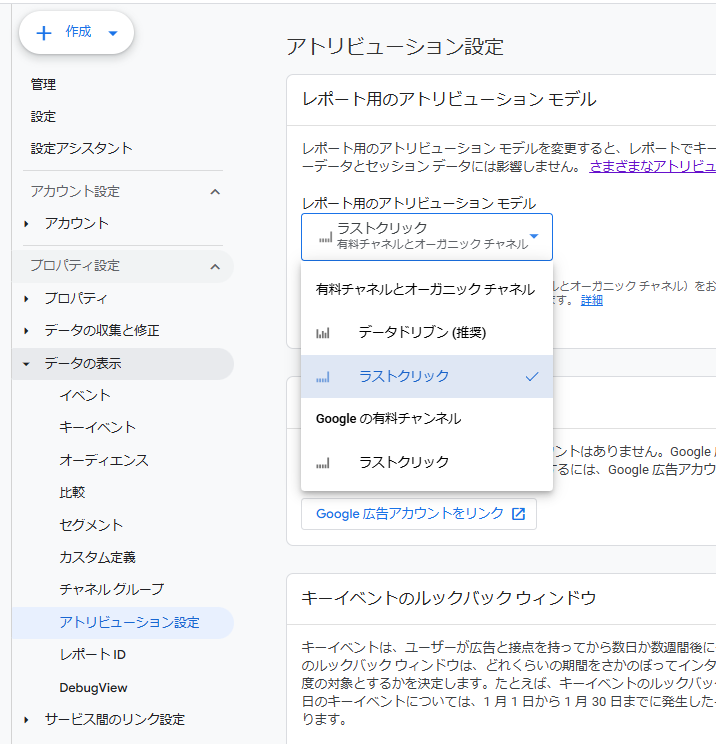
1. Go to **Admin > Property Settings > Data Display > Attribution Settings**
2. In **Attribution Settings > Reporting Attribution Model**, select:
- **Paid and Organic Channels > Last Click**
3. Save the settings and proceed to **Exploration Reports**
4. Select **Dimensions > Attribution > Source (or other relevant dimensions)**
- ⚠️ **Note:** Do not use session-based source dimensions from **Traffic Source**
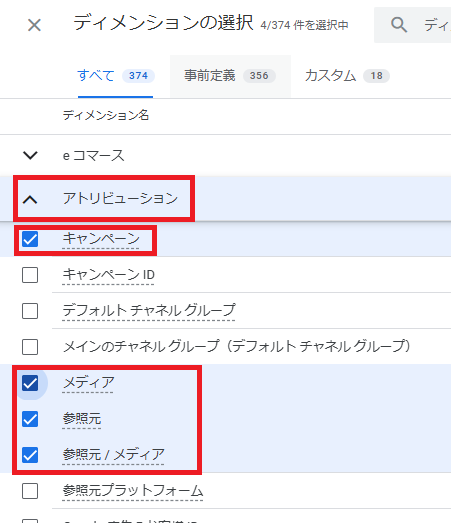
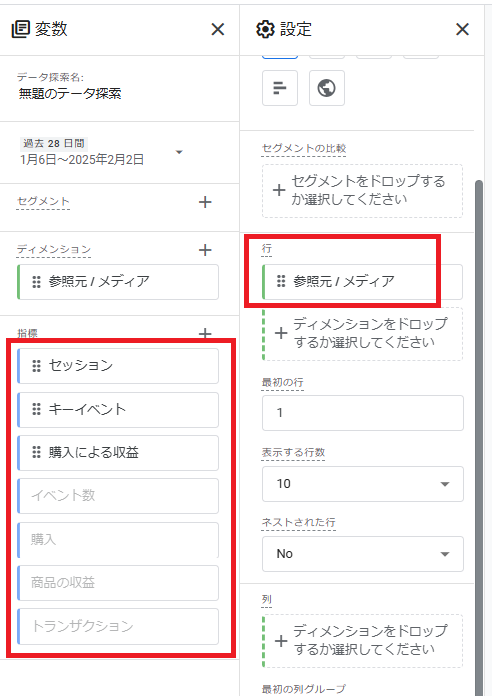
With these settings, you can view revenue by last-click source.
## Limitations of Attribution Reports
While attribution reports are useful, they have limitations. Only specific metrics are available, and transaction counts or regular events cannot be analyzed within these reports.
## Extracting Purchase Counts in BigQuery
To overcome these limitations, you can create a query in BigQuery that adds the last-click traffic source to each row, allowing for a more detailed analysis of purchase counts and revenue attribution.
With this approach, if a user enters the site from an external source during a session, the traffic source (e.g., `last_click_source`) will be updated accordingly.
For example, the result will look like this:
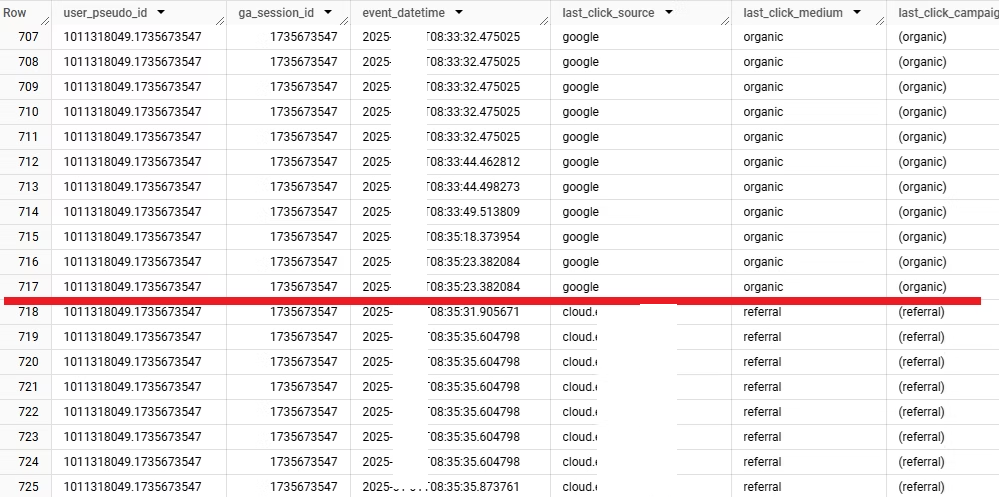
| user_id | session_id | event_timestamp | event_name | traffic_source | session_source |
|---------|-----------|----------------------|-------------|---------------------|---------------------|
| 12345 | 67890 | 2024-02-01 12:00:00 | page_view | google / organic | google / organic |
| 12345 | 67890 | 2024-02-01 12:10:00 | page_view | | google / organic |
| 12345 | 67890 | 2024-02-01 12:20:00 | page_view | facebook / cpc | facebook / cpc |
| 12345 | 67890 | 2024-02-01 12:30:00 | purchase | | facebook / cpc |
In this example:
- The user first visits the site via **Google Organic**.
- During the session, they return via **Facebook Ads (CPC)**.
- The purchase event is attributed to **Facebook CPC**, as it was the last click source.
By using BigQuery, you can track the last-click source dynamically and analyze its impact on purchases more accurately.
## ⚠️ Important Note
In BigQuery, when traffic comes from **Google Ads**, the `collected_traffic_source.medium` value is still recorded as **"organic"** instead of **"cpc"**.
### How to Handle This Issue
To correctly attribute Google Ads traffic, check the `gclid` column. If a `gclid` value is present, the `medium` column should be rewritten as `"cpc"`.
For example, you can use a query like this:
```sql
CASE
WHEN gclid IS NOT NULL THEN 'cpc'
ELSE collected_traffic_source.medium
END AS corrected_medium
```