https://github.com/akratch/mgb64
A decompilation and native source port of a 1997 Nintendo 64 first-person shooter, for research & preservation. Bring your own ROM - no copyrighted assets included.
https://github.com/akratch/mgb64
bring-your-own-rom decompilation game-preservation n64 native-port nintendo-64 opengl reverse-engineering sdl2 source-port
Last synced: 4 days ago
JSON representation
A decompilation and native source port of a 1997 Nintendo 64 first-person shooter, for research & preservation. Bring your own ROM - no copyrighted assets included.
- Host: GitHub
- URL: https://github.com/akratch/mgb64
- Owner: akratch
- License: mit
- Created: 2026-06-19T17:38:29.000Z (21 days ago)
- Default Branch: main
- Last Pushed: 2026-07-04T18:13:47.000Z (6 days ago)
- Last Synced: 2026-07-04T20:07:07.230Z (5 days ago)
- Topics: bring-your-own-rom, decompilation, game-preservation, n64, native-port, nintendo-64, opengl, reverse-engineering, sdl2, source-port
- Language: C
- Size: 7.41 MB
- Stars: 6
- Watchers: 0
- Forks: 0
- Open Issues: 12
-
Metadata Files:
- Readme: README.md
- Contributing: CONTRIBUTING.md
- License: LICENSE
- Code of conduct: CODE_OF_CONDUCT.md
- Codeowners: .github/CODEOWNERS
- Security: SECURITY.md
- Roadmap: ROADMAP.md
- Notice: NOTICE.md
Awesome Lists containing this project
README
MGB64
Man with the Golden Build
A decompilation and native source port
of a 1997 Nintendo 64 first-person shooter, reimplemented in portable C so
it can be studied, preserved, and run natively on modern machines.
-blue.svg)


> [!IMPORTANT]
> **This project ships no game.** It contains decompiled code and an original
> port layer — **no ROM and no copyrighted assets** (graphics, audio, models,
> fonts, level data). To run the port you must supply your **own**
> legally-dumped copy of the game. Please read **[DISCLAIMER.md](DISCLAIMER.md)**.
## Gameplay Examples
| Runway | Cradle |
| --- | --- |
| [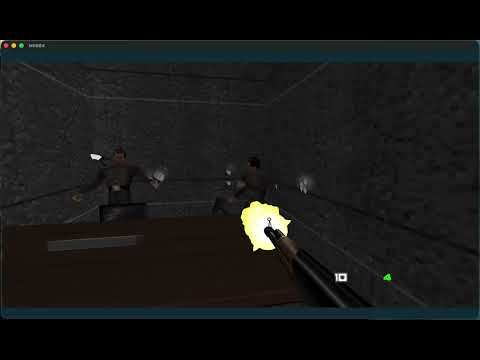](https://youtu.be/Jh3GOirvobI) | [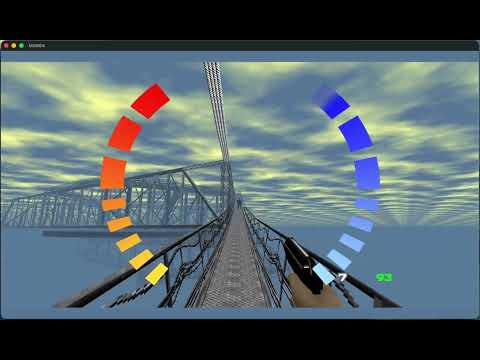](https://youtu.be/Pob6Itc7rCQ) |
| [Watch on YouTube](https://youtu.be/Jh3GOirvobI) | [Watch on YouTube](https://youtu.be/Pob6Itc7rCQ) |
## Download
> **Bring your own ROM.** Downloads contain **no game data** — you supply your
> own legally-dumped GoldenEye 007 ROM at runtime (see
> [DISCLAIMER.md](DISCLAIMER.md)).
MGB64 ships as a real app: a Dear ImGui launcher rendered *in-process* —
insert a ROM, configure everything, jump to any level, and play, with an
in-game overlay (**F1**) for live settings. One portable codebase builds it on
all three desktop platforms.
| Platform | Download | Notes |
| --- | --- | --- |
| **macOS** 13+ (Apple Silicon) | **[MGB64.app — latest release](https://github.com/akratch/mgb64/releases/latest)** | `.app` in a `.zip`. Unsigned, so on first launch **right-click → Open** to pass Gatekeeper. Intel Macs: [build from source](#building) (Homebrew SDL2 is single-arch, so no universal prebuilt yet). |
| **Windows** 10/11 (x64) | **[Portable `.zip` — latest release](https://github.com/akratch/mgb64/releases/latest)** | Unzip and run `ge007.exe` (bundles `SDL2.dll`). Or [build from source](#building) (MSYS2/MinGW, a few minutes). |
| **Linux** (x86‑64, glibc 2.35+) | **[AppImage — latest release](https://github.com/akratch/mgb64/releases/latest)** | `chmod +x` and run (bundles SDL2/GL); a `.tar.gz` is also attached. Or [build from source](#building) (SDL2 + GL + D‑Bus dev packages). |
> **Platform status.** macOS is built and tested by the maintainers. Windows and
> Linux use the **same portable codebase** and are wired into the build and
> release pipeline (`.github/workflows/release.yml`); their prebuilt binaries
> are attached to tagged releases (starting with v0.3.1) but are **not yet
> maintainer‑tested**. Please report platform issues via the app's
> **Diagnostics → Export Diagnostics** button or the
> [bug report template](.github/ISSUE_TEMPLATE/bug_report.md).
How it all works and how each platform is built:
**[docs/APP_ARCHITECTURE.md](docs/APP_ARCHITECTURE.md)**.
## What is this?
MGB64 combines the decompiled game code with a native PC/macOS port. It builds
on the same N64 decompilation ecosystem as
[Super Mario 64](https://github.com/n64decomp/sm64) and
[Ocarina of Time](https://github.com/zeldaret/oot) decompilations and the
[Perfect Dark](https://github.com/fgsfdsfgs/perfect_dark) port:
- **A decompilation** — the original N64 game's logic, rewritten as readable,
buildable C and MIPS assembly. The native port is the supported build today;
byte-identical N64 ROM rebuilding is still in progress.
- **A native port** — a platform layer (`src/platform/`) that runs the same game
code on PC/macOS: it loads *your* ROM at runtime, translates the N64 display
lists to a modern GPU, and provides audio, input, and file I/O. No copyrighted
data is compiled into the binary ("bring your own ROM").
## Status
> **Experimental.** This is a research/preservation project, not a polished
> consumer release, and it is **not** a 1:1 replacement for original hardware.
- ✅ The decompilation covers the bulk of the game's systems (rendering, AI,
combat, level logic, menus, audio).
- ✅ **The native port builds and runs from a clean checkout + your own ROM**
(`cmake -B build && cmake --build build`), with native rendering, audio, and
keyboard/mouse + gamepad input.
- ✅ **Asset-free:** no ROM media is compiled into the binary — textures, audio,
animation, fonts, and logos are read from *your* ROM at runtime.
- ✅ **Opt-in visual remaster:** a one-flag `--remaster` mode layers modern
post-processing (ambient occlusion, bloom, filmic tonemap, colour grade, FXAA,
supersampling) and optional user-built HD texture packs on a native Metal
backend, while `--faithful` preserves the byte-faithful 1997 look. See
**[docs/VISUAL_MODES.md](docs/VISUAL_MODES.md)**.
- ⚠️ **Platform support: developed and tested on macOS (Apple Silicon) only.**
Windows and Linux have CMake/build-system support and are intended targets,
but they have **not** been tested by the maintainers yet — expect build or
runtime issues, and please report them (see
[docs/BUILDING.md](docs/BUILDING.md#reporting-platform-validation) for the
platform validation report template).
- 🚧 Rebuilding the original **N64 ROM** (byte-matching), SDK provenance cleanup,
and renderer/audio parity are the main open areas. See
**[ROADMAP.md](ROADMAP.md)** for the
precise state and good first issues.
- ⚠️ The tree still contains inventoried N64 SDK/libultra compatibility
material that is **not** MIT-licensed first-party code. See
**[THIRD_PARTY.md](THIRD_PARTY.md)** before describing or redistributing the
project.
There are known graphical and gameplay issues and occasional instability. Bug
reports and PRs are very welcome.
## The app (insert ROM, configure, play)
Beyond the CLI, MGB64 builds an in-process **app** (default `-DMGB64_APP=ON`):
a Dear ImGui launcher rendered in the same window as the game — **no separate
process, one portable codebase** for macOS/Windows/Linux. It provides a native
"insert ROM" picker with validation, an auto-generated settings panel (every
engine config key), quick launch-to-level / multiplayer, and an in-game overlay
(F1) with live settings. Automation/diagnostic invocations bypass the launcher
and run the unchanged engine path, so the validation harness is unaffected.
- Run the launcher: `./build/ge007` (no arguments).
- macOS bundle: `./macos/Scripts/build_gl_app.sh` → `build-macos-app/MGB64.app`.
- Architecture + per-OS build/seams: **[docs/APP_ARCHITECTURE.md](docs/APP_ARCHITECTURE.md)**.
> macOS is validated; Windows/Linux use only portable seams and are wired in the
> build. A prebuilt "Download" section (rolling latest + tagged releases) is
> planned.
## Building
> [!WARNING]
> **This port has only been built and tested on macOS (Apple Silicon) so far.**
> The Linux and Windows (MSYS2/MinGW64) paths below are provided in good faith
> but are **not yet verified** by the maintainers. If they fail for you, please
> open a platform validation report issue.
Full instructions — toolchain, dependencies, native-port setup, and the
matching-target asset-extraction path — are in
**[docs/BUILDING.md](docs/BUILDING.md)**. In brief:
1. Install the build dependencies for your platform (see the build doc).
2. Build the native port with CMake; the public checkout compiles without ROM
media or extracted assets.
3. Run the port with a ROM **you legally own** using `--rom /path/to/rom.z64`,
or place it at the repository root for auto-detection.
4. Matching-target contributors can use the asset-extraction and
Makefile path described in the build docs.
```sh
# Native port (PC/macOS):
cmake -B build -DCMAKE_BUILD_TYPE=Release
cmake --build build -j
```
## Running
You must already own and supply the ROM — the port reads it at runtime; no game
data is bundled. The default command boots normally into the game frontend:
```sh
./build/ge007 --rom "/path/to/baserom.u.z64"
```
Common startup examples:
```sh
# Boot normally with an explicit ROM path:
./build/ge007 --rom "/path/to/baserom.u.z64"
# Direct-boot a solo stage by name:
./build/ge007 --rom "/path/to/baserom.u.z64" --level dam
# Direct-boot mission 2 on Secret Agent:
./build/ge007 --rom "/path/to/baserom.u.z64" --mission 2 --difficulty secret
# Direct-boot by raw internal LEVELID, useful for validation:
./build/ge007 --rom "/path/to/baserom.u.z64" --level 33
# Keep saves/config in a dedicated directory:
./build/ge007 --rom "/path/to/baserom.u.z64" --savedir "$HOME/.mgb64"
```
If you don't pass `--rom`, the port auto-detects a compatible ROM in the working
directory and common locations (`~/Downloads`, `~/Documents`, `~/Desktop`, `~`)
by size, N64 header, and internal cartridge name.
### Visual modes
The port renders a **faithful original** look and an opt-in **remaster**, each a
single flag. Note the default boot (no flag) already enables the cinematic post-FX
and 2× supersampling — so pass **`--faithful`** for the byte-faithful 1997 look.
| Mode | Command | What you get |
| --- | --- | --- |
| **Faithful** | `./build/ge007 --faithful --level dam` | Byte-faithful 1997 original — post-FX off, native resolution, stock textures, classic FOV/crosshair/aim. |
| **Faithful HD** | `./build/ge007 --faithful-hd --level dam` | The faithful look at 2× supersampling and HD-pack-ready — set `Video.TexturePack` for HD textures. |
| **Default** | `./build/ge007 --level dam` | Cinematic post-FX (colour grade, tonemap, bloom, FXAA, sharpen, vignette, dither) + 2× SSAA; ambient occlusion off. |
| **Remaster** | `./build/ge007 --remaster --level dam` | The full remaster: adds screen-space ambient occlusion on top of the default look (uses the native Metal backend on macOS). |
The three preset flags are **transient and mutually exclusive** — none writes
`ge007.ini`. Every individual effect is also a `Video.*`/`Input.*` setting (with a
`GE007_*` env-var alias) you can toggle via `--config-override`; run
`./build/ge007 --list-settings` for the full list. HD texture packs are built from
*your own* ROM dump with `tools/texpack` and are never distributed. Full details:
**[docs/VISUAL_MODES.md](docs/VISUAL_MODES.md)**.
Useful runtime options:
| Option | Purpose |
| --- | --- |
| `--rom PATH` | Load the ROM from `PATH`. A positional ROM path also works. |
| `--level NAME` | Direct-boot a supported solo stage by slug, for example `dam`, `facility`, `runway`, `surface1`, `bunker1`, or `egypt`. |
| `--level N` | Direct-boot a raw internal `LEVELID`. Example: `33` is Dam. These numbers are not mission-order numbers. |
| `--mission N` | Direct-boot solo mission order `1` through `20`. Use this when you mean "mission 2", "mission 3", etc. |
| `--difficulty VALUE` | Select the direct-boot difficulty. Values: `agent`, `secret`, `00`, `007`, or numeric `0` through `3`. Defaults to Agent. |
| `--savedir PATH` | Store `ge007.ini` and save data in `PATH`. Without this, the port uses the current directory when writable, then falls back to a per-user directory. |
| `--list-settings` | Print registered persistent settings and exit. Does not require a ROM. |
| `--dump-config` | Print the current config view after loading `ge007.ini` and exit. Does not require a ROM. |
| `--config-override KEY=VALUE` | Override a persistent setting for this run without saving it. Repeatable. |
| `--faithful` | Boot the pixel-/feel-faithful original (post-FX off, native res, stock textures, classic FOV, no modern crosshair/hitmarkers/minimap, vanilla pad aim) for this run only. Transient — does not modify `ge007.ini`. Explicit `--config-override` still wins. See [docs/VISUAL_MODES.md](docs/VISUAL_MODES.md). |
| `--faithful-hd` | Like `--faithful` but at 2× supersampling and HD-pack-ready (set `Video.TexturePack`). Transient; mutually exclusive with `--faithful`/`--remaster`. |
| `--remaster` | Boot the full opt-in remaster in one switch: ambient occlusion, bloom, filmic tonemap, colour grade, FXAA, sharpen, vignette, dither, 2× SSAA (native Metal backend on macOS). Transient; mutually exclusive with `--faithful`/`--faithful-hd`. See [docs/VISUAL_MODES.md](docs/VISUAL_MODES.md). |
| `--config-set KEY=VALUE` | Set a persistent config value, save `ge007.ini`, and exit. Repeatable. Does not require a ROM. |
| `--reset-config` | Reset registered persistent settings to defaults, save `ge007.ini`, and exit. Does not require a ROM. |
| `--no-input-grab` | Do not capture the mouse. Useful while testing windowed startup. |
| `--background` | Run without grabbing input and with background-friendly settings. Useful for smoke tests. |
If you pass no direct-boot option, the game starts normally. `--level` accepts
stage slugs or raw internal `LEVELID` values; `--mission` accepts campaign order.
For example, use `--mission 2` or `--level facility` for mission 2, not
`--level 2`. See [docs/BUILDING.md](docs/BUILDING.md#running) for more platform
setup detail.
### Controls (default)
| Action | Keyboard & mouse | Gamepad |
| --- | --- | --- |
| Move | `W` `A` `S` `D` | Left stick |
| Look | Mouse | Right stick |
| Fire | Left click | RT |
| Aim (hold) | Right click | LT |
| Cycle weapon | Mouse wheel | `Y` (next) / Back (prev) |
| Reload | `R` | — |
| Interact | `F` | — |
| Crouch (toggle) | `C` / `LCtrl` | L3 |
| Lean L/R (in aim mode) | `Q` / `E` | — |
| Watch menu | `Tab` | — |
| Pause | `Esc` | — |
| Mute audio | `M` | — |
| Show controls | `H` | — |
Mouse sensitivity, window size, display mode, and VSync are configurable in
`ge007.ini`. By default the port writes config/save data in the current
directory when it is writable; use `--savedir PATH` to keep a separate profile.
The display mode key is `Video.WindowMode` with `windowed`, `borderless`, or
`exclusive`; for example: `--config-set Video.WindowMode=borderless`. VSync is
`Video.VSync` with `off`, `on`, or `adaptive`; frame pacing is `Video.FrameCap`
with `30`, `60`, or `display`. Output gamma is `Video.Gamma`, where `1.0` leaves
colors unchanged.
`Video.RenderScale` adjusts the internal scene framebuffer from `1.0` to `4.0`
for supersampling. `Video.MSAA` accepts `0`, `2`, `4`, or `8` samples for scene
anti-aliasing.
`Video.HiDPI` controls Retina/high-DPI drawable rendering. It defaults to `0`
for steadier performance on large windows; set it to `1` for opt-in native
display-pixel rendering.
`Video.FovY` controls the normal gameplay vertical field of view from `45` to
`105` degrees (default `50` for a modern widescreen feel; `--faithful` restores
the classic `60`); scoped weapons and watch animations still use their own zoom
values.
`Video.RetroFilter` is `auto`, `off`, or `on` for the VI-style soft output
filter. `Video.Display` selects the zero-based SDL display index and falls back
to display 0 if the saved index is unavailable. `Video.WindowX` and
`Video.WindowY` are relative to that display, with `-1` meaning centered.
Run `ge007 --list-displays` to print detected SDL displays and fullscreen modes.
For `Video.WindowMode=exclusive`, set `Video.FullscreenWidth`,
`Video.FullscreenHeight`, and optionally `Video.FullscreenRefresh`; leave them
at `0` to use SDL's default display mode.
Pressing `H` also prints the full control list to the console.
## Known limitations
This is an experimental, work-in-progress port — **not** a 1:1 replacement for
original hardware. It runs the game's decompiled code natively; it is not an
emulator and is not cycle-exact. Rendering and audio use some documented
compatibility approximations, and a few areas are still converging toward exact
N64 behavior. **[PORT.md](PORT.md)** has the full, honest breakdown: what is and
isn't faithful, the known divergences, and the validation coverage. Please read
it before filing parity bugs.
## Repository layout
| Path | Contents |
| --- | --- |
| `src/game/` | Decompiled game code |
| `src/platform/` | Native port layer (SDL2 windowing, OpenGL + opt-in Metal backends, audio, input, config, ROM I/O) + the app↔engine seams (`host_window`, `app_overlay_hooks`, `config_schema`, `input_bindings`) |
| `src/app/` | The **in-process app shell** (C++17 + Dear ImGui): launcher, panels (ROM / Settings / Launch / Controls / Modes / Diagnostics), in-game overlay, and diagnostics. Compiled into `ge007` as the `mgb64_app` static library. See [`docs/APP_ARCHITECTURE.md`](docs/APP_ARCHITECTURE.md). |
| `src/libultra/` | N64 SDK compatibility material (see [THIRD_PARTY.md](THIRD_PARTY.md)) |
| `lib/` | Vendored third-party libs: `glad`, `stb`, `imgui`, `nfd`, `fonts` (all listed in [THIRD_PARTY.md](THIRD_PARTY.md)) |
| `include/` | Shared headers |
| `assets/` | Asset **build glue** only (extraction config, linker scripts, `.incbin` wrappers). Extracted ROM data lands here at build time and is git-ignored. |
| `tools/` | Build/extraction tooling (extractor, texture conversion, checksum, `asm-processor`, …) |
| `scripts/` | Extraction, build, and release/launch helper scripts |
| `macos/` | macOS packaging: the portable-app bundler (`build_gl_app.sh` → `MGB64.app`), the optional legacy Swift app shell, and signing/notarization scripts — see [`macos/README.md`](macos/README.md) |
| `ld/`, `*.ld` | Linker scripts |
| `docs/` | Build, status, architecture, and design documentation |
## Contributing
Contributions are welcome — see **[CONTRIBUTING.md](CONTRIBUTING.md)** for the
workflow, coding style, and the one rule that matters most: **never commit ROMs
or any ROM-derived assets.** Project conduct is covered in
**[CODE_OF_CONDUCT.md](CODE_OF_CONDUCT.md)**, and vulnerability / repository
hygiene reports are covered in **[SECURITY.md](SECURITY.md)**.
Maintainers should enable the tracked safety hooks once per checkout:
```sh
scripts/install_git_hooks.sh
```
The hooks run the ROM/data contamination guard before commits and pushes.
## Acknowledgements
This project builds directly on the
[**n64decomp/007**](https://github.com/n64decomp/007) decompilation, which we
started from and continue to work off of. Our thanks to its authors and
contributors for the foundational reverse-engineering effort that this port
extends.
It also stands on the shoulders of the wider N64 decompilation community. Thanks
to the SM64, Ocarina of Time, and Perfect Dark decomp/port projects for the
tooling, conventions, and trail-blazing that make work like this possible, and
to the authors of [`asm-processor`](tools/asm-processor) and the other bundled
or locally referenced tools.
## License & legal
First-party code in this repository (the port layer, build system, tooling, and
documentation) is released under the **[MIT License](LICENSE)**. The MIT license
does **not** grant any rights in the original game. See **[NOTICE.md](NOTICE.md)**
for the short license/provenance summary.
The decompiled game code is a transformative work provided for research,
preservation, and educational purposes. **No copyrighted ROM or assets are
distributed.** All trademarks are the property of their respective owners, and
this project is not affiliated with or endorsed by any rights holder. Please
read **[DISCLAIMER.md](DISCLAIMER.md)** in full before using this project.
Third-party components (including N64 SDK compatibility headers/source, bundled
tools/libraries, and local-only matching-target tool placeholders) and their
provenance are inventoried in
**[THIRD_PARTY.md](THIRD_PARTY.md)**.
Maintainer release hygiene checks are documented in
**[docs/RELEASE_CHECKLIST.md](docs/RELEASE_CHECKLIST.md)**.