https://github.com/aks-arise1600/mysqlgui
mysql workbench
https://github.com/aks-arise1600/mysqlgui
cmake cpp mysql qt5
Last synced: 2 months ago
JSON representation
mysql workbench
- Host: GitHub
- URL: https://github.com/aks-arise1600/mysqlgui
- Owner: aks-arise1600
- License: gpl-3.0
- Created: 2023-11-06T10:35:11.000Z (over 2 years ago)
- Default Branch: main
- Last Pushed: 2024-07-02T11:22:14.000Z (about 2 years ago)
- Last Synced: 2025-02-22T06:26:22.902Z (over 1 year ago)
- Topics: cmake, cpp, mysql, qt5
- Language: C++
- Homepage:
- Size: 3.17 MB
- Stars: 2
- Watchers: 1
- Forks: 0
- Open Issues: 0
-
Metadata Files:
- Readme: README.md
- License: LICENSE
Awesome Lists containing this project
README

MySQL GUI 1.1b
MySQL GUI is a UI based MySQL workbench. It is design as all SQL commands or queries to execute with user interactive mode.
## Install Dependencies
sudo apt update
sudo apt install -y build-essential qt5-qmake qtbase5-dev qtbase5-dev-tools cmake git
sudo apt install -y mysql-server libmysqlclient-dev
sudo systemctl start mysql.service
## Configure MySQL (root password)
sudo mysql
ALTER USER 'root'@'localhost' IDENTIFIED WITH mysql_native_password BY 'password';
exit
## Build with cmake
git clone https://github.com/aks-arise1600/MySqlGUI.git
cd MySqlGUI
mkdir cBuild && cd cBuild
cmake ..
make
## Build with qmake
git clone https://github.com/aks-arise1600/MySqlGUI.git
cd MySqlGUI
mkdir qBuild && cd qBuild
qmake ..
make
## MySQL Connection

## Select Query on selection treeview item

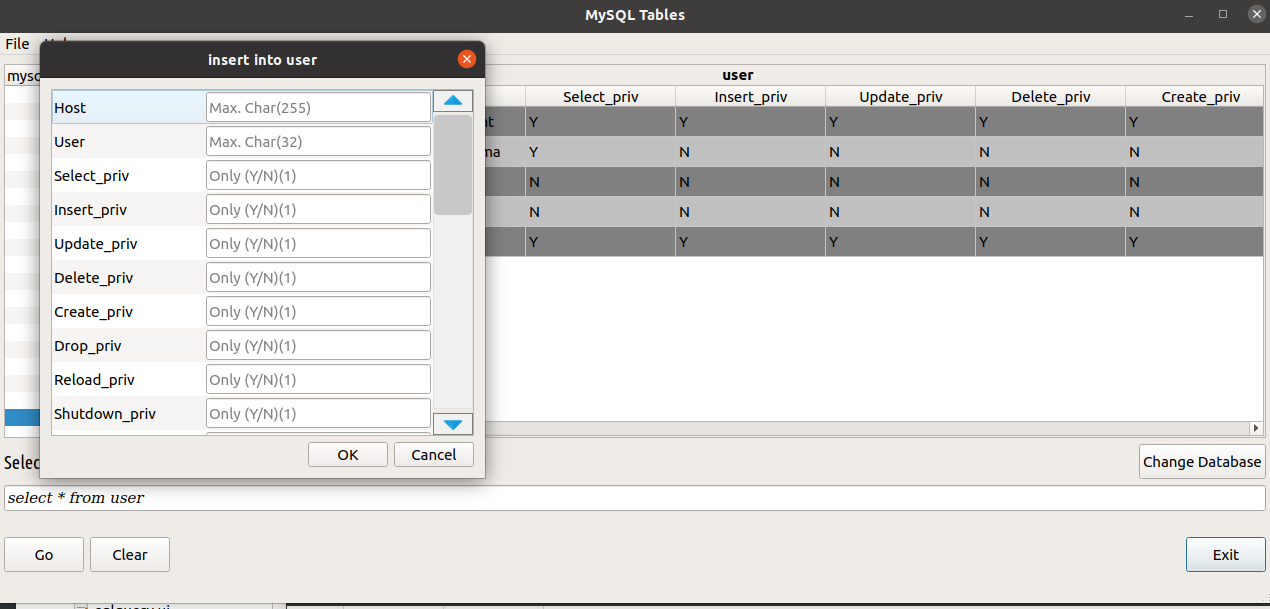
## Insert Values on selected treeview item with right click

## References
1. [MySQL Install](https://www.digitalocean.com/community/tutorials/how-to-install-mysql-on-ubuntu-20-04)
2. [MySQL Queries](https://www.mysqltutorial.org/mysql-cheat-sheet.aspx)
3. [Qt SQLDatabase programming](https://doc.qt.io/qt-6/qsqldatabase.html)