https://github.com/akshaybabloo/cpp-notes
Introduction to C++
https://github.com/akshaybabloo/cpp-notes
cpp cpp-notes
Last synced: about 1 year ago
JSON representation
Introduction to C++
- Host: GitHub
- URL: https://github.com/akshaybabloo/cpp-notes
- Owner: akshaybabloo
- License: mit
- Created: 2016-02-01T23:21:49.000Z (over 10 years ago)
- Default Branch: master
- Last Pushed: 2020-06-08T02:22:27.000Z (about 6 years ago)
- Last Synced: 2025-06-09T00:05:36.825Z (about 1 year ago)
- Topics: cpp, cpp-notes
- Language: C++
- Homepage:
- Size: 992 KB
- Stars: 12
- Watchers: 2
- Forks: 5
- Open Issues: 0
-
Metadata Files:
- Readme: README.md
- License: LICENSE
Awesome Lists containing this project
README
# C++ Notes
C++ Notes
**Table of Contents**
- [1 Requirements](#1-requirements)
- [1.1 Mac](#11-mac)
- [1.2 Windows](#12-windows)
- [CMake](#cmake)
- [2 Basics](#2-basics)
- [2.1 Identifiers](#21-identifiers)
- [2.2 Defining Variables](#22-defining-variables)
- [2.3 Pointer and Reference](#23-pointer-and-reference)
- [2.4 Arrays and Strings](#24-arrays-and-strings)
- [2.5 Conditions](#25-conditions)
- [2.6 Switch Case](#26-switch-case)
- [2.7 While Loop](#27-while-loop)
- [2.8 For Loop](#28-for-loop)
- [2.9 Range base `For` loop](#29-range-base-for-loop)
- [2.10 Using stdout](#210-using-stdout)
- [3 Functions](#3-functions)
- [3.1 Defining a function](#31-defining-a-function)
- [3.2 Passing values to a function](#32-passing-values-to-a-function)
- [3.3 Automatic variables vs. Static variables](#33-automatic-variables-vs-static-variables)
- [3.4 Return a function call](#34-return-a-function-call)
- [3.5 Function pointer](#35-function-pointer)
- [3.6 Overloading function names](#36-overloading-function-names)
- [3.7 Overloading operators with function](#37-overloading-operators-with-function)
- [3.8 Variable number of arguments](#38-variable-number-of-arguments)
- [3.9 Recursive function](#39-recursive-function)
- [4 Preprocessors](#4-preprocessors)
- [4.1 Macro constants](#41-macro-constants)
- [4.2 Including a file](#42-including-a-file)
- [4.3 Conditions in preprocessor](#43-conditions-in-preprocessor)
- [4.4 Macro expansion](#44-macro-expansion)
- [4.5 Problems with Macro's](#45-problems-with-macros)
- [4.6 Line continuation](#46-line-continuation)
- [4.6 Include guard](#46-include-guard)
- [5 Classes and Objects in C++](#5-classes-and-objects-in-c)
- [5.1 Defining Classes and Objects](#51-defining-classes-and-objects)
- [5.2 Data members](#52-data-members)
- [5.3 Function members](#53-function-members)
- [5.4 Constructors and Destructors](#54-constructors-and-destructors)
- [5.5 Implicit and Explicit conversion](#55-implicit-and-explicit-conversion)
- [5.6 Namespaces](#56-namespaces)
- [5.7 Using `this`](#57-using-this)
- [5.8 Operator overload: Member function](#58-operator-overload-member-function)
- [5.9 Operator overload: Non-member function](#59-operator-overload-non-member-function)
- [5.10 Conversion operator](#510-conversion-operator)
- [5.11 Using new and delete](#511-using-new-and-delete)
- [5.6 File IO](#56-file-io)
- [5.6.1 Reading Files](#561-reading-files)
- [5.6.2 Writing File](#562-writing-file)
- [6. Data Structures](#6-data-structures)
- [6.1 Structs](#61-structs)
## 1 Requirements
This tutorial is based on C++11. Make sure you are using the latest IDE's - XCode (Mac) or Visual Studio (Windows). You can use other IDE's but make sure it supports the latest C++ version.
IDE's that I think are good:
1. [Visual Studio 2019 Community](https://www.visualstudio.com/) - Cross-platform
2. [XCode](https://developer.apple.com/xcode/) - Mac
3. [CLion](https://www.jetbrains.com/clion) - Cross-platform
4. [NetBeans](https://netbeans.org/downloads/index.html) - Cross-platform
5. [Eclipse](https://eclipse.org/downloads/) - Cross-platform
### 1.1 Mac
**Adding files to Xcode**
1. Download `XCode` from the App Store.
2. Open Xcode application and click on `File > New > Workspace...`.
3. Name the `Workspace` as `CPP-Notes`.
4. Click on the `+` sign and then click on `Add Files to "CPP-Notes"...`
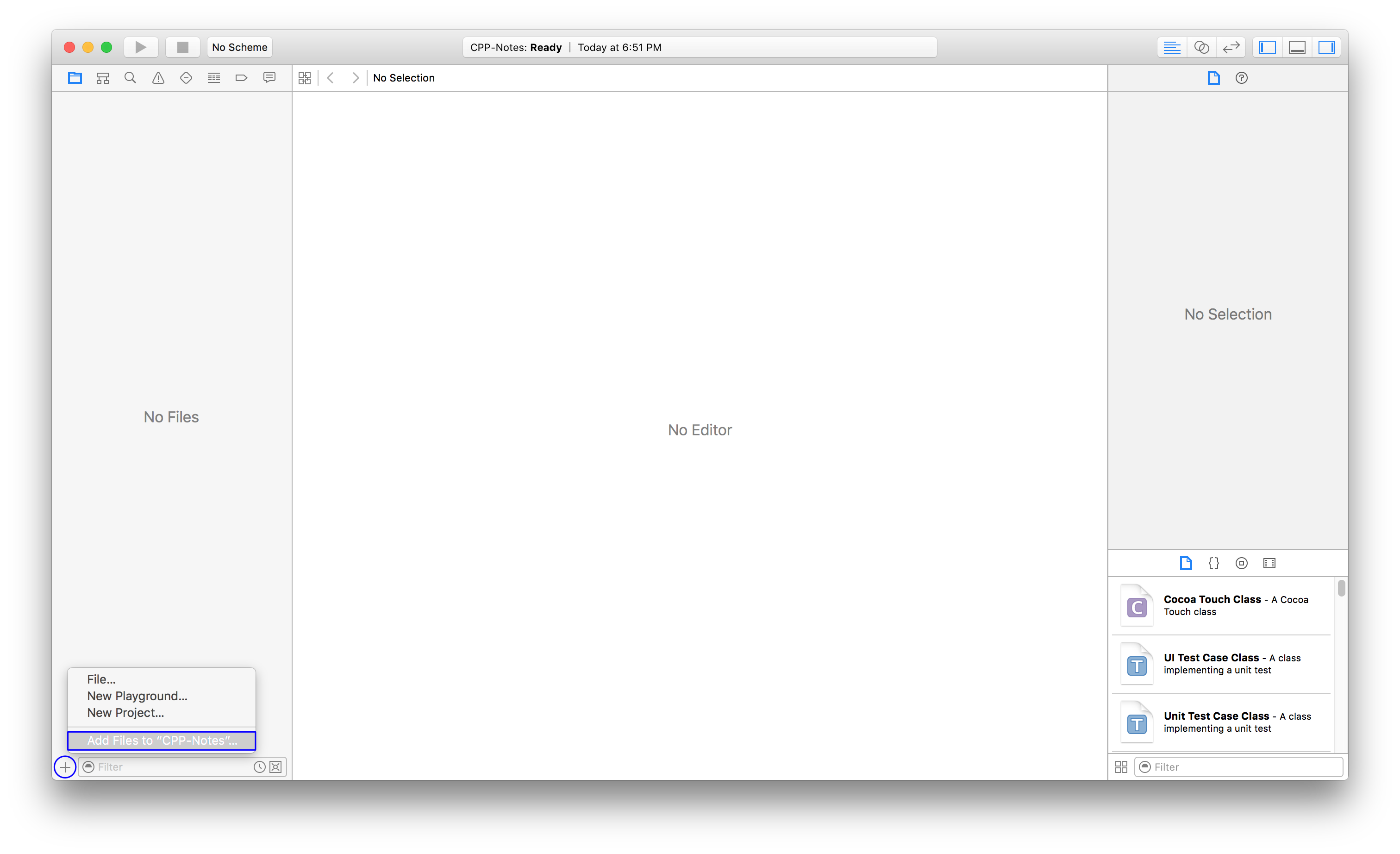
**Creating Project**
1. Click on the `+` sign and then click on `New Project...`
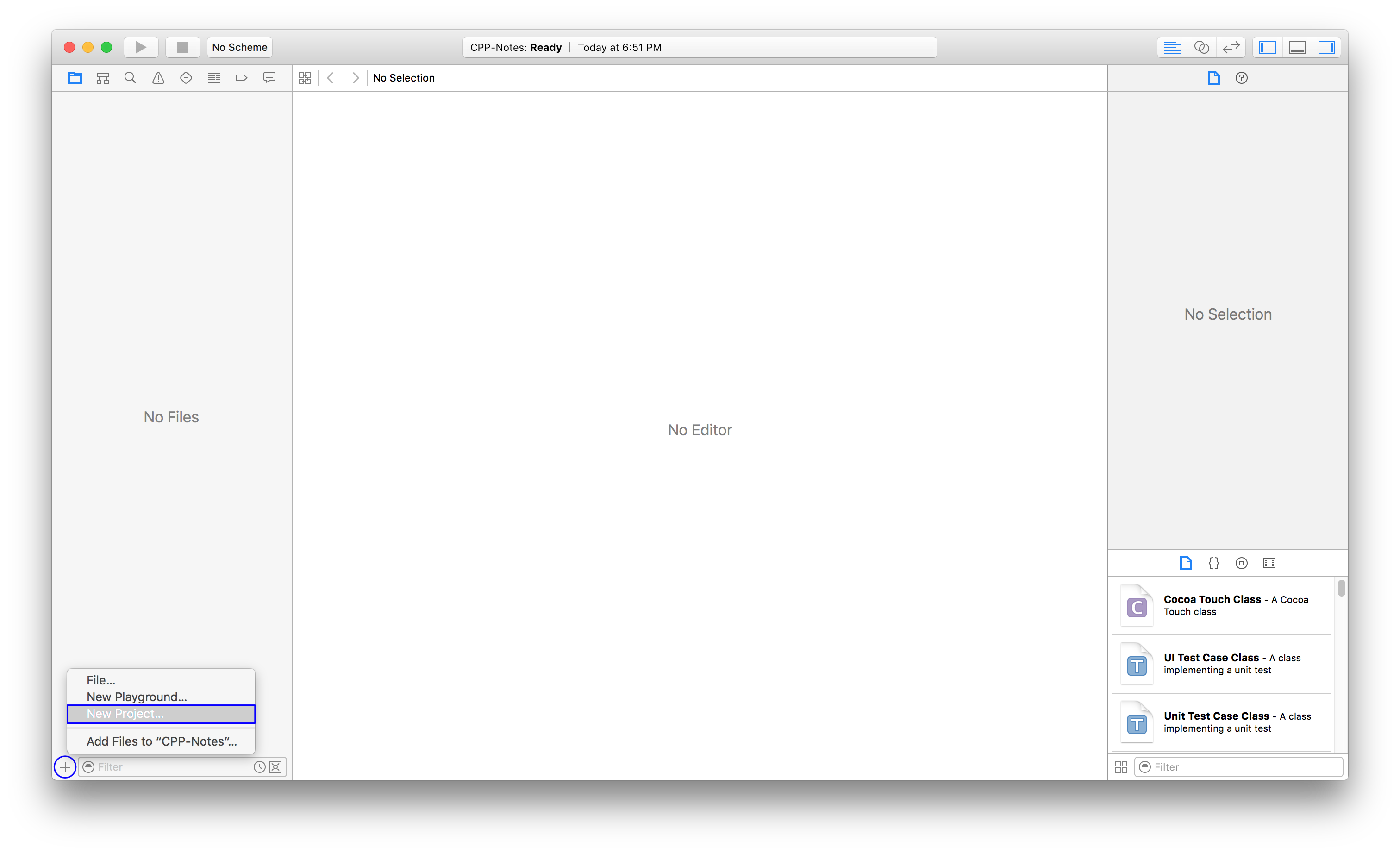
2. Under `OSX > Application` select `Command Line Tool` and click next. In that, type in the name of the product and make sure you select the language as `C++`.
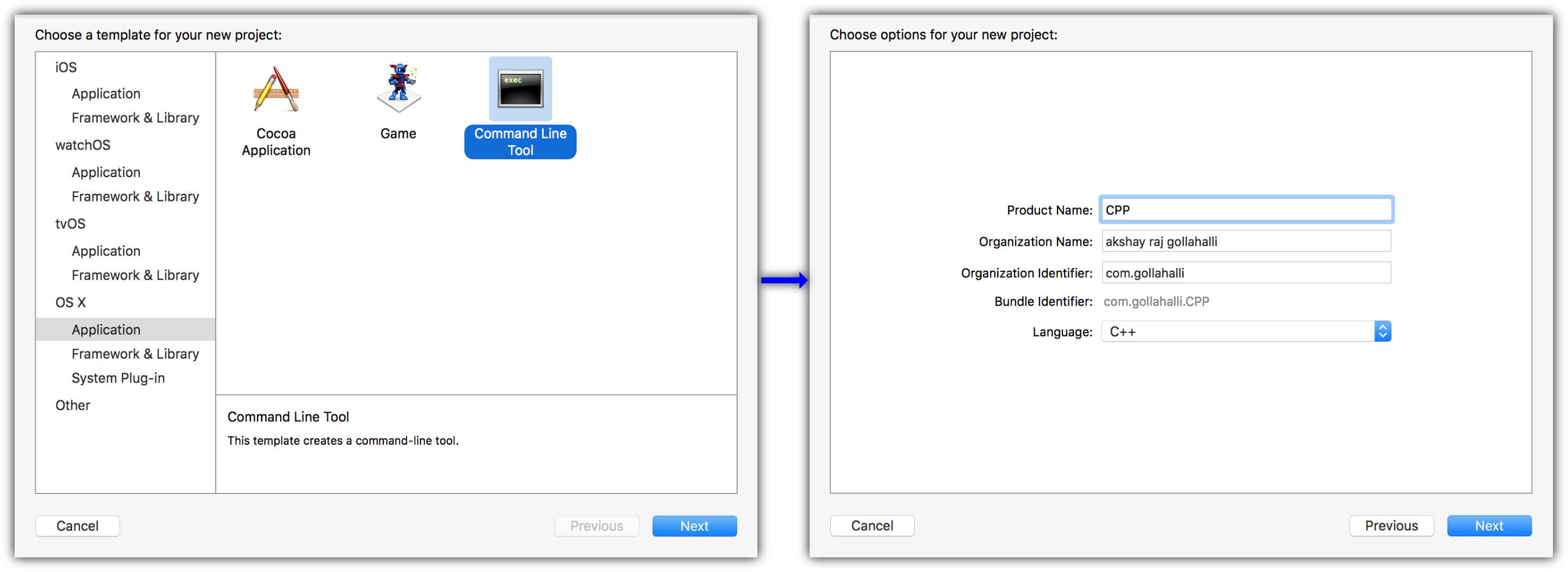
3. Save it where every you want.
### 1.2 Windows
1. Go to [https://www.visualstudio.com/en-us/visual-studio-homepage-vs.aspx](https://www.visualstudio.com/en-us/visual-studio-homepage-vs.aspx) and download `Visual Studio Community` version. Make sure `Visual C++` package is selected and continue the installation.
2. Once installed, Click on `File > New > Project` or use the shortcut Ctrl + Shift + N.
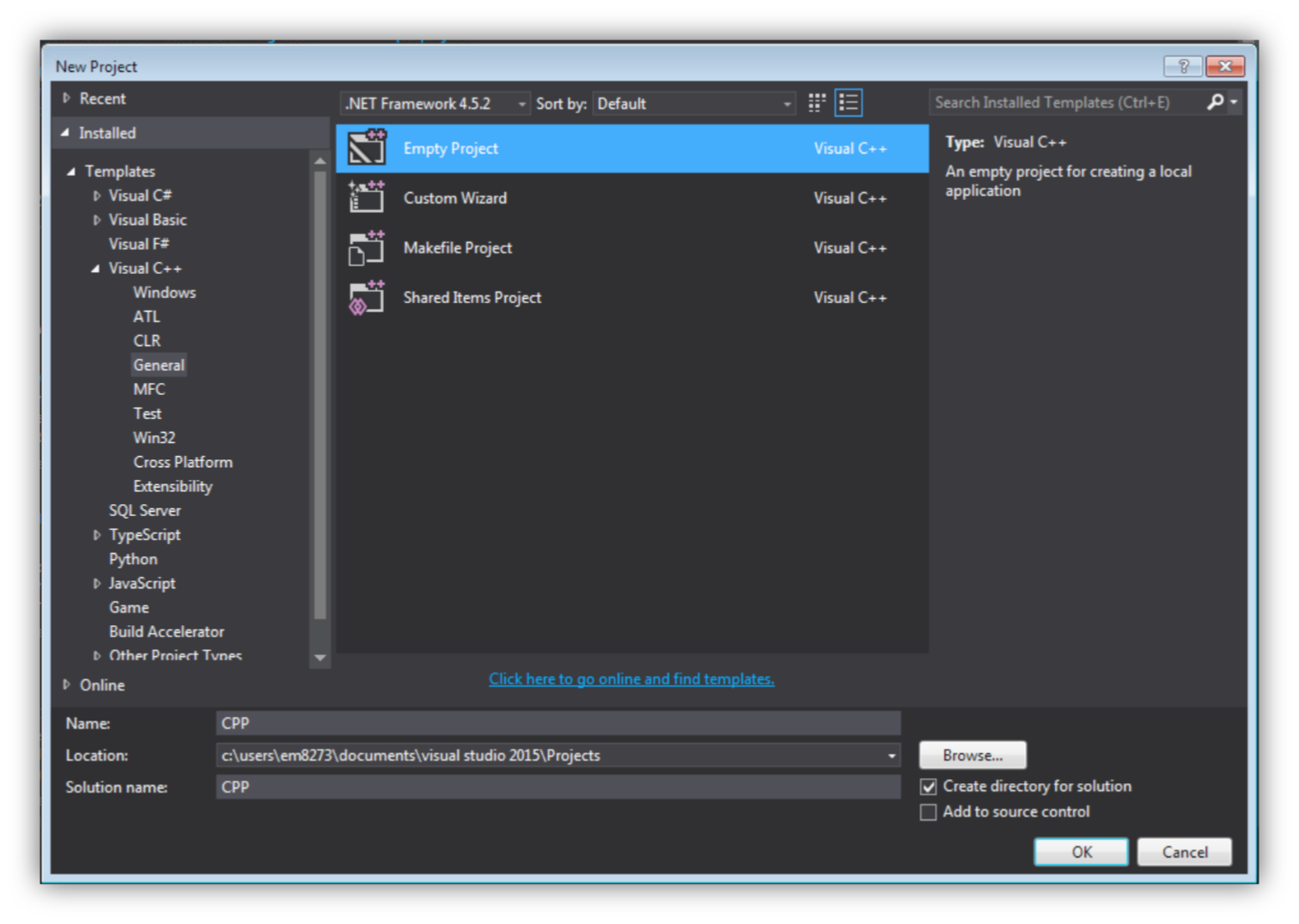
3. We are adding the preprocessing variable because of the way Microsoft has written its c++ compiler. For that to happen, we are creating a C++ file. Under `Solution Explorer` right click on `Source Files > Add > New Item...` name it as `test.cpp` and type int he following:
```cpp
#include
using namespace std;
int main(int argc, char ** argv) {
puts("hello");
return 0;
}
```
From the menubar click on `Build > Build Solution`
4. Under Solution Explorer, right click on `CPP > Properties`
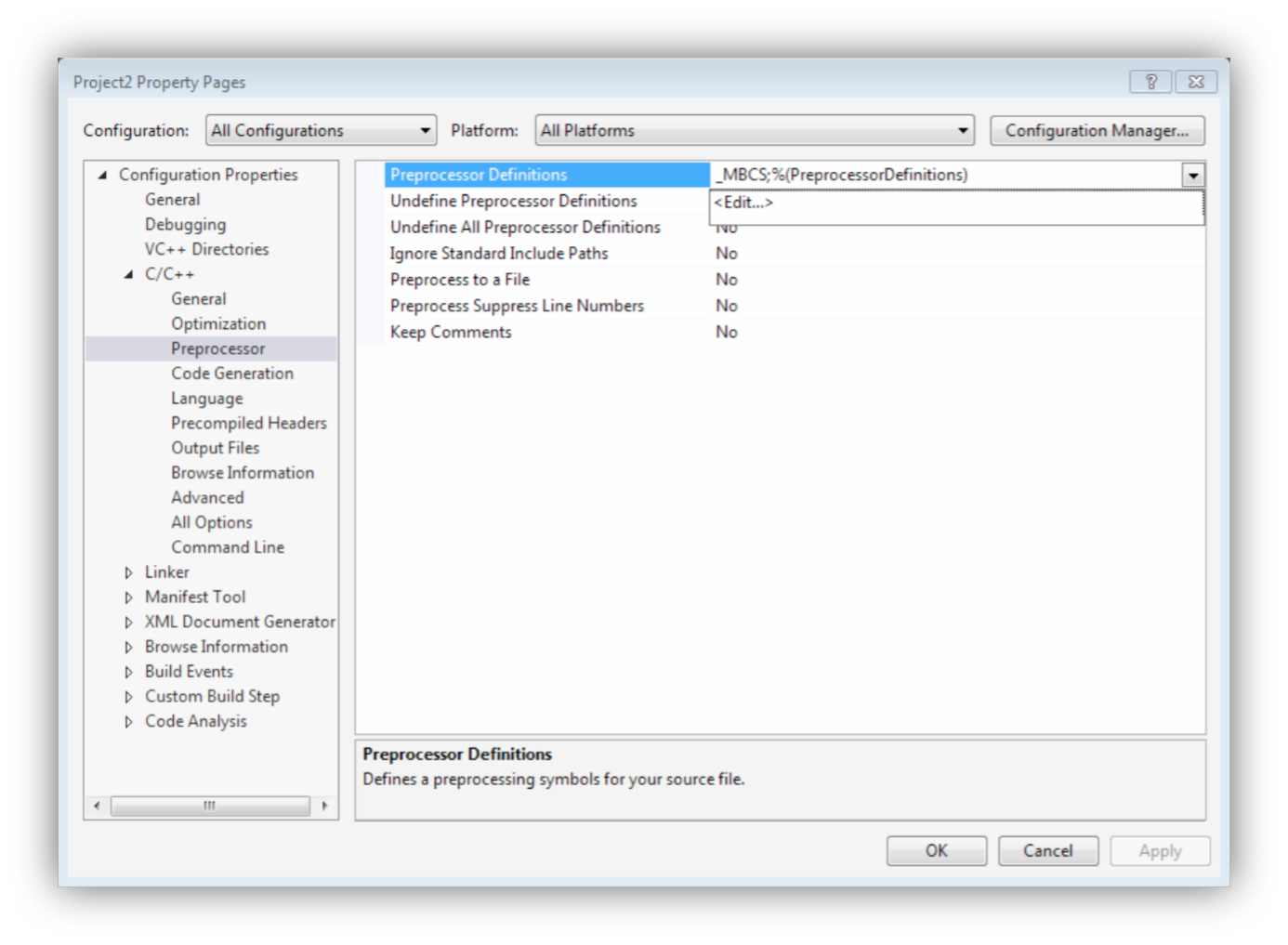
As shown in the image above click on ``. In the text box type in the following:
```
_CRT_SECURE_NO_WARNINGS
_HAS_ITERATOR_DEBUGGING=0
```
Click on `OK`
**Running the CPP files**
1. Open your command prompt, by doing WINDOWS + R and type in `cmd`.
2. To execute the built `test.cpp`, You would have to go to the project folder `CPP > Build > CPP.exe`. Drag and drop `CPP.exe` on the command prompt the press `Enter`, this will output `hello`.
### CMake
CMake is a build system for C++. See their website - [CMake](https://cmake.org) - for more information.
## 2 Basics
C++ inherits most of its code style from C language, but both are very different from each other. Let's consider an example:
See [2_1_HelloWorld.cpp](https://github.com/akshaybabloo/CPP-Notes/blob/master/2_Basics/2_1_HelloWorld.cpp)
```cpp
// This is a comment
/*
This is a block code.
*/
#include //<- Libraries
#include
using namespace std; //<- scope to identifiers
int main(int argc, char ** argv) {
puts("hello"); // this statement outputs hello with a new line
printf("hello\n"); // this is similar to puts but doesn't end with new line
cout << "hello\n"; // more complex way to output without new line
return 0; // 0 means success
}
```
A C++ program can also be written like this (though I wouldn't recommend it):
```cpp
#include
using namespace std;
int
main
(
int
argc,
char
**
argv) {
puts("
hello")
;
return 0;
}
```
**Things to remember**
1. A statement should always end with `;`.
2. `#Include` should always be in single line without any space followed by `<>` or `""`.
### 2.1 Identifiers
C++ follows the following standards
* [ISO Latin Alphabets](https://en.wikipedia.org/wiki/ISO_basic_Latin_alphabet)
| A | B | C | D | E | F | G | H | I | J | K | L | M | N | O | P | Q | R | S | T | U | V | W | X | Y | Z |
|---|---|---|---|---|---|---|---|---|---|---|---|---|---|---|---|---|---|---|---|---|---|---|---|---|---|
| a | b | c | d | e | f | g | h | i | j | k | l | m | n | o | p | q | r | s | t | u | v | w | x | y | z |
* [Western arabic numbers](https://en.wikipedia.org/wiki/Arabic_numerals)
| 0 | 1 | 2 | 3 | 4 | 5 | 6 | 7 | 8 | 9 |
|---|---|---|---|---|---|---|---|---|---|
* [ASCII Underscore](http://www.theasciicode.com.ar/ascii-printable-characters/underscore-understrike-underbar-low-line-ascii-code-95.html)
| _ |
|---|
* These identifiers cannot conflict with C++ 86 keywords (which includes 11 tokens)
| | | |
|-------------------------|------------------------|-----------------------------|
| alignas (since C++11) | explicit | signed |
| alignof (since C++11) | export(1) | sizeof |
| and | extern | static |
| and_eq | FALSE | static_assert (since C++11) |
| asm | float | static_cast |
| auto(1) | for | struct |
| bitand | friend | switch |
| bitor | goto | template |
| bool | if | this |
| break | inline | thread_local (since C++11) |
| case | int | throw |
| catch | long | TRUE |
| char | mutable | try |
| char16_t (since C++11) | namespace | typedef |
| char32_t (since C++11) | new | typeid |
| class | noexcept (since C++11) | typename |
| compl | not | union |
| concept (concepts TS) | not_eq | unsigned |
| const | nullptr (since C++11) | using(1) |
| constexpr (since C++11) | operator | virtual |
| const_cast | or | void |
| continue | or_eq | volatile |
| decltype (since C++11) | private | wchar_t |
| default(1) | protected | while |
| delete(1) | public | xor |
| do | register | xor_eq |
| double | reinterpret_cast | |
| dynamic_cast | requires (concepts TS) | |
| else | return | |
| enum | short | |
* Identifiers are case sensitive.
### 2.2 Defining Variables
See [2_2_DefineVariables.cpp](https://github.com/akshaybabloo/CPP-Notes/blob/master/2_Basics/2_2_DefineVariables.cpp)
Identifiers (or variables) can be initialized by using the following syntax:
```
DataType VariableName = "String" or number;
```
You can also define a read-only variable or a constant in C++ by using the keyword `const`.
### 2.3 Pointer and Reference
see [2_3_Pointers_Reference.cpp](https://github.com/akshaybabloo/CPP-Notes/blob/master/2_Basics/2_3_Pointers_Reference.cpp)
A variable can be called in two ways; `call by value` and `call by reference`.
A pointer and reference are a type of data type, which is commonly used in C/C++ programming. It is a very powerful and confusing concept. It will take some time to understand.
* A pointer can take reference of another variable or a real value
Lets understand how identifiers work. When we say `int a = 10;`, an integer variable `a` has a value of `10` in the memory. When we say `int b = a;`, an integer variable `b` has a copy of variable `a`
```cpp
int a = 10;
int b = a; // b = 10
```
**Pointers**
So, When I say `int *c = &a`, it means that pointer `c` points to the reference of `a`.
```cpp
int a = 10;
int *b = &a;
printf("%d\n", *b); // this will print the reference value of a, which is 10
```
**Reference**
References are the address of value in the memory. The pointer points to this address while calling.
* A reference can only call a variable which is already initialized.
So, when I say `int &d = b` the address if `b` is stored in `d`.
```cpp
int b = 20;
int &d = b;
printf("%d\n", d);
```
### 2.4 Arrays and Strings
See [2_4_1_Arrays.cpp](https://github.com/akshaybabloo/CPP-Notes/blob/master/2_Basics/2_4_Arrays_Strings/2_4_1_Arrays.cpp) and [2_4_2_String.cpp](https://github.com/akshaybabloo/CPP-Notes/blob/master/2_Basics/2_4_Arrays_Strings/2_4_2_String.cpp)
There are two types of Arrays and String in C++, one using C style Arrays & String and the second one using Standard Library (STL), which will be covered later.
**Arrays**
The syntax of a C-based array is
```cpp
int a[5] = {1,2,3,4,5}; // array[SizeOfArray] = {'contents'};
printf("%d\n", a[0]); // 1
```
**Strings**
A string is an array of characters terminated string or also called as null terminated string. A string is always terminated with 0.
```cpp
char a[6] = {'a', 'b', 'c', 'd', 'e', 0};
printf("%s\n", a); // abcde
```
### 2.5 Conditions
See [2_5_Conditions.cpp](https://github.com/akshaybabloo/CPP-Notes/blob/master/2_Basics/2_5_Conditions.cpp)
There are two ways to use conditional operators.
1. Traditional conditional operator.
2. Ternary conditional operator.
**Traditional conditional operator**
`if..else..` are the common type of conditional statements.
```cpp
int a = 10;
int b = 20;
if (a > b) {
puts("a>b");
} else {
puts("b>a");
}
```
**Ternary conditional operator**
Its a one liner conditional operator
```cpp
int a = 10;
int b = 20;
printf("%d\n", a > b ? a : b); // if a is greater than b, print a else print b
```
### 2.6 Switch Case
See [2_6_Switch_Case.cpp](https://github.com/akshaybabloo/CPP-Notes/blob/master/2_Basics/2_6_Switch_Case.cpp)
It is a conditional statement, which requires an expression which should satisfy a condition. If a condition is not satisfied, then it jumps to `default`. An expression should always be a constant of integer or a character. Syntax looks something like this
```cpp
switch (/* expression */) {
case /* value */:
/* statement */
}
```
### 2.7 While Loop
See [2_7_While_Loop.cpp](https://github.com/akshaybabloo/CPP-Notes/blob/master/2_Basics/2_7_While_Loop.cpp)
There are two types of `While` loop in C++
1. `While` loop
```cpp
while (/* condition */) {
/* code */
}
```
2. `do.. While..` loop
```cpp
do {
/* code */
} while(/* condition */);
```
### 2.8 For Loop
See [2_8_For_Loop.cpp](https://github.com/akshaybabloo/CPP-Notes/blob/master/2_Basics/2_8_For_Loop.cpp)
For loop is like `while` loop but with some extra features
```cpp
for (size_t i = 0; i < count; i++) {
/* code */
}
```
### 2.9 Range base `For` loop
See [2_9_Range_For.cpp](https://github.com/akshaybabloo/CPP-Notes/blob/master/2_Basics/2_9_Range_For.cpp)
Starting from C++11, we can use range based `For` loop
```cpp
for (type var1 : var2) {
/* code */
}
```
### 2.10 Using stdout
C++ also has a way to used object oriented way of printing out contents to the terminal/command prompt. So far we have used `printf` and `puts`.
```cpp
std::cout << "Hello World!" << std::endl;
```
The above code shows a bitwise stream of string to `cout`. The `<<` shows left shift of the content.
Creating a compiled version of `cout` uses a lot of resources when compared to `puts` or `printf`, this is because to compile `cout` the whole standard library - `STL` - is copied.
## 3 Functions
A function can be defined as a block of code that is separate from the existing code; that is all the variables used in a function would only belong to that particular function. For example (pseudo code):
```cpp
int a = 10;
int b = 20;
c = sum(a, b);
int sum (int a, int b){
return a + b;
}
printf("%d\n", c);
```
From the above the variables `a` and `b` in function `sum()` are different from the initialized variable `a` and `b`.
This particular type of function is call `call by value` function. Another type of function is called as the `call by reference` or sometimes called as the `call by address`. For example (pseudo code):
```cpp
int a = 10;
int b = 20;
c = sum(&a, &b);
int sum (int *a, int *b){
return *a + *b;
}
printf("%d\n", c);
```
### 3.1 Defining a function
See [3_1_1_Define_Function](https://github.com/akshaybabloo/CPP-Notes/tree/master/3_Functions/3_1_Define_Function/3_1_1_Define_Function.cpp)
In C++, a function should be declared first before calling it. That is:
```cpp
void name(/* arguments */) {
/* code */
}
int main(int argc, char const *argv[]) {
name()
return 0;
}
```
C++ will not compile if the function being called is written after the main function.
See [3_1_2_Forward_Declaration](https://github.com/akshaybabloo/CPP-Notes/tree/master/3_Functions/3_1_Define_Function/3_1_2_Forward_Declaration.cpp)
To overcome this problem, we have something called `Forward Declaration`. For example:
```cpp
void name(/* arguments */);
int main(int argc, char const *argv[]) {
name()
return 0;
}
void name(/* arguments */) {
/* code */
}
```
`void name(/* arguments */);` is know as `Forward Declaration` or prototype of `name()`
See [3_1_3_Function_Header.cpp](https://github.com/akshaybabloo/CPP-Notes/tree/master/3_Functions/3_1_Define_Function/3_1_3_Function_Header.cpp) and [3_1_3_Function_Header.h](https://github.com/akshaybabloo/CPP-Notes/tree/master/3_Functions/3_1_Define_Function/3_1_3_Function_Header.cpp)
The common way to do `Forward Declaration` is to put the prototype in a header file. For example:
`3_1_3_Function_Header.cpp`
```cpp
#include "3_1_3_Function_Header.h"
int main(int argc, char const *argv[]) {
name()
return 0;
}
void name(/* arguments */) {
/* code */
}
```
`3_1_3_Function_Header.h`
```cpp
#ifndef 3_1_3_Function_Header_h
#define 3_1_3_Function_Header_h
void name(/* arguments */);
#endif
```
### 3.2 Passing values to a function
There are two two ways to pass values to a function
1. Pass by Value
2. Pass by Reference
**Pass by value:**
See [3_2_1_Pass_by_Value.cpp](https://github.com/akshaybabloo/CPP-Notes/tree/master/3_Functions/3_2_Passing_Values/3_2_1_Pass_by_Value.cpp)
When you pass a value to a function, a copy of that value is stored in the argument.
```cpp
void sum(int c, int d) {
printf("%d\n", c + d);
}
int main(int argc, char const *argv[]) {
int a = 10;
int b = 20;
sum(a,b);
return 0;
}
```
**Pass by Reference:**
See [3_2_2_Pass_by_Reference.cpp](https://github.com/akshaybabloo/CPP-Notes/tree/master/3_Functions/3_2_Passing_Values/3_2_2_Pass_by_Reference.cpp)
We will talk more about pointers in the coming chapters. In C/C++ (but not limited to theses languages), when you create a variable a memory is allocated to that variable, this memory space has an address (location of it), so the reference here means we are sending the address of the variable rather than the variable itself.
For example, let us consider `int a = 10;`, which means an integer variable `a` has a value of `10` if you convert this in a diagrammatically you will get the following:
```
int a = 10;
----------
| a | 10 | --> 123456
----------
```
The number `123456` is the address/location of integer `a` in the memory. When passing the value by reference you send this address, that means you do not create extra space for data; you just use what you have.
```cpp
void sum(int *a, int *b){
printf("%d\n", *a+*b); // *a and *b pointing to the address given to them.
}
int main(int argc, char ** argv) {
int a = 10;
int b = 20;
sum(&a,&b); // address of a and b
return 0;
}
```
See [3_2_3_Pass_by_Reference_Const.cpp](https://github.com/akshaybabloo/CPP-Notes/tree/master/3_Functions/3_2_Passing_Values/3_2_3_Pass_by_Reference_Const.cpp)
There is one problem with pointers in C/C++, that is if you change the contents of the address in `sum()` function you will change the value of the variable. For example If we add a new integer `a=30` or `*a=30` variable to `sum()`
```cpp
void sum(int &a, int &b){
a = 30;
printf("%d\n", a+b);
}
// or
void sum(int *a, int *b){
*a = 30;
printf("%d\n", *a+*b);
}
```
The value of `a` is completely changed, for this not to happen we will have to use a keyword called `const`.
```cpp
void sum(const int &a, const int &b){
a = 30;
printf("%d\n", a+b);
}
// or
void sum(const int *a, const int *b){
*a = 30;
printf("%d\n", *a+*b);
}
```
### 3.3 Automatic variables vs. Static variables
**Automatic variable**
See [3_3_1_Auto_Variable.cpp](https://github.com/akshaybabloo/CPP-Notes/tree/master/3_Functions/3_3_Auto_Static_Variables/3_3_1_Auto_Variable.cpp)
By default, C++ uses automatic variables in every function. Whenever the function is called the variable local to it is initialized on a stack. For example
```cpp
void name() {
int a = 10;
printf("%d\n", a);
a = 30;
}
int main(int argc, char const *argv[]) {
name();
name();// this will always print the same thing
return 0;
}
```
**Static variable**
See [3_3_2_Static_Variable.cpp](https://github.com/akshaybabloo/CPP-Notes/tree/master/3_Functions/3_3_Auto_Static_Variables/3_3_2_Static_Variable.cpp)
Unlike automatic variables Static variables do not get created on every function call, they just use whatever was previously defined. Don't forget to use `const` if you don't want to change the value.
### 3.4 Return a function call
See [3_4_Return_Function.cpp](https://github.com/akshaybabloo/CPP-Notes/tree/master/3_Functions/3_4_Return_Function.cpp)
To return a function, we would have to type in the return type and use the keyword `return` at the end of the function. For example:
```cpp
int number(){
return 10;
}
int main(int argc, char const *argv[]) {
printf("%d\n", number());
return 0;
}
```
### 3.5 Function pointer
See [3_5_Function_Pointer.cpp](https://github.com/akshaybabloo/CPP-Notes/tree/master/3_Functions/3_5_Function_Pointer.cpp)
You can call a function by pointing to it, the same way you point to a variable. The only difference is that the data type of the function should match with the data type of the function pointer. For example
```cpp
void name( {
puts("hello");
}
int main(int argc, char const *argv[]) {
void (*function_pointer)() = name;
function_pointer();
return 0;
}
```
### 3.6 Overloading function names
See [3_6_Overloading_Fucntion_Names.cpp](https://github.com/akshaybabloo/CPP-Notes/tree/master/3_Functions/3_6_Overloading_Fucntion_Names.cpp)
In C++ you can have multiple functions with the same name, but the signature (data type) should be same all over the function.
### 3.7 Overloading operators with function
See [3_7_Oveloading_Operators.cpp](https://github.com/akshaybabloo/CPP-Notes/tree/master/3_Functions/3_7_Oveloading_Operators.cpp)
In C++ you can change the definition of the following 38 operators:
+
-
*
/
%
^
&
|
~
!
=
<
>
+=
-=
*=
/=
%=
^=
&=
|=
<<
>>
>>=
<<=
==
!=
<=
>=
&&
||
++
--
,
->*
->
( )
[ ]
That means an addition operator can be turned into multiplication operator.
### 3.8 Variable number of arguments
See [3_8_Variable_Arguments.cpp](https://github.com/akshaybabloo/CPP-Notes/tree/master/3_Functions/3_8_Variable_Arguments.cpp)
In C++ you can have multiple arguments given to a function, this can be achieved by adding `...` in the function arguments space.
There are four macros that needs to be called when using a variable arguments:
* *va_list*: `va_list fa` is used as a parameter.
* *va_start*: `va_start(ap, parameter)` initialize a variable argument list.
* *va_arg*: `va_arg(ap, type)` gets the next available argument of a data type.
* *va_end*: `va_end(ap)` Ends using variable argument list
### 3.9 Recursive function
See [3_9_Recursive_Function.cpp](https://github.com/akshaybabloo/CPP-Notes/tree/master/3_Functions/3_9_Recursive_Function.cpp)
In C++ you can call a function itself. For example:
```cpp
int main(int argc, char const *argv[]) {
main();
return 0;
}
```
These types of functions are called recursive functions. These functions as an alternate to For loops.
## 4 Preprocessors
The preprocessors are used to process the code before sending it to the compiler. The most common way is the file inclusion using `#include <>`. You can also use macro preprocessors by using `#define NUMBER 1`, these acts like a string substitution.
When you open a `.h` the contents of the file you often see looks something like this:
```cpp
#ifndef main_h
#define main_h
void function_name();
#endif /* main_h */
```
They are called as an "include guard" which checks for inclusion.
Another type of preprocessor is used by using `#pragma` that are used (or targeted) for specific compilers and architectures.
### 4.1 Macro constants
See [4_1_Macro_Constants.cpp](https://github.com/akshaybabloo/CPP-Notes/tree/master/4_Preprocessors/4_1_Macro_Constants.cpp)
You can define a macro constant by using `#define macro`. For example:
```cpp
#define NUMBER 1
int main(int argc, char const *argv[]) {
printf("%d\n", NUMBER);
return 0;
}
```
When the above code is compiled the NUMBER is replaced by a literal value before the code reaches to the compiler. At this point you cannot get its address or use pointers.
### 4.2 Including a file
See [4_2_Include_File](https://github.com/akshaybabloo/CPP-Notes/tree/master/4_Preprocessors/4_2_Include_File/)
To include a file in a C++ file you would have to use `#include "file_name.h"`. This will place all the contents in the `cpp` before the code is sent to the compiler.
### 4.3 Conditions in preprocessor
See [4_3_Preprocessor_Conditions](https://github.com/akshaybabloo/CPP-Notes/tree/master/4_Preprocessors/4_3_Preprocessor_Conditions)
Preprocessor consists of different types of conditional compilation
#if
Opening `if` condition
#else
`else` condition
#elif
`else if` condition
#ifdef
`if defined` condition
#ifndef
`if not defined` condition
#endif
`end if` condition
Also, there are two alternatives for `#ifdef` and `#ifndef`, they are:
```cpp
#if defined(macro)
#if !defined(macro)
```
### 4.4 Macro expansion
See [4_4_Macro_Expansion.cpp](https://github.com/akshaybabloo/CPP-Notes/tree/master/4_Preprocessors/4_4_Macro_Expansion.cpp)
Macro's can also take parameters and replace them when called. For example:
```cpp
#define ADD(a,b) (a+b)
int main(int argc, char const *argv[]) {
printf("%d\n", ADD(10,20));
return 0;
}
```
### 4.5 Problems with Macro's
See [4_5_Macro_Problems.cpp](https://github.com/akshaybabloo/CPP-Notes/tree/master/4_Preprocessors/4_5_Macro_Problems.cpp)
You should always be careful when using parameterised macros. See [4_5_Macro_Problems.cpp](https://github.com/akshaybabloo/CPP-Notes/tree/master/4_Preprocessors/4_5_Macro_Problems.cpp) for more details.
### 4.6 Line continuation
See [4_6_Line_Continuation.cpp](https://github.com/akshaybabloo/CPP-Notes/tree/master/4_Preprocessors/4_6_Line_Continuation.cpp)
If you want to use complex macros you can use `line continuation` by add `\` at the end of the each line. For example:
```cpp
#define LOOPER(i) do \
{ \
printf("%d\n",i++); \
} while (i < 3);
```
### 4.6 Include guard
See [4_6_Include_Guard](https://github.com/akshaybabloo/CPP-Notes/tree/master/4_Preprocessors/4_6_Include_Guard)
There might be a situation where you might have to define a header file in another header file and when called in a C++ file you might include both header files. When you compile this you will have a `Build fail`, to over come this we have to include something called as `Include guard`. It looks something like this
```cpp
#ifndef _HEADERNAME_H
#define _HEADERNAME_H
...
#endif
```
## 5 Classes and Objects in C++
C++ is a an Object Oriented Program, that's what makes it different from C programming language. A class is define by using `class` keyword followed by class name. For example:
```cpp
class name_t {
int i; // Data members
public: // Function members
name_t (arguments); // Constructor
~name_t (); // Destructor
};
```
Few points to remember:
* A class can have multiple constructor and only one destructor.
* A class when called and naming it is called an instance of that class. Example `name_t name;`, `name` is an instance of class `name_t`.
* Using classes you can allocate memory properly.
More information can be found [here](http://www.cplusplus.com/doc/tutorial/classes/).
### 5.1 Defining Classes and Objects
There are different ways to define a class. For example
See [5_1_1_Define_Classes.cpp](https://github.com/akshaybabloo/CPP-Notes/tree/master/5_Classes_Objects/5_1_Define_Classes/5_1_1_Define_Classes.cpp)
```cpp
class name_t {
int i;
public:
void some_name (arguments){ /* do something */};
};
int main(int argc, char const *argv[]) {
name_t obj1;
return 0;
}
```
Another way is to use `private` keyword, you can then use this to define `private` variables and function after `public`. For example:
```cpp
class name_t {
public:
void some_name (arguments){/* do something */};
private:
int i;
};
int main(int argc, char const *argv[]) {
name_t obj1;
return 0;
}
```
The public functions can be used outside, just declare it in the class file and define it outside the `class`. For example:
See [5_1_2_Define_Classes.cpp](https://github.com/akshaybabloo/CPP-Notes/tree/master/5_Classes_Objects/5_1_Define_Classes/5_1_2_Define_Classes.cpp)
```cpp
class name_t {
public:
void some_name (arguments);
private:
int i;
};
void name_t::some_name (arguments){/* do something */};
int main(int argc, char const *argv[]) {
name_t obj1;
return 0;
}
```
The code can be divided into 3 stages:
* *Interface*: Usually kept in the header file.
```cpp
class name_t {
private:
/* data */
public:
void some_name (arguments);
};
```
* *Implementation*: Usually kept in an implementation file
```cpp
void name_t::some_name (arguments){/* do something */};
```
* *Usage*: Usually kept in `cpp` file
```cpp
int main(int argc, char const *argv[]) {
name_t obj1;
return 0;
}
```
### 5.2 Data members
See [5_2_Data_Members.cpp](https://github.com/akshaybabloo/CPP-Notes/tree/master/5_Classes_Objects/5_2_Data_Members.cpp)
In C and C++ we can find keyword called `struct`, when used in C++ it is an object. The different between a `struct` and `class` is that, `struct` by default has `public` data members, where as `class` has `private` data members, everything else is the same. For example:
```cpp
struct name_t {
/* data */
};
```
is same as
```cpp
struct name_t {
public:
/* data */
};
```
### 5.3 Function members
See [5_3_Fucntion_Members.cpp](https://github.com/akshaybabloo/CPP-Notes/tree/master/5_Classes_Objects/5_3_Fucntion_Members.cpp)
You can define a same function with different signatures in C++.
### 5.4 Constructors and Destructors
See [5_4_Constructors_Dstructors.cpp](https://github.com/akshaybabloo/CPP-Notes/tree/master/5_Classes_Objects/5_4_Constructors_Dstructors.cpp)
A constructor can be used to send in arguments while initializing a class. Destructors are used to clear the memory after the program ends, in C++ destructor are always called at the end of the program by default.
### 5.5 Implicit and Explicit conversion
See [5_5_Implicit_Explicit.cpp](https://github.com/akshaybabloo/CPP-Notes/tree/master/5_Classes_Objects/5_5_Implicit_Explicit.cpp)
By Default C++ does implicit conversion. To make an explicit conversion we need to use `explicit` keyword for a constructor.
For example:
```cpp
class name_t {
public:
explicit name_t (arguments);
virtual ~name_t ();
};
```
### 5.6 Namespaces
See [5_6_Namespaces.cpp](https://github.com/akshaybabloo/CPP-Notes/tree/master/5_Classes_Objects/5_6_Namespaces.cpp)
Namespace in C++ acts like a scope to a group of classes, functions etc... A Namespace can be created by using `namespace` keyword. For example:
```cpp
namespace name {
};
```
### 5.7 Using `this`
See [5_7_Using_this.cpp](https://github.com/akshaybabloo/CPP-Notes/tree/master/5_Classes_Objects/5_7_Using_this.cpp)
An object in C++ can access its own pointer, to do so, `this` keyword is used. You can print out the address of a pointer by using
```cpp
printf("%p\n", this);
```
### 5.8 Operator overload: Member function
See [5_8_Operator_Overload_Member_Function.cpp](https://github.com/akshaybabloo/CPP-Notes/tree/master/5_Classes_Objects/5_8_Operator_Overload_Member_Function.cpp)
Any function that belongs to a class is called a member function. Operator overload can be a part of member function.
### 5.9 Operator overload: Non-member function
See [5_9_Operator_Overload_Non_Member_Function.cpp](https://github.com/akshaybabloo/CPP-Notes/tree/master/5_Classes_Objects/5_9_Operator_Overload_Non_Member_Function.cpp)
Any function that does not belong to a class is called a non-member function.
### 5.10 Conversion operator
See [5_10_Conversion_Operator.cpp](https://github.com/akshaybabloo/CPP-Notes/tree/master/5_Classes_Objects/5_10_Conversion_Operator.cpp)
You can use `+=` to concatenate a string with a rational number that belongs to a member function.
### 5.11 Using new and delete
See [5_11_New_and_Delete.cpp](https://github.com/akshaybabloo/CPP-Notes/tree/master/5_Classes_Objects/5_11_New_and_Delete.cpp)
C++ allows you to allocate and delete memory for different data types using two keywords, `new` - To allocate memory and `delete` - To deallocate memory. For example:
```cpp
class name_t {
private:
/* data */
public:
name_t (arguments);
virtual ~name_t ();
};
int main(int argc, char const *argv[]) {
name_t *a = new name_t(); // to allocate memory
delete a; // to deallocate memory
return 0;
}
```
## 5.6 File IO
In this section we will look at how to read and write files using `fstream`.;
### 5.6.1 Reading Files
[6_1_Reading_File.cpp](https://github.com/akshaybabloo/CPP-Notes/tree/master/6_File_IO/6_1_Reading_File.cpp)
Reading a file in C++ can be done using `ifstream`, this data type has many functions associated to it but we want `open`, `good` and `close`. `open` opens a file from the memory, `good` checks if the state of stream is good or not and `close` closes the file after reading from it.
### 5.6.2 Writing File
[6_2_Writing_File.cpp](https://github.com/akshaybabloo/CPP-Notes/tree/master/6_File_IO/6_2_Writing_File.cpp)
Writing file can be done using `ofstring`, like `ifstring`, this data type provides the same functions - `open` and `close`. If a file already exists with that name, its over written, this can be changed using `ios::app` option that appends any string given to it.
## 6. Data Structures
_A data structure is a group of data elements grouped together under one name._ A structure can have multiple data types grouped together to form a way of representation.
### 6.1 Structs
[7_1_Structs.cpp](https://github.com/akshaybabloo/CPP-Notes/tree/master/7_Data_Structures/7_1_Structs.cpp)
It has a group of data types that can be called by name. It can be represented as:
```cpp
struct STRUCT_NAME {
DATA_TYPE NAME;
};
```
You can access them as:
```cpp
STRUCT_NAME some_name;
some_name.NAME
```