https://github.com/aksw/sparqlanalytics
Java based middleware/proxy framework for live analysis of SPARQL queries. Publish live SPARQL endpoint metrics using embeddable HTML/JavaScript widgets.
https://github.com/aksw/sparqlanalytics
Last synced: 16 days ago
JSON representation
Java based middleware/proxy framework for live analysis of SPARQL queries. Publish live SPARQL endpoint metrics using embeddable HTML/JavaScript widgets.
- Host: GitHub
- URL: https://github.com/aksw/sparqlanalytics
- Owner: AKSW
- Created: 2013-03-28T01:34:27.000Z (about 13 years ago)
- Default Branch: master
- Last Pushed: 2013-04-03T23:41:05.000Z (about 13 years ago)
- Last Synced: 2025-11-18T03:02:48.124Z (7 months ago)
- Language: JavaScript
- Homepage:
- Size: 3.29 MB
- Stars: 5
- Watchers: 2
- Forks: 2
- Open Issues: 0
-
Metadata Files:
- Readme: README.md
Awesome Lists containing this project
README
## Welcome to the SPARQL Analytics project.
This project aims to develop a java based middleware/proxy framework for live analysis of SPARQL queries. Publish live SPARQL endpoint metrics using embeddable HTML/JavaScript widgets.
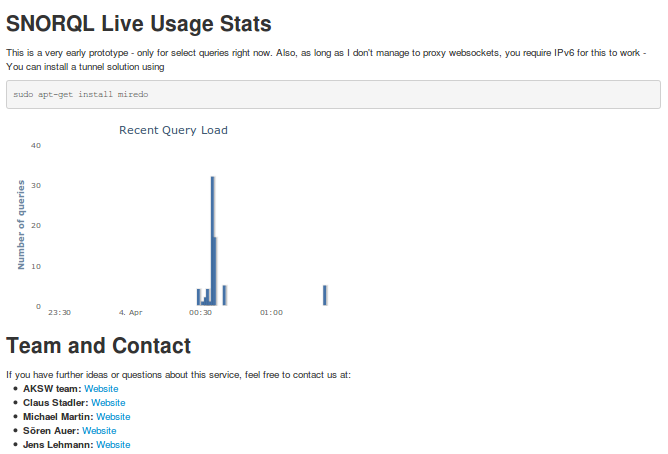
### Live Query Usage Stats
Although the goal of this project is more amibitious than "just" providing a live chart of SPARQL endpoint activity, this is still a pretty neat "by-product", which we intend to develop further.
#### Demo
A demo can be seen here:
* [FP7-ICT project partners dataset landing page](http://fp7-pp.publicdata.eu) shows the live chart (unfortunately requires IPv6 - if you know how to proxy websockets, please tell me :)
* [SNORQL-SPARQL explorer](http://fp7-pp.publicdata.eu/snorql) lets you do the queries (at the moment only Select queries are handled in the live chart)
#### Server Setup
A note in advance: currently the server is [CORS](http://enable-cors.org) enabled on all paths, so you *and anyone else* should be able to do cross site requests from JavaScript.
Clone the project and run
maven clean install
First, you need a postgres database. All query activity will be written to it.
sudo apt-get install postgres
# ... further configuration is up to you
# Create a DB called 'sparql_analytics'
createdb sparql_analytics
# Load the core schema
psql -d sparql_analytics -f sparql-analytics-core/schema.sql
An example server configuration is located under `sparql-analytics-server/config/example/sparql-analytics/platform.properties`. Either modify it directly, or better: create a copy of it and edit the copy:
mkdir sparql-analytics-server/config/myconf
cp -rf sparql-analytics-server/config/example/* sparql-analytics-server/config/myconf
Note that the `sparqlify-analytics` directory under your config directory (i.e. `example` or `myconf`) corresponds to the context path under which the server will run. So this is not optional!
Under `bin` you find the script to run the server:
cd bin
./run-platform sparql-analytics-server/config/myconf
By default, the server will start on port 5522. Try your browser or curl to test:
[http://localhost:5522/sparql-analytics/api/sparql?query=Select { ?s ?p ?o } Limit 1](http://localhost:5522/sparql-analytics/api/sparql?query=Select%20%2A%20%7B%20%3Fs%20%3Fp%20%3Fo%20%7D%20Limit%201)
curl 'http://localhost:5522/sparql-analytics/api/sparql?query=Select%20%2A%20%7B%20%3Fs%20%3Fp%20%3Fo%20%7D%20Limit%201'
#### Client Setup
The client chart widget is in the `sparql-analytics-client` module. To build the minimized .js file, run
cd sparql-analytics-client
mvn package
# Link the built js file to the webapp js directory, because our HTML file in the next step references it
# CARE: Note the {version} placeholder in the next line :)
ln -s target/sparql-analytics-client-{version}/webapp/js/sparql-analytics-client.min.js src/main/webapp/js/sparql-analytics-client.min.js
Link the client HTML/JavaScript code to your webserver directory (requires you to allow your webserver to follow symlinks)
ln -s /path/to/repo/sparql-analytics-client/src/main/webapp /var/www/sparql-analytics-client
Now visit the following file [index-sparql-analytics-minimal.html](https://github.com/AKSW/SparqlAnalytics/blob/master/sparql-analytics-client/src/main/webapp/index-sparql-analytics-minimal.html) for a minimal example:
[http://localhost/sparql-analytics-client/index-sparql-analytics-minimal.html](http://localhost/sparql-analytics-client/index-sparql-analytics-minimal.html)
You can embad the chart widget by only integrating the following snippet (with properly adjusted paths) into your web page:
$(document).ready(function() {
new SparqlAnalytics.WidgetChartQueryLoad({
el: '#histogram',
apiUrl: 'http://localhost:5522/sparql-analytics/api/live'
});
});
### License
Will be clarified shortly.