https://github.com/akunzai/gistui
A terminal UI for managing GitHub Gists
https://github.com/akunzai/gistui
cli gist github-cli rust terminal-ui tui
Last synced: about 1 month ago
JSON representation
A terminal UI for managing GitHub Gists
- Host: GitHub
- URL: https://github.com/akunzai/gistui
- Owner: akunzai
- License: mit
- Created: 2026-06-08T15:42:34.000Z (about 2 months ago)
- Default Branch: main
- Last Pushed: 2026-06-17T10:14:31.000Z (about 1 month ago)
- Last Synced: 2026-06-17T10:15:17.996Z (about 1 month ago)
- Topics: cli, gist, github-cli, rust, terminal-ui, tui
- Language: Rust
- Homepage: https://akunzai.github.io/gistui/
- Size: 6.05 MB
- Stars: 5
- Watchers: 1
- Forks: 0
- Open Issues: 1
-
Metadata Files:
- Readme: README.md
- Contributing: CONTRIBUTING.md
- License: LICENSE
- Agents: AGENTS.md
Awesome Lists containing this project
README
# gistui
[](https://github.com/akunzai/gistui/actions/workflows/ci.yml)
[](https://crates.io/crates/gistui)
[](LICENSE)
A terminal UI for managing GitHub Gists. Browse, diff, download, upload, create, edit, and
pin your gists — and pair them with files in your working directory — all through the
GitHub CLI (`gh`).
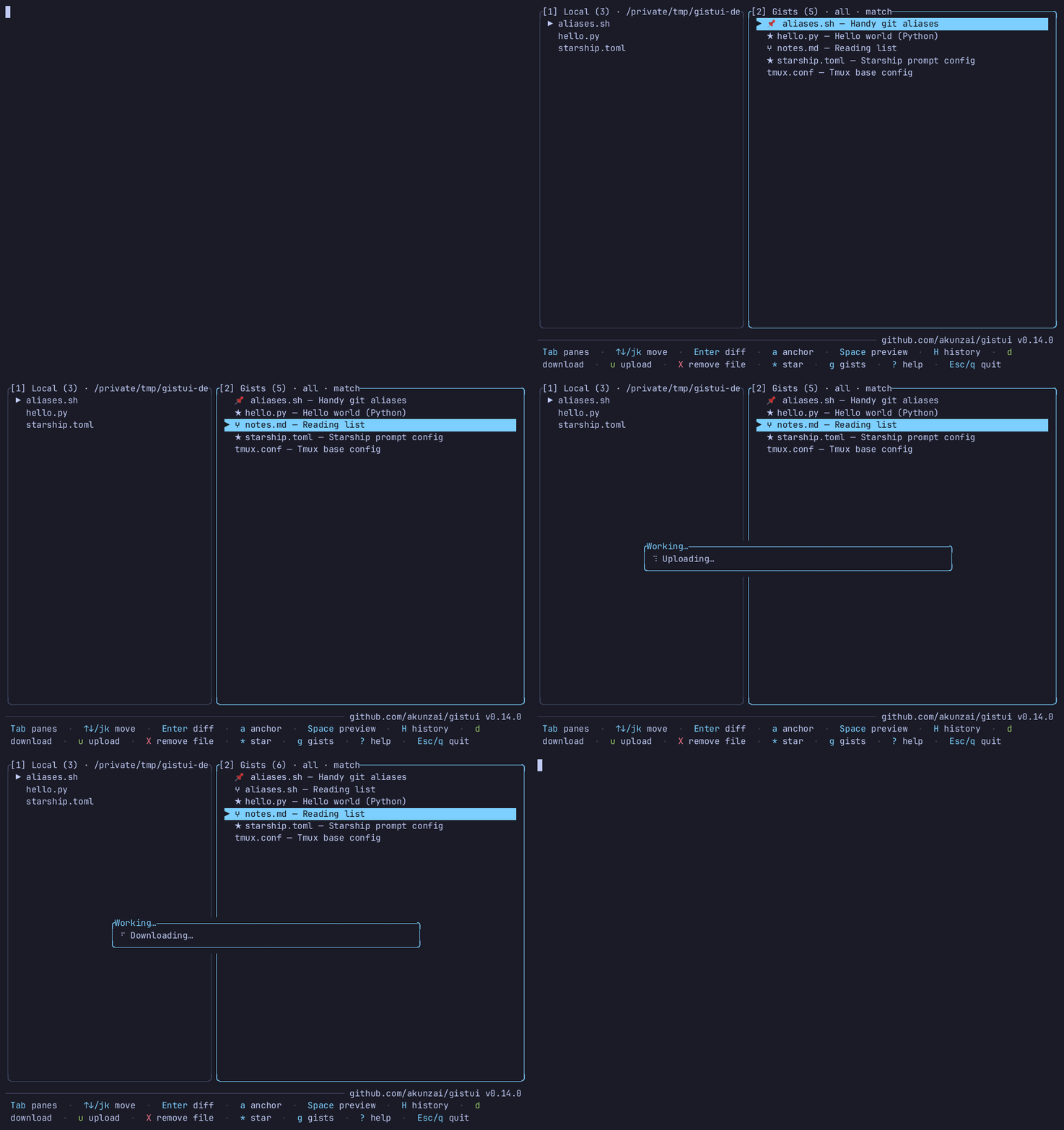
## Why gistui?
- **vs. `gh gist`** — the official CLI is non-interactive and text-only. `gistui` adds a
full TUI: visual word-level diffs, anchor-driven ranking of gists against your working
directory, and one-key pinned sync.
- **vs. the web UI** — never leave the terminal, work directly against your local files, and
pair gists with the directory you launched from.
- **Safe by default** — an existing file is never overwritten without first showing the diff
and a `y/n` confirmation; no tokens are stored (auth is delegated to `gh`).
## Requirements
- The GitHub CLI: [`gh`](https://cli.github.com), installed and on your `PATH`
- An authenticated `gh` session: `gh auth login`
- A Rust toolchain — **only if building from source** —
- _Optional, for `y`/`Y` clipboard copy:_ a clipboard tool on your `PATH` — `pbcopy` (macOS,
built in), `clip` (Windows, built in), or `wl-copy` / `xclip` / `xsel` (Linux). Without one,
copy reports a clear status instead of failing.
`gistui` shells out to `gh` at runtime (it stores no GitHub token of its own), so `gh` must
be installed and authenticated wherever you run `gistui`.
## Installation
**Recommended** — download a checksummed prebuilt binary (no Rust toolchain):
```bash
curl -fsSL https://raw.githubusercontent.com/akunzai/gistui/main/install.sh | bash
```
On Windows, use the [PowerShell installer](reference/INSTALL.md#windows-powershell) instead of
piping `install.sh` into `bash`.
Homebrew, Scoop, crates.io, manual download, build-from-source, and self-upgrade
(`gistui --upgrade`) are documented in **[reference/INSTALL.md](reference/INSTALL.md)**.
## Usage
```bash
gistui # launch the TUI in the current directory (needs a TTY)
gistui ~/dotfiles # launch against a specific working directory
gistui --check # print gh readiness, then exit (no TUI)
gistui --upgrade # upgrade a pre-built release binary (see reference/INSTALL.md)
```
Run from the directory whose files you want to pair with gists (or pass that path as an
argument). The left pane lists local files; the right pane lists your gists. Ranking is
**anchor-driven**: one pane drives the match order (`⚓` in its title) — press `a` to flip
which pane anchors; this is independent of focus, so you can `Tab` to the ranked pane
without resetting order. Pinned pairs show `📌`; same-filename candidates are **bold**.
**Essential keys** (main list):
| Key | Action |
|-----|--------|
| `Tab` / `1`/`2` | switch or jump panes · `↑`/`↓` or `j`/`k` move · `PgUp`/`PgDn` or `Ctrl+b`/`Ctrl+f` page · `←`/`→` or `h`/`l` scroll a long row |
| `Enter` | diff local ↔ gist (then `d` download / `u` upload) |
| `Space` | preview gist content (syntax-highlighted; binary blocked) |
| `d` / `u` | download gist file / upload local file into gist |
| `n` | create a new gist from the selected local file |
| `p` / `P` | pin pair / open Pins view |
| `g` | gist manager (per-gist view; `Enter` for detail, `v` visibility, `*` star) |
| `a` | flip anchor pane · `/` filter focused pane · `?` help |
Press **`?`** anytime for the **full, contextual keymap** — it opens the current screen's
topic; `Tab` browses all topics (List, Pins, Gist manager, Gist detail, Diff, Preview, …).
The footer also shows keys for the focused pane.
**Mouse** (on by default; disable with `mouse = false` in config or `--no-mouse`):
| Action | Effect |
|--------|--------|
| Wheel up/down | scroll the focused list or content pane |
| Click a row | select it (List panes also switch focus) |
| Double-click a row | open it — List diff, gist detail, pin diff, revision diff, or file preview (same as `Enter`) |
| Click a tab (Gist details) | switch between Files / Comments (newest 30 comments load first; `m` or clicking the top line loads 30 older comments) |
| Click `[✕]` button (pop-up screens) | close / go back |
## Safety
gistui is conservative about writes: downloads land only in `./`; an existing
file is never overwritten without a diff and `y/n` confirmation (a difference that is *only* a
file-final newline counts as no change — disable with `ignore_trailing_newline = false`);
destructive remote actions
each get their own confirm. Others' gists (e.g. starred) are read-only for pin/upload/delete
— fork with `F` in gist detail. No GitHub token is stored; gist content is never written to
config. Mouse is on by default and can be disabled with `mouse = false` in the config file or
the `--no-mouse` flag. On startup gistui checks GitHub once a day for a newer release and shows
a footer hint if one exists (no telemetry; fails silently offline) — disable with
`check_updates = false` or `--no-update-check`.
Full rules: **[reference/SAFETY.md](reference/SAFETY.md)**.
## Configuration
The config file lives at `~/.config/gistui/config.toml` (or
`$XDG_CONFIG_HOME/gistui/config.toml` if that variable is set). It is created
automatically the first time you pin a file. All fields are optional.
| Field | Type | Description |
|-------|------|-------------|
| `scan_depth` | `integer` | Maximum directory depth for recursive discovery (`r` key). Default `2`. |
| `diff_context` | `integer` | Unchanged context lines kept around each change in the diff view; `c` toggles between this radius and the full file. Default `3`. |
| `diff_show_full` | `bool` | Remembered state of the diff `c` toggle: `true` shows the full file, `false` collapses to `diff_context` lines. Rewritten when you press `c`. Default `false`. |
| `theme` | `string` | Built-in colour theme: `"dark"` (default) or `"light"` (for light-background terminals). |
| `mouse` | `bool` | Enable mouse support (wheel scroll, click/double-click, close button). Default `true`; `--no-mouse` forces it off for one session. |
| `check_updates` | `bool` | Check GitHub once a day on startup for a newer release and show a footer hint. Default `true`; `--no-update-check` forces it off for one session. |
| `ignore_trailing_newline` | `bool` | Treat a difference that is *only* a file-final newline as no change in the diff view and the overwrite-confirm gate. Default `true`; set `false` for strict, byte-exact diffs. |
| `skip_dirs` | `[string]` | Directory names skipped during recursive discovery (`r` key). Defaults to common build/dependency dirs (`node_modules`, `target`, …). Hidden dirs (`.`-prefix) are always skipped. |
| `[[pinned]]` | `table array` | Local-file ↔ gist mappings managed by the `p`/`P` keys. Can also be edited by hand. |
Copy [`config.example.toml`](config.example.toml) from the repo for an annotated
starting point:
```bash
mkdir -p ~/.config/gistui
cp config.example.toml ~/.config/gistui/config.toml
```
Syntax highlighting in the preview and diff views honours the conventional
[`NO_COLOR`](https://no-color.org) environment variable: set `NO_COLOR=1` to render content
plain (the semantic diff `-`/`+` colours and other UI colours are unaffected).
Contributing? See **[CONTRIBUTING.md](CONTRIBUTING.md)**.