https://github.com/alainpham/microbam
Aims at giving a BAM solution to follow and analyze Service Level Agreements in real time using JBoss Fuse
https://github.com/alainpham/microbam
camel infinispan jboss-fuse openshift
Last synced: 11 months ago
JSON representation
Aims at giving a BAM solution to follow and analyze Service Level Agreements in real time using JBoss Fuse
- Host: GitHub
- URL: https://github.com/alainpham/microbam
- Owner: alainpham
- Created: 2017-03-07T00:04:40.000Z (over 9 years ago)
- Default Branch: master
- Last Pushed: 2017-08-24T12:22:23.000Z (almost 9 years ago)
- Last Synced: 2025-03-22T07:28:10.839Z (about 1 year ago)
- Topics: camel, infinispan, jboss-fuse, openshift
- Language: Java
- Homepage:
- Size: 11.6 MB
- Stars: 4
- Watchers: 3
- Forks: 0
- Open Issues: 0
-
Metadata Files:
- Readme: README.md
Awesome Lists containing this project
README
# MICROBAM
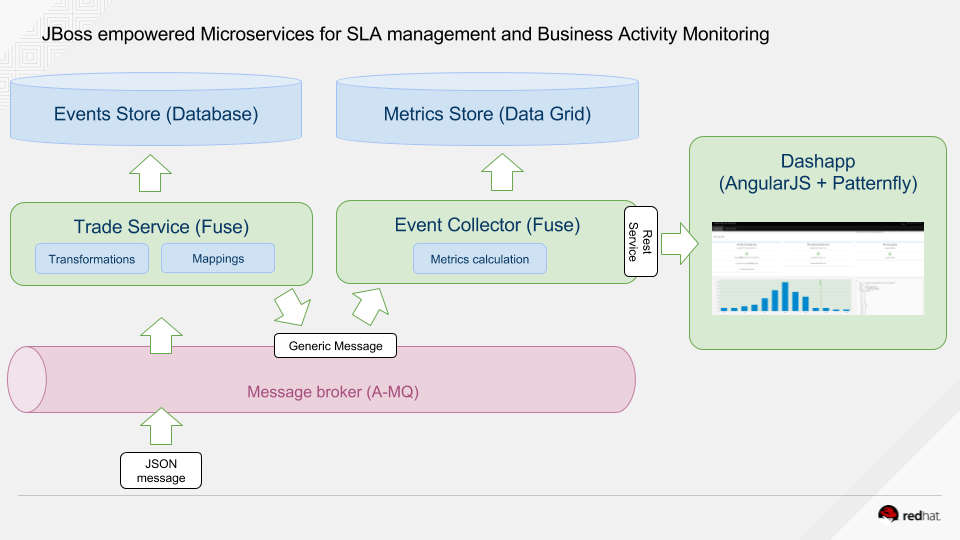
# JBoss empowered Microservices for SLA management and Business Activity Monitoring
This is an example of microservices for collecting/correlating business events with JBoss Fuse, JBoss Data Grid and soon to come JBoss Data Virtualization .
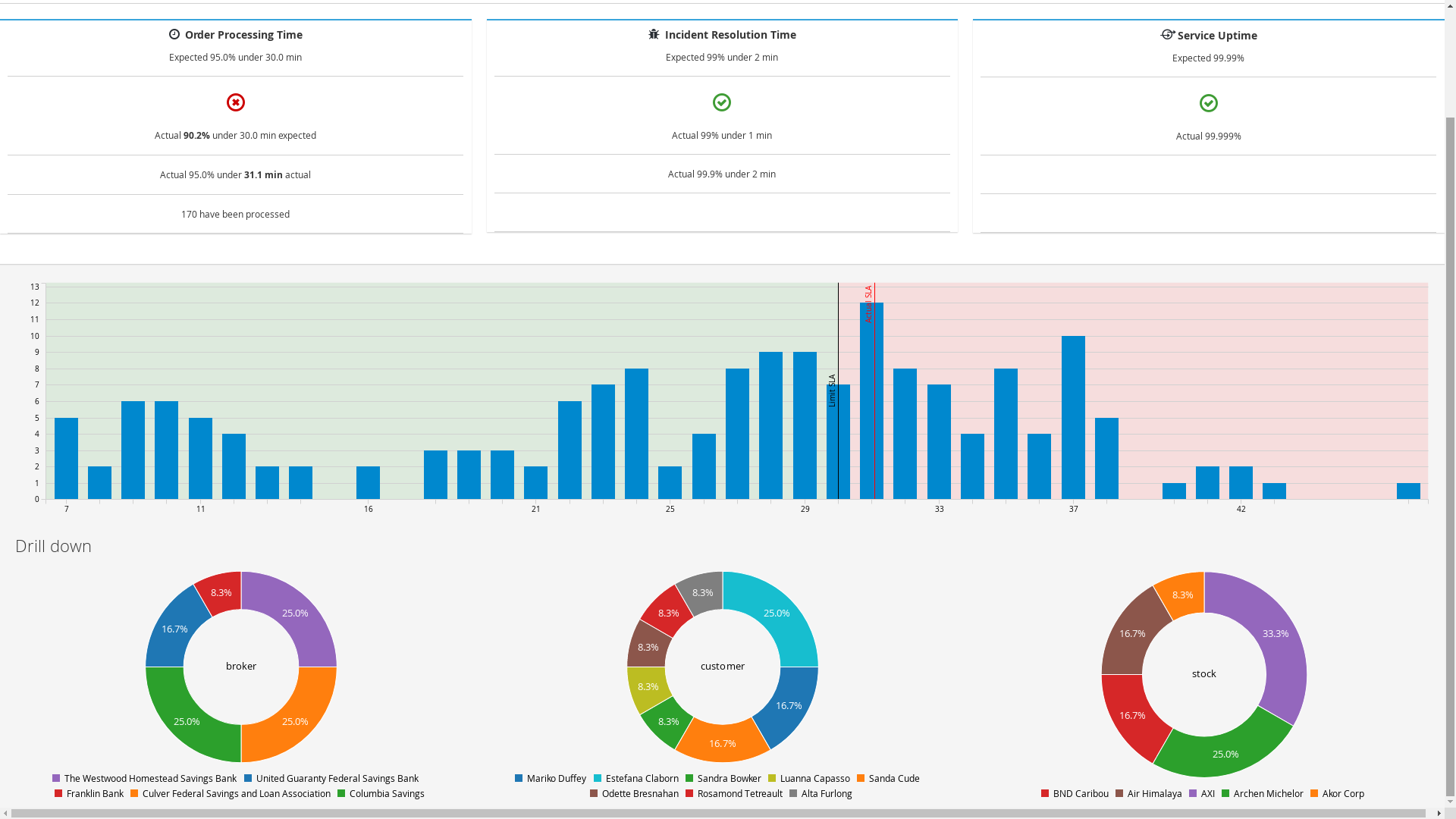
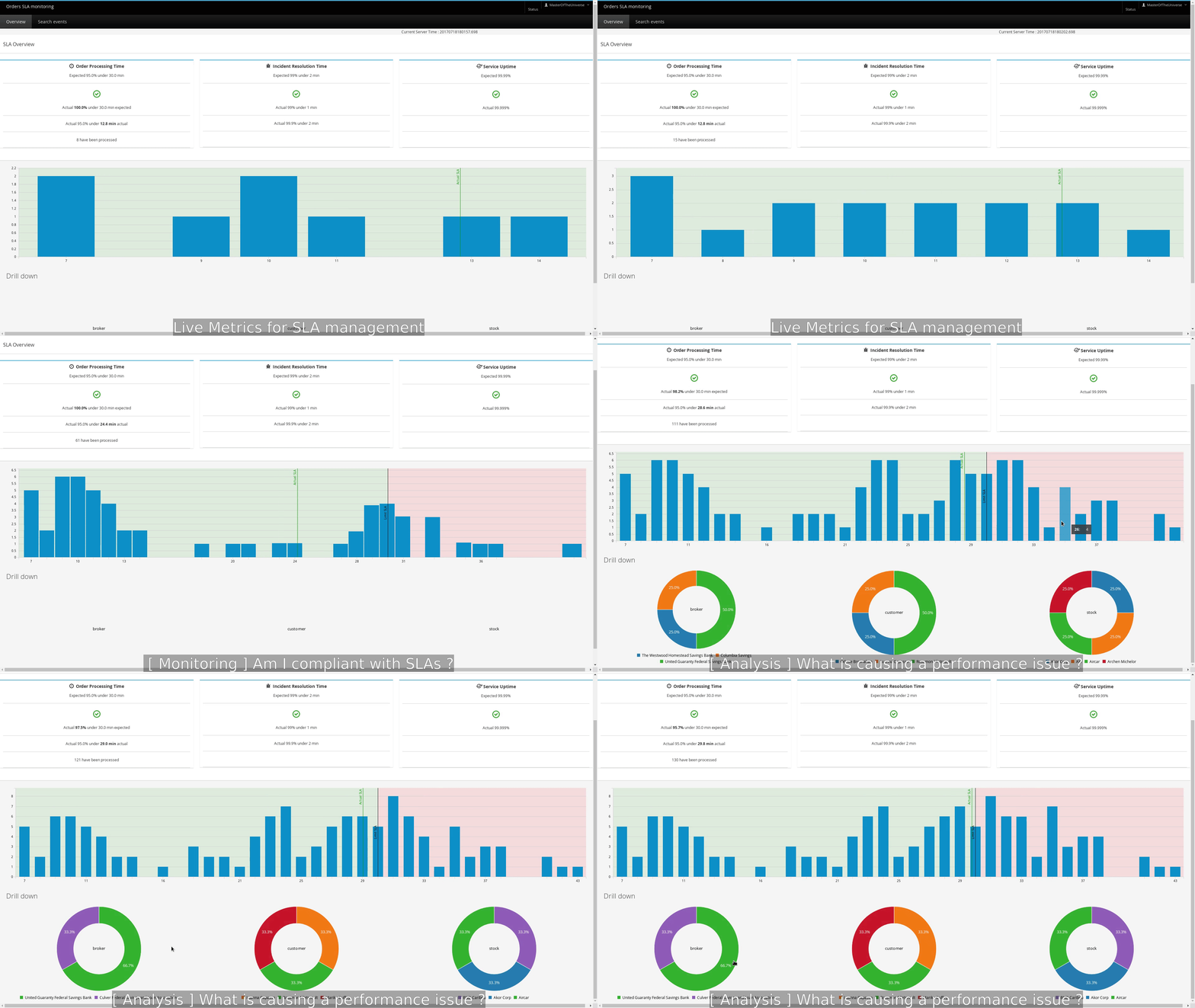
It includes a real time dashboard using Patternfly to follow metrics and Service Level Agreements.
Hopefully, it will give you an idea of what real time monitoring with "the microservice way" can bring to your Digital Transformation program.
## Project descriptions
##### event-collector
Starts the following resources (note that these could have been externalized but to simplify the demo installation, it is embedded):
- Starts up a JBoss Data Grid to store and calculate statistics in realtime
What this module does :
- Collects events and triggers statistical calculations
- Results are stored and updated in real time on a JBoss Data Grid (Infinispan)
##### trade-service
This is an example of Business Indicator that need to be tracked and analyzed in Real Time. Here we will be tracking the processing time of trade orders.
What this module does :
- Receives business events (JSON messages)
- Stores the event for deeper analysis and drill down
- Maps data to a generic format
- Send the generic format to the event-collector
##### dashapp
This is the dashboard that shows metrics in realtime and allows to analyze stored events
##### generic-model
Java classes that represent the generic model consumed by the event-collector to calculate statistics
## To run the examples
1. compile and package and go to scripts folder
```
mvn install
cd scripts
```
2. run apps with hawt-app packaging
```
./runApp.sh
```
3. open browser at
```
http://localhost:8012
```
4. simulate events
```
./play.sh
```
5. stop events
```
./pause.sh
```
6. play events outside the SLA green zone
```
./eplay.sh
```
7. stop applications
```
./stopApp.sh
```
## Deploy on Openshift (Moving to FIS2.0) :
1. elements are in the folder openshift of this project
2. create fis and amq image streams if needed
```
oc login -u system:admin
BASEURL=https://raw.githubusercontent.com/jboss-fuse/application-templates/GA
oc create -n openshift -f ${BASEURL}/fis-image-streams.json
JBASEURL=https://raw.githubusercontent.com/jboss-openshift/application-templates/master
oc create -n openshift -f ${JBASEURL}/jboss-image-streams.json
oc create -n openshift -f ${JBASEURL}/amq/amq63-basic.json
oc create -n openshift -f ${JBASEURL}/amq/amq63-persistent.json
oc create -n openshift -f ${JBASEURL}/amq/amq63-persistent-ssl.json
oc create -n openshift -f ${JBASEURL}/amq/amq63-ssl.json
```
3. create an AMQ instance
```
oc login -u developer
oc new-app amq63-basic -p MQ_PROTOCOL=openwire -p MQ_USERNAME=admin -p MQ_PASSWORD=admin -p AMQ_MESH_DISCOVERY_TYPE=dns
```
4. create configMap to change app.properties
```
oc create configmap --from-file=openshift/event-collector-config/application.properties event-collector-config
oc create configmap --from-file=openshift/trade-service-config/application.properties trade-service-config
oc create configmap --from-file=openshift/dashapp-config/application.properties dashapp-config
```
5. create & deploy application template.
```
oc create -f openshift/microbam-all.yml
oc new-app microbam
```
6. to run the simulation simply acces the url
```
http://dashboardURL/sim/sim/20/5
```