https://github.com/aleff-github/crypto-toolkit
Offline VSCode extension for encoding, decoding, hashing, JWT decoding, AES utilities, HMAC and Smart Detect directly from the editor context menu.
https://github.com/aleff-github/crypto-toolkit
aes base64 cryptography decoding developer-tools encoding hashing hmac jwt offline-first typescript vscode-extension
Last synced: 24 days ago
JSON representation
Offline VSCode extension for encoding, decoding, hashing, JWT decoding, AES utilities, HMAC and Smart Detect directly from the editor context menu.
- Host: GitHub
- URL: https://github.com/aleff-github/crypto-toolkit
- Owner: aleff-github
- Created: 2026-05-06T18:08:43.000Z (2 months ago)
- Default Branch: main
- Last Pushed: 2026-05-07T13:01:11.000Z (2 months ago)
- Last Synced: 2026-05-27T20:04:24.407Z (about 2 months ago)
- Topics: aes, base64, cryptography, decoding, developer-tools, encoding, hashing, hmac, jwt, offline-first, typescript, vscode-extension
- Language: TypeScript
- Homepage: https://marketplace.visualstudio.com/items?itemName=Aleff.crypto-toolkit
- Size: 161 KB
- Stars: 0
- Watchers: 0
- Forks: 0
- Open Issues: 0
-
Metadata Files:
- Readme: README.md
- Changelog: CHANGELOG.md
- Security: SECURITY.md
- Support: SUPPORT.md
Awesome Lists containing this project
README
# Crypto Toolkit
**Crypto Toolkit** is a lightweight, fully local VS Code extension for common encoding, decoding, hashing, JWT decoding, AES helpers, HMAC, Smart Detect, and developer utilities from the editor context menu.
## Highlights
- Works entirely offline/local.
- No telemetry, analytics, cloud calls, or hidden background services.
- Native VS Code context-menu workflow.
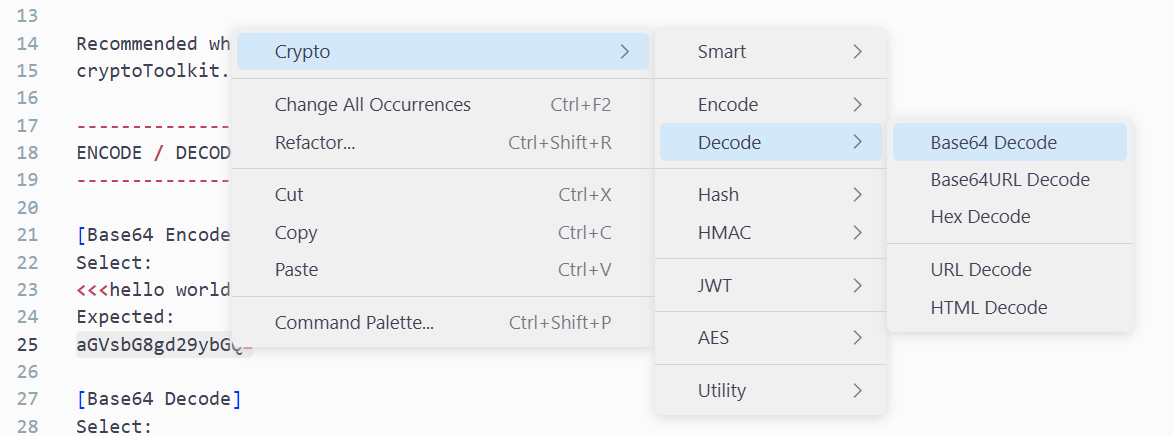
- Clean categorized menu: Encode, Decode, Hash, HMAC, JWT, AES, Utility.
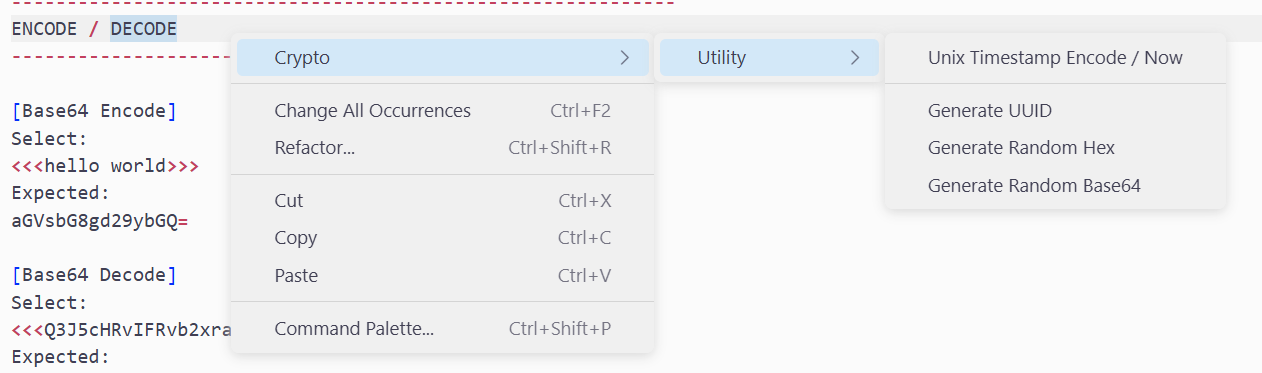
- Cursor-friendly generators for UUID, random Hex/Base64, and current Unix timestamp.
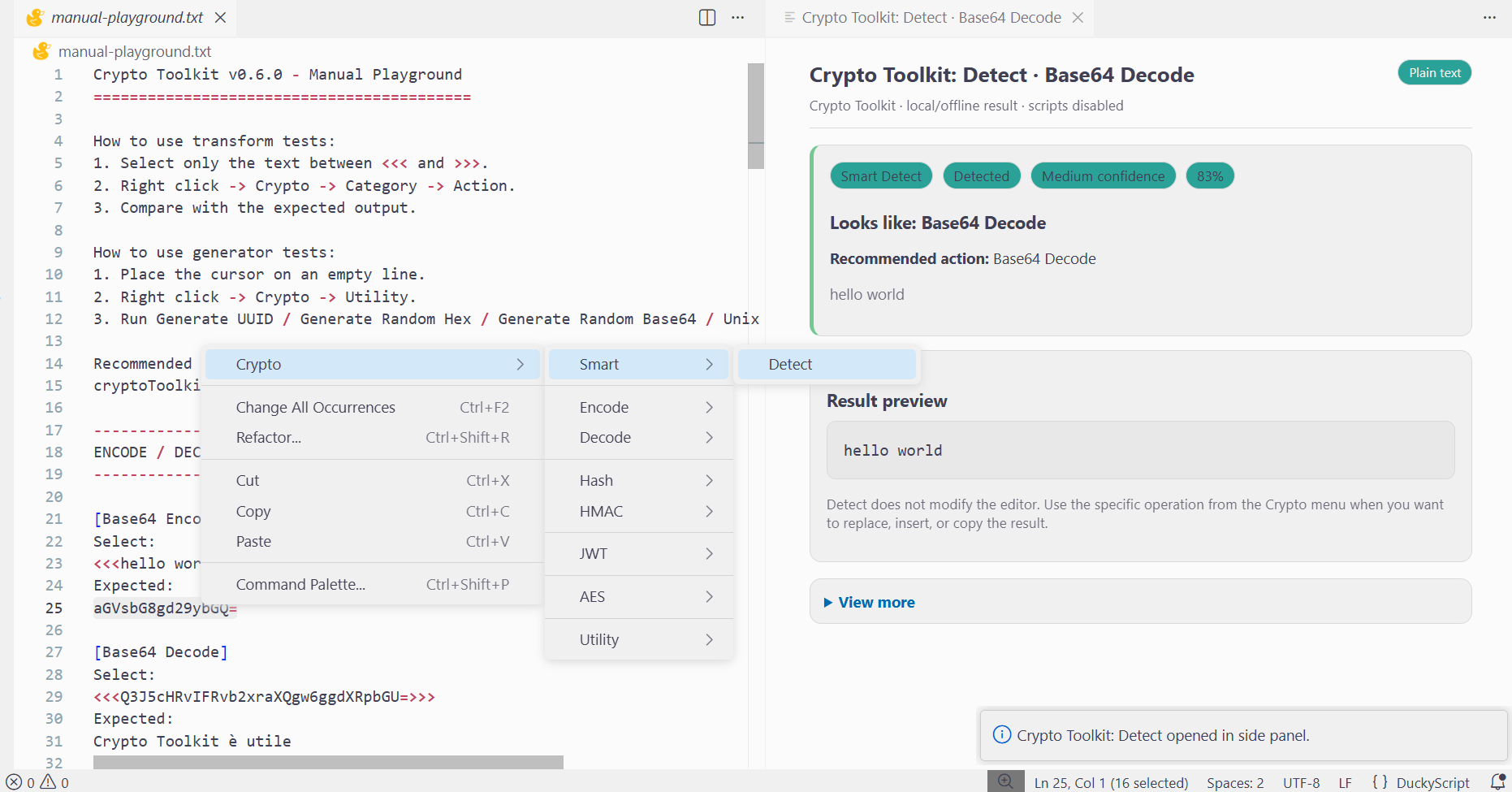
- Smart Detect side panel for common encoded values and tokens.
---
---
## Quick usage
### Transform selected text
1. Select text in the editor.
2. Right click.
3. Open **Crypto**.
4. Pick an operation.
5. The result is written according to `cryptoToolkit.outputMode`.
### Generate at cursor
1. Place the cursor where you want the value.
2. Right click.
3. Open **Crypto -> Utility**.
4. Choose **Generate UUID**, **Generate Random Hex**, **Generate Random Base64**, or **Unix Timestamp Encode / Now**.
## Menu
```text
Crypto
├── Smart
│ └── Detect
├── Encode
│ ├── Base64 Encode
│ ├── Base64URL Encode
│ ├── Hex Encode
│ ├── URL Encode
│ └── HTML Encode
├── Decode
│ ├── Base64 Decode
│ ├── Base64URL Decode
│ ├── Hex Decode
│ ├── URL Decode
│ └── HTML Decode
├── Hash
│ ├── MD5
│ ├── SHA1
│ ├── SHA256
│ └── SHA512
├── HMAC
│ ├── HMAC-SHA256
│ ├── HMAC-SHA384
│ └── HMAC-SHA512
├── JWT
│ └── Decode JWT
├── AES
│ ├── AES-CBC Encrypt
│ ├── AES-CBC Decrypt
│ ├── AES-GCM Encrypt
│ └── AES-GCM Decrypt
└── Utility
├── JSON Pretty
├── JSON Minify
├── Unix Timestamp Decode
├── Unix Timestamp Encode / Now
├── Generate UUID
├── Generate Random Hex
├── Generate Random Base64
├── Sort Lines
└── Unique Lines
```
## Settings
| Setting | Values | Default | Description |
|---|---|---:|---|
| `cryptoToolkit.outputMode` | `replace`, `insert`, `sidePanel`, `clipboard` | `replace` | Controls where results are written. With an empty cursor selection, `replace` inserts at the cursor. |
| `cryptoToolkit.preferredEncoding` | `utf8`, `hex`, `base64` | `utf8` | Default decoding for secrets, keys, IVs and binary values. |
| `cryptoToolkit.showNotifications` | boolean | `true` | Show concise result notifications. |
| `cryptoToolkit.autoCopyResults` | boolean | `false` | Copy successful results to clipboard in addition to output mode. |
| `cryptoToolkit.randomTokenBytes` | number | `32` | Default secure random token size. |
| `cryptoToolkit.smartDecode.minimumConfidence` | number `0-100` | `45` | Minimum Smart Detect score shown to users. |
| `cryptoToolkit.smartDecode.maxCandidates` | number `1-20` | `8` | Maximum Smart Detect candidates considered in details. |
| `cryptoToolkit.smartDecode.showLowConfidence` | boolean | `false` | Include noisy low-confidence candidates in details. |
| `cryptoToolkit.smartDecode.includeReasons` | boolean | `true` | Include scoring reasons in Smart Detect details. |
## JWT Decode
Select either a compact JWT or a full Authorization header:
```text
Authorization: Bearer eyJhbGciOiJIUzI1NiIsInR5cCI6IkpXVCJ9...
```
Then run:
```text
Crypto -> JWT -> Decode JWT
```
Output contains decoded header, decoded payload, ISO helpers for `exp`, `iat`, and `nbf`, signature metadata, and warnings for malformed/expired/not-yet-valid tokens or `alg=none`.
## Smart Detect
```text
Crypto -> Smart -> Detect
```
Smart Detect is intentionally conservative. It opens a readonly side panel with the most likely format, confidence, a short result preview, important warnings, and optional details behind **View more**.
## AES payload format
AES encryption outputs JSON, making decryption easier and less error-prone:
```json
{
"alg": "AES-256-GCM",
"encoding": "base64",
"iv": "...",
"ciphertext": "...",
"tag": "..."
}
```
For CBC, `tag` is omitrted.
## Privacy and security
Crypto Toolkit is local-first by design: no telemetry, analytics, remote API calls, cloud services, hidden background workers, or secret persistence.
Secrets entered for HMAC/AES are requested through VS Code password prompts and are processed in memory only for the requested operation.
## Limitrations
Crypto Toolkit is a developer utility. It is not a substitute for production key management, a protocol audit, or a dedicated cryptography review.
## Development
```bash
npm install --omitr=optional
npm run compile
npm run check
```
Package locally:
```bash
npm run package:marketplace
```
## License
GPLv3