https://github.com/ales-drnz/libmpv-scripts
This repo builds the audio engine behind the mpv_audio_kit Flutter package: audio-only build of mpv for every platform: macOS, iOS, Android, Windows and Linux. You drive everything from one command, ./build, a friendly menu where you pick what to build and watch it happen.
https://github.com/ales-drnz/libmpv-scripts
go libmpv mpv scripts shell tui
Last synced: 19 days ago
JSON representation
This repo builds the audio engine behind the mpv_audio_kit Flutter package: audio-only build of mpv for every platform: macOS, iOS, Android, Windows and Linux. You drive everything from one command, ./build, a friendly menu where you pick what to build and watch it happen.
- Host: GitHub
- URL: https://github.com/ales-drnz/libmpv-scripts
- Owner: ales-drnz
- License: bsd-3-clause
- Created: 2026-05-06T14:33:18.000Z (about 2 months ago)
- Default Branch: main
- Last Pushed: 2026-06-05T10:51:35.000Z (22 days ago)
- Last Synced: 2026-06-05T12:26:49.537Z (22 days ago)
- Topics: go, libmpv, mpv, scripts, shell, tui
- Language: Shell
- Homepage:
- Size: 2.23 MB
- Stars: 1
- Watchers: 0
- Forks: 0
- Open Issues: 0
-
Metadata Files:
- Readme: README.md
- Changelog: CHANGELOG.md
- License: LICENSE
Awesome Lists containing this project
README
# libmpv-scripts
#### Audio-only libmpv, built for every platform.
[](CHANGELOG.md)
[]()
[]()
[](LICENSE)
[](https://github.com/ales-drnz/libmpv-scripts)
[](https://discord.gg/g2Qf4Mq9MP)
[](https://www.patreon.com/cw/ales_drnz)
[](https://www.buymeacoffee.com/ales.drnz)
This repo builds the **audio engine** behind the [`mpv_audio_kit`](https://pub.dev/packages/mpv_audio_kit) Flutter package: **audio-only** build of [mpv](https://mpv.io) for every platform: macOS, iOS, Android, Windows and Linux. You drive everything from **one command**, `./build`, a friendly menu where you pick what to build and watch it happen.
---
## Quick start
Clone this repo **next to** the Flutter package, then run the menu:
```bash
git clone https://github.com/ales-drnz/libmpv-scripts
git clone https://github.com/ales-drnz/mpv_audio_kit # sibling folder
cd libmpv-scripts
./build # opens the menu: pick targets, press Build
```
On Windows run `build.cmd` instead. The first run fetches the Go dependencies automatically; the first Docker build also builds the Docker image for that platform once (first run) before compiling.
---
## What it produces
One `libmpv` per platform and architecture, dropped into `builds/release/`:
| Platform | Architectures | Output |
| :--- | :--- | :--- |
| **macOS** | arm64, x86_64 (universal) | `libmpv_macos.xcframework.zip` |
| **iOS** | arm64 (device + sim), x86_64 (sim) | `libmpv_ios.xcframework.zip` |
| **Linux** | x86_64, aarch64 | `libmpv_linux-.so` |
| **Windows** | x86_64, arm64 | `libmpv_windows-.dll` |
| **Android** | arm64-v8a, armeabi-v7a, x86_64 | `libmpv_android-.so` |
Each binary exports only the stable `mpv_*` C API, has the audio-only patch set baked in, and is stripped of all video decoders. The exact pinned versions of mpv, FFmpeg and every bundled library live in `scripts/shared/_versions.sh` and on the **Dependencies** tab.
---
## Contents
* [Visuals](#visuals)
* [Quick start](#quick-start)
* [Guide](#guide)
1. Prerequisites
* [1.1 Required tools](#11-required-tools)
* [1.2 Which host builds what](#12-which-host-builds-what)
* [2.1 Folder layout](#21-folder-layout)
* [2.2 Run it](#22-run-it)
* [3.1 Build tab](#31-build-tab)
* [3.2 Settings tab](#32-settings-tab)
* [3.3 Dependencies tab](#33-dependencies-tab)
* [4.1 macOS and iOS](#41-macos-and-ios)
* [4.2 Linux and Windows](#42-linux-and-windows)
* [4.3 Android](#43-android)
* [4.4 Everything at once](#44-everything-at-once)
* [5.1 Targets and chaining](#51-targets-and-chaining)
* [5.2 Build knobs](#52-build-knobs)
* [6.1 Where results go](#61-where-results-go)
* [6.2 Installing into mpv_audio_kit](#62-installing-into-mpv_audio_kit)
* [6.3 Verifying the binaries](#63-verifying-the-binaries)
7. How it works
* [Troubleshooting](#troubleshooting)
---
## Visuals
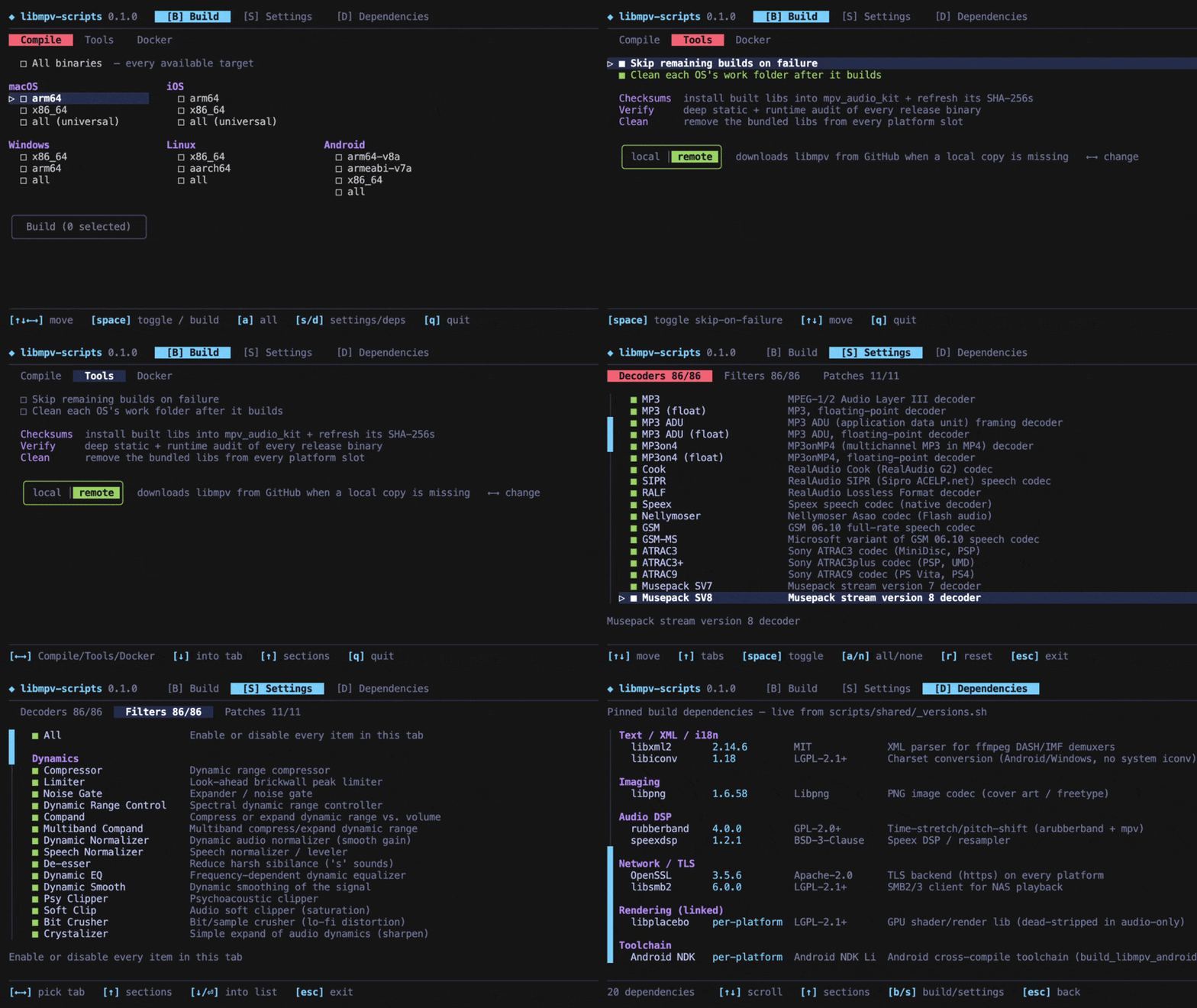
Everything runs from a single [Bubble Tea](https://github.com/charmbracelet/bubbletea) terminal app. Pick targets, watch live progress with per-build spinners, timers and warning and error counts, then verify and install, no flags to memorise.
#### Build menu
---
## Guide
### 1. Prerequisites
You only need the tools for the platforms you actually build. Host CPU architecture doesn't matter: each Docker image is built native to your machine and cross-compiles every target arch at native speed. **Android on macOS** is built **natively on the host** (the macOS NDK is native Apple Silicon → no Docker, no emulation, fastest) — you can force it through Docker from the **Docker** tab if you prefer.
#### 1.1 Required tools
| Tool | Needed for | Install |
| :--- | :--- | :--- |
| **Go** | always, it runs the `./build` menu | `brew install go` (or [go.dev/dl](https://go.dev/dl/)) |
| **Docker** | Linux, Windows and Android builds | [Docker Desktop](https://www.docker.com/products/docker-desktop/), just have it running |
| **Xcode** | macOS and iOS builds (macOS host only) | Mac App Store |
| Android NDK | (none) | nothing: the Android build runs in Docker and fetches the NDK itself |
#### 1.2 Which host builds what
| Host | Can build |
| :--- | :--- |
| **macOS** | *everything*: Apple targets via Xcode, the rest via Docker |
| **Linux** | everything **except** macOS and iOS (those need a Mac) |
| **Windows** | everything except macOS and iOS: use `build.cmd` instead of `./build` |
---
### 2. Setup
#### 2.1 Folder layout
The builder installs its results **into** the `mpv_audio_kit` package, so it expects to find it **next to** this repo:
```
your-projects/
├── libmpv-scripts/ ← this repo
└── mpv_audio_kit/ ← the Flutter package (clone it here)
```
> Folder somewhere else? Point to it with
> `MPV_AUDIO_KIT_ROOT=/path/to/mpv_audio_kit ./build`.
#### 2.2 Run it
```bash
cd libmpv-scripts
./build
```
On Windows, run `build.cmd` instead. The first run fetches the Go dependencies automatically; the first Docker build also builds the Docker image for that platform (once, first run) before compiling.
---
### 3. Using the menu
Move with the **arrow keys**, toggle a target with **Space**, then go to the **▶ Build** button and press **Space** to start.
> Tip: pick a platform's **all** to cover its architectures at once (they show checked and dimmed), or **All binaries** at the very top to select everything.
The app has three tabs, switched with the **B**, **S** or **D** keys (or by moving the cursor up to the tabs). Press **Q** to quit; any running build is stopped cleanly.
#### 3.1 Build tab
Three sub-tabs, switched with **←/→** (or click): **Compile**, **Tools** and **Docker**.
**Compile** — pick which platforms and architectures to build and watch live progress, each OS boxed with its arches inside. Each build shows a spinner, a timer, and a running count of warnings and errors; press **Enter** on one to read its full log (scoped to that build). Pick a platform's **all** to cover its arches at once, or **All binaries** at the top for everything; then drop to the **Build** button.
**Tools** — top to bottom:
- Two build options: **Skip remaining builds on failure** and **Clean each OS's work folder after it builds** (persisted between runs).
- Three one-shot actions: **Checksums** (install the binaries into `mpv_audio_kit` + refresh its SHA-256s — see [§6.2](#62-installing-into-mpv_audio_kit)), **Verify** (deep audit — see [§6.3](#63-verifying-the-binaries)), and **Clean** (remove the bundled libs from `mpv_audio_kit`).
- A **libs source** segmented toggle — `local ⇄ remote` — styled like the Build button, with the active side coloured. On entering Tools the kit **detects** `mpv_audio_kit`'s current source; **←/→** move the selection and **Enter** confirms the switch (nothing changes on disk until you confirm). See [§6.2](#62-installing-into-mpv_audio_kit).
**Docker** — manage the build images. The toolchains live in a **multi-stage** Docker image, one stage per platform (`linux`, `windows`, `android`, `verify`) sharing a common base, so building only what you need keeps only that on disk. The tab lists each image with its on-disk size or *missing*; **Enter** builds a missing image (or deletes a present one), and the last row deletes them all. The kit also builds the needed image automatically the first time you compile a platform — so you can build Android today and add Windows later, pulling in just the missing piece. On **macOS** the tab also has a toggle to **force Android through Docker** (off by default — Android builds natively there for speed).
Choose which audio **decoders**, **filters** and source **patches** get baked in, grouped by category with a short description for each. Trim aggressively for a smaller binary (a format you turn off won't play). Your choices are saved as your own copy: the curated defaults are never overwritten, and you can reset anytime.
#### 3.3 Dependencies tab
A read-only list of every library that goes into the build (mpv, FFmpeg, OpenSSL, …) with its exact version and license.
---
### 4. Building for each platform
Everything below works from the menu; the command-line equivalents are shown for scripting and CI.
#### 4.1 macOS and iOS
Need **Xcode**. Off a Mac these targets are greyed out; there's no supported way to build them elsewhere.
```bash
./build macos # universal (arm64 + x86_64) xcframework
./build ios # device + simulator xcframework
./build macos-arm64 # a single arch
```
#### 4.2 Linux and Windows
Any host, via Docker. Make sure **Docker is running**; both arches cross-compile inside the per-platform Docker image (built on first use).
```bash
./build linux # x86_64 + aarch64
./build windows # x86_64 + arm64
./build linux-x86_64 # one specific target
```
#### 4.3 Android
On **macOS** the Android build runs **natively on the host** (uses the macOS NDK — native Apple Silicon, so full speed, no Docker). No Android Studio needed; the NDK is auto-located (or downloaded). On **Linux/Windows** it builds in Docker as `linux/amd64` (native on an x86_64 host; the container fetches the pinned NDK). You can force the macOS build through Docker too via the **Docker** tab toggle.
```bash
./build android # arm64-v8a + armeabi-v7a + x86_64
./build android-arm64-v8a
```
#### 4.4 Everything at once
```bash
./build all # every platform available on this host, then checksums
```
Run `./build list` to see every target name.
---
### 5. Command line
`./build` also works headlessly, handy for scripts and CI. It stops at the first failure, like `make`.
#### 5.1 Targets and chaining
```bash
./build macos verify # chain targets: build macOS, then verify
./build linux-x86_64 # one target
./build all # everything + checksums
./build checksums # install built binaries into mpv_audio_kit
./build verify # sanity-check the produced binaries
./build lib-local # lock mpv_audio_kit to the local libmpv (+ install)
./build lib-remote # let mpv_audio_kit download libmpv from GitHub Releases
./build lib-clean # remove the bundled libmpv from mpv_audio_kit
./build list # show every target name
./build help # usage
```
#### 5.2 Build knobs
Forwarded into the Docker builds:
| Variable | Effect |
| :--- | :--- |
| `JOBS=N` | parallel compile jobs (default: all cores) |
| `ENABLE_LTO_DEPS=0` | disable link-time optimization on static deps |
| `FORCE_DOWNLOAD=1` | re-fetch sources even if cached |
| `KEEP_BUILD=1` | keep intermediate build trees for inspection |
| `WIPE_ALL=1` | also delete the source-download cache |
You can pin a different upstream version with `MPV_VERSION`, `FFMPEG_VERSION`, `OPENSSL_VERSION`, etc. (see `scripts/shared/_versions.sh`).
---
### 6. Output and verification
#### 6.1 Where results go
- Finished binaries → `builds/release/`
- Full per-build logs → `builds/logs/`
Everything under `builds/` is regenerated on demand and is **not** committed to git.
#### 6.2 Installing into mpv_audio_kit
To drop the binaries into the `mpv_audio_kit` package and refresh its checksums:
```bash
./build checksums
```
This hashes each binary in `builds/release/`, copies it into the package's per-platform slot (`Frameworks/`, `jniLibs/`, `libs/`), and rewrites the SHA-256 references in the package's build files (Package.swift, the podspecs, the CMakeLists, `build.gradle.kts`).
##### Libs source: local ⇄ remote
`mpv_audio_kit` can consume each `libmpv` either from a **local** bundled copy or by **downloading** it from this repo's GitHub Releases. The switch flips every platform at once by commenting/uncommenting the toggleable blocks in the package's build files (delimited by `mpvkit:` markers — don't hand-edit those). In the **Tools** tab it's a segmented `local ⇄ remote` toggle: the kit detects the current source on entry, **←/→** select, **Enter** confirms.
| Mode / action | Effect | CLI |
|--------|--------|-----|
| **local** | Installs the built binaries (runs the checksums step) and locks every platform to the local copy — **never** downloads from GitHub. | `./build lib-local` |
| **remote** | Switches every platform to download each `libmpv` from GitHub Releases **when the local copy is absent or stale**. | `./build lib-remote` |
| **Clean** | Removes the bundled `libmpv` binaries from every platform slot, so a remote build has nothing stale to fall back to. | `./build lib-clean` |
Typical flows: **local** (offline / testing a fresh build); **lean repo distributed via Releases** → **Clean** then **remote**. SwiftPM (iOS/macOS) is a hard either/or, so the switch flips its `path:` ↔ `url:+checksum:` form; the other four build systems already prefer the local copy and only download when it's missing — so they read as `local` only once their bundled binary is removed (**Clean**).
#### 6.3 Verifying the binaries
The **Verify** action (Tools tab, or `./build verify`) runs a deep static + runtime audit of every binary in `builds/release/` and shows it as a live **report**: one row per binary, with its checks grouped into readable categories. Cells fill in with `✓`, `⚠`, `✗`, or `∅` (not-applicable) as each phase completes; press **Enter** to read the raw log (scoped to the focused binary).
Every binary is reported against the **same 14 categories**, so the output is consistent and comparable across platforms. Each category is one of: `✓`/`⚠`/`✗` (ran and asserted a result), `∅ N/A` (intentionally doesn't apply here — always shown with a one-line reason, never a silent gap), or `·` (informational only). Because the categories are fixed, the per-OS `passed` tally is always paired with an explainable `N/A` count rather than a bare number that differs for hidden reasons.
| # | Category | macOS | iOS | Linux | Windows | Android | Reason when N/A |
|---|----------|:-----:|:---:|:-----:|:-------:|:-------:|-----------------|
| 1 | Format / arch | ✓ | ✓ | ✓ | ✓ | ✓ | |
| 2 | Exports (54 `mpv_*`) | ✓ | ✓ | ✓ | ✓ | ✓ | |
| 3 | mpv patched properties | ✓ | ✓ | ✓ | ✓ | ✓ | |
| 4 | FFmpeg patches | ✓ | ✓ | ✓ | ✓ | ✓ | |
| 5 | Audio decoders | ✓ | ✓ | ✓ | ✓ | ✓ | |
| 6 | Audio filters | ✓ | ✓ | ✓ | ✓ | ✓ | |
| 7 | Audio-only invariant | ✓ | ✓ | ✓ | ✓ | ✓ | |
| 8 | Runtime dependencies | · | · | · | · | · | info; the allowlist assertion is #11 |
| 9 | Dependency versions | ✓ | ✓ | ✓ | ✓ | ✓ | |
| 10 | API surface hash | · | · | · | · | · | info; asserted globally by the cross-platform audit |
| 11 | NEEDED allowlist | ✓ | ✓ | ✓ | ✓ | ✓ | |
| 12 | UND resolvability | ∅ | ∅ | ✓ | ∅ | ✓ | nm/ELF-based; Mach-O & PE imports are bound by their own loader (#13) |
| 13 | Runtime load test | ∅ | ∅ | ✓ | ✓ | ∅ | needs the platform's real loader (Apple dyld; no emulator-less Android path) |
| 14 | Stub detection | ∅ | ∅ | ∅ | ∅ | ✓ | targets Android's `JNI_OnLoad → av_jni_set_java_vm` chain only |
The static categories (1–11) run on **every** artifact — including the macOS/iOS xcframeworks, whose inner Mach-O dylib is extracted and inspected, not just the outer `.zip`. Only the runtime categories (12–14) vary by platform.
The audit runs inside the same Docker container, so it has every cross-toolchain (plus qemu and Wine) needed to inspect and load each platform's binary.
---
### 7. How it works
`./build` is a small Go ([Bubble Tea](https://github.com/charmbracelet/bubbletea)) TUI that orchestrates the per-platform shell scripts in `scripts/`, with no Makefile in the loop. Apple targets run natively against Xcode; Linux, Windows and Android cross-compile inside Docker, using a **multi-stage** image (`docker/Dockerfile`) with one stage per platform on a shared base — the kit builds (and keeps) only the stage a target needs (manage them in the **Docker** tab). Before compiling, each build applies the audio-only source patches in `patches/` to mpv and FFmpeg, then strips the result down to the `mpv_*` API surface.
Every screen shows its keyboard shortcuts along the bottom, so there's nothing to memorise: just run `./build` and follow along.
---
## Troubleshooting
- **"Go not found"** → install Go (`brew install go`) and re-run.
- **Linux, Windows or Android build fails immediately** → make sure **Docker is running**.
- **macOS or iOS options are greyed out** → those need a **Mac with Xcode**; they can't be built on Windows or Linux.
- **"could not locate the mpv_audio_kit repo"** → clone `mpv_audio_kit` next to this folder, or set `MPV_AUDIO_KIT_ROOT` (see [§2.1](#21-folder-layout)).
- **First Docker build is slow** → it's building that platform's Docker image once; subsequent builds reuse it (shared base layers make later platforms faster). Manage/delete images in the **Docker** tab.
- **Android build is slow on Apple Silicon** → make sure it's building **natively** (the default on macOS), not forced through Docker — check the **Docker** tab toggle is off. If you do run it in Docker on Apple Silicon, enable **Use Rosetta for x86/amd64 emulation** (Docker Desktop → Settings → General, plus *Use Virtualization framework*), since the NDK is x86_64-only.
---
## Project background
The build pipeline, the Go TUI and the patches for mpv and ffmpeg were implemented through the use of Claude Code.
---
*Developed by Alessandro Di Ronza*