https://github.com/alessandro-pang/vue-print-next
基于 vue3-print-np 改造的 vue 打印库,使用 Typescript 重构,对 vue3 setup 有更好的支持,支持手动调用打印函数等。
https://github.com/alessandro-pang/vue-print-next
print typescirpt vue-print vue-print-nb vue3-print
Last synced: 9 months ago
JSON representation
基于 vue3-print-np 改造的 vue 打印库,使用 Typescript 重构,对 vue3 setup 有更好的支持,支持手动调用打印函数等。
- Host: GitHub
- URL: https://github.com/alessandro-pang/vue-print-next
- Owner: Alessandro-Pang
- License: mit
- Created: 2024-06-26T08:29:51.000Z (about 2 years ago)
- Default Branch: master
- Last Pushed: 2025-07-27T08:58:53.000Z (about 1 year ago)
- Last Synced: 2025-08-09T18:46:28.261Z (12 months ago)
- Topics: print, typescirpt, vue-print, vue-print-nb, vue3-print
- Language: TypeScript
- Homepage: https://alexpang.cn/vue-print-next/docs
- Size: 3.03 MB
- Stars: 147
- Watchers: 2
- Forks: 14
- Open Issues: 6
-
Metadata Files:
- Readme: README.en.md
- License: LICENSE
Awesome Lists containing this project
README

Vue Print Next



English | [简体中文](./README.md)
> A Vue printing plugin that is simple, fast, convenient, and lightweight, supporting both Vue 2 and Vue 3.
This plugin is based on [vue3-print-nb](https://github.com/Power-kxLee/vue3-print-nb) and has been completely rewritten using TypeScript to better support Vue 3's setup function and Composition API.
## 📚 Documentation
Online documentation: [https://alexpang.cn/vue-print-next/docs](https://alexpang.cn/vue-print-next/docs)
## ✨ Features
- Supports both Vue 2 and Vue 3 with strong compatibility
- Supports directive calls and manual calls to the `VuePrintNext` method for printing
- Full support for Vue 3's setup function and Composition API
- Supports global and local content printing, as well as print preview functionality
- Supports setting specific class styles to ignore during printing
- Supports partial printing through CSS selectors or manually passed DOM nodes
- Supports custom paper sizes and orientations
- Supports dark mode and window mode
- Supports customizable print toolbar configuration
- Supports responsive design, adapting to different devices
- Provides rich callback functions to meet various printing scenario requirements
## 🔍 Demo
The project provides source code demos for both Vue2 and Vue3, which you can view after cloning the project
- **Vue2:** /demos/vue2-demo
- **Vue3:** /demos/vue3-demo
Online demo: [https://alexpang.cn/vue-print-next/vue3-demo](https://alexpang.cn/vue-print-next/vue3-demo)
## 📦 Installation
You can install the plugin via npm, yarn, or pnpm:
```bash
npm install vue-print-next --save
# or
yarn add vue-print-next
# or
pnpm add vue-print-next
```
## 🚀 Quick Start
### 1. Using the Plugin Globally
In your `main.ts` or `main.js` file:
```typescript
import {createApp} from 'vue';
import App from './App.vue';
import {printPlugin} from 'vue-print-next';
const app = createApp(App);
app.use(printPlugin);
app.mount('#app');
```
### 2. Using Directives in Vue3 Components
```html
// Import the directive directly
import {vPrint} from 'vue-print-next';
Print the entire page
Print partial content
This is the content to be printed
More content...
```
### 3. Using Directives in Vue2 Components
```html
import {vPrint} from "vue-print-next";
export default {
name: 'App',
directives: {
print: vPrint
},
}
Print the entire page
Print partial content
This is the content to be printed
More content...
```
### 4. Using the `VuePrintNext` Class
If you need more complex printing logic, you can use the `VuePrintNext` class directly:
```html
import {VuePrintNext} from 'vue-print-next';
function handlePrint() {
new VuePrintNext({el: '#printMe', /** other parameters */});
}
Print partial content
This is the content to be printed
```
## 📋 API Details
### `vPrint` Directive
- **Full-screen printing**: `Print the entire page`
- **Partial printing**: `Print partial content`, where `#printMe` is the CSS selector for the DOM element to be printed.
### `VuePrintNext` Class
Used for manually calling the print functionality.
#### Parameter Description
| Parameter | Type | Description | Default Value |
|-----------------------------|------------------------------|-------------------------------------------|------------|
| `el` | `string` \| `HtmlElement` | Element to print, supports CSS selectors or DOM nodes | - |
| `standard` | `string` | Document type, default is html5, options: html5, loose, strict | 'html5' |
| `noPrintSelector` | `string[]` \| `string` | CSS selectors to ignore during printing | - |
| `popTitle` | `string` | Header when printing | Default current title |
| `preview` | `boolean` | Whether to enable print preview | `false` |
| `previewTitle` | `string` | Preview window title | 'Print Preview' |
| `previewPrintBtnLabel` | `string` | Print button label in preview window | 'Print' |
| `extraCss` | `string` | Additional CSS file path | - |
| `extraHead` | `string` | Additional `` content | - |
| `url` | `string` | Print content from specified URL | - |
| `asyncUrl` | `function` | Method for asynchronously loading URL content | - |
| `zIndex` | `number` | `z-index` value for preview window | 20002 |
| `paperSize` | `string` | Paper size, options include 'A0' to 'A8', 'Letter', 'Legal', 'Tabloid', 'custom' | 'A4' |
| `orientation` | `string` | Paper orientation, options: 'portrait' or 'landscape' | 'portrait' |
| `customSize` | `object` | Custom paper size, only effective when paperSize is 'custom' | - |
| `darkMode` | `boolean` | Whether preview window uses dark mode by default | `false` |
| `windowMode` | `boolean` | Whether preview window uses popup mode (non-fullscreen) | `false` |
| `defaultScale` | `number` | Default zoom ratio for preview window | 1 |
| `previewTools` | `object \| boolean` | Preview toolbar configuration, controls which tool buttons to display (zoom, theme, fullscreen) | `{ zoom: true, theme: true, fullscreen: true }` |
| `openCallback` | `function` | Callback when print window opens | - |
| `closeCallback` | `function` | Callback when print window closes | - |
| `beforeOpenCallback` | `function` | Callback before print window opens (for print preview) | - |
| `previewBeforeOpenCallback` | `function` | Callback before preview iframe loads (for preview) | - |
| `previewOpenCallback` | `function` | Callback after preview iframe loads (for preview) | - |
## 🌰 Usage Examples
### Printing the Entire Page
```html
Print the entire page
```
### Printing Partial Content
Print partial content by specifying the `id` parameter:
```html
This is the content to be printed
Print partial content
```
### Using ref to Get Print Element
Allows passing a DOM node, as shown below, you can get the print element through `ref`
```html
import {ref, type Ref} from 'vue';
import {VuePrintNext} from "vue-print-next";
const printEle = ref(null) as Ref<HTMLElement>;
function handlePrint() {
new VuePrintNext({el: printEle.value})
}
This is the content to be printed
Print partial content
```
### Passing Object Parameters
```html
This is the content to be printed
Print partial content
const printObj = {
el: "#printMe",
preview: true,
extraCss: "https://cdn.example.com/extra.css",
openCallback() {
console.log('Print executed');
},
closeCallback() {
console.log('Print tool closed');
}
}
```
### Printing a URL
Print by specifying a URL, ensuring your URL complies with the same-origin policy:
```html
Print specified URL
const printObj = {
url: 'https://example.com/print-content'
}
```
### Ignoring Elements That Should Not Be Printed
Ignore elements that should not be printed by setting the `noPrintSelector` parameter:
```html
Gourd baby, gourd baby
This should not be printed
Seven flowers on one vine
This should not be printed
Not afraid of wind and rain
This should not be printed
Ignore elements that should not be printed
const printObj = {
el: '#printMe',
// Allows using CSS selectors, supports passing an array
noPrintSelector: '.no-print'
}
```
### Asynchronously Loading URL Content
If your URL needs to be loaded asynchronously, you can use the following method:
```html
Asynchronously load URL and print
const printObj = {
asyncUrl(resolve) {
setTimeout(() => {
resolve('https://example.com/print-content');
}, 2000);
}
}
```
### Setting Paper Size and Orientation
You can set the size and orientation of the print paper using the `paperSize` and `orientation` parameters:
```html
This is the content to be printed
A4 Landscape Print
const printObj = {
el: '#printMe',
paperSize: 'A4', // Set paper size to A4
orientation: 'landscape', // Set paper orientation to landscape
preview: true // Enable preview mode
}
```
### Custom Paper Size
When you need to use a non-standard paper size, you can set `paperSize` to `'custom'` and provide the `customSize` parameter:
```html
This is the content to be printed
Custom Size Print
const printObj = {
el: '#printMe',
paperSize: 'custom', // Set to custom size
customSize: {
width: '100', // Width
height: '150', // Height
unit: 'mm' // Unit: mm, cm, in, px
},
preview: true
}
```
### Dark Mode and Window Mode
You can set the display mode of the preview interface using the `darkMode` and `windowMode` parameters:
```html
This is the content to be printed
Dark Mode Preview
const printObj = {
el: '#printMe',
preview: true,
darkMode: true, // Enable dark mode
windowMode: true, // Use popup mode (non-fullscreen)
defaultScale: 0.8 // Set default zoom ratio to 80%
}
```
### Custom Preview Toolbar
You can customize the display of the preview toolbar using the `previewTools` parameter:
```html
This is the content to be printed
Custom Toolbar
const printObj = {
el: '#printMe',
preview: true,
// Only show zoom and theme toggle buttons, don't show fullscreen button
previewTools: {
zoom: true,
theme: true,
fullscreen: false
}
}
```
## 🤝 Contribution Guide
1. Fork this repository
2. Create your feature branch (`git checkout -b feature/amazing-feature`)
3. Commit your changes (`git commit -m 'Add some amazing feature'`)
4. Push to the branch (`git push origin feature/amazing-feature`)
5. Open a Pull Request
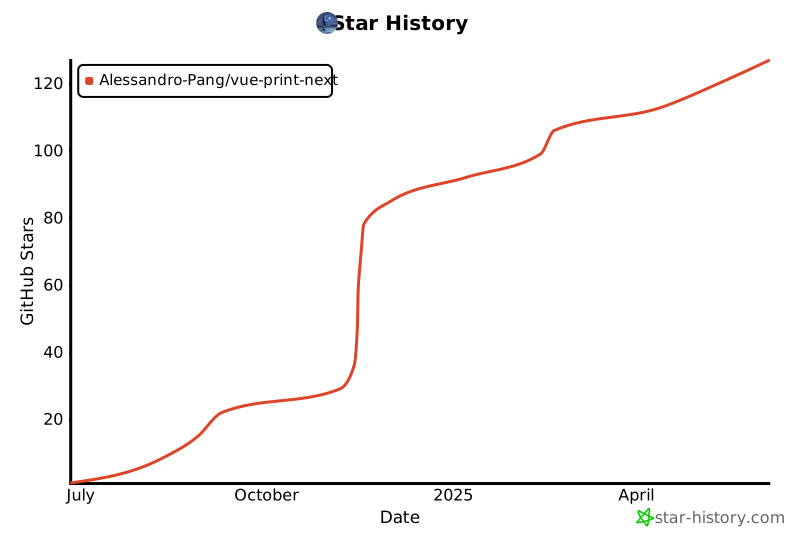
## ⭐ Star History
## 👥 Supporters


## 📄 License
[MIT](http://opensource.org/licenses/MIT)
---
Welcome to discuss and raise issues or submit Pull Requests on [GitHub Issues](https://github.com/Alessandro-Pang/vue-print-next/issues)!