https://github.com/alexboia/lvd-fluentui-component-scaffolding
A tool to generate the basic structure of a React component built using the FluentUi library.
https://github.com/alexboia/lvd-fluentui-component-scaffolding
fluentui javascript javascript-applications nodejs nodejs-modules react reactjs scaffolding
Last synced: 6 months ago
JSON representation
A tool to generate the basic structure of a React component built using the FluentUi library.
- Host: GitHub
- URL: https://github.com/alexboia/lvd-fluentui-component-scaffolding
- Owner: alexboia
- License: bsd-3-clause
- Created: 2021-08-17T19:08:53.000Z (about 5 years ago)
- Default Branch: main
- Last Pushed: 2021-08-31T16:33:55.000Z (about 5 years ago)
- Last Synced: 2025-02-26T00:20:06.615Z (over 1 year ago)
- Topics: fluentui, javascript, javascript-applications, nodejs, nodejs-modules, react, reactjs, scaffolding
- Language: JavaScript
- Homepage:
- Size: 400 KB
- Stars: 1
- Watchers: 2
- Forks: 0
- Open Issues: 0
-
Metadata Files:
- Readme: README.md
- License: LICENSE
Awesome Lists containing this project
README
# FluentUI Component Scaffolding
[](https://nodei.co/npm/lvd-fluentui-component-scaffolding/)
This is a nodejs application to generate the basic structure of a React component built using the [FluentUI](https://github.com/microsoft/fluentui) library, including the scripts and configuration requried for publishing it to the `npm` package repository.
This tool uses a built-in template directory, collects some additional data, such as package name, library name, package author and creates:
- the basic directory structure;
- build scripts, `package.json`, webpack configuration files, license file and a standard `.gitignore`;
- empty component file;
- empty stylesheet files;
- basic structure of a demo application to feature the component.
It also runs `npm install` after the package structure has been created.
## Installing
`npm install --g lvd-fluentui-component-scaffolding`
## Usage
Navigate to the root directory where your component will be created and run:
`npm exec create-fluentui-component`
You will then be prompted for additional information, which is further detailed below.
## Demo
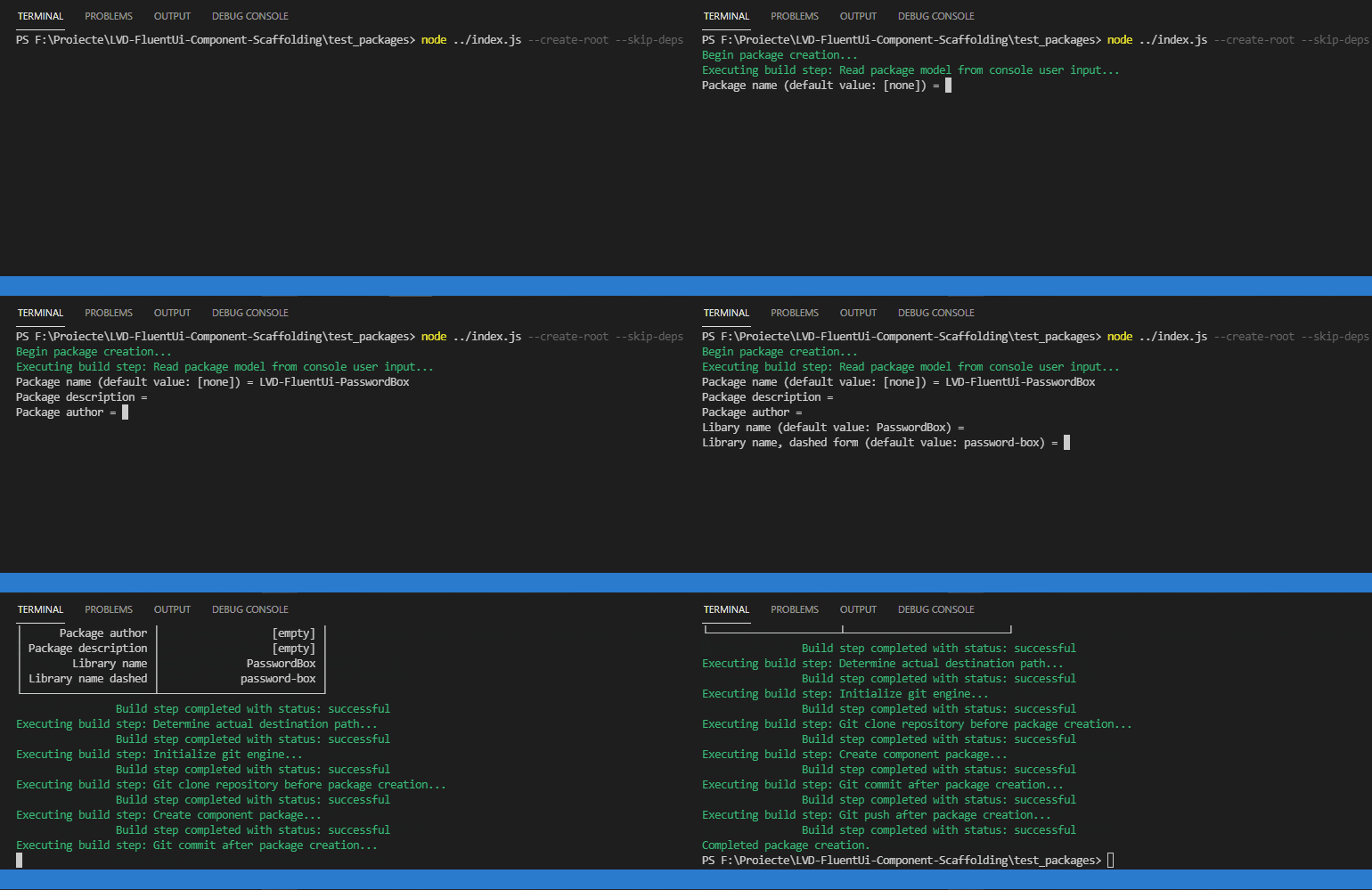
Below you can find a screen capture of running this tool with the following arguments:
- `--create-root`
- `--skip-deps`
- `--git-clone-repo="[repo-url]"`
- `--git-push`
### Command line arguments
| Argument | Type | Description |
| --- | --- | --- |
| `--version` | `boolean` | Show version number |
| `--from-manifest`, `--fm` | `boolean` | Read package information from a manifest file named component-manifest.json in the base destination directory. Defaults to `false`. |
| `--create-root`, `--cr` | `boolean` | Create root component directory. Defaults to `false`, that is use current working directory as root. |
| `--skip-deps`, `--sd` | `boolean` | Do not run `npm install` afer the component package has been created. Defaults to `false`. |
| `--skip-vscode`, `--svs` | `boolean` | Do not create the `.code-workspace` VS Code workspace file, even if it is included in the template. Defaults to `false`. |
| `--git-clone-repo`, `--gcr` | `boolean` | Clone the specified directory before creating the component package. Will fail if directory is not empty. Defaults to `null`. |
| `--git-commit`, `--gcm` | `boolean` | Perform a git commit after creating the component package. You will be prompted for an optional commit message. Defaults to `false`. |
| `--git-push`, `--gcm` | `boolean` | Perform a git commit and push after creating the component package. If this flag is specified, the `git-commit` flag is not required. Defaults to `false`. |
| `--git-name`, `--gnm` | `boolean` | Configure git operations to use this author name. Defaults to `null`. |
| `--git-email`, `--gem` | `boolean` | Configure git operations to use this author email. Defaults to `null`. |
| `--git-username`, `--gur` | `boolean` | Configure git operations to use this username when logging on. Defaults to `null`. |
| `--git-token`, `--gtk` | `boolean` | Configure git operations to use this token as password when logging on. Defaults to `null`. |
| `--log-directory`, `--ld` | `string` | Specify log directory name. Defaults to `package_builder_logs`. |
| `--worskpace-directory`, `--wdir` | `string` | Specify workspace directory name. Defaults to `workspace`. |
| `--additional-dirs`, `--adirs` | `string[]` | Specify additional directories to be created alongside the workspace directory. Defaults to `[]`. Example: `--additonal-dirs dira dirb dirb/dirb1 dirc`. |
| `--help` | `boolean` | Show help |
## Required user input
The following parameters are collected from user input:
| Parameter | Description | Mandatory | Default | Valid values |
| --- | --- | --- | --- | --- |
| `Package name` | The name of the package. The name used in `package.json` is obtained from this value, converted to lower case | `Y` | If `--create-root` is not specified, then the default package name is the name of the current directory, if considered valid. | letters, numbers and dashes |
| `Package description` | The description of the package | `N` | - | - |
| `Package author` | The author of the package | `N` | - | - |
| `Libary name` | The name of the root component; also the name used for the library configuratin in the webpack config file. | `N` | The part of the package name following the last dash. | letters, numbers and underscores |
| `Library name, dashed form` | The name of the root component in dashed form. | `N` | Derived from the library name. | letters, numbers and dashes |
## Output structure
The following output structure is all relative to the workspace directory.
### The directory structure
The following directory structure is generated within:
| Directory | Description |
| --- | --- |
| `demo` | Demo application root directory |
| `demo/build/app` | Demo application build output directory |
| `dist` | Component library build output |
| `docs` | Documentation files |
| `src` | Root directory for all component library source files |
| `src/assets` | Assets directory (eg. image files) |
| `src/components` | Component javascript source code |
| `src/css` | Root directory for all stylesheet files |
| `src/css/components` | Component-related stylesheet files |
| `src/docs` | Documentation source files |
### Support files
The following support files are generated (configuration files, build scripts, license):
| File | Description |
| --- | --- |
| `LICENSE` | License file - BSD 3-clause by default |
| `.gitignore` | The git-ignore file, which, by default, contains entries for `node_modules` directory and `*.tgz` files |
| `package.json` | The `package.json` file, with [a bunch of stuff already added to it](https://github.com/alexboia/LVD-FluentUi-Component-Scaffolding/blob/main/template/package.json), including standard dependencies and dev-dependencies. |
| `README.md` | The readme file file, with the package title and package description added to it. |
| `webpack-app.config.js` | [webpack configuration file for building the demo application](https://github.com/alexboia/LVD-FluentUi-Component-Scaffolding/blob/main/template/webpack-app.config.js) |
| `webpack-dist.config.js` | [webpack configuration file for building the library itself for distribution via npm packaging](https://github.com/alexboia/LVD-FluentUi-Component-Scaffolding/blob/main/template/webpack-dist.config.js) |
| `build-all.ps1` | PowerShell script for building the demo app and the library itself in one sitting |
| `build-app.ps1` | PowerShell script for building the demo app |
| `build-dist.ps1` | PowerShell script for building the library itself |
| `${PackageName}.code-workspace` | VS Code workspace file. The `${PackageName}` placeholder is replaced with the value collected (or derived) from user input. |
### Component files
The following javascript files are generated for the library-related component:
| File | Description |
| --- | --- |
| `src/components/${LibraryName}.jsx` | [The main component file](https://github.com/alexboia/LVD-FluentUi-Component-Scaffolding/blob/main/template/src/components/%24%7BLibraryName%7D.jsx), that contains an empty component class definition. The `${LbraryName}` placeholder is replaced with the value collected (or derived) from user input. |
| `src/components/Index.js` | The root export file that will be used as an entry point when building the library itself. |
The following javascript files are generated for the demo application-related components:
| File | Description |
| --- | --- |
| `src/App.jsx` | The actual demo [application main component](https://github.com/alexboia/LVD-FluentUi-Component-Scaffolding/blob/main/template/src/App.jsx) |
| `src/Root.jsx` | Sets up the root component structure, including the stuff required for FluentUI apps |
| `src/Index.jsx` | Sets up the who react application lifecycle |
### Stylesheet files
The following stylesheet files are generated for the library-related component:
| File | Description |
| --- | --- |
| `src/css/components/${LibraryNameDashed}.css` | The main component stylesheet file. The `${LibraryNameDashed}.css` placeholder is replaced with the value collected (or derived) from user input. |
| `src/css/components/index.css` | The root file that will be used as a stylesheet entry point when building the library itself. |
The following stylesheet files are generated for the demo application:
| File | Description |
| --- | --- |
| `src/css/style.css` | The maine demo app stylesheet file. Contains [some standard includes, as well as basic rules](https://github.com/alexboia/LVD-FluentUi-Component-Scaffolding/blob/main/template/src/css/style.css). |
### Demo application
The following files are generated in order to run the built demo application:
| File | Description |
| --- | --- |
| `demo/index.html` | The html entry point for the demo application. Either run it directly or deploy it somewhere. |
## Supported placeholders
The following placeholders are supported for usage both in file names, as well as file contents:
| Placeholder | Value |
| --- | --- |
| `${LibraryName}` | `Library name` |
| `${LibraryNameDashed}` | `Library name, dashed form` |
| `${PackageName}` | `Package name` |
| `${PackageNameLower}` | `Package name`, converted to lower case |
| `${PackageDescription}` | `Package description` |
| `${PackageAuthor}` | `Package author` |
| `${CurrentYear}` | `new Date().getFullYear()` |
| `${LogDirectoryName}` | Log directory name as provided via command line arguments. Defaults to `_logs` |
## Generated log files
The tool generates the following log files:
- `[LOG_DIRECTORY_PATH]/error.log` - for error events: exceptions, errors coming from the git engine, erros from the `npm install` `stderr` output;
- `[LOG_DIRECTORY_PATH]/activity.log` - for every other stuff that's being logged - debug messages, warning messages, info messages and so on.
As of version 0.0.5, the `[LOG_DIRECTORY_PATH]` is located at `[USER_HOME]/lvd-fluentui-component-scaffolding/[LOG_DIRECTORY_NAME]` where:
- `[USER_HOME]` depends on the os;
- `[LOG_DIRECTORY_NAME]` defaults as mentioned above, but may be overridden using the `--log-directory` flag.
## Notes
1. To avoid having `npm pack` strip the empty directories, a `.dummy` file is included in each template directory. This does not find its way in the final component package directory.
2. To avoid having `npm pack` rename the `.gitignore` file in the template directory to `.npmignore`, the file is included using the `.ignore` name and renamed when when creating the final component package directory.
## Changelog
### Version 0.0.5
- Default directory name is now `package_builder_logs`;
- Changed logging directory location: logs are now saved globally in `[USER_HOME]/lvd-fluentui-component-scaffolding/[LOG_DIRECTORY_NAME]` where:
- `[USER_HOME]` depends on the os;
- `[LOG_DIRECTORY_NAME]` defaults as mentioned above, but may be overridden using the `--log-directory` flag.
- Changed package structure to include a workspace directory used for the component package itself, to avoid issues when a git clone needs to be performed but, at the same time, the `--from-manifest` flag is used.
- Added possibility to create additional directories alongside the package workspace, using the `--additional-dirs` flag.
### Version 0.0.4
- Fixed an issue with logging throwing `.trim()` is not a function in certain conditions.
- Updated package description and home page in `package.json`.
### Version 0.0.3
- Can now read package information from a manifest file placed in the base target directory (see above). By default it reads from console user input, use `--from-manifest` to switch to package manifest mode;
- Added option to skip installing dependencies by automatically running `npm install`. By default, dependencies are installed, use `--skip-deps` to skip installation;
- Added `.code-workspace` template file in the package template and an option to skip creating it, if desired, by specifying the `--skip-vscode` flag;
- Can now clone a git repository before creating component package, by using `--git-clone-repo=[repo-url]`;
- Can now commit to the previously cloned git repository after component si created, by using the flag `--git-commit`;
- Can now push to the previously cloned git repository after component si created, by using the flag `--git-push`;
- Basic git configuration can be specified by using the flags: `--git-name`, `--git-email`, `--git-username` and `--git-token`;
- Better error handling;
- More detailed and better formatted output of executed steps;
- Major refactoring and some bug fixes.
### Version 0.0.2
- Can now specify whether or not to create a root directory for the package. By default it does not, use `--create-root` flag to create it.
### Version 0.0.1
- First tracked version
## Donate
I put some of my free time into developing and maintaining this plugin.
If helped you in your projects and you are happy with it, you can...
[](https://ko-fi.com/Q5Q01KGLM)