https://github.com/alexprogrammerde/soulfire
🧙 Advanced Minecraft Bot Tool. Deploy automated bots for server testing, automation, and development.
https://github.com/alexprogrammerde/soulfire
bot minecraft minecraft-bot minecraft-bot-attack minecraft-botting stress-testing
Last synced: 5 months ago
JSON representation
🧙 Advanced Minecraft Bot Tool. Deploy automated bots for server testing, automation, and development.
- Host: GitHub
- URL: https://github.com/alexprogrammerde/soulfire
- Owner: AlexProgrammerDE
- License: agpl-3.0
- Created: 2021-07-18T08:51:24.000Z (about 5 years ago)
- Default Branch: main
- Last Pushed: 2026-02-14T15:32:41.000Z (5 months ago)
- Last Synced: 2026-02-14T22:17:48.371Z (5 months ago)
- Topics: bot, minecraft, minecraft-bot, minecraft-bot-attack, minecraft-botting, stress-testing
- Language: Java
- Homepage: https://soulfiremc.com
- Size: 24.7 MB
- Stars: 471
- Watchers: 2
- Forks: 48
- Open Issues: 9
-
Metadata Files:
- Readme: README.md
- Changelog: changelog.sh
- Contributing: CONTRIBUTING.md
- Funding: .github/FUNDING.yml
- License: LICENSE
- Codeowners: .github/CODEOWNERS
- Security: SECURITY.md
- Agents: AGENTS.md
Awesome Lists containing this project
README

[](https://discord.gg/vHgRd6YZmH) [](https://ko-fi.com/alexprogrammerde)
# SoulFire
Advanced Minecraft Bot Tool. Deploy automated bots for server testing, automation, and development.
This repository only contains the CLI and server implementation. The official GUI client is in [another repository](https://github.com/AlexProgrammerDE/SoulFireClient).
---
> [!WARNING]
> This tool should only be used on servers you own or have explicit permission to test. Ensure your hosting provider
> allows automated bot testing. If you use this software without authorization, you make yourself (or your
> legal guardians) liable; the developers of SoulFire are not responsible for your own actions.
---
## 🚀 Features
* GUI (Multiple themes) & CLI
* Configurable options for every session like the number of bots, join delay and more
* Load and save profiles for quick access
* Support for online and offline mode servers
* Supports [almost every Minecraft version](#-version-support)
* Use `Microsoft` (Credentials & Device Code supported) and `Offline` accounts for both Java Edition and Bedrock Edition
* Use `HTTP`, `SOCKS4` and `SOCKS5` proxies
* Multiple [built-in plugins](#-plugins) like `AutoRespawn`, `AutoJump`, `ClientSettings` and more
* Console command support
* A* Pathfinding (Diagonal moves, parkour, mining blocks, placing blocks)
## 🖥 Installation
> [!TIP]
> Want to check out how SoulFire looks before installing it? Take a look at the official [demo page](https://demo.soulfiremc.com).
For installing SoulFire, please refer to the [installation guide](https://soulfiremc.com/docs/installation).
## 🍿 Version support
You can find an up-to-date list of supported versions in
the [documentation](https://soulfiremc.com/docs/usage/versions).
## ⌨ Commands
For a list of all available commands, look at the [documentation](https://soulfiremc.com/docs/usage/commands)
or run `help` in the GUI or CLI.
## 📻 Plugins
You can read about the SoulFire plugins in the [documentation](https://soulfiremc.com/docs/usage/plugins).
## 🗃 Import accounts and proxies
You can read about how to import accounts in the [account documentation](https://soulfiremc.com/docs/usage/accounts) and
how to import proxies in the [proxy documentation](https://soulfiremc.com/docs/usage/proxies).
## 🤿 Looking for proxies?
There are many websites that offer free proxies, but be careful as many of them are not reliable or secure.
Our recommended proxy provider is [Thordata](https://affiliate.thordata.com/soulfire), who sponsors SoulFire.
They offer premium residential proxies with excellent speeds - use code **THORDATA** for 20% off your first purchase.
For a full list of recommended providers, check out our [Get Proxies](https://soulfiremc.com/get-proxies) page.
## 💻 Command Line Usage
If you want to use the CLI of SoulFire, please refer to the [CLI Mode Guide](https://soulfiremc.com/docs/guides/cli-mode).
## 🧵 Demo
SoulFire has a built-in GUI for easy usage. Try a SoulFire demo yourself at the [demo page](https://demo.soulfiremc.com).
https://github.com/user-attachments/assets/6244d54c-a1e5-4467-a705-c929b9de2b57
## ✨ Nightly builds
You can download the latest development version of SoulFire
through [nightly.link](https://nightly.link/AlexProgrammerDE/SoulFire/workflows/build/main).
## 🔧 Build from source
1. Install Java 25+
2. Download the latest source code from GitHub
3. Run `./gradlew build` in the project directory
4. Get the jar file from `client-launcher/build/libs` or `dedicated-launcher/build/libs`
## 👨💻 Developer API
SoulFire offers a Developer API to create your own plugins using the plugin API and mixins.
The software may regularly have breaking changes, so you'll have to stick to a version of SoulFire or update your plugin
regularly.
To learn more about the Developer API, take a look at the
official [plugin example](https://github.com/AlexProgrammerDE/SoulFirePluginExample).
## 🌈 Community
Feel free to join our Discord community server:
[](https://discord.gg/vHgRd6YZmH)
This project is in active development, so if you have any feature requests or issues, please submit them here on GitHub.
PRs are welcome, too.
## 🏅 Sponsors
![[SignPath]](https://avatars.githubusercontent.com/u/34448643)
Free code signing on Windows provided by SignPath.io, certificate by SignPath Foundation
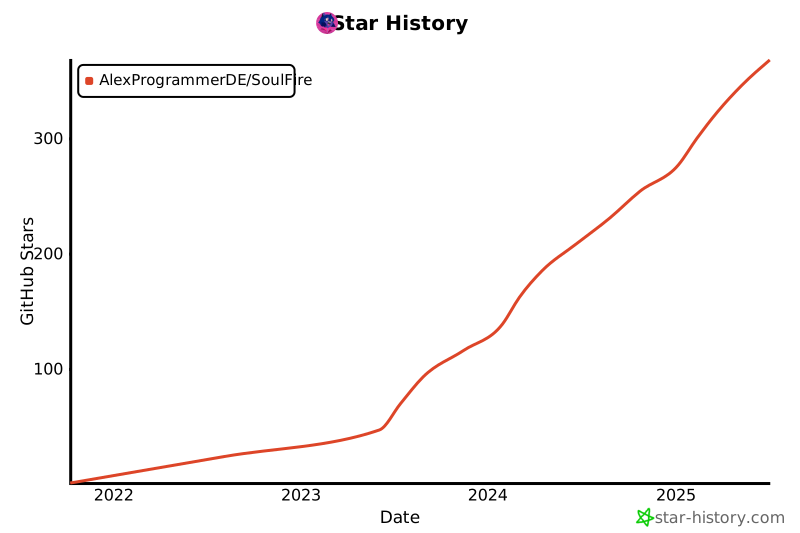
## 🌟 Star History