https://github.com/alexprut/phpstructureddata
A set of PHP libraries that use the http://schema.org vocabulary to implement and output Microdata or RDFa Lite 1.1 semantics.
https://github.com/alexprut/phpstructureddata
microdata php php-library rdfa-lite schema-org
Last synced: about 1 year ago
JSON representation
A set of PHP libraries that use the http://schema.org vocabulary to implement and output Microdata or RDFa Lite 1.1 semantics.
- Host: GitHub
- URL: https://github.com/alexprut/phpstructureddata
- Owner: alexprut
- License: mit
- Archived: true
- Created: 2014-03-07T09:52:01.000Z (over 12 years ago)
- Default Branch: master
- Last Pushed: 2019-07-14T18:08:52.000Z (almost 7 years ago)
- Last Synced: 2024-12-06T19:16:38.257Z (over 1 year ago)
- Topics: microdata, php, php-library, rdfa-lite, schema-org
- Language: PHP
- Homepage:
- Size: 692 KB
- Stars: 34
- Watchers: 8
- Forks: 5
- Open Issues: 2
-
Metadata Files:
- Readme: README.md
- Changelog: CHANGELOG.md
- License: LICENSE
Awesome Lists containing this project
README
PHPStructuredData [](https://travis-ci.org/alexprut/PHPStructuredData)
=================
A set of PHP libraries that use the http://schema.org vocabulary to implement and output Microdata or RDFa Lite 1.1 semantics.
This library is used in the Joomla CMS since version 3.2 (called [JMicrodata](https://github.com/joomla/joomla-cms/tree/master/libraries/joomla/microdata "JMicrodata")).
Created during the Google Summer of Code 2013 and 2014.
Quick overview
--------------
The library was designed with this goals in mind:
1. Having the possibility to __switch between Microdata__ and __RDFa Lite 1.1__ semantics.
2. Having the possibility to __switch the Type dynamically__, you just change the Type (there are more than 550+ different available Types).
3. Display __validated semantics__, the library takes care of displaying data in the correct format (e.g. all the dates in the ISO standard).
4. __Enable/disable__ the __library__ output.
5. __Fallbacks__, you should never lose any meaningful semantic (e.g. if you change the Type and it does not have an _author_ Property, it will fallback to the _Person_ Type with the _name_ Property).
Class diagram
-------------
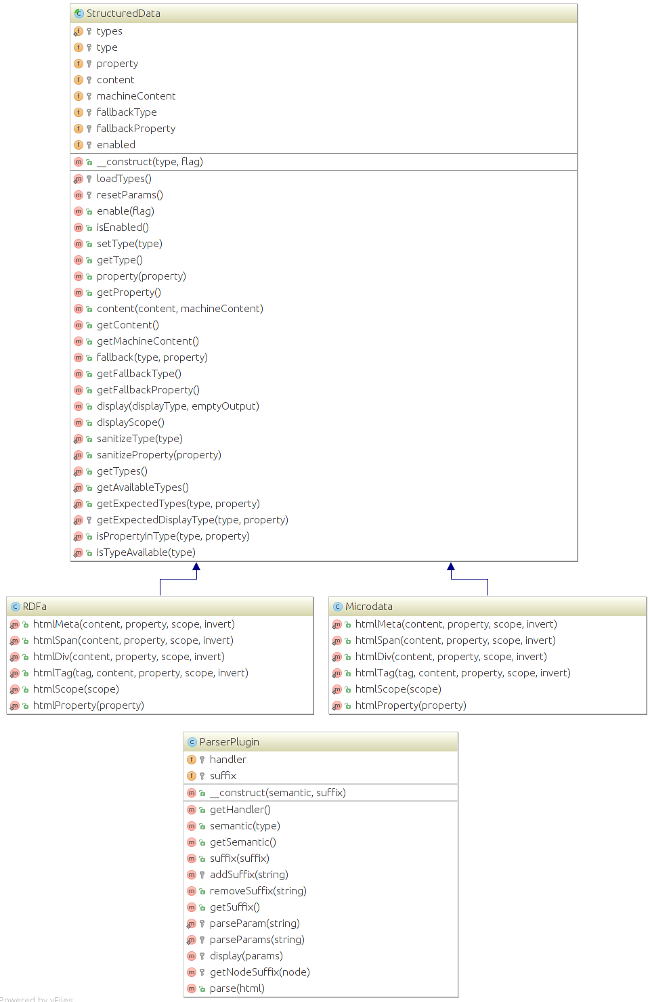
Installation
------------
* __Composer__:
Add in your ```composer.json``` file:
``` json
{
"require": {
"palex/phpstructureddata": "*"
}
}
```
* __From Source__:
Run ```git clone https://github.com/alexprut/PHPStructuredData.git```
* __Direct download__:
Download the last version from [here](https://github.com/alexprut/PHPStructuredData/archive/master.zip "download")
Usage Example
-------------
Let's suppose that you already have an instance of the Microdata or RDFa library. And you need to add Microdata or RDFa semantics to the following HTML which is part of an article (_e.g._ ```$sd = new PHPStructuredData\Microdata('Article');```).
```php
displayScope();?>>
content(null, 'en-GB')->property('inLanguage')->display('meta', true)?>
content('How to Tie a Reef Knot')->property('name')->display();?>
Written by content('John Doe')->property('author')->fallback('Person', 'name')->display();?>
content('1 January 2014', '2014-01-01T00:00:00+00:00')->property('datePublished')->display();?>
content('Lorem ipsum dolor sit amet...')->property('articleBody')->display();?>
```
The ```Microdata``` library will render:
```html
How to Tie a Reef Knot
Written by
John Doe
1 January 2014
Lorem ipsum dolor sit amet...
```
The ```RDFa``` library will render:
```html
How to Tie a Reef Knot
Written by
John Doe
1 January 2014
Lorem ipsum dolor sit amet...
```
Instead, if you decide to change the current Type (_e.g._ ```$sd->setType('Review');```).
The ```Microdata``` library will render:
```html
How to Tie a Reef Knot
Written by
John Doe
1 January 2014
Lorem ipsum dolor sit amet...
```
The ```RDFa``` library will render:
```html
How to Tie a Reef Knot
Written by
John Doe
1 January 2014
Lorem ipsum dolor sit amet...
```
As you can see ```John Doe``` __fallbacks__ to the _Person_ Type, and there is no loss of information, even if the current Type doesn't have an _author_ Property it will display important information for the machines, search engines know that there is a Person ```John Doe```.
Instead, if you decide to not render Microdata or RDFa semantics, you just __disable the library__ output (_e.g._ ```$sd->enable('false');```).
Both ```Microdata``` and ```RDFa``` library will render:
```html
How to Tie a Reef Knot
Written by John Doe
1 January 2014
Lorem ipsum dolor sit amet...
```
Currently both ```RDFa``` and ```Microdata``` library doesn't support multiple fallbacks.
ParserPlugin
============
If you want to keep your views separated from the logic, ```ParserPlugin``` is a PHP class for parsing the HTML markup and converting the ```data-*``` HTML5 attributes into the correctly formatted Microdata or RDFa Lite 1.1 semantics.
The ```data-*``` attributes are new in HTML5, they gives us the ability to embed custom data attributes on all HTML elements. So if you disable the library output, the HTML will still be validated. The default suffix the library will search for is ```data-sd```, where sd stands for structured data, but you can register more than one custom suffix.
Markup Syntax
-------------
##### setType
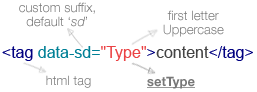
The _type_ defines which schema is being used for the following markup. The Type must always have the first character Uppercase to be correctly interpreted. If the type is a valid schema, the global scope for the page from this point onwards is updated to this schema. The plugin will replace the data tag with ```itemscope itemtype='https://schema.org/Type'``` in case of Microdata semantics or ```vocab='https://schema.org' typeof='Type'``` in case of RDFa Lite 1.1 semantics.
###### Example:
```html
This is my article
```
This will be output using ```Microdata``` semantics as:
```html
This is my article
```
Or using ```RDFa``` semantics as:
```html
This is my article
```
##### Specifying generic item properties
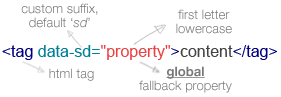
Once a schema has been declared, the next step is to declare individual properties – explaining the content and giving it semantic meaning.
The _property_ must always have the first character as lowercase to be correctly interpreted. If the property is found to be part of the current schema, the plugin will replace the data tag with ```itemprop='property'``` in case of Microdata semantics or ```property='property'``` in case of RDFa Lite 1.1 semantics. If the property is not found to be a valid property of the active schema, it will be ignored and the next available property will be parsed.
###### Example:
```html
This is my article
```
This will be output using ```Microdata``` semantics as:
```html
This is my article
```
Or using ```RDFa``` semantics as:
```html
This is my article
```
##### Specifying schema—dependant item properties
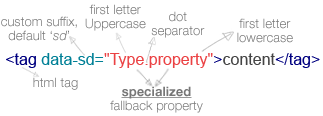
Sometimes you may want to explicitly state a property which should only be used when a specific schema is active – for example, if the property has a specific property in one schema, which is called something different in another schema.
It is possible to achieve this by using a schema–dependant property. This works by using a combination between both _Type_ and _property_, separated by a full stop. In short, if the current global scope is equal to Type and the property is part of that Type, the plugin will replace the data tag with ```itemprop='property'``` in case of Microdata semantics or ```property='property'``` in case of RDFa Lite 1.1.
###### Example:
```html
This is my article
4
```
This will be output using ```Microdata``` semantics as:
```html
This is my article
4
```
Or using ```RDFa``` semantics as:
```html
This is my article
4
```
### Using multiple properties
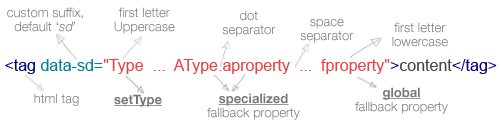
It is possible, using a combination of these, to specify multiple properties including some which are specific for a schema and others which are generic. The order of the building blocks isn't significant and a white space is used as a separator.
###### Example:
```html
This is my article
4
Amazing dessert recipes
```
This will be output using ```Microdata``` semantics as:
```html
This is my article
4
Amazing dessert recipes
```
Or using ```RDFa``` semantics as:
```html
This is my article
4
Amazing dessert recipes
```
##### Nesting schemas
Sometimes it is necessary to nest schemas – for example if you want to describe a person when you have the Article schema open. This is possible using nested schemas. To use this, simply append the schema preceeded by a full stop, __after__ the property. Once you have finished using the nested schema, close the containing tag, and re-set the original schema.
###### Example:
```html
This is my article
4
John Doe
Cake
```
This will be output using ```Microdata``` semantics as:
```html
This is my article
4
John Doe
Cake
```
Or using ```RDFa``` semantics as:
```html
This is my article
4
John Doe
Cake"
```
##### The Algorithm:
1. First the parser checks for __setTypes__. If one or more matches are found then the current global scope will be updated with the first match. At this point if there are no specific or generic properties the algorithm will finish and replace the data tag with the specified scope. Otherwise continue to point 2.
2. The parser checks for __specific item properties__. If one or more valid matches are found, then the algorithm will finish and replace the data tag with the first match property. Otherwise go to point 3
3. The parser checks for __generic properties__. If one or more valid matches are found, then the algorithm will replace the data tag with the first property that is matched, and complete the algorithm.
Usage Example
-------------
Let's suppose that you already have an instance of the ```ParserPlugin``` library. And you need to add Microdata or RDFa semantics to the following HTML which is part of an article (_e.g._ ```$parser = new PHPStructuredData\ParserPlugin('microdata'); $scope='Article';```).
```html
How to Tie a Reef Knot
Written by
John Doe
1 January 2014
Lorem ipsum dolor sit amet...
```
The ```Microdata``` output will be:
```html
How to Tie a Reef Knot
Written by
John Doe
1 January 2014
Lorem ipsum dolor sit amet...
```
The ```RDFa``` output will be:
```html
How to Tie a Reef Knot
Written by
John Doe
1 January 2014
Lorem ipsum dolor sit amet...
```
Instead, if you decide to change the current Type (_e.g._ ```$scope="Review";```).
The ```Microdata``` output will be:
```html
How to Tie a Reef Knot
Written by
John Doe
1 January 2014
Lorem ipsum dolor sit amet...
```
The ```RDFa``` output will be:
```html
How to Tie a Reef Knot
Written by
John Doe
1 January 2014
Lorem ipsum dolor sit amet...
```
Documentation
-------------
```PHPStructuredData``` libraries use the ```types.json``` file to check and output validated semantics, that file contains all the available Types and Properties from the http://schema.org vocabulary, and it was generated automatically with the https://github.com/alexprut/Spider4Schema web crawler.
Todos
-----
##### StructuredData
* Add ```itemref``` support.
* Add multiple fallbacks support to ```StructuredData```.
* Add to the ```types.json``` all the required properties specified by Google, Yandex, Baidu.
License
-------
PHPStructuredData is licensed under the MIT License – see the LICENSE file for details.