https://github.com/alexurquhart/vue-bootstrap-typeahead
An autocomplete/typeahead component for Vue 2 and Bootstrap 4
https://github.com/alexurquhart/vue-bootstrap-typeahead
Last synced: 5 months ago
JSON representation
An autocomplete/typeahead component for Vue 2 and Bootstrap 4
- Host: GitHub
- URL: https://github.com/alexurquhart/vue-bootstrap-typeahead
- Owner: alexurquhart
- License: mit
- Archived: true
- Created: 2018-08-23T20:09:55.000Z (over 7 years ago)
- Default Branch: master
- Last Pushed: 2022-07-26T01:00:24.000Z (over 3 years ago)
- Last Synced: 2025-07-05T15:37:12.773Z (5 months ago)
- Language: Vue
- Homepage: https://alexurquhart.github.io/vue-bootstrap-typeahead/
- Size: 2.29 MB
- Stars: 206
- Watchers: 7
- Forks: 156
- Open Issues: 73
-
Metadata Files:
- Readme: README.md
- Changelog: CHANGELOG.md
- License: LICENSE.txt
Awesome Lists containing this project
- awesome-vue - vue-bootstrap-typeahead - An autocomplete/typeahead component for Vue 2 and Bootstrap 4 ` 📝 3 years ago` (UI Components [🔝](#readme))
- awesome-vue - vue-bootstrap-typeahead - An typeahead/autocomplete component for Vue2 using Bootstrap 4 CSS. (Components & Libraries / UI Components)
- awesome-vue - vue-bootstrap-typeahead ★49 - An typeahead/autocomplete component for Vue2 using Bootstrap 4 CSS. (UI Components / Form)
- awesome-vue - vue-bootstrap-typeahead - An typeahead/autocomplete component for Vue2 using Bootstrap 4 CSS. (UI Components / Form)
README
# vue-bootstrap-typeahead
## Project Status
This project is no longer being maintained.
[](https://www.npmjs.com/package/vue-bootstrap-typeahead)
[](https://travis-ci.org/alexurquhart/vue-bootstrap-typeahead)
[](https://coveralls.io/github/alexurquhart/vue-bootstrap-typeahead?branch=master)
[](https://www.npmjs.com/package/vue-bootstrap-typeahead)
[](https://github.com/alexurquhart/vue-bootstrap-typeahead/blob/master/LICENSE.txt)
A simple `list-group` based typeahead/autocomplete using Bootstrap 4 and Vue 2
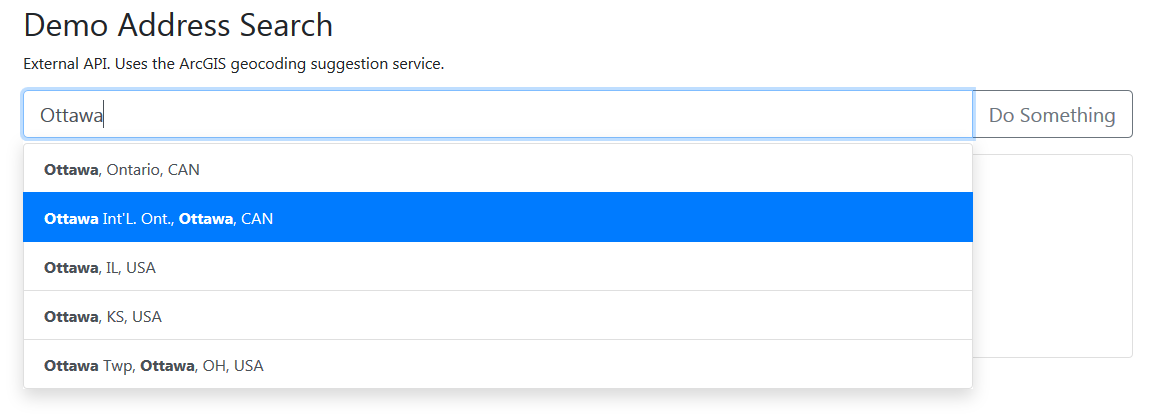
## [View The Examples](https://alexurquhart.github.io/vue-bootstrap-typeahead/#/examples)
## Installation
From NPM:
```
> npm i vue-bootstrap-typeahead --save
```
Minified UMD and CommonJS builds are available in the 'dist' folder. The component is also available for use in the browser directly on unpkg:
```html
```
## Usage
Import and register the component
```javascript
import VueBootstrapTypeahead from 'vue-bootstrap-typeahead'
// Global registration
Vue.component('vue-bootstrap-typeahead', VueBootstrapTypeahead)
// OR
// Local registration
export default {
components: {
VueBootstrapTypeahead
}
}
```
### Basic Usage
The only required attribute is a `data` array.
```html
```
### Working with API's
The typeahead does not fetch any data, for maximum flexibility it will only work with already loaded API responses in the form of arrays. The `serializer` attribute allows you to define a function to turn each array item in the response into a text string, which will appear in the results.
```html
import _ from 'underscore'
const API_URL = 'https://api-url-here.com?query=:query'
export default {
name: 'TestComponent',
data() {
return {
addresses: [],
addressSearch: '',
selectedAddress: null
}
},
methods: {
async getAddresses(query) {
const res = await fetch(API_URL.replace(':query', query))
const suggestions = await res.json()
this.addresses = suggestions.suggestions
}
},
watch: {
addressSearch: _.debounce(function(addr) { this.getAddresses(addr) }, 500)
}
}
```
### Attributes
Name | Type | Default | Description
--- | --- | --- | ---
data | `Array` | | Array of data to be available for querying. **Required**
serializer | `Function` | `input => input` | Function used to convert the entries in the `data` array into a text string.
size | `String` | | Size of the `input-group`. Valid values: `sm` or `lg`
backgroundVariant | `String` | | Background color for the autocomplete result `list-group` items. [See valid values](http://getbootstrap.com/docs/4.1/utilities/colors/#background-color)
textVariant | `String` | | Text color for the autocomplete result `list-group` items. [See valid values](http://getbootstrap.com/docs/4.1/utilities/colors/#color)
inputClass | `String` | | Class to the added to the `input` tag for validation, etc.
maxMatches | `Number` | 10 | Maximum amount of list items to appear.
minMatchingChars | `Number` | 2 | Minimum matching characters in query before the typeahead list appears
prepend | `String` | | Text to be prepended to the `input-group`
append | `String` | | Text to be appended to the `input-group`
### Events
Name | Description
--- | ---
`hit` | Triggered when an autocomplete item is selected. The entry in the input `data` array that was selected is returned.
`input` | The component can be used with `v-model`
### Slots
There are `prepend` and `append` slots available for adding buttons or other markup. Overrides the `prepend` and `append` attributes.
### Scoped Slots
You can use a [scoped slot](https://vuejs.org/v2/guide/components-slots.html#Scoped-Slots) called `suggestion` to define custom content
for the suggestion `list-item`'s
```html
{{ data.code }}
```
## Local Examples/Demo
Clone this repository and run `npm run serve` and navigate to http://localhost:8080 to launch the documentation. The source is in `src/views/Home.vue`
You can also view and edit examples hosted on CodePen [here](https://alexurquhart.github.io/vue-bootstrap-typeahead/#/examples)
## Contributing
Please note that active development is done on the `Development` branch. PR's are welcome!