https://github.com/alexylon/ferrocrypt
FerroCrypt is a pure Rust library, CLI, and desktop application for encrypting and decrypting files and directories using password-based or key-pair-based encryption.
https://github.com/alexylon/ferrocrypt
cli cryptography decryption encryption file-encryption gui hybrid-encryption rust rust-lang rustlang security security-tools slint symmetric-encryption
Last synced: about 2 months ago
JSON representation
FerroCrypt is a pure Rust library, CLI, and desktop application for encrypting and decrypting files and directories using password-based or key-pair-based encryption.
- Host: GitHub
- URL: https://github.com/alexylon/ferrocrypt
- Owner: alexylon
- License: gpl-3.0
- Created: 2022-07-07T15:56:41.000Z (about 4 years ago)
- Default Branch: main
- Last Pushed: 2026-05-22T23:36:24.000Z (about 2 months ago)
- Last Synced: 2026-05-23T00:26:21.477Z (about 2 months ago)
- Topics: cli, cryptography, decryption, encryption, file-encryption, gui, hybrid-encryption, rust, rust-lang, rustlang, security, security-tools, slint, symmetric-encryption
- Language: Rust
- Homepage:
- Size: 18.2 MB
- Stars: 16
- Watchers: 3
- Forks: 2
- Open Issues: 1
-
Metadata Files:
- Readme: README.md
- Changelog: CHANGELOG.md
- Contributing: CONTRIBUTING.md
- License: LICENSE
- Security: SECURITY.md
- Agents: AGENTS.md
Awesome Lists containing this project
README

FerroCrypt

[](https://crates.io/crates/ferrocrypt)
[](https://docs.rs/ferrocrypt/latest)

[](https://crates.io/crates/ferrocrypt-cli)
FerroCrypt is a pure Rust library, CLI, and desktop application for encrypting and decrypting files and directories using password-based or key-pair-based encryption.
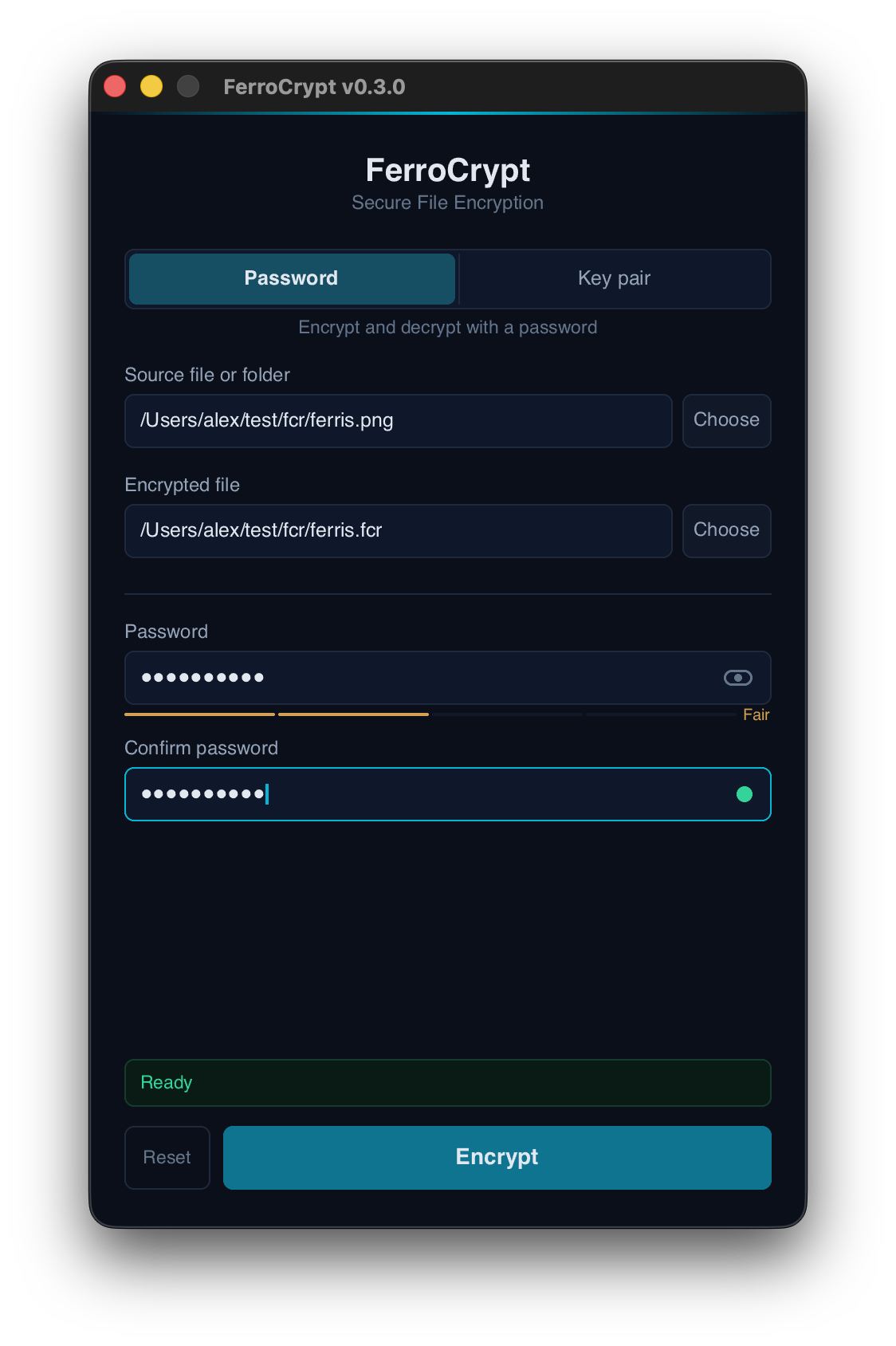
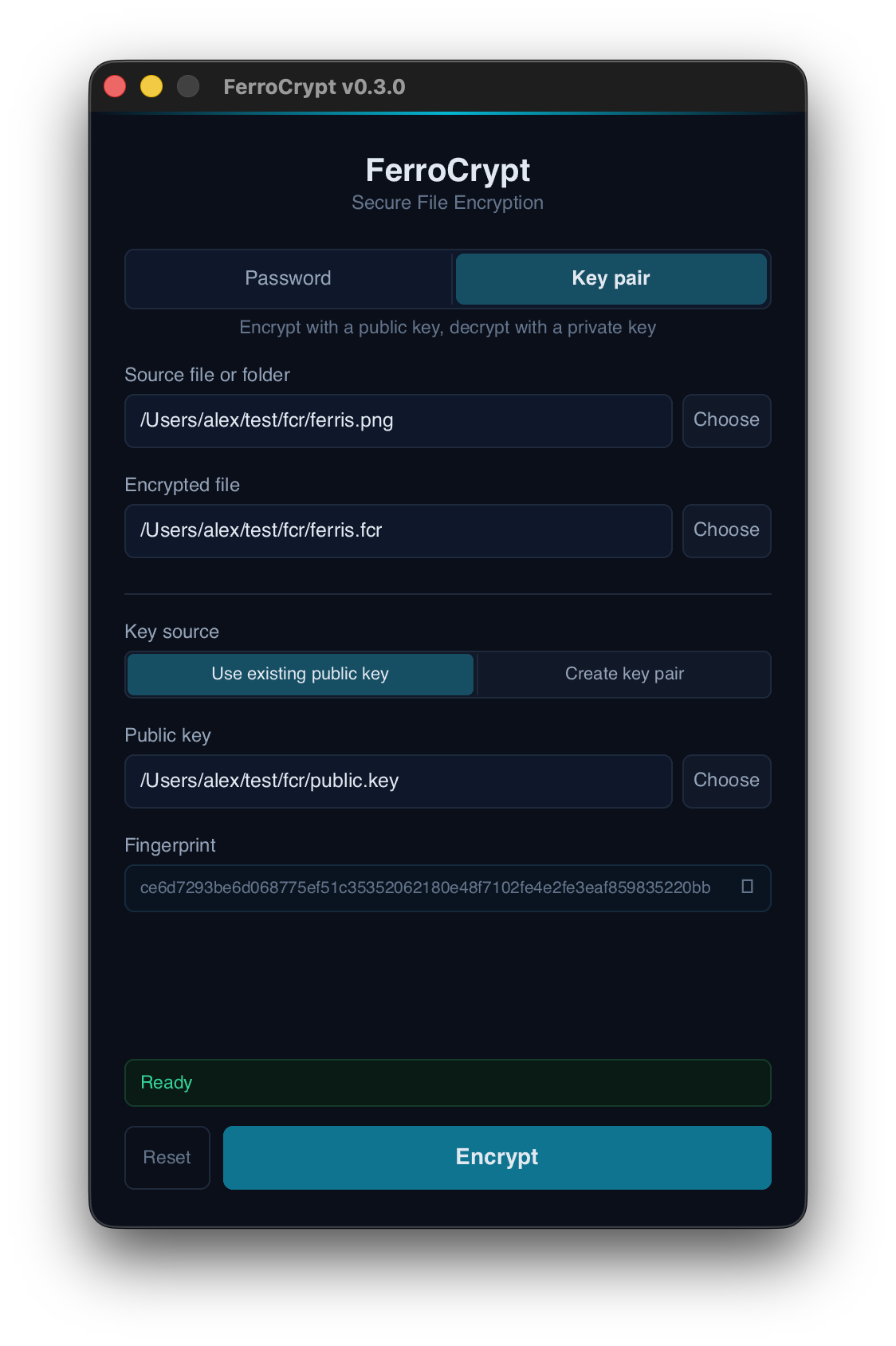
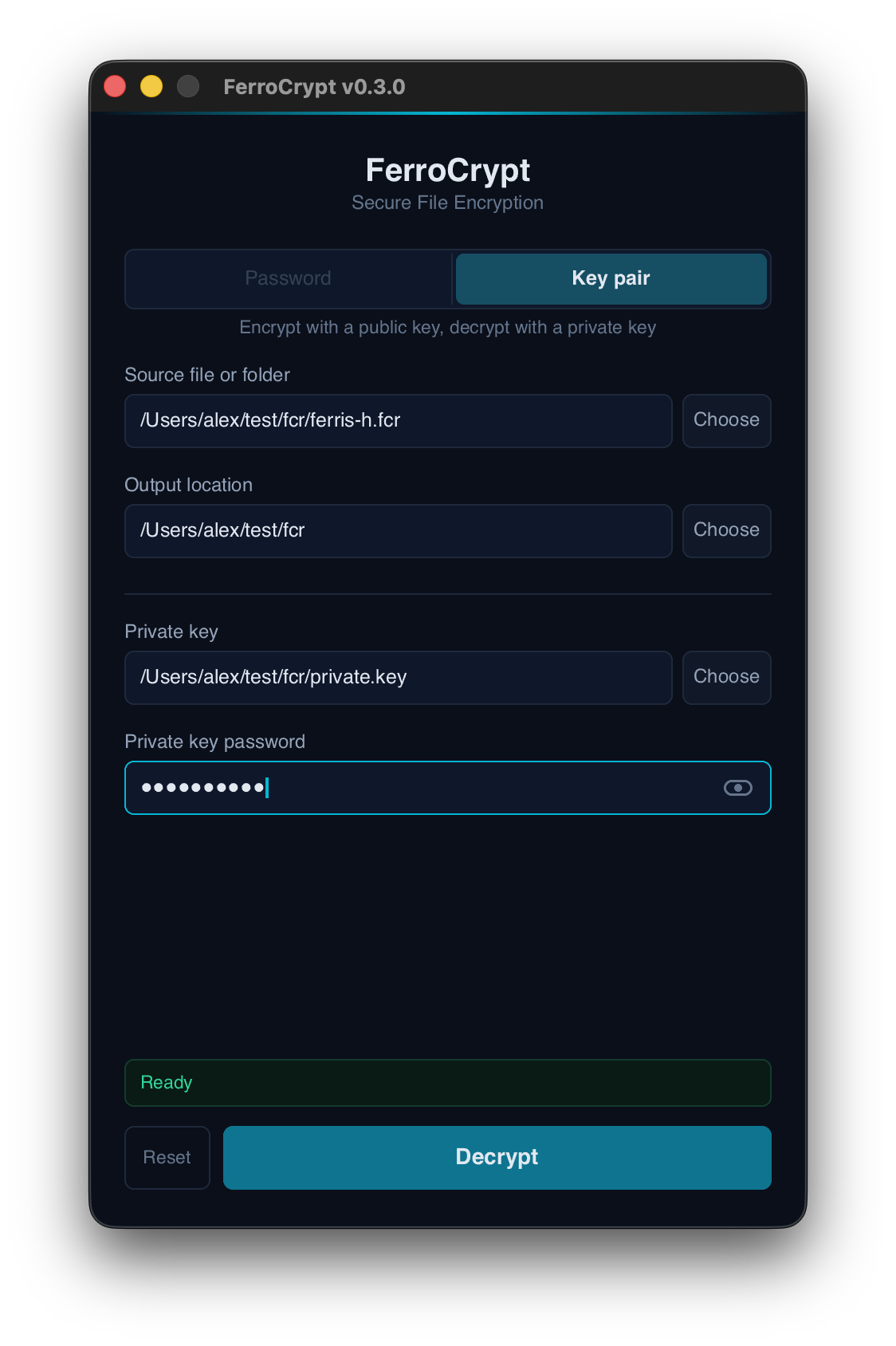
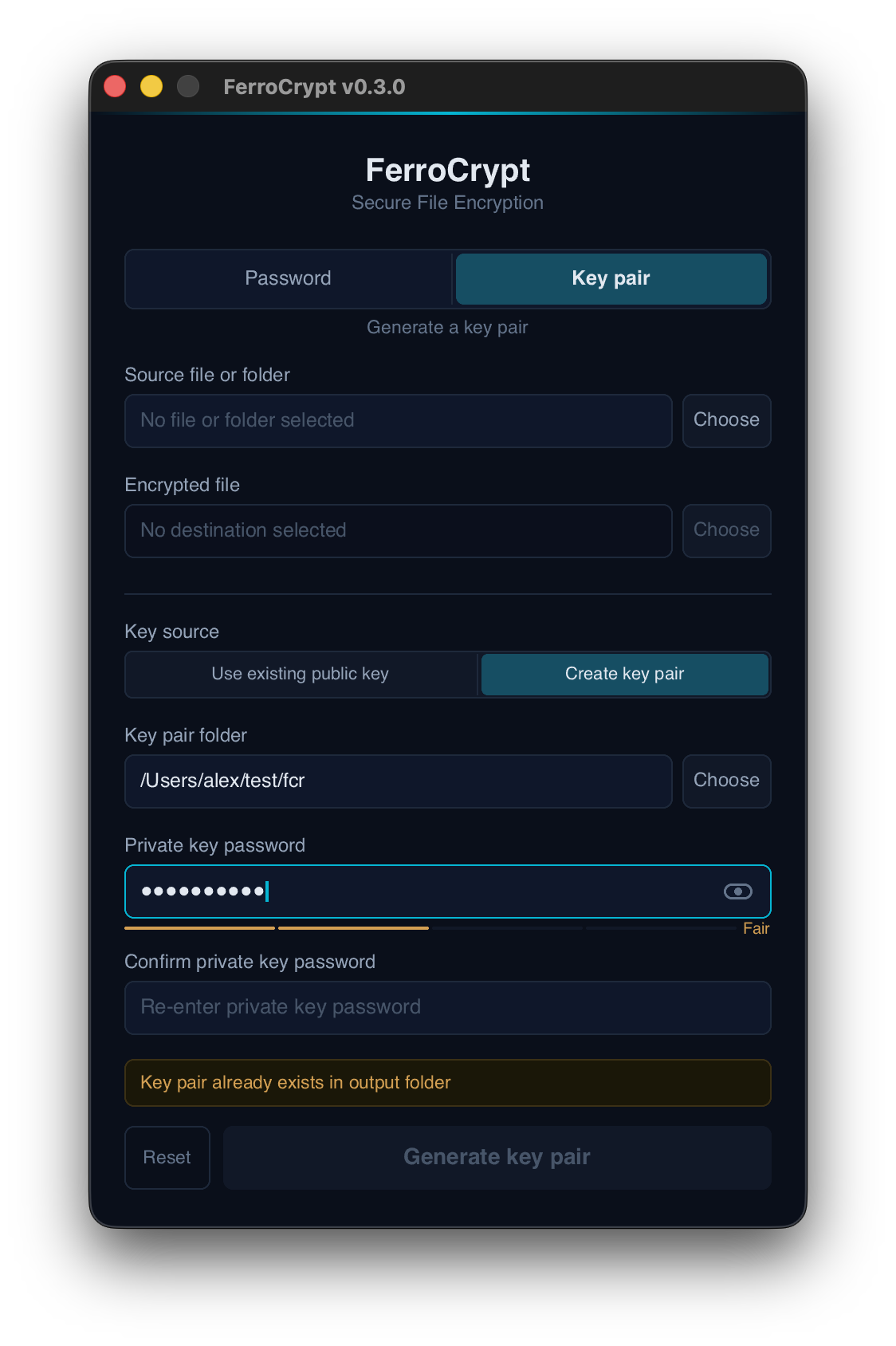
## Desktop app (screenshots)
> **Status:** This repository is preparing the **v0.3.0** release. The latest
> stable release on crates.io is `0.2.5`, which uses the previous on-disk format
> and CLI; everything below describes the v0.3.0 line. Pre-releases of v0.3.0
> (`0.3.0-alpha.N`, `0.3.0-beta.N`, `0.3.0-rc.N`) may be published to crates.io
> and GitHub Releases. They are opt-in — `cargo add ferrocrypt` will not select
> them automatically; the exact version must be pinned in `Cargo.toml`.
> **Further breaking changes (wire format, public API, CLI) may land between
> pre-releases and before the final v0.3.0 cut.** Files produced by any
> pre-release or by `main` are not interchangeable with `0.2.5`, and any
> pre-release artefact should be treated as unstable until v0.3.0 ships. See the
> [`[Unreleased]` section of `CHANGELOG.md`](CHANGELOG.md#unreleased) for the
> full list of breaking changes so far.
## Table of contents
- [Overview](#overview)
- [Installation](#installation)
- [Rust library](#rust-library)
- [Command-line interface](#command-line-interface)
- [Desktop application](#desktop-application)
- [Command-line usage](#command-line-usage)
- [Password-based encryption](#password-based-encryption)
- [Public-key encryption](#public-key-encryption)
- [Interactive mode](#interactive-mode)
- [Subcommands](#subcommands)
- [Common options](#common-options)
- [Desktop application](#desktop-application-1)
- [Main properties](#main-properties)
- [Security and limitations](#security-and-limitations)
- [Decryption errors](#decryption-errors)
- [Technical reference](#technical-reference)
- [Rust version support](#rust-version-support)
- [License](#license)
- [Acknowledgments](#acknowledgments)
## Overview
FerroCrypt encrypts a file or directory into a single `.fcr` file. Each file carries one or more typed recipients — any one of them can unlock the same encrypted payload:
- **Passphrase recipient (`argon2id`)** — encryption and decryption use the same passphrase. Typical use is encrypting data that only the user needs to read again.
- **Public-key recipient (`x25519`)** — encryption uses one or more recipient public keys; decryption uses the matching password-protected private key. Typical use is sending encrypted data to someone else, or to several recipients in a single file.
The recipient list is part of authenticated metadata inside the file, not the filename or extension. Renaming an encrypted file does not change how FerroCrypt interprets it.
Directory encryption is intended for safe transfer and storage of file contents. It preserves directory structure and regular file data, but it is not a full system-backup format.
## Installation
Pre-built CLI binaries and desktop packages are published on the [GitHub Releases](https://github.com/alexylon/ferrocrypt/releases) page.
Available release artifacts include:
- CLI binaries for macOS, Linux, and Windows
- Desktop packages for macOS, Debian/Ubuntu, and Windows
> **macOS:** On first run, macOS may block the app. When the warning dialog appears, click *Done*. Then open System Settings → Privacy & Security and scroll to the *Security* section. A line will appear there saying *"FerroCrypt" was blocked to protect your Mac*, with an *Open Anyway* button next to it — click that button. The button is only available for about an hour after the first blocked launch attempt.
### Rust library
```bash
# Latest stable (currently 0.2.5 — previous on-disk format and API)
cargo add ferrocrypt
# Pre-release of v0.3.0 (opt-in; required to use the v0.3.0 features documented below)
cargo add ferrocrypt@0.3.0-beta.1
```
API documentation is available on [docs.rs](https://docs.rs/ferrocrypt/latest/ferrocrypt/).
### Command-line interface
Install from crates.io:
```bash
# Latest stable (currently 0.2.5)
cargo install ferrocrypt-cli
# Pre-release of v0.3.0 (opt-in; required to use the v0.3.0 CLI documented below)
cargo install ferrocrypt-cli --version 0.3.0-beta.1
```
Or build from source:
```bash
cargo build --release
```
The compiled binary is written to `target/release/ferrocrypt` on macOS and Linux, or `target\release\ferrocrypt.exe` on Windows.
### Desktop application
Building the desktop application from source requires Rust and `cargo-bundle`:
```bash
cd ferrocrypt-desktop
cargo bundle --release
```
The bundle command produces platform-specific packages, such as `.app`, `.deb`, `.AppImage`, or `.msi`, depending on the host platform and installed tooling.
Linux builds also require these system packages:
```bash
# Debian/Ubuntu
sudo apt install libfontconfig-dev libfreetype-dev libxcb-shape0-dev \
libxcb-xfixes0-dev libxkbcommon-dev libwayland-dev libssl-dev
# Fedora
sudo dnf install fontconfig-devel freetype-devel libxcb-devel \
libxkbcommon-devel wayland-devel openssl-devel
```
AppImage output also requires `mksquashfs`, provided by the `squashfs-tools` package.
## Command-line usage
The CLI exposes four subcommands — `encrypt`, `decrypt`, `keygen`, `fingerprint` — and starts an interactive prompt when invoked without arguments. The encryption mode (passphrase or public-key) is chosen by the credentials supplied to `encrypt`; `decrypt` reads the file's recipient list and routes itself.
### Password-based encryption
```bash
# Encrypt a file or directory with a passphrase
ferrocrypt encrypt -i secret.txt -o ./encrypted
# Decrypt the resulting .fcr file
ferrocrypt decrypt -i ./encrypted/secret.fcr -o ./decrypted
# Write the encrypted file to an explicit path
ferrocrypt encrypt -i secret.txt -s ./secret.fcr
```
When neither `--public-key` nor `--recipient` is given, `encrypt` runs in passphrase mode. `--passphrase` (`-p`) makes the choice explicit.
### Public-key encryption
```bash
# Generate a key pair
ferrocrypt keygen -o ./keys
# Encrypt with a public key file
ferrocrypt encrypt -i secret.txt -o ./encrypted -k ./keys/public.key
# Decrypt with the matching private key
ferrocrypt decrypt -i ./encrypted/secret.fcr -o ./decrypted -K ./keys/private.key
```
`-k` (lowercase) selects the shareable public key; `-K` (uppercase) selects the secret private key. Each flag has exactly one meaning.
Multiple recipients can be combined into one `.fcr`: pass `-k` and `-r` repeatedly and any matching private key will decrypt the file.
```bash
# Encrypt to two public-key recipients in a single file
ferrocrypt encrypt -i secret.txt -o ./encrypted \
-k ./alice/public.key \
-k ./bob/public.key
```
Public keys can also be represented as `fcr1...` recipient strings. The contents of `public.key` is already such a string, so a separate command to extract it is not needed:
```bash
# Print the recipient string stored in a public key file
cat ./keys/public.key
# Print the public key fingerprint for independent verification
ferrocrypt fingerprint ./keys/public.key
# Encrypt directly to a recipient string
ferrocrypt encrypt -i secret.txt -o ./encrypted -r fcr1...
```
The shorter aliases `enc`, `dec`, `gen`, and `fp` may be used in place of the full subcommand names.
Passphrases are not accepted as command-line arguments. The CLI prompts for them with hidden input. For scripts and CI environments, the `FERROCRYPT_PASSPHRASE` environment variable may be used.
If `encrypt` is given an input that already begins with the FerroCrypt magic bytes, it warns and prompts for confirmation on an interactive shell, refuses with exit code 1 on a non-interactive shell, or proceeds when `--allow-double-encrypt` is set.
### Interactive mode
```text
$ ferrocrypt
FerroCrypt interactive mode
Commands: encrypt (enc), decrypt (dec), keygen (gen), fingerprint (fp), quit
ferrocrypt> encrypt -i secret.txt -o out
Passphrase:
Confirm passphrase:
ferrocrypt> quit
```
The interactive prompt exits on `quit`, `exit`, or Ctrl-D. Ctrl-C cancels the current line without exiting the prompt.
### Subcommands
| Subcommand | Alias | Purpose |
|---|---|---|
| `encrypt` | `enc` | Encrypt a file or directory |
| `decrypt` | `dec` | Decrypt a `.fcr` file |
| `keygen` | `gen` | Generate a public/private key pair |
| `fingerprint` | `fp` | Print a public key fingerprint |
`fingerprint` takes a public key file path directly: `ferrocrypt fingerprint ./keys/public.key`.
### Common options
| Option | Applies to | Description |
|---|---|---|
| `-i, --input` | `encrypt`, `decrypt` | Input file or directory |
| `-o, --output-dir` | `encrypt`, `decrypt`, `keygen` | Output directory |
| `-s, --save-as` | `encrypt` | Explicit encrypted output file path |
| `-p, --passphrase` | `encrypt` | Encrypt with a passphrase (default when no recipient is given) |
| `-r, --recipient` | `encrypt` | Public recipient string (`fcr1...`); repeatable |
| `-k, --public-key` | `encrypt` | Public key file; repeatable |
| `-K, --private-key` | `decrypt` | Private key file (required for public-key files) |
| `--allow-double-encrypt` | `encrypt` | Permit encrypting an input that already looks like a `.fcr` file |
| `--max-kdf-memory` | `decrypt` | Maximum Argon2id memory cost accepted during decryption |
| `--keep-partial` | `decrypt` | Keep the staged `.incomplete` working copy on failure for forensic or recovery use |
## Desktop application
The desktop application provides the same encryption workflows through a graphical interface. It accepts files and directories as input and detects encrypted files by reading their file headers.
- **Password** tab — passphrase-based encryption.
- **Key pair** tab — public/private-key encryption. Key pairs can be generated from inside the application. Public key fingerprints are displayed for independent verification.
Encrypted output is named automatically and can be changed with Save As. Key files are validated on selection, and invalid inputs or output conflicts are reported before encryption or decryption begins. A password-strength indicator is shown when a password is entered.
## Main properties
- **Single encrypted-file format.** Password-based and public-key encryption both produce `.fcr` files.
- **Mode detection from file contents.** Encrypted files are recognized from their internal header, not from the file extension.
- **Authenticated metadata.** File headers are authenticated before any plaintext is produced.
- **Streaming encryption.** File data is processed in chunks, so large inputs do not need to be held entirely in memory.
- **Directory support.** Directories are stored as a FerroCrypt Archive (FCA) — a small native archive format for one output root with regular files, directories, Unix permissions, and a portable safe path subset — and encrypted as part of the payload.
- **Public recipient strings.** Public keys can be shared as lowercase `fcr1...` recipient strings.
- **Public key fingerprints.** SHA3-256 fingerprints provide a stable ID for independent public-key verification.
- **Atomic output.** Encrypted files and generated key files are staged before being moved into their final location.
- **Hardened extraction on Linux, macOS, and Windows.** Every directory step is anchored to a capability handle that refuses symlinks at any path component, and on Windows additionally rejects NTFS reparse points (junctions and mount points). Extraction writes cannot be redirected outside the chosen output directory.
- **Typed library errors.** The Rust API distinguishes wrong credentials, unsupported data, authentication failures, truncation, and resource-limit failures.
- **Pure Rust implementation.** The cryptographic implementation does not depend on OpenSSL. The library forbids `unsafe` code.
Multi-recipient public-key encryption is supported by the library API. A single `.fcr` file can be encrypted for several X25519 public keys, allowing any matching private key to decrypt it.
## Security and limitations
FerroCrypt is an encryption tool, not an authentication or identity system. Public-key encryption controls which private keys can decrypt a file, but it does not prove who created the encrypted file. Sender authentication requires a separate signing mechanism.
The project has not undergone an independent third-party security audit. The [`chacha20poly1305`](https://crates.io/crates/chacha20poly1305) AEAD crate it uses for data encryption was [audited by NCC Group](https://research.nccgroup.com/2020/02/26/public-report-rustcrypto-aes-gcm-and-chacha20poly1305-implementation-review/).
Limitations:
- Pre-v1 FerroCrypt files and key pairs are not compatible with the current v1 format. Older data must be decrypted with the release that created it and then re-encrypted with the current release.
- Directory encryption preserves file contents, directory structure, and Unix file permissions. It does not preserve ownership, timestamps, ACLs, extended attributes, hardlink identity, setuid/setgid/sticky bits, or platform-specific metadata.
- Symlinks, hardlink archive entries, device files, FIFOs, sockets, archives with more than one top-level root, and exact or ASCII-case-insensitive duplicate paths are rejected during archive processing.
- Archive paths must conform to a portable safe subset: no Windows-reserved characters (`< > : " | ? *`), no Windows-reserved device names (`CON`, `PRN`, `AUX`, `NUL`, `CLOCK$`, `COM1..9`, `LPT1..9`) — including in extension stems (e.g. `CON.txt`), no ASCII control bytes (`0x00..=0x1F`), no trailing dot or space, no leading or trailing `/`, no `\`. Rejection happens at encrypt and at decrypt; the same rules apply on every supported OS.
- Filesystem hardlinks encountered during encryption are stored as independent regular files.
- Default archive limits are enforced during encryption and decryption: at most 250,000 entries, 64 GiB of total regular-file content, and 64 path components per entry.
- Failed decryptions do not write to the final output path. By default the staged `.incomplete` working copy is removed before the error returns, so a failed decrypt leaves no plaintext residue under the output directory. Pass `decrypt --keep-partial` (CLI) or `IncompleteOutputPolicy::RetainOnError` (library) to keep the staged copy for backup-recovery or forensic inspection; retained partials may represent an attacker-chosen prefix of the original because the per-chunk authentication only detects truncation when the final chunk arrives.
- Hardened extraction is unified across Linux, macOS, and Windows: every directory open uses `cap-std` plus `cap-fs-ext` no-follow primitives, with an additional `FILE_ATTRIBUTE_REPARSE_POINT` rejection on Windows so junctions and mount points are refused alongside symlinks. The same code path applies on every supported OS.
## Decryption errors
FerroCrypt reports decryption failures according to the stage that failed. This helps distinguish common causes without treating all failures as a generic wrong-password error.
Common failure categories include:
- **Private key unlock failed: wrong passphrase or tampered file** — the private key passphrase is wrong, or the encrypted private key file has been modified.
- **Decryption failed: recipient `argon2id` unwrap failed** — the supplied passphrase does not unlock the file, or the recipient metadata has been modified.
- **Decryption failed: recipient `x25519` unwrap failed** — the supplied private key does not unlock the file, or the recipient metadata has been modified.
- **Decryption failed: recipient `x25519` MAC mismatch** (multi-recipient) — a recipient unwrapped a candidate file key, but the authenticated header did not verify. Decryption continues with the next recipient in the file.
- **Decryption failed: no recipient could unlock the file** — none of the supported recipients in the file could unlock the file key.
- **Decryption failed: header tampered after unlock** — a candidate file key was found, but the authenticated header did not verify.
- **Payload authentication failed: data tampered or corrupted** — the header verified, but the encrypted payload was corrupted or modified.
- **Encrypted file is truncated** — the encrypted stream ended before its final authenticated chunk.
- **Encrypted file has unexpected trailing data** — extra data was found after the authenticated encrypted stream.
- **KDF resource cap exceeded** — the file requests more Argon2id memory than the configured limit permits. The default cap is 1 GiB; raise it with `--max-kdf-memory` if the source is trusted.
- **Unknown critical recipient: ``. Upgrade FerroCrypt.** — the file uses a recipient type marked as required that this release does not support.
No failed decryption produces a completed output at the requested final path. The default behavior removes any staged `.incomplete` working copy before the error returns; `--keep-partial` keeps it for inspection. A leftover `.incomplete` from a previous failed run is preserved across a retry that fails with `Previous .incomplete exists`, so the prior partial is not silently overwritten.
## Technical reference
The canonical technical references are:
- [**`FORMAT.md`**](ferrocrypt-lib/FORMAT.md) — `.fcr`, `private.key`, `public.key`, recipient entries, payload stream, extension data, and archive rules.
- [**`STRUCTURE.md`**](ferrocrypt-lib/STRUCTURE.md) — library organization, API boundaries, dependency direction, and decryption flow.
The cryptographic implementation uses:
| Role | Primitive |
|---|---|
| Payload encryption | XChaCha20-Poly1305 STREAM-BE32 |
| Passphrase KDF | Argon2id |
| Public-key agreement | X25519 |
| Key derivation | HKDF-SHA3-256 |
| Header authentication | HMAC-SHA3-256 |
| Public-key fingerprint | SHA3-256 |
| Recipient string encoding | Bech32, HRP `fcr` |
## Rust version support
The `ferrocrypt` library crate currently targets **MSRV 1.87**. This minimum supported Rust version is checked in CI and may be raised in future releases if required by dependencies or language changes.
## License
Licensed under GPL-3.0-only. See [`LICENSE`](LICENSE).
## Acknowledgments
The desktop application is built with [Slint](https://slint.dev/).
Password strength scoring is adapted from [Proton Pass](https://github.com/protonpass/proton-pass-common) (GPLv3).
[](https://forthebadge.com)