https://github.com/ali77gh/chap
Simple Programming Language for fun.
https://github.com/ali77gh/chap
interpreter programming-language wasm
Last synced: over 1 year ago
JSON representation
Simple Programming Language for fun.
- Host: GitHub
- URL: https://github.com/ali77gh/chap
- Owner: ali77gh
- License: gpl-3.0
- Created: 2023-09-13T11:27:03.000Z (almost 3 years ago)
- Default Branch: stable
- Last Pushed: 2024-06-14T12:10:49.000Z (about 2 years ago)
- Last Synced: 2024-10-30T06:58:47.055Z (over 1 year ago)
- Topics: interpreter, programming-language, wasm
- Language: Rust
- Homepage: https://ali77gh.github.io/ChapApp/
- Size: 274 KB
- Stars: 207
- Watchers: 2
- Forks: 4
- Open Issues: 0
-
Metadata Files:
- Readme: README.md
- License: LICENSE
Awesome Lists containing this project
README
# Chap

[](https://www.rust-lang.org/)\
[](https://github.com/ali77gh/Chap/actions/workflows/rust.yml)
[](https://github.com/ali77gh/chap/blob/master/LICENSE)
Chap is an easy to learn, dynamic, interpretive, and keyword-less language written in Rust.
Remember, Chap is not a tool! its Art.
Syntax is something between [Lisp](https://en.wikipedia.org/wiki/Lisp_(programming_language)), [Assembly](https://en.wikipedia.org/wiki/Assembly_language) and [PHP](https://www.php.net/).

[ChapApp](https://github.com/ali77gh/chapAPP) the WebIDE (WASM).
## Table of content
1. [Why was it named 'Chap'?](#name)
1. [Features](#features)
1. [Keywords](#keywords)
1. [Syntax](#syntax)
1. [Operators](#operators)
1. [ControlFlow](#control-flow)
1. [Samples](#samples)
1. [Data Types](#datatypes)
1. [Memory Management](#memory-management)
1. [Installation](#installation)
1. [How to use](#how-to-use)
1. [Builtin function](#builtin-functions)
## Name
Rust or راست in persian means right and Chap or چپ means left.
If you code in rust(right) too much, you gradually become capitalist after a while. So you need to write some chap(left) to escape from the matrix.
Chap unlocks **Two-Dimensional** Full Stack Development. Front⬆️End, Back⬇️End, Rust➡️End, Chap⬅️End.
## Features
1. Easy to learn.
2. Cross platform (It runs on Linux, MacOS, Windows, Web(WASM))
## Keywords
What makes a programming language hard to learn?
```chp
"Keywords"
```
| Language | Keywords | Difficulty level |
|----------|-----------|------------------|
| C# | 102 | 5/5 |
| Java | 48 | 4/5 |
| Python | 35 | 3/5 |
| Lua | 22 | 2/5 |
| Chap | 0 | 0/5 |
There are no keywords in Chap.
## Syntax
A normal line of code in chap has 3 chunks separated with -> operator:
```chp
chunk1 -> chunk2 -> chunk3
```
| Chunk 1 | Chunk 2 | Chunk 3 |
|--------------|---------------|-----------------|
| input params | function name | output variable |
```chp
param1, param2 -> function_name -> $output_variable
```
For example:
```chp
1, 2 -> add -> $sum
```
1 and 2 separated by "," are input params.\
These input params are moving to "add" function.\
Finally $sum is a variable that holds the add result in it.
Note: "add" is not a keyword, it's a builtin function.
## Ok but why?
English language is a **"left to right"** (aka LTR) language, and programming languages should follow the same rule, right?
Wrong:
```javascript
// c base languages:
result = send(sqrt(1 + 2).toString());
↑ ↑ ↑ ↑ ↑
5 4 2 1 3
```
But chap:
```chp
// chap
1,2 -> add -> sqrt -> to_string -> send -> $result
↑ ↑ ↑ ↑ ↑
1 2 3 4 5
```
This is actually left to right like normal english.
Note: "Chain" syntax is added in version 2.0.0
## Syntax Rules
Make a comment with // and anything you write on the right side will be ignored by compiler.
```chp
1, 2 -> add -> $sum // this is a comment
```
You can write many lines of code in one line by separating lines by ";"
```chp
1 -> $a; $a, 2-> sum -> $b; $b -> print -> $_
```
Input params are separated by comma character ",".
Input params can be:
1. Variable
1. String with " character around like: "hello world"
1. Int just a number: 5
1. Float just a normal form of floating point number 3.14
1. Bool is a boolean value which is a true or false
1. Tags start with @. [(more on control flow)](#control-flow)
```chp
$a, "hello", 5, 3.14, false -> function_name -> $output_var
```
Function names are not case-sensitive.
Function names are not sensitive about anything else:
```chp
// to_string = ToString = TOSTRING = to string = t o s t r_i_n_g
```
Variables should start with $ which is known as the most loved feature of PHP.
Variable name rules:
```chp
$12 // Ok
$sp a ce // OK
$#^3 // Ok
$a,b // comma not allowed
$really? // question mark at the end not allowed
$rea?lly // OK
$some->thing // "->" is not allowed
```
## Short syntax features
If a function has no output variable you can remove chunk3:
```chp
"hello world" -> print
↑ ↑ ↑
input function removed chunk3
```
If a function has no input param you can remove chunk1:
```chp
input -> $user_input
↑ ↑ ↑
nothing function output
```
Removing chunk2 (function name) means assigning a variable:
```chp
1 -> $variable
// it's actually short for:
// 1 -> assign -> $variable
```
If a function has no input param and output_var you just write function name:
```chp
exit
```
If a function has output var but you removed chunk3 the result of function will get printed:
```chp
1, 2 -> add
// it's short for:
// 1, 2 -> add -> print
```
If you just write some params. chap will print them:
```chp
1, 2
// result: 1, 2
// or
$a
// prints whatever $a is
```
As you can guess, we have the world's smallest hello world:
```chp
"Hello World"
```
I wish I could remove double quotes too :)
## Chain syntax (aka pipe)
Sometimes you have a collection of function calls like this:
```chp
1, 2 -> add -> $tmp1
$tmp1 -> sqrt -> $tmp2
$tmp2 -> print
```
As you can see, output of a function call is input of the next function call.
In this case, you can use piping syntax to write functions next to each other and get rid of temp variables:
```chp
1, 2 -> add -> sqrt -> print
```
## Parentheses
You can't use Piping when one of the functions has more than one param.
```chp
1,2 -> add -> add -> print
↑
This needs two input params
```
In this case you can use Parentheses:
```chp
(1,2 -> add), (3 -> sqrt) -> add -> print
```
This converts two:
```chp
1,2 -> add -> $TMP1
3 -> sqrt -> $TMP2
$TMP1, $TMP2 -> add -> print
```
## Operators
There is one operator -> which moves data from left to right and it is language logo.
Why are operators bad?\
Because they behave different with different types.
Look at this python example:
```python
number = input("Enter a number:")
result = number * 5 # multiply number by 5
print(number, "* 5 =", result)
```
Following code has a bug and the result will be:
```python
Enter a number: 3
3 * 5 = 33333
# no runtime error
```
Why? Because Python uses the same operator for math.multiply and strings.repeat.
So * operator **"IS NOT A TYPE SAFE"** operator and it will **"DO UNEXPECTED THINGS"** when your forget to pass the right type to it and it will happen without throwing runtime errors (which is bad).
Same code in Chap:
```chp
input -> $number
$number, 5 -> multiply -> $result
$result
// error in line 2: multiply function works only with numbers int and float
```
Runtime errors are much better than logical errors, and in chap we have the repeat function:
```chp
"foo ", 3 -> repeat
// foo foo foo
```
In many languages "+" operator has the same problem:
```python
# Python
def add(a, b):
a + b # concat or add? both?
add("1", "2") # 12
add(1, 2) # 3
```
```chp
// Chap:
"1", "2" -> concat // 12
1, 2 -> concat // 12 // you can concat integers safely
1, 2 -> add // 3
"1", "2" -> add // runtime error
```
## Debugger
You can put a ? at the end of function name to debug that line:
```chp
1 -> $a
2 -> $b
$a, $b -> add? -> $c
// result 1, 2 -> add -> 3
```
Chap also has a function called "dump" which prints every variable you have.
## Control Flow
You can create a tag like this:
```chp
@tag_name
```
And you can jump to it:
```chp
@tag_name -> jump
// or
@tag_name, true -> jump_if
// or
@tag_name, 1, 1 -> jump_if_equal
// or
@tag_name, 1, 0 -> jump_if_not_equal
```
## loop
Jumping backward makes loops:
```chp
@l
"Hello until your battery dies"
@l -> jump
```
## if
```chp
@i, 1, 1 -> jump_if_equal
"this will not print"
@i
```
Note: Indention is not necessary
## Array
Initialize:
```chp
[1 2 3 4] -> $myArray
```
Insert:
```chp
$myArray, 5 -> insert
```
Pop:
```chp
$myArray-> pop -> $last_item
```
Get item by index:
```chp
$myArray, 1 -> get -> $first_item
// arrays index start from 1
```
## Samples
Note: You can test and tweak samples at [ChapApp](https://ali77gh.github.io/ChapApp/).
## hello_world.chp
```chp
"Hello world"
```
```sh
Hello world
```
## counter.chp
```chp
0 -> $counter
@l
$counter -> increase
@l, $counter, 100 -> jump_if_not_equal
$counter
```
```sh
100
```
## number_guess_game.chp
```chp
1,10 -> random_number -> $answer
@loop
input -> $guess
$guess -> to_int -> $guess
@win, $answer, $guess -> jump_if_equal
"wrong"
@loop -> jump
@win
"you win"
```
```sh
1
wrong
2
wrong
3
you win
```
## christmas_tree.chp
```chp
// Editable
0 -> $counter
@loop
$counter -> increase
$counter, 2 -> multiply -> $stars_size
10, $counter -> minus -> $space_size
"*", $stars_size -> repeat -> $stars
" ", $space_size -> repeat -> $spaces
$spaces, $stars -> cat
@loop, $counter, 10 -> jump if not equal
```
```sh
**
****
******
********
**********
************
**************
****************
******************
********************
```
## christmas_tree_with_trunk.chp
```chp
// Editable
0 -> $counter
@loop
$counter -> increase
$counter, 1 -> multiply -> $stars_size
19, $counter -> minus -> $space_size
" * ", $stars_size -> repeat -> $stars
" ", $space_size -> repeat -> $spaces
$spaces, $stars -> cat
"`*-", $stars_size -> repeat -> $stars
" ", $space_size -> repeat -> $spaces
$spaces, $stars -> cat
@loop, $counter, 10 -> jump if not equal
3 -> $c
@loop
$c-> increase
$c, 2 -> multiply -> $stars_size
22, $c-> minus -> $space_size
"*", $stars_size -> repeat -> $stars
" ", $space_size -> repeat -> $spaces
$spaces, $stars -> cat
@loop, $c, 7 -> jump if not equal
```
```sh
*
`*-
* *
`*-`*-
* * *
`*-`*-`*-
* * * *
`*-`*-`*-`*-
* * * * *
`*-`*-`*-`*-`*-
* * * * * *
`*-`*-`*-`*-`*-`*-
* * * * * * *
`*-`*-`*-`*-`*-`*-`*-
* * * * * * * *
`*-`*-`*-`*-`*-`*-`*-`*-
* * * * * * * * *
`*-`*-`*-`*-`*-`*-`*-`*-`*-
* * * * * * * * * *
`*-`*-`*-`*-`*-`*-`*-`*-`*-`*-
********
**********
************
**************
```
## DataTypes
```chp
1 -> type_of
int
3.14 -> type of
float
"ali" -> TypeOf
string
true -> type
boolean
-> [1 2 3] -> type
list
```
## Memory Management
Your OS will free memory after process is done!
## Installation
### Download release
[link](https://github.com/ali77gh/Chap/releases)
### Build from source
```bash
git clone https://github.com/ali77gh/Chap
cargo build --release
sudo cp ./target/release/chap /usr/bin
```
## How To Use
### REPL (Run Execute Print Loop)
[./repl/mod.rs](https://github.com/ali77gh/Chap/blob/master/src/repl/mod.rs)
```bash
❯ chap
-> "hello world"
hello world
->
```
### File_executor
[./file_executor/mod.rs](https://github.com/ali77gh/Chap/blob/master/src/file_executor/mod.rs)
```bash
❯ chap number_guess_game.chp
1
wrong
2
wrong
3
you win answer was: 3
```
### Use As lib
[./lib.rs](https://github.com/ali77gh/Chap/blob/master/src/lib.rs)
```bash
cargo add chap # this include eval function
```
or
```bash
cargo build --release --lib
```
## Release Note version 2.0.0
- [x] Arrays
- [x] fix: 'random' module will not work on WASM
- [x] eval function
- [x] [ChapApp](https://github.com/ali77gh/ChapApp)
- [x] Piping syntax (1, 2 -> add -> toString -> print)
- [x] Parentheses (1, 2 -> add), (2, 3 -> add) -> concat -> $var // 35
- [x] New debugger syntax 1,2 -> add? -> $sum
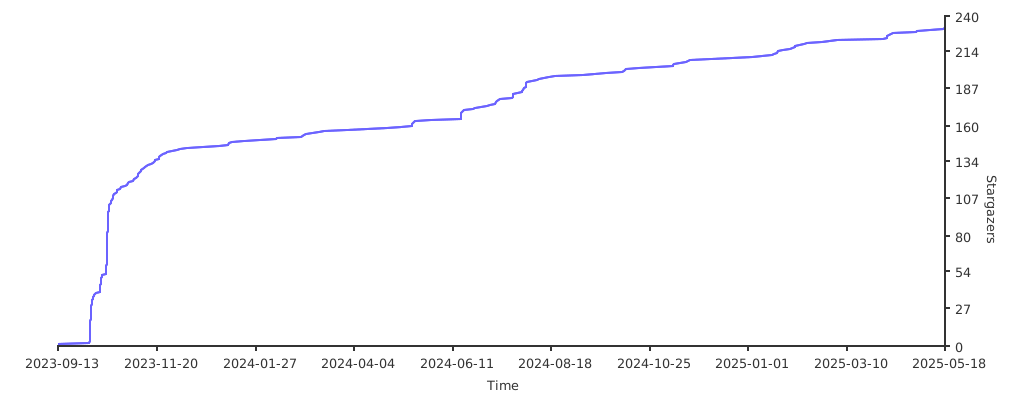
## Stars
[](https://starchart.cc/ali77gh/chap)
## Builtin Functions
[runtime/builtin_function](https://github.com/ali77gh/Chap/tree/master/src/runtime/builtin_function)\
Chap has 49 builtin function(version 2.0.0) (less than Java's keywords)
| Names | Input params | output | description |
|-------------------------|-------------------|----------|-------------------------------------------------------------|
| assign | any | any | put a value or variable in other variable 1 -> $a |
| std_out, print, show | any, any, any,... | any | prints params to console |
| std_in, input | nothing | string | read user input from console |
| exit, quit, kill, end | nothing | nothing | ends execution |
| jump | @tag | nothing | moves executor curser to closest tag with specified name |
| jump_if | @tag, bool | nothing | jumps to tag if 1st param is true |
| jump_if_not | @tag, bool | nothing | jumps to tag if 1st param is false |
| jump_if_equal, jeq | @tag, any, any | nothing | jumps to tag if 2th and 3th params are equal |
| jump_if_not_equal, jneq | @tag, any, any | nothing | jumps to tag if 2th and 3th params are not equal |
| new_tag | @tag | nothing | creates tag (you can call this just by writing tag name |
| add | num, num | num | adds two numbers 1 + 2 = 3 or 1.5 + 1 = 2.5 |
| add_many, add_all | num, num, num,... | num | adds many numbers 1 + 2 + 3 = 6 |
| minus | num, num | num | minus two numbers 3 - 2 = 1 |
| multiply | num, num | num | minus two numbers 3 * 2 = 6 |
| divide | num, num | num | divide two numbers 3 / 2 = 1.5 |
| modulus, mod | num, num | num | divide remaining 3 / 2 = 1 |
| power, pow | num, num | num | power 3 ** 2 = 9 |
| square_root, sqrt | num | num | square root 9 -> sqrt -> 3 |
| increase, inc | $num | nothing | adds one to variable short form of: $a,1 -> add -> $a |
| decrease, dec | $num | nothing | minus one from variable short form of: $a,1 -> minus -> $a |
| equal, eq | any, any | bool | true if 1st and 2nd are equal and false if they are not |
| not_equal, neq | any, any | bool | true if 1st and 2nd are not equal and false if they are |
| and | bool, bool | bool | and logical gate |
| or | bool, bool | bool | or logical gate |
| not | bool | bool | not logical gate |
| greater_than, gt | num, num | bool | true if 1st param is bigger than 2nd param 3,2 -> true |
| less_than, lt | num, num | bool | true if 1st param is less than 2nd param 3,2 -> false |
| concat, cat | any, any | string | convert inputs to string and concat them "al","i" -> "ali" |
| repeat | any, int | string | convert inputs to string and repeat "a",3 -> "aaa" |
| length, len | any | int | convert input to string and returns length 456 -> 3 |
| contains, has | any | bool | convert inputs to string and returns 1st contains 2nd 11,1->true |
| slice, sub_string | any, int, int | string | "hello", 1, 3 -> "el" |
| insert | array, any | nothing | insert an item to list |
| get | array, int | any | get nth item of list second param is index of item |
| pop | array | any | remove last item of list and returns it |
| last | array | any | return lsat item of list (without removing it) |
| has | array, any | bool | check if an item exist in a list |
| remove | array, any | nothing | removes a given item from list |
| remove_at | array, int | nothing | removes item at index of second param |
| index_of | array, any | int | search for an item on list and returns index |
| to_string | any | string | convert input to string 1 -> "1" |
| to_float | string | float | convert input to float "1.5" -> 1.5 ; "a"->error |
| to_int | string | int | convert input to int "1" -> 1 ; "a"->error |
| dump, dump_memory | nothing | nothing | prints all variables with values |
| type_of, type | any | str | prints type of param 1 -> int; "s" -> string |
| now_sec, now, unixtime | nothing | float | unix time standard in seconds |
| wait_mil, wait_millis | int | nothing | delay code execution for 1st milliseconds |
| wait_sec, wait_sec | int | nothing | delay code execution for 1st seconds |
| wait_min, wait_minute | int | nothing | delay code execution for 1st minutes |
| wait_hour,wait_hour | int | nothing | delay code execution for 1st hours |
| wait_hour,wait_hour | int | nothing | delay code execution for 1st hours |