https://github.com/aliberts/bangerbot
Get those bangers banging 🔥
https://github.com/aliberts/bangerbot
bangers cli dj music python tracks
Last synced: about 1 year ago
JSON representation
Get those bangers banging 🔥
- Host: GitHub
- URL: https://github.com/aliberts/bangerbot
- Owner: aliberts
- License: mit
- Created: 2023-11-06T15:52:50.000Z (over 2 years ago)
- Default Branch: main
- Last Pushed: 2023-11-09T15:15:11.000Z (over 2 years ago)
- Last Synced: 2025-03-21T04:51:15.587Z (about 1 year ago)
- Topics: bangers, cli, dj, music, python, tracks
- Language: Python
- Homepage:
- Size: 213 KB
- Stars: 3
- Watchers: 1
- Forks: 0
- Open Issues: 0
-
Metadata Files:
- Readme: README.md
- License: LICENSE.md
Awesome Lists containing this project
README
# BangerBot — Get those bangers banging 🔥
[](https://python-poetry.org/)

[](https://github.com/astral-sh/ruff)
[](https://pypi.python.org/pypi/bangerbot)


## What is this for?
Preparing a DJ set and digging for tracks car be very time consuming and cumbersome. This is a tool aimed for DJs to ease their workflow by providing them a simple utility to download their favorites ([FREE !](#disclaimer)) tracks.
It's as simple as this:
```bash
banger get https://soundcloud.com/fc_kabagar/kylie-on-jersey
```
When you're in a digging session, you might not want to spend time getting your tracks in-between each listening, but you still want to save them. Just write your tracks urls (Youtube or Soundcloud) inside your `~/Music/bangerbot/bangers.txt` file.
When you're ready, run a batch to catch'em all:
```bash
banger batch
```
When downloading your bangers, BangerBot will automatically put them either in `bangerbot/HQ-tracks/` (High Quality) or `bangerbot/LQ-tracks/` (Low Quality) depending on their audio format, ready to be imported to your Traktor, Rekordbox or Serato libraries:
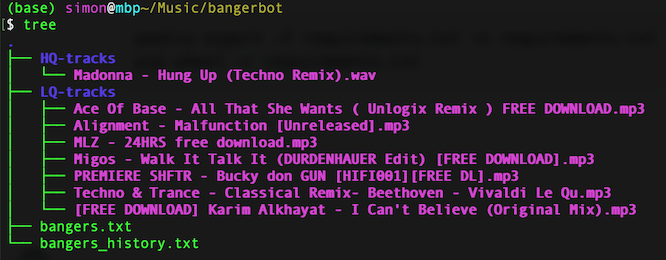
BangerBot will write the urls of all the downloaded tracks in `bangers_history.txt`.
## But... why?
BangerBot is essentially a wrapper around [scdl](https://github.com/flyingrub/scdl) and [yt-dlp](https://github.com/yt-dlp/yt-dlp). You could run a command with either of them and get the same result as with BangerBot. But you'd have to first decide which CLI tool to use depending on the source (Youtube or Soundcloud) and then remember their commands and all the options each time.
Here's what the equivalent of `banger get ` looks like with, e.g., yt-dlp:
```bash
yt-dlp --format bestaudio[ext=m4a] -P
```
What BangerBot provides is mainly 2 things:
- A simple and consistent interface, because you don't care if that track is coming from SoundCloud or Youtube, you just want to `get` it.
- A workflow utility that helps you get straight to the point and reduce the hassle when preparing a DJ set.
## Installation
### 1. Install pipx
If you don't have it, install [pipx](https://github.com/pypa/pipx)
#### MacOS
```bash
brew install pipx
pipx ensurepath
```
#### Linux
```bash
python3 -m pip install --user pipx
python3 -m pipx ensurepath
```
### 2. Install BangerBot
```bash
pipx install bangerbot
```
### 3. Run init
Follow the prompt to setup the folder used by BangerBot:
```bash
banger init
```
This will create the bangerbot folder and install the `scdl`and `yt-dlp` dependencies via pipx if they are not found
## Use BangerBot
### get
Download a banger:
```bash
banger get https://soundcloud.com/fc_kabagar/kylie-on-jersey
```
### batch
Download multiples bangers at once.
Simply put your tracks url inside `bangers.txt` (1 url per line) and run a batch:
```bash
banger batch
```
The default location for `bangers.txt` is `~/Music/bangerbot/bangers.txt` but you can change it when setting up with `banger init` or you can point to any file you like using the `-f` option.
```bash
banger batch -f ~/Music/some_more_bangers.txt
```
## Supported urls
For now, BangerBot only supports SoundCloud and Youtube urls.
## Roadmap
- [x] Support Youtube and SoundCloud urls
- [x] `banger get`
- [x] `banger batch`
- [ ] Tests
- [ ] Improve history format: banger_name: short_url
- [ ] Shell completion
- [ ] `banger info` to get info about a track
- [ ] `banger history` to display history
- [ ] `banger where` to show the location of the bangerbot folder
- [ ] Safely clear banger.txt content after download
- [ ] Fetch metadata to downloaded tracks
## Disclaimer
Supporting music artists is very important to keep them bangers coming.
This tool is intended to get tracks when they are made freely available for download by the producer or as a last resort if you really can't get the track anywhere else.
Besides, tracks that are not freely available will be downloaded in `.mp3` or `.m4a` which might sound ok for you at home but probably won't on a larger sound system.
Do not use this tool to steal artists and music producers hard work, seriously. 🙏