https://github.com/alienkevin/brace-lang
A modern scripting language for TI-83 and TI-84 calculators
https://github.com/alienkevin/brace-lang
Last synced: 11 months ago
JSON representation
A modern scripting language for TI-83 and TI-84 calculators
- Host: GitHub
- URL: https://github.com/alienkevin/brace-lang
- Owner: AlienKevin
- License: mit
- Created: 2018-11-18T13:58:27.000Z (over 7 years ago)
- Default Branch: master
- Last Pushed: 2019-01-14T01:45:37.000Z (over 7 years ago)
- Last Synced: 2025-03-17T11:50:47.254Z (over 1 year ago)
- Language: Java
- Size: 475 KB
- Stars: 4
- Watchers: 0
- Forks: 0
- Open Issues: 0
-
Metadata Files:
- Readme: README.md
- License: LICENSE
Awesome Lists containing this project
README
# Brace
Brace is a modern scripting language for TI-83 and TI-84 calculators. Brace is designed to make programming Texas Instrument calculators more easily and enjoyable.
Warning: This parser does not check for syntax errors, so be sure to follow the syntax rules listed in the features list carefully. It is recommended that you use Brace to write small programs shorter than 300 or so lines so that you can spot errors. Contribution is extremely welcome if anyone wants to write a parser for Brace :)
Here's a screenshot of editing Brace in Sublime Text 3:

Here's a list of useful features:
1. modern syntax of curly braces `{` and `}` instead of clumsy `Then` and `End`
2. arbitrarily nested `if`, `elif`, and `else`
3. user-defined functions with parameters
4. user-defined variables with friendly names
5. local scopes within functions
6. single and multi-line comments
7. more commonly used `==` as equality operator instead of `=` in TI-Basic
8. more commonly used `=` as assignment operator instead of weird `→` in TI-Basic
9. boolean operators `&&` (and) and `||` (or)
10. boolean values `true` and `false`
11. Multiple output formats for TI calculators, online TI-Basic IDE SourceCoder, and plain text. Each format treats special characters differently
All of the upon features aim at making coding less stressful, tedious and buggy.
## Installation
In the git repository, click "Brace.jar" and then click "download". After you downloaded the jar file, double click to execute it. If you cannot open the jar file, use command line to execut it. For Windows users, open cmd.exe, navigate to the directory where you stored the jar file and type `java.exe -jar Brace.jar`, then the Brace command line interface should appear.
## Usage
Brace.jar is a command line interface for you to convert a Brace file to TI-Basic file.
### 1. Convert Brace to TI-Basic
Here the demo of Brace CLI working in Windows 10:

After you see the welcome message, type `convert` and hit ENTER. The prompt "Enter Brace file address" will show up. Enter your brace file address there. Then, the prompt "Enter TI-Basic file address" will show up. Enter your target TI-Basic file address (maybe empty an empty file or a file with content, ). All of the target TI-Basic file's contents will be replaced by the result of the conversion. After you finished conversion, type `exit` to exit the CLI.
### 2. Make your life easier
- `cd` command
Just as you would in Windows/Unix command line, you can use `cd 'directory'` command to point to any directory. You can also use `cd ..` (two dots) to move back to the parent directory.

In this example, I used the `cd` command to point to my working directory. Then I could just enter the names of the files I want to convert without the long directory names.
- `store` command
To store the file addresses that you use very often, use the `store` command to make it easier to refer to them.

In this example, I named the file address for my Brace file "braceTest" and the assigned the address to it.
- `back` command
To cancel any operation in the middle, use the `back` command.
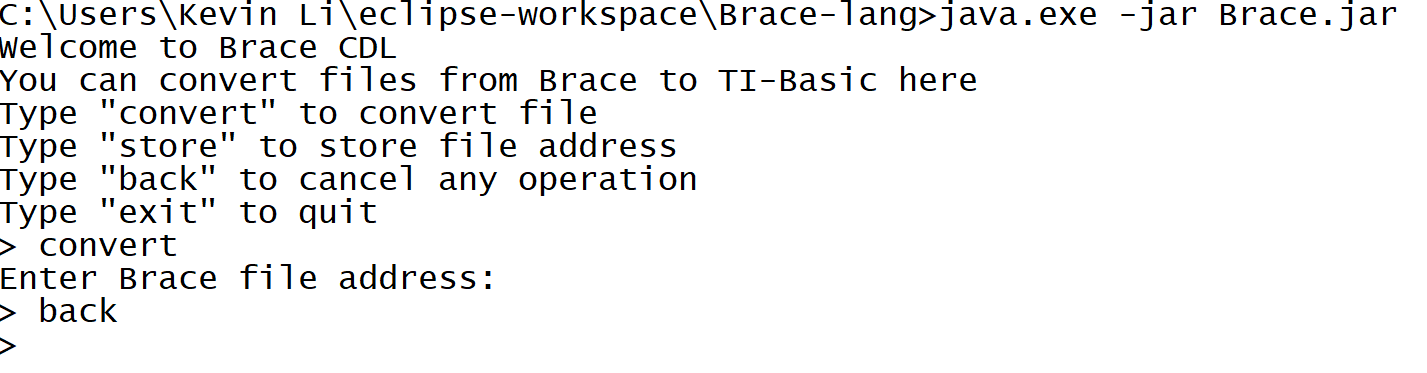
In this example, I first wanted to convert a file but I forgot the file address and wanted to cancel the operation. I just entered `back` to cancel the `convert`.
## License
This project is licensed under the terms of the MIT license.