https://github.com/alikaragoz/MCSwipeTableViewCell
:point_up_2: Convenient UITableViewCell subclass that implements a swippable content to trigger actions (similar to the Mailbox app).
https://github.com/alikaragoz/MCSwipeTableViewCell
Last synced: 7 months ago
JSON representation
:point_up_2: Convenient UITableViewCell subclass that implements a swippable content to trigger actions (similar to the Mailbox app).
- Host: GitHub
- URL: https://github.com/alikaragoz/MCSwipeTableViewCell
- Owner: alikaragoz
- License: mit
- Archived: true
- Created: 2013-03-02T16:58:43.000Z (about 13 years ago)
- Default Branch: master
- Last Pushed: 2018-09-17T13:02:40.000Z (over 7 years ago)
- Last Synced: 2024-04-24T18:57:45.050Z (almost 2 years ago)
- Language: Objective-C
- Homepage:
- Size: 1.54 MB
- Stars: 2,968
- Watchers: 146
- Forks: 411
- Open Issues: 31
-
Metadata Files:
- Readme: README.md
- License: LICENSE
Awesome Lists containing this project
- awesome-ios - MCSwipeTableViewCell - :point_up_2: Convenient UITableViewCell subclass that implements a swippable content to trigger actions (similar to the Mailbox app). (UI / Table View / Collection View)
- awesome-ios-star - MCSwipeTableViewCell - :point_up_2: Convenient UITableViewCell subclass that implements a swippable content to trigger actions (similar to the Mailbox app). (UI / Table View / Collection View)
- fucking-awesome-ios - MCSwipeTableViewCell - :point_up_2: Convenient UITableViewCell subclass that implements a swippable content to trigger actions (similar to the Mailbox app). (UI / Table View / Collection View)
README
MCSwipeTableViewCell
--------------------
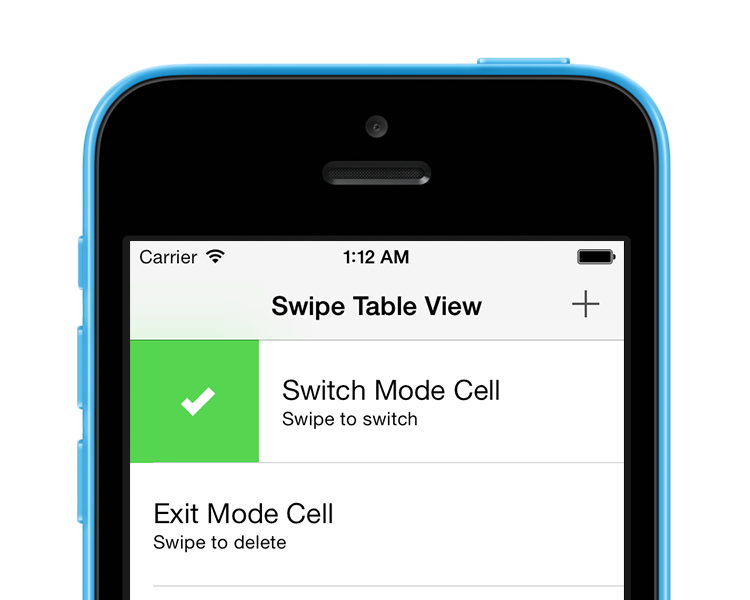
An effort to show how one would implement a UITableViewCell like the one we can see in the very well executed [Mailbox](http://www.mailboxapp.com/) iOS app.
## Preview
### Exit Mode
The exit mode `MCSwipeTableViewCellModeExit` is the original behavior we can see in the Mailbox app. Swiping the cell should make it disappear. Convenient in destructive modes.

### Switch Mode
The switch mode `MCSwipeTableViewCellModeSwitch` is a new behavior I'm introducing. The cell will bounce back after selecting a state, this allows you to keep the cell. Convenient to switch an option quickly.

## API Reference
Please refer to the header file [`MCSwipeTableViewCell.h`](MCSwipeTableViewCell/MCSwipeTableViewCell.h) for a complete overview of the capabilities of the class.
## Usage
```objc
- (UITableViewCell *)tableView:(UITableView *)tableView cellForRowAtIndexPath:(NSIndexPath *)indexPath {
static NSString *CellIdentifier = @"Cell";
MCSwipeTableViewCell *cell = [tableView dequeueReusableCellWithIdentifier:CellIdentifier];
if (!cell) {
cell = [[MCSwipeTableViewCell alloc] initWithStyle:UITableViewCellStyleSubtitle reuseIdentifier:CellIdentifier];
// Remove inset of iOS 7 separators.
if ([cell respondsToSelector:@selector(setSeparatorInset:)]) {
cell.separatorInset = UIEdgeInsetsZero;
}
[cell setSelectionStyle:UITableViewCellSelectionStyleGray];
// Setting the background color of the cell.
cell.contentView.backgroundColor = [UIColor whiteColor];
}
// Configuring the views and colors.
UIView *checkView = [self viewWithImageName:@"check"];
UIColor *greenColor = [UIColor colorWithRed:85.0 / 255.0 green:213.0 / 255.0 blue:80.0 / 255.0 alpha:1.0];
UIView *crossView = [self viewWithImageName:@"cross"];
UIColor *redColor = [UIColor colorWithRed:232.0 / 255.0 green:61.0 / 255.0 blue:14.0 / 255.0 alpha:1.0];
UIView *clockView = [self viewWithImageName:@"clock"];
UIColor *yellowColor = [UIColor colorWithRed:254.0 / 255.0 green:217.0 / 255.0 blue:56.0 / 255.0 alpha:1.0];
UIView *listView = [self viewWithImageName:@"list"];
UIColor *brownColor = [UIColor colorWithRed:206.0 / 255.0 green:149.0 / 255.0 blue:98.0 / 255.0 alpha:1.0];
// Setting the default inactive state color to the tableView background color.
[cell setDefaultColor:self.tableView.backgroundView.backgroundColor];
[cell.textLabel setText:@"Switch Mode Cell"];
[cell.detailTextLabel setText:@"Swipe to switch"];
// Adding gestures per state basis.
[cell setSwipeGestureWithView:checkView color:greenColor mode:MCSwipeTableViewCellModeSwitch state:MCSwipeTableViewCellState1 completionBlock:^(MCSwipeTableViewCell *cell, MCSwipeTableViewCellState state, MCSwipeTableViewCellMode mode) {
NSLog(@"Did swipe \"Checkmark\" cell");
}];
[cell setSwipeGestureWithView:crossView color:redColor mode:MCSwipeTableViewCellModeSwitch state:MCSwipeTableViewCellState2 completionBlock:^(MCSwipeTableViewCell *cell, MCSwipeTableViewCellState state, MCSwipeTableViewCellMode mode) {
NSLog(@"Did swipe \"Cross\" cell");
}];
[cell setSwipeGestureWithView:clockView color:yellowColor mode:MCSwipeTableViewCellModeSwitch state:MCSwipeTableViewCellState3 completionBlock:^(MCSwipeTableViewCell *cell, MCSwipeTableViewCellState state, MCSwipeTableViewCellMode mode) {
NSLog(@"Did swipe \"Clock\" cell");
}];
[cell setSwipeGestureWithView:listView color:brownColor mode:MCSwipeTableViewCellModeSwitch state:MCSwipeTableViewCellState4 completionBlock:^(MCSwipeTableViewCell *cell, MCSwipeTableViewCellState state, MCSwipeTableViewCellMode mode) {
NSLog(@"Did swipe \"List\" cell");
}];
return cell;
}
```
### Delegate
MCSwipeTableViewCell has a set of delegate methods in order to track the user behaviors. Take a look at the header file to be aware of all the methods provided by `MCSwipeTableViewCellDelegate`.
```objc
@interface MCTableViewController ()
```
```objc
#pragma mark - MCSwipeTableViewCellDelegate
// Called when the user starts swiping the cell.
- (void)swipeTableViewCellDidStartSwiping:(MCSwipeTableViewCell *)cell;
// Called when the user ends swiping the cell.
- (void)swipeTableViewCellDidEndSwiping:(MCSwipeTableViewCell *)cell;
// Called during a swipe.
- (void)swipeTableViewCell:(MCSwipeTableViewCell *)cell didSwipeWithPercentage:(CGFloat)percentage;
```
### Cell Deletion
In `MCSwipeTableViewCellModeExit` mode you may want to delete the cell with a nice fading animation, the following lines will give you an idea how to execute it:
```objc
[cell setSwipeGestureWithView:crossView color:redColor mode:MCSwipeTableViewCellModeExit state:MCSwipeTableViewCellState2 completionBlock:^(MCSwipeTableViewCell *cell, MCSwipeTableViewCellState state, MCSwipeTableViewCellMode mode) {
NSLog(@"Did swipe \"Cross\" cell");
// Code to delete your cell...
}];
```
You can also ask for a confirmation before deleting a cell:
```objc
__weak MCTableViewController *weakSelf = self;
[cell setSwipeGestureWithView:crossView color:redColor mode:MCSwipeTableViewCellModeExit state:MCSwipeTableViewCellState1 completionBlock:^(MCSwipeTableViewCell *cell, MCSwipeTableViewCellState state, MCSwipeTableViewCellMode mode) {
NSLog(@"Did swipe \"Cross\" cell");
__strong MCTableViewController *strongSelf = weakSelf;
strongSelf.cellToDelete = cell;
UIAlertView *alertView = [[UIAlertView alloc] initWithTitle:@"Delete?"
message:@"Are you sure your want to delete the cell?"
delegate:self
cancelButtonTitle:@"No"
otherButtonTitles:@"Yes", nil];
[alertView show];
}];
```
Then handle the `UIAlertView` action:
```objc
#pragma mark - UIAlertViewDelegate
- (void)alertView:(UIAlertView *)alertView clickedButtonAtIndex:(NSInteger)buttonIndex {
// No
if (buttonIndex == 0) {
[_cellToDelete swipeToOriginWithCompletion:^{
NSLog(@"Swiped back");
}];
_cellToDelete = nil;
}
// Yes
else {
// Code to delete your cell...
}
}
```
There is also an example in the demo project, I recommend to take a look at it.
### Changing the trigger percentage
If the default trigger limits do not fit to your needs you can change them with the `firstTrigger` *(default: 25%)* and `secondTrigger` *(Default: 75%)* properties.
```objc
cell.firstTrigger = 0.1;
cell.secondTrigger = 0.5;
```
### Reseting cell position
It is possible to put the cell back to it's position when using the `MCSwipeTableViewCellModeExit` mode with the `-swipeToOriginWithCompletion:` method:
```objc
[cell swipeToOriginWithCompletion:^{
NSLog(@"Cell swiped back!");
}];
```
## Installation
### CocoaPods
[CocoaPods](http://cocoapods.org) is a dependency manager for Cocoa projects.
```bash
$ gem install cocoapods
```
To integrate MCSwipeTableViewCell into your Xcode project using CocoaPods, specify it in your `Podfile`:
```ruby
pod 'MCSwipeTableViewCell', '~> 2.1.4'
```
Then, run the following command:
```bash
$ pod install
```
### Carthage
[Carthage](https://github.com/Carthage/Carthage) is a decentralized dependency manager that automates the process of adding frameworks to your Cocoa application.
You can install Carthage with [Homebrew](http://brew.sh/) using the following command:
```bash
$ brew update
$ brew install carthage
```
To integrate MCSwipeTableViewCell into your Xcode project using Carthage, specify it in your `Cartfile`:
```ogdl
github "alikaragoz/MCSwipeTableViewCell" >= 2.1.4
```
## Compatibility
This library is not compatible with auto-layout so you will need to disable auto-layout in your xib properties.
## Requirements
- iOS >= 5.0
- ARC
## Contact
Ali Karagoz
- http://github.com/alikaragoz
- http://twitter.com/alikaragoz
## License
MCSwipeTableViewCell is available under the MIT license. See the LICENSE file for more info.