https://github.com/alikhil/kubectl-find
Missing kubectl UNIX-find-like plugin to find resources and perform action on them
https://github.com/alikhil/kubectl-find
find krew kubectl kubectl-plugin kubernetes
Last synced: 6 months ago
JSON representation
Missing kubectl UNIX-find-like plugin to find resources and perform action on them
- Host: GitHub
- URL: https://github.com/alikhil/kubectl-find
- Owner: alikhil
- License: apache-2.0
- Created: 2025-06-23T20:33:02.000Z (about 1 year ago)
- Default Branch: main
- Last Pushed: 2025-12-22T17:29:13.000Z (8 months ago)
- Last Synced: 2025-12-22T18:35:09.691Z (8 months ago)
- Topics: find, krew, kubectl, kubectl-plugin, kubernetes
- Language: Go
- Homepage:
- Size: 211 KB
- Stars: 65
- Watchers: 1
- Forks: 0
- Open Issues: 0
-
Metadata Files:
- Readme: README.md
- Changelog: CHANGELOG.md
- License: LICENSE
- Code of conduct: code-of-conduct.md
Awesome Lists containing this project
- awesome-kubectl-plugins - kubectl find - find-like plugin for kubectl to find resources and perform action on them | Uncategorized | [](https://github.com/alikhil/kubectl-find/stargazers) | (kubectl Plugins / Installing plugins via awesome-kubectl-plugins)
README
# kubectl find
[](https://deepwiki.com/alikhil/kubectl-find)
[](https://goreportcard.com/report/github.com/alikhil/kubectl-find)

It's a plugin for `kubectl` that gives you a **UNIX find**-like experience.
Find resource based on
- **name regex**
- **age**
- **labels**
- **status**
- **node name** (for pods only)
- **restarts** (for pods only)
- **image name** (for pods only)
- **jq filter** - custom condition
and then **print, patch or delete** any.
## Usage
```shell
kubectl fd [resource type | pods] [flags]
Flags:
-r, --name string Regular expression to match resource names against; if not specified, all resources of the specified type will be returned.
-n, --namespace string If present, the namespace scope for this CLI request
-A, --all-namespaces Search in all namespaces; if not specified, only the current namespace will be searched.
--status string Filter pods by their status (phase); e.g. 'Running', 'Pending', 'Succeeded', 'Failed', 'Unknown'.
--image string Regular expression to match container images against.
-j, --jq string jq expression to filter resources; Uses gojq library for evaluation.
--restarted Find pods that have been restarted at least once.
-l, --selector string Label selector to filter resources by labels.
--max-age string Filter resources by maximum age; e.g. '2d' for 2 days, '3h' for 3 hours, etc.
--min-age string Filter resources by minimum age; e.g. '2d' for 2 days, '3h' for 3 hours, etc.
--node string Filter pods by node name regex; Uses pod.Spec.NodeName or pod.Status.NominatedNodeName if the former is empty.
-L, --labels strings Comma-separated list of labels to show.
-T, --annotations strings Comma-separated list of annotations to show.
-N, --node-labels strings Comma-separated list of node labels to show.
--natural-sort Sort resource names in natural order.
-h, --help help for kubectl find
-p, --patch string Patch all found resources with the specified JSON patch.
-e, --exec string Execute a command on all found pods.
--delete Delete all matched resources.
-f, --force Skip confirmation prompt before performing actions on resources.
```
## Install
### Using [krew](https://krew.sigs.k8s.io/)
```shell
krew install fd
```
### Download binary
Download [latest release](https://github.com/alikhil/kubectl-find/releases) for your platform/os and save it under `$PATH` as `kubectl-fd`
## Examples
### Filter by jq
Based on [gojq](https://github.com/itchyny/gojq) implementation of `jq`.
Check resource structure on [kubespec.dev](https://kubespec.dev/).
#### Find pods with empty nodeSelector
```shell
kubectl fd pods -j '.spec.nodeSelector == null' -A
```
#### Find pods with undefined resources
```shell
kubectl fd pods -j 'any( .spec.containers[]; .resources == {} )' -A
```
### Filter using regex
Instead of
```shell
kubectl get pods -o name | grep test
```
Run
```shell
kubectl fd -r test
```
### Filter by resource age
```shell
kubectl fd cm --min-age 1d -A --name spark
```
### Execute command on several pods
```shell
kubectl fd pods -l app=nginx --exec 'nginx -s reload'
```
### Find all failed pods and delete them
```shell
kubectl fd pods --status failed -A --delete
```
### Find restarted pods
```shell
kubectl fd --restarted
```
### Enhanced output
#### Show resource labels
```shell
k fd -L app.kubernetes.io/component
NAME READY STATUS RESTARTS AGE COMPONENT
admin-backend-server-6fb6bbb8f6-2xntp 1/1 Running 0 7h4m deployments-server
admin-frontend-nginx-b8c88b7b4-pxx2x 1/1 Running 0 3h7m deployments-nginx
top-react-ok-app-develop-nginx-586c65496f-h4b9p 1/1 Running 0 11h deployments-nginx
top-react-ok-app-stage-nginx-8595cbfb6c-qzt2z 1/1 Running 0 11h deployments-nginx
nginx 1/1 Running 0 18d
redis-redis-ha-server-0 1/1 Running 0 11h
super-admin-server-65d57f8787-5c9sd 1/1 Running 0 11h deployments-server
ok-web-app-nginx-5c78887cbf-2n8fw 1/1 Running 0 11h deployments-nginx
```
#### Show node labels of the pods
```shell
k fd -N topology.kubernetes.io/zone
NAME READY STATUS RESTARTS AGE NODE ZONE
admin-backend-server-6fb6bbb8f6-2xntp 1/1 Running 0 7h5m nodeee-short-2 eu-central1-b
admin-frontend-nginx-b8c88b7b4-pxx2x 1/1 Running 0 3h8m nodeee-short-2 eu-central1-b
top-react-ok-app-develop-nginx-586c65496f-h4b9p 1/1 Running 0 11h nodeee-short-2 eu-central1-b
top-react-ok-app-stage-nginx-8595cbfb6c-qzt2z 1/1 Running 0 11h nodeee-short-2 eu-central1-b
nginx 1/1 Running 0 18d nodeee-long-3 eu-central1-b
redis-redis-ha-server-0 1/1 Running 0 11h nodeee-short-2 eu-central1-b
super-admin-server-65d57f8787-5c9sd 1/1 Running 0 11h nodeee-short-2 eu-central1-b
ok-web-app-nginx-5c78887cbf-2n8fw 1/1 Running 0 11h nodeee-short-2 eu-central1-b
zipkin-ok-shop-zipkin-5d94fcdc67-r8pcx 1/1 Running 0 10d nodeee-long-1 eu-central1-b
```
#### Show resource annotations
```shell
k fd -T example.com/owner
NAME READY STATUS RESTARTS AGE OWNER
admin-backend-server-6fb6bbb8f6-2xntp 1/1 Running 0 7h4m team-a
admin-frontend-nginx-b8c88b7b4-pxx2x 1/1 Running 0 3h7m team-b
top-react-ok-app-develop-nginx-586c65496f-h4b9p 1/1 Running 0 11h team-a
nginx 1/1 Running 0 18d
```
#### Natural sort
Normal sort
```shell
kubectl fd
NAME READY STATUS RESTARTS AGE
nginx-0 1/1 Running 0 5m14s
nginx-1 1/1 Running 0 5m12s
nginx-10 1/1 Running 0 4m53s
nginx-11 1/1 Running 0 4m50s
nginx-12 1/1 Running 0 4m48s
nginx-13 1/1 Running 0 4m46s
nginx-14 1/1 Running 0 4m44s
nginx-2 1/1 Running 0 5m10s
nginx-3 1/1 Running 0 5m7s
nginx-4 1/1 Running 0 5m5s
nginx-5 1/1 Running 0 5m3s
nginx-6 1/1 Running 0 5m1s
nginx-7 1/1 Running 0 4m59s
nginx-8 1/1 Running 0 4m57s
nginx-9 1/1 Running 0 4m55s
```
Natural sort
```shell
kubectl fd --natural-sort
NAME READY STATUS RESTARTS AGE
nginx-0 1/1 Running 0 6m6s
nginx-1 1/1 Running 0 6m4s
nginx-2 1/1 Running 0 6m2s
nginx-3 1/1 Running 0 5m59s
nginx-4 1/1 Running 0 5m57s
nginx-5 1/1 Running 0 5m55s
nginx-6 1/1 Running 0 5m53s
nginx-7 1/1 Running 0 5m51s
nginx-8 1/1 Running 0 5m49s
nginx-9 1/1 Running 0 5m47s
nginx-10 1/1 Running 0 5m45s
nginx-11 1/1 Running 0 5m42s
nginx-12 1/1 Running 0 5m40s
nginx-13 1/1 Running 0 5m38s
nginx-14 1/1 Running 0 5m36s
```
## Completion
Copy [kubectl_complete-fd](https://github.com/alikhil/kubectl-find/blob/main/kubectl_complete-fd) script somewhere under `PATH`.
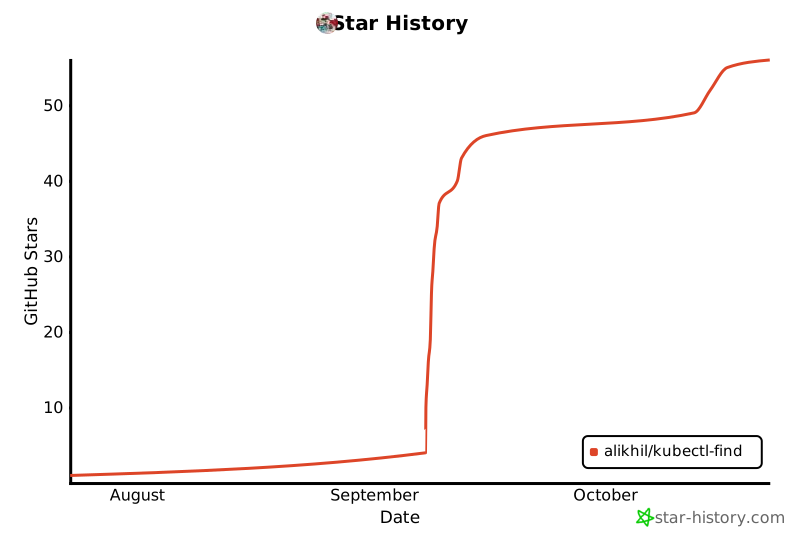
## Star History