https://github.com/alislin/markdown-fence
Markdown Fence vscode 扩展,支持分栏格式
https://github.com/alislin/markdown-fence
docsify-plugin extension-vscode fence markdown
Last synced: over 1 year ago
JSON representation
Markdown Fence vscode 扩展,支持分栏格式
- Host: GitHub
- URL: https://github.com/alislin/markdown-fence
- Owner: alislin
- License: mit
- Created: 2025-03-17T02:39:07.000Z (over 1 year ago)
- Default Branch: master
- Last Pushed: 2025-03-24T10:27:27.000Z (over 1 year ago)
- Last Synced: 2025-03-24T11:34:47.297Z (over 1 year ago)
- Topics: docsify-plugin, extension-vscode, fence, markdown
- Language: TypeScript
- Homepage: https://alislin.github.io/markdown-fence
- Size: 374 KB
- Stars: 0
- Watchers: 1
- Forks: 0
- Open Issues: 0
-
Metadata Files:
- Readme: README.md
- Changelog: CHANGELOG.md
- License: license.md
Awesome Lists containing this project
README
# Markdown Fence

vscode 扩展 Markdown Fence
vscode extension "markdown fence".
## 功能 Features
**标准语法 Standard syntax**
使用下面标记进行分隔
Use markers to split into multi-column styles
- ``
- ``
- ``
**快速语法 Short syntax**
使用下面标记进行分隔
Use markers to split into multi-column styles
- ``
- ``
- ``
**简写语法 Short syntax**
> 会在不支持的 markdown 解析器中留下分栏可见字符
> Column-visible characters are left in unsupported markdown parsers
使用下面标记进行分隔,后续字符三个以上至任意数量都可以
Use the following tags to separate them, and more than three or more characters are acceptable to any number
- `/>>>`
- `/---`
- `/<<<`
**分栏标题 Column headings**
在分栏第一行使用加粗的文本,并且在后续保持一个空行。这行就会解析为分栏标题。
Use bold text on the first line of the column and keep a blank line for the follow-up. This line resolves to a section header.
`**标题 title**`
`<空行 empty row>`
**命令 Command**
支持导出 html,pdf 两种格式
Support export of HTML and PDF formats
- `Markdown Fence: Export to HTML`
- `Markdown Fence: Export to PDF`
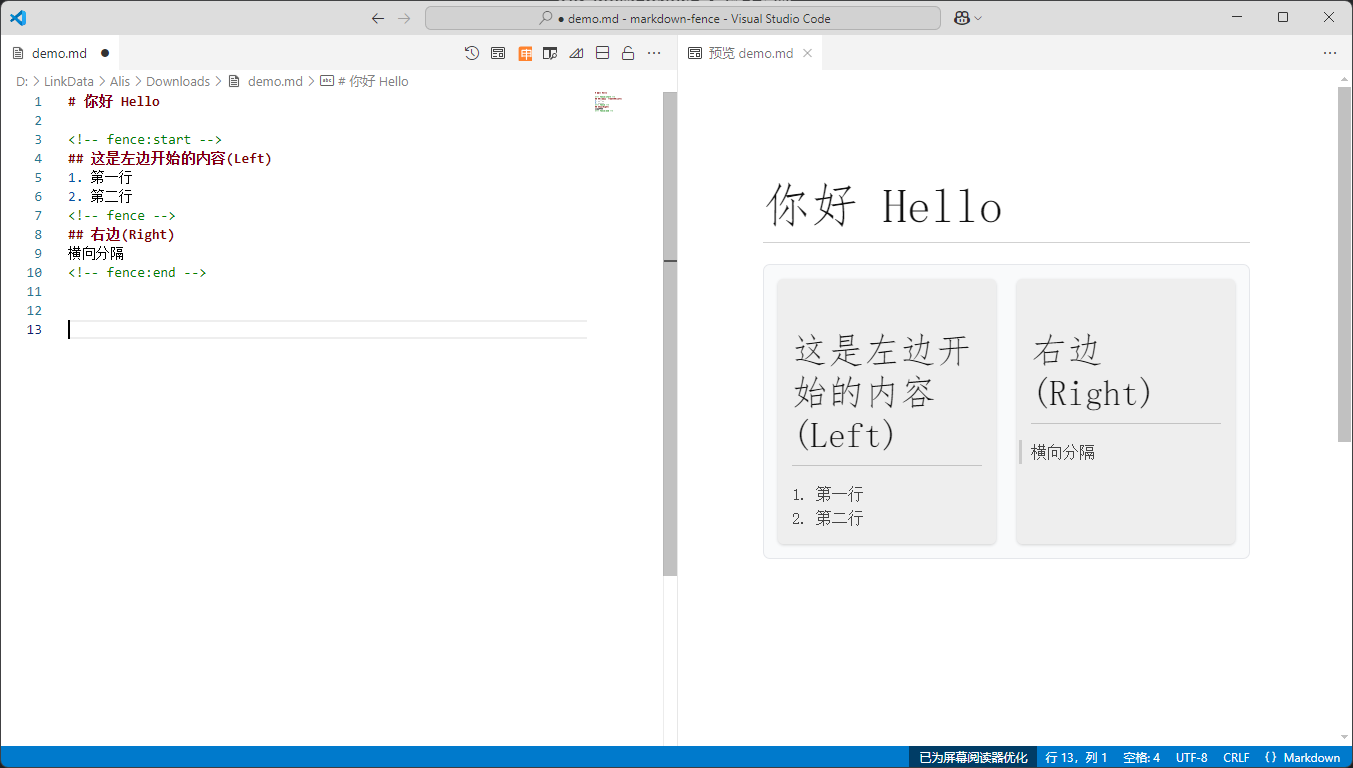
**markdown**
markdown 内容如下
markdown content:
```markdown
## 这是左边开始的内容
1. 第一行
2. 第二行
## 右边标题
横向分隔
```
**预览**
预览
after render:
```html
这是左边开始的内容
- 第一行
- 第二行
右边标题
横向分隔
```
## 样式 style
可以根据自己的需要编写样式覆盖
You can write style overrides according to your needs
```css
.fence-block,fence-short-block {
}
.fence-item,fence-short-item {
}
```
## docsify plugin 插件支持
Markdown Fence 也提供了docsify支持。按下面添加插件即可使用
Markdown Fence also provides docsify support. Click below to add a plug-in to use
```diff
Markdown Fence
+
+
var num = 0;
window.$docsify = {
name: 'Markdown Fence',
repo: '',
+ plugins:[fence]
}
```