https://github.com/aliucord/manager
The new way to install Aliucord – in a user-friendly way
https://github.com/aliucord/manager
android compose jetpack-compose kotlin modding
Last synced: 5 months ago
JSON representation
The new way to install Aliucord – in a user-friendly way
- Host: GitHub
- URL: https://github.com/aliucord/manager
- Owner: Aliucord
- License: osl-3.0
- Created: 2021-07-16T22:22:05.000Z (almost 5 years ago)
- Default Branch: main
- Last Pushed: 2026-01-28T06:34:25.000Z (5 months ago)
- Last Synced: 2026-01-28T10:58:54.002Z (5 months ago)
- Topics: android, compose, jetpack-compose, kotlin, modding
- Language: Kotlin
- Homepage:
- Size: 12.9 MB
- Stars: 504
- Watchers: 8
- Forks: 63
- Open Issues: 9
-
Metadata Files:
- Readme: README.md
- Funding: .github/FUNDING.yml
- License: LICENSE
Awesome Lists containing this project
README

Aliucord Manager
The new method to install Aliucord, in a user-friendly way.
[](https://discord.gg/EsNDvBaHVU)
[](https://github.com/Aliucord/Manager/stargazers)
[](https://nightly.link/Aliucord/Manager/workflows/build/main/app.zip)


[](https://github.com/Aliucord/Manager/blob/main/LICENSE)
## Prerequisites
Supported Android versions:
- Android 7 (SDK 24) - Android 16 QPR1 (SDK 36)
- Architectures: arm64, armeabi-v7, x86_64, x86
If you have already installed Aliucord before via the old installer app, you can uninstall the
legacy installer. It is deprecated and does not work anymore.
## Installation
1. Download the [latest release APK](https://github.com/Aliucord/Manager/releases/latest)
2. Open and install Aliucord Manager
- If you have not enabled "Install from unknown sources" for your browser via system settings, do so now.
3. Open Aliucord Manager
4. Grant the permission requests
5. Click "New Install" or "Update" if you have previously installed Aliucord.
- You may change how the Aliucord app icon will look once installed.
6. Click "Install" and wait. Do not exit the app while it is running.
- If a failure occurs, it may be due to a variety of reasons:
- Poor internet connection
- Internet censorship / blocks (use a VPN or a different DNS server)
- Insufficient free storage (at least 500MB is recommended)
- If you are stuck, please ask for help in the `#support` channel of our [Discord](https://discord.gg/EsNDvBaHVU0).
7. Click "Launch" or directly launch the newly installed Aliucord app
8. Grant the permission requests
9. Sign in to Discord
10. Install plugins by following these [instructions](https://github.com/aliucord/aliucord#-plugin-installation)
## Building
1. Install the prerequisites:
- Git
- [JDK 21+](https://adoptium.net/temurin/releases/?os=any&arch=any&version=21)
2. Clone the repo:
```shell
git clone https://github.com/Aliucord/Manager && cd Manager
```
3. Build the project:
#### Linux/macOS
```shell
chmod +x gradlew && ./gradlew :app:packageStaging --stacktrace
```
#### Windows
```shell
.\gradlew.bat :app:packageStaging --stacktrace
```
4. Built APK will be located at `./app/build/outputs/apk/staging/app-staging.apk`
## Translations
This project handles crowd-sourced translations through Crowdin! If you happen to be fluent in one of the languages listed below,
then please feel free to contribute your translations!
[](https://crowdin.com/project/aliucord-manager)
[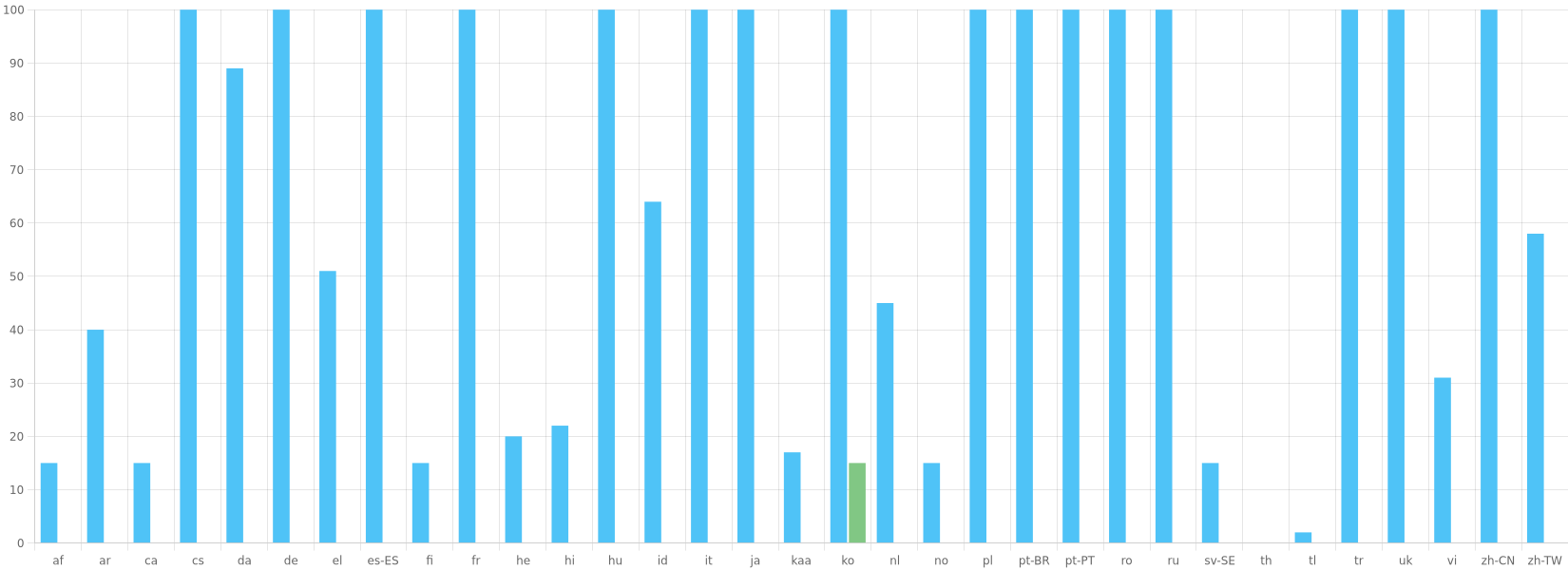](https://crowdin.com/project/aliucord-manager)