https://github.com/alkuinvito/chat-client
LAN Chat Client - Private, Offline, Encrypted Messaging
https://github.com/alkuinvito/chat-client
chat golang wails
Last synced: 5 months ago
JSON representation
LAN Chat Client - Private, Offline, Encrypted Messaging
- Host: GitHub
- URL: https://github.com/alkuinvito/chat-client
- Owner: alkuinvito
- License: gpl-3.0
- Created: 2025-07-22T07:13:30.000Z (11 months ago)
- Default Branch: main
- Last Pushed: 2025-08-07T13:52:06.000Z (11 months ago)
- Last Synced: 2025-08-07T15:31:21.805Z (11 months ago)
- Topics: chat, golang, wails
- Language: TypeScript
- Homepage:
- Size: 590 KB
- Stars: 0
- Watchers: 0
- Forks: 0
- Open Issues: 0
-
Metadata Files:
- Readme: README.md
- License: LICENSE
Awesome Lists containing this project
README
# 💬 Chat Client: Private, Offline, Encrypted Messaging
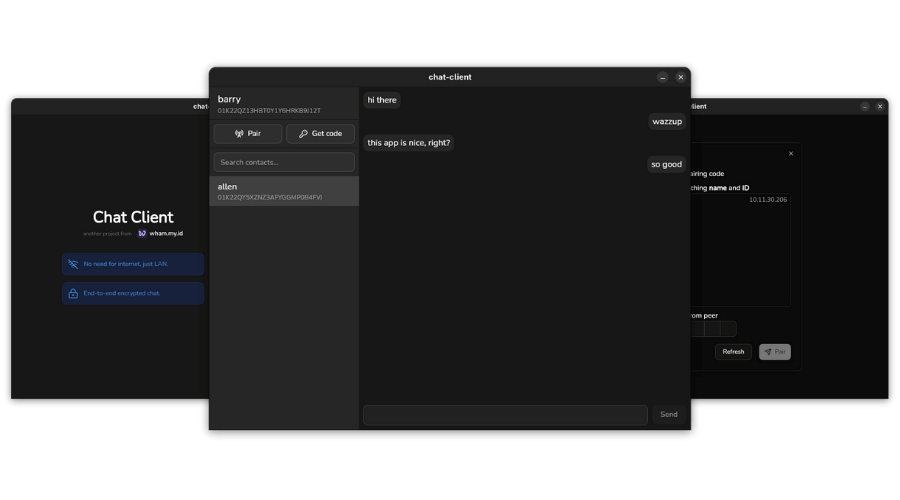

 
__Chat Client__ is a lightweight, cross-platform peer-to-peer chat application designed for secure communication within a local network.
## 🔐 Features
- __End-to-End Encryption (AES-256)__: All messages are encrypted with AES-256, ensuring your conversations remain private and secure.
- __Offline-Only (No Internet Required)__: Works entirely within your local network – no external servers or internet connection needed.
- __Cross-Platform__: Runs on both Linux and Windows, with a consistent and clean UI.
- __Zero Configuration__: Automatic peer discovery and seamless connection – no setup required.
- __Fast & Lightweight__: Minimal resource usage with instant message delivery over LAN.
## 🚀 Installation
You can download the pre-build binary application from the [release page](https://github.com/alkuinvito/chat-client/releases). Currently only available for __Linux__ and __Windows__ in AMD64 architecture. To develop and build yourself, you can follow the __Local Development__ below.
## ⚙️ Local Development
Develop and build your own chat client with these steps:
1. Set your local environment with Go and Node. The app was tested and developed using `go@1.24.5` and `node@22.17.1`.
2. Install `wails` to develop and build using this guide [here](https://wails.io/docs/gettingstarted/installation).
3. Run project in dev mode with live reload using:
```bash
wails dev
```
4. Build project to binary package to supported platform and architecture with `wails build`. Here's an example to build for target os Linux 64-bit:
```bash
wails build -clean -platform linux/amd64
```
5. The output binary file will be inside `build/bin` directory.