https://github.com/allebb/hooker
Hooker is a lightweight PHP web application that can be used to trigger remote workflows (such as automated deployments) on your Linux or UNIX based servers.
https://github.com/allebb/hooker
cicd deployment nginx php trigger-deployments virtualhost webhooks
Last synced: about 1 month ago
JSON representation
Hooker is a lightweight PHP web application that can be used to trigger remote workflows (such as automated deployments) on your Linux or UNIX based servers.
- Host: GitHub
- URL: https://github.com/allebb/hooker
- Owner: allebb
- License: gpl-2.0
- Created: 2015-12-31T18:17:12.000Z (over 10 years ago)
- Default Branch: master
- Last Pushed: 2021-01-25T12:06:19.000Z (over 5 years ago)
- Last Synced: 2023-03-17T20:40:24.560Z (over 3 years ago)
- Topics: cicd, deployment, nginx, php, trigger-deployments, virtualhost, webhooks
- Language: PHP
- Homepage:
- Size: 149 KB
- Stars: 4
- Watchers: 2
- Forks: 0
- Open Issues: 0
-
Metadata Files:
- Readme: README.md
- License: LICENSE
Awesome Lists containing this project
README
# Hooker
Hooker is a lightweight PHP web application that can be used to trigger remote workflows on your Linux or UNIX based
servers. It is fully self-contained by design (a single script), it doesn't have any external dependencies and does not require any package managers such as Composer making it perfect for inclusion into legacy projects too.
It has specifically been designed to simplify and automate application deployments using Git or Docker containers when
you don't want or need the complexity of a full CI/CD setup, but you can easily use it for a ton of other really useful
tasks.
## Requirements
* A web server (the installation guide uses Nginx)
* PHP 5.4+
* The ``shell_exec()`` function is required (Some shared hosting environments disable this!)
## License
This script is released under the [GPLv2](https://github.com/allebb/hooker/blob/master/LICENSE) license. Feel free to
use it, fork it, improve it and contribute by open a pull-request!
## Installation
It is recommended to set-up a new virtual host configuration on your web server of which then acts as a web-hook endpoint for
multiple configured projects.
You should create separate site configurations that then get triggered by specifying the site/application configuration
with the ``app`` parameter eg. ``https://deploy.mysite.com/hooker.php?app=website1``.
**If you have set up your server using [Conductor](https://github.com/allebb/conductor) you can automatically install Hooker by running this simple command:**
```shell
bash -c "$(curl -fsSL https://raw.githubusercontent.com/allebb/hooker/stable/utils/auto-install-conductor.sh)"
```
> Hooker is fully self-contained in a single script (it doesn't have any external dependency and therefore doesn't't require the need to pull dependencies from Composer or ``include`` a ton of external scripts) so if you wish to include this single script into an existing project simple copy the ``hooker.php`` file and update the default values within this file to your needs.
#### Creating the new virtualhost directory
In this example, we'll create a new Nginx vhost configuration on an Ubuntu Linux server and use the default ``www-data`` user (for simplicity and demonstration purposes).
First we need to create a hosting directory to host our ``hooker.php`` file:
```shell
sudo -u www-data mkdir /var/www/hooker
```
We will now create a cache directory for Composer, this will speed up package installs (if you intend to use it):
```shell
sudo mkdir /var/www/.cache
sudo chown -R www-data:www-data /var/www/.cache
```
We'll use Git to download the latest (stable) version (we'll also be able to use ``sudo -u www-data git pull`` in future
to apply updates):
```shell
cd /var/www/hooker
sudo -u www-data git clone https://github.com/allebb/hooker.git .
sudo -u www-data git checkout stable
```
We'll now copy the example configuration file and use that to configure our individual sites:
```shell
sudo -u www-data cp hooker.conf.example.php hooker.conf.php
```
At this point you should edit this file and configure your sites, for example it may look like this:
``/var/www/hooker/hooker.conf.php``
```php
/**
* Hooker Configuration File
*/
return [
// Enable output of debugging information.
'debug' => true,
// Need to customise the default Git path?
// 'git_bin' => '/usr/bin/git',
// Need to customise the default PHP version used for running Composer and other PHP specific tasks?
// ** This path can also be overridden by individual sites/applications as required in the sites array below. **
//'php_bin' => '/usr/bin/php7.4',
// Need to customise the default Composer path?
// ** This path can also be overridden by individual sites/applications as required in the sites array below. **
//'composer_bin' => '/usr/bin/composer',
// By default we'll allow any server(s) to "hit" these deployment hooks but you can add specific IP addresses
// to the whitelist if you wish...
'ip_whitelist' => [],
'sites' => [
// An example basic HTML website (Webhook example: http://deploy.mysite.com/hooker.php?app=my_basic_website&key=SomeRandomWordThatMustBePresentInTheKeyParam).
'my_example_website' => [
'debug' => false, // Override and disable the output of debug info for this specific deployment workflow?
'key' => 'SomeRandomStringThatMustBePresentInTheKeyParam',
'local_repo' => '/var/www/html-website', // Use current directory
'is_github' => true, // Using GitHub webhooks to trigger this workflow.
'branch' => 'deploy-prod', // As long as the GitHub webhook request relates to changes on this git branch, we'll run the deployment workflow!
//'pre_commands' => [
// // Uses the default (inherited deployment commands)
//],
//'deploy_commands' => [
// // Uses the default (inherited deployment commands eg. cd {{local-repo}} && {{git-bin}} reset --hard HEAD && {{git-ssh-key}}{{git-bin}} pull)
//],
//'post_commands' => [
// // Uses the default (inherited deployment commands)
//],
],
// An example Laravel Deployment Configuration (Webhook example: http://deploy.mysite.com/hooker.php?app=my_other_website&key=32c9f55eea8526374731acca13c81aca)
'my_other_website' => [
'key' => '32c9f55eea8526374731acca13c81aca',
'local_repo' => '@conductor', // This will auto-resolve to /var/conductor/applications/my_other_website
'git_ssh_key_path' => '@conductor', // Optional - This will auto-resolve and use the Conductor generated private (deployment) key at /var/www/.ssh/my_other_website.deploykey
'user' => false,
'php_bin' => '/usr/bin/php8.0',
// Override the "default" PHP version used for this deployment/running Composer, this application needs PHP 8.0!
//'composer_bin' => '/usr/bin/composer', // Need to override with a different Composer version?
'pre_commands' => [
'{{php-bin}} {{local-repo}}/artisan down', // Example of a pre-command to set our Laravel application into "maintenance mode".
'{{php-bin}} {{local-repo}}/artisan config:clear', // We'll also clear the configuration cache before we pull the latest code from Git..
],
//'deploy_commands' => [
// // Uses the default (inherited deployment command eg. cd {{local-repo}} && {{git-bin}} reset --hard HEAD && {{git-bin}} pull)
// // You can of course run other tasks here too, shell scripts, npm, nodejs etc. etc.
//],
'post_commands' => [
'cd {{local-repo}} && {{php-bin}} {{composer-bin}} install --no-dev --no-progress --prefer-dist --optimize-autoloader',
'chmod 755 {{local-repo}}/storage',
'{{php-bin}} {{local-repo}}/artisan migrate --force',
'{{php-bin}} {{local-repo}}/artisan config:cache',
'{{php-bin}} {{local-repo}}/artisan cache:clear',
'{{php-bin}} {{local-repo}}/artisan route:cache',
'{{php-bin}} {{local-repo}}/artisan up',
//'{{php-bin}} {{local-repo}}/artisan queue:restart', // Using a job queue? Restart it so it uses the latest version of your code!
//'{{php-bin}} {{local-repo}}/artisan horizon:terminate', // Using Horizon for your queues instead??
],
],
// An example Laravel Deployment Configuration using a local ".hooker.json" repository configuration. (Webhook example: http://deploy.mysite.com/hooker.php?app=another_application&key=VgUjbEIPbOCpiRQa2UHjqiXcmbE8eIht)
'another_application' => [
'key' => 'VgUjbEIPbOCpiRQa2UHjqiXcmbE8eIht',
'local_repo' => '/var/www/another_application',
'git_ssh_key_path' => '/var/www/.ssh/id_rsa', // Optional - We can set a private (deployment key) that will be used when git makes requests.
'use_json' => 'true', // This will read the configuration from a .hooker.json file stored in your git repo. eg. /var/www/another_application/.hooker.json
],
],
];
```
### Create an SSH keypair for the www-data user
**This section is optional and only required if you need to pull from private repositories and don't wish to generate deployment keys on an application by application basis (using ``conductor genkey {app_name}`` or manually).**
Let's change into the ``www-data`` user's home directory:
```shell
cd /var/www
```
We will now create a new ``.ssh`` directory (profile) for the 'www-data' user (as it is this user account that will be,
behind the scenes connecting to Git) and set the required permissions.
```shell
mkdir .ssh
chown www-data:www-data -R .ssh
chmod 0700 .ssh
```
Now we'll generate a new SSH key-pair for the ``www-data`` user of which will be used to authenticate with your Git
hosting service.
__In order to enable headless operation ensure that you use the default options (just keep pressing the ENTER key at the
prompts) and when asked to enter a passphrase ensure that you leave it empty otherwise Hooker will not work correctly!__
```shell
sudo -u www-data ssh-keygen -t rsa -b 4096
```
The contents of the public key (``/var/www/.ssh/id_rsa.pub``) now needs to be copied and added to your Git hosting
provider's SSH keys section:
```shell
cat /var/www/.ssh/id_rsa.pub
```
### Set correct permissions on the site directory
Now, we need to set the correct ownership and permissions for this new site:
```shell
chown www-data:www-data -R /var/www/hooker
```
### Configure Nginx virtualhost configuration
This example Nginx virtualhost configuration can be added to your server - assuming you're using Nginx and PHP7.0-FPM (
just make adjustments as required):
``/etc/nginx/sites-available/hooker.conf``
```
server {
listen 80;
# Wish to secure and host your deployment web service over HTTPS using a LetsEncrypt SSL certificate?
#listen 443 ssl;
#ssl_certificate /etc/letsencrypt/live/{your_certificcate_name}/fullchain.pem;
#ssl_certificate_key /etc/letsencrypt/live/{your_certificcate_name}/privkey.pem;
#ssl_trusted_certificate /etc/letsencrypt/live/{your_certificcate_name}/chain.pem;
# Recommendations from https://raymii.org/s/tutorials/Strong_SSL_Security_On_nginx.html
#ssl_protocols TLSv1.2 TLSv1.3;
#ssl_ciphers 'ECDHE-RSA-AES256-GCM-SHA512:DHE-RSA-AES256-GCM-SHA512:ECDHE-RSA-AES256-GCM-SHA384:DHE-RSA-AES256-GCM-SHA384:ECDHE-RSA-AES256-SHA384';
#ssl_prefer_server_ciphers on;
#ssl_session_cache shared:SSL:10m;
root /var/www/hooker;
server_name {your_domain};
location / {
try_files $uri $uri/ /index.php?$query_string;
}
location ~ \.php$ {
try_files $uri /index.php =404;
fastcgi_split_path_info ^(.+\.php)(/.+)$;
fastcgi_pass unix:/var/run/php/php7.4-fpm.sock;
fastcgi_index index.php;
fastcgi_param SCRIPT_FILENAME $document_root$fastcgi_script_name;
include fastcgi_params;
}
}
```
Once created, you will need to symlink it to the ``/etc/nginx/sites-enabled`` directory like so:
```shell
cd /etc/nginx/sites-enabled
ln -s ../sites-available/hooker.conf .
```
Now restart Nginx for the new virtualhost configuration to take effect:
```shell
sudo service nginx restart
```
### Finished!
If all goes well, you should be able to access the 'ping' test page at: ``http://deploy.mysite.com/hooker.php?ping``, a
successful installation should return the word 'PONG'.
## Updating
To update the version of Hooker simple run the following command(s):
```shell
cd /var/www/hooker
sudo -u www-data git pull
```
**Remember to check and update your server's ``hooker.conf.php`` and if you are using them in your code repositories, your local ``.hooker.json`` files with any new configuration
options, an overview of the "Configuration options" can be found in the next section.**
## Configuration options
A full list and explanation of the configuration items and workflow "placeholders" tags can be found in
the [Configuration Items](docs/CONFIGURATION-ITEMS.md) file.
## Using a .hooker.json configuration file in your codebase
Instead of having to edit and update the ``hooker.conf.php`` on the server each time you wish to make a change to the deployment
workflow, a ``.hooker.json`` file can be committed to your Git repository and will be used to define the workflow steps,
the syntax is as follows:
**This example demonstrates the deployment of a Laravel web application**
```json
{
"debug": true,
"php_bin": "/usr/bin/php8.0",
"composer_bin": "/usr/bin/composer",
"pre_commands": [
"{{php-bin}} {{local-repo}}/artisan down",
"{{php-bin}} {{local-repo}}/artisan config:clear"
],
"#deploy_commands": [],
"post_commands": [
"cd {{local-repo}} && {{php-bin}} {{composer-bin}} install --no-dev --no-progress --prefer-dist --optimize-autoloader",
"chmod 755 {{local-repo}}/storage",
"{{php-bin}} {{local-repo}}/artisan migrate --force",
"{{php-bin}} {{local-repo}}/artisan config:cache",
"{{php-bin}} {{local-repo}}/artisan cache:clear",
"{{php-bin}} {{local-repo}}/artisan route:cache",
"{{php-bin}} {{local-repo}}/artisan view:cache",
"{{php-bin}} {{local-repo}}/artisan up"
]
}
```
**Notice in the above JSON file example that the ``deploy_commands`` JSON key has been commented out (with a hash), this
is important as an empty array here will override the default ``git pull`` commands, only uncomment this if you need to
do custom tasks/customise the git pull command here.**
**Keep in mind that the Hooker webservice will first check that a local ``.hooker.json`` file exists and then uses the
workflow steps within it, so you would have to effectively "hit" this endpoint twice for any ``.hooker.json`` changes to
take effect as the first time it's run, it will load the local file which in turn would then pull the latest changes
from your repository and only then, on the next execution will it use the latest workflow instructions.**
**For this to work, your Hooker configuration file MUST specify the ``local_repo`` and ``key`` properties
in addition, the ``use_json`` property must also be set to ``true``.**
For security reasons, when using a ``.hooker.json`` file some overrides are not available and will need to be set in the
main Hooker web service configuration file (``hooker.conf.php``). These settings are: ``remote_repo``, ``branch``
, ``local_repo``, ``key``, ``disable_init`` and ``user``.
## Configuring Services to use Hooker
Generally you would simply use the webhook URL in your CI/CD environment which will then make a request to the endpoint
and resulting in the deployment of your application/website on your server but for smaller projects where you don't need
the complexity or overhead of full CI/CD environments you can instead use some of these services below to quickly and
easily set up a fully automated deployment environment.
The following examples shows how to set up webhooks to trigger deployments from a couple of the most used Git hosting
services.
### Configuring Hooker with GitHub Webhooks
Getting your sites and web applications to deploy using GitHub web hooks is super easy - You can very easily (and
quickly) have your code automatically deployed to your server (or group of servers) by simply adding a GitHub web hook.
When I've needed setup quick and simple automated deployments, I'll create a separate Git branch called "deploy-prod" (
or "deploy-test") and then set up a GitHub webhook to trigger these deployments using Hooker.
If you wish to use this simple method for having your sites or applications automatically deploy ensure that you set up
the GitHub webhook as follows:
In your ``hooker.conf.php`` file make sure that you have these (``is_github`` and ``branch``) settings:
```text
'sites' => [
'my-example-webapp' => [
...
'key' => 'MyRandomDeploymentKey',
'remote_repo' => 'git@github.com:allebb/example.git',
'is_github' => true, // Using GitHub webhooks to trigger this workflow.
'branch' => 'deploy-prod', // As long as the GitHub webhook request relates to changes on this git branch, we'll run the deployment workflow!
...
],
]
```
You should then configure your GitHub web hook to send the payload to your hooker deployment URL, in our example this
would be ``http://deploy.mysite.com/hooker.php?app=my-example-webapp&key=MyRandomDeploymentKey`` and ensure that you
specify the **Content type** as ``application/json`` as shown here:
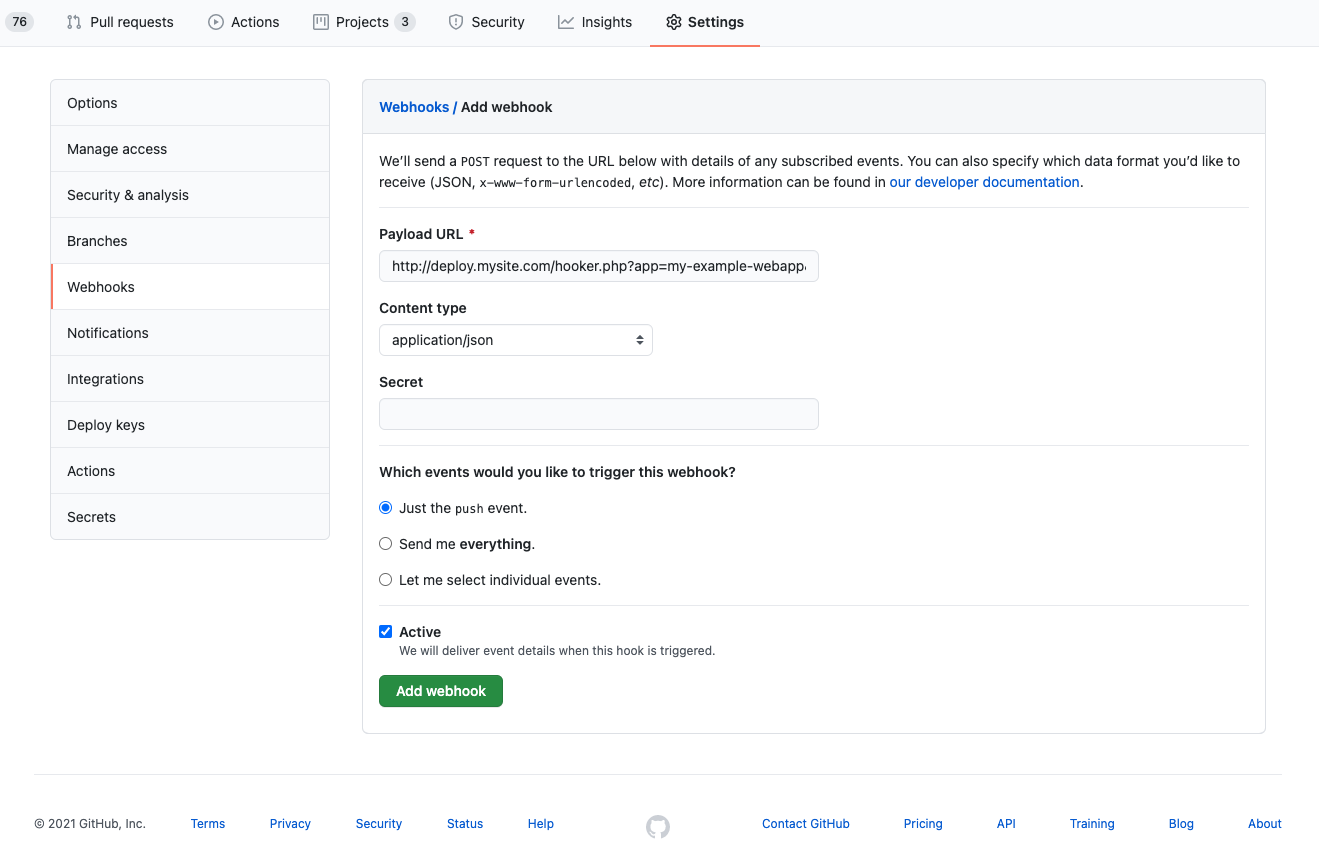
When you push to the configured branch, GitHub will trigger a deployment to our server using this web hook URL. You can
view the output of the deployment process from this screen too as long as you have the ``debug`` option set
to ``true`` in your Hooker configuration you will be able to see the output (result) of each of your workflow/deployment
steps.
### Configuring Hooker with BitBucket Webhooks
As per the GitHub section above (see for context), you can also enable your configuration to receive standard webhooks from BitBucket.
You should configure your BitBucket webhook like so:
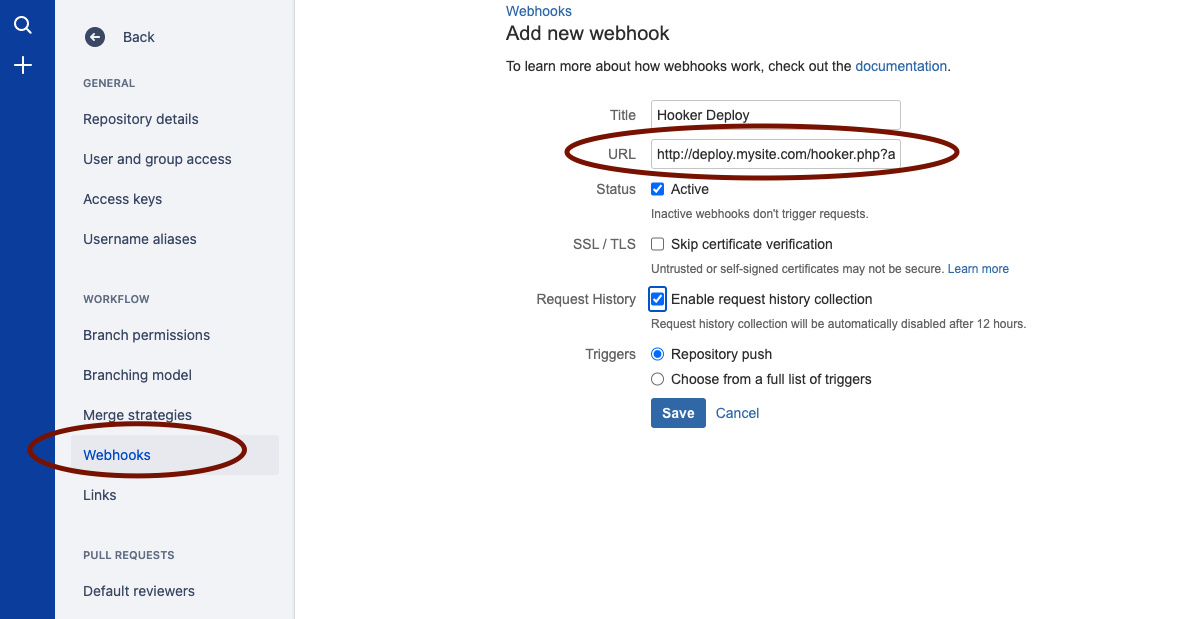
Enabling BitBucket support is as simple as setting your site configuration to match this example:
```text
'sites' => [
'my-example-webapp' => [
...
'key' => 'MyRandomDeploymentKey',
'remote_repo' => 'git@bitbucket.org:allebb/example.git',
'is_bitbucket' => true, // Using BitBucket webhooks to trigger this workflow.
'branch' => 'deploy-prod', // As long as the BitBucket webhook request relates to changes on this git branch, we'll run the deployment workflow!
...
],
]
```
### Configuring Hooker with GitLab Webhooks
As per the GitHub section above (see for context), you can also enable your configuration to receive standard webhooks from GitLab.
You should configure your GitLab webhook like so:
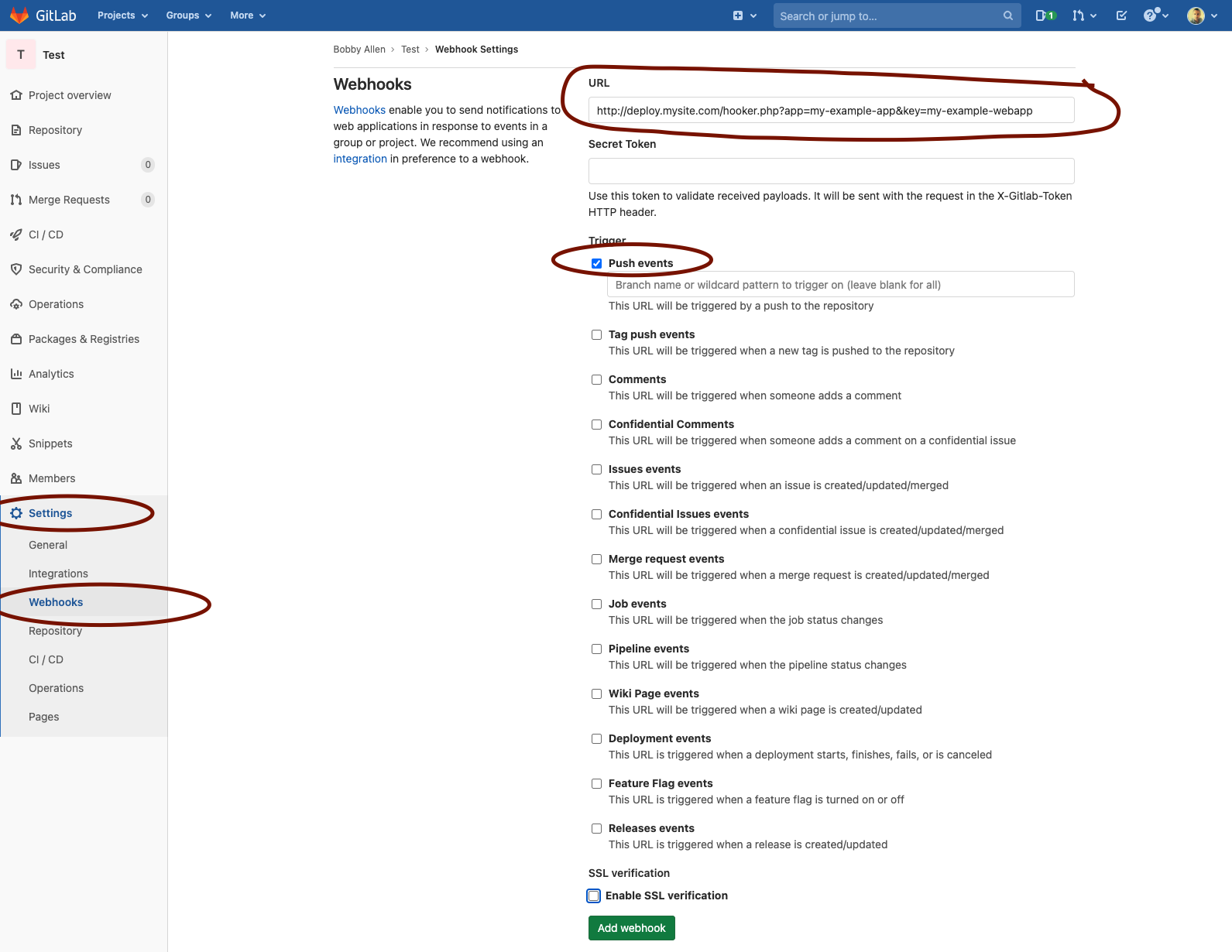
Enabling GitLab support is as simple as setting your site configuration to match this example:
```text
'sites' => [
'my-example-webapp' => [
...
'key' => 'MyRandomDeploymentKey',
'remote_repo' => 'git@gitlab.com:allebb/example.git',
'is_gitlab' => true, // Using GitLab webhooks to trigger this workflow.
'branch' => 'deploy-prod', // As long as the GitLab webhook request relates to changes on this git branch, we'll run the deployment workflow!
...
],
]
```
## Bugs
Please report any bugs on the [Issue Tracker](https://github.com/allebb/hooker/issues), please ensure that bug reports
are clear and contain as much information as possible.
Bug reports will be looked at and resolved as soon as possible!