https://github.com/alonsobsd/bhyvemgr
Bhyve management GUI written in Freepascal/Lazarus
https://github.com/alonsobsd/bhyvemgr
bhyve fpc freebsd lazarus pascal
Last synced: 26 days ago
JSON representation
Bhyve management GUI written in Freepascal/Lazarus
- Host: GitHub
- URL: https://github.com/alonsobsd/bhyvemgr
- Owner: alonsobsd
- License: bsd-3-clause
- Created: 2024-08-19T07:36:10.000Z (almost 2 years ago)
- Default Branch: main
- Last Pushed: 2026-05-26T20:07:50.000Z (about 1 month ago)
- Last Synced: 2026-05-26T20:14:42.143Z (about 1 month ago)
- Topics: bhyve, fpc, freebsd, lazarus, pascal
- Language: Pascal
- Homepage:
- Size: 796 KB
- Stars: 96
- Watchers: 6
- Forks: 11
- Open Issues: 1
-
Metadata Files:
- Readme: README.md
- Funding: .github/funding.yml
- License: LICENSE
Awesome Lists containing this project
README
# Bhyvemgr
Bhyvemgr is a bhyve management GUI written in Freepascal/Lazarus on FreeBSD. It needs a bunch of tools mostly installed on base system and some installed from ports/packages. Currently it supports amd64 and aarch64. The main goal is to be a desktop user application to easily and quickly setup and run virtual machines on the FreeBSD host.

# Features
- virtual machines management
- create virtual machines from cloud/vm images
- cloud init and naugeinit initialization support
- devices management (support almost all bhyve pci devices with some exceptions)
- dnsmasq support
- vnc and xfreerdp client support
- zfs/ufs support
- raw/zfs volume support
- bridge/tap support
- bhyve_config configuration variables support
- basic sudo/doas support
- uefi/uboot support only
- swtpm support
- ipv4/ipv6 support
- aarch64 and amd64 support
- i18n support
- PF/NAT support
- and more
# TODO
- Allow change VM (zfs/ufs) directory to custom ones
# Bhyvemgr dependencies
## From base system
bhyve, bhyvectl, bhyveload, chown, chmod, fetch, file, ifconfig, install, kill, kldload, kldstat, makefs, pciconf, pfctl, pgrep, rm, service, sysctl, truncate, xz, zfs and zpool
## From ports/packages
bhyve-firmware (sysutils/bhyve-firmware), doas (security/doas) or sudo (security/sudo), qemu-tools (emulators/qemu@tools), swtpm (sysutils/swtpm), vncviewer (net/tigervnc-viewer) and xfreerdp3 (net/freerdp3)
### Network configuration
bhyvemgr can use two kind of network settings: *Quick network configuration* or *Optimal network configuration*. Choose one of them accord to your own needs. I recommend second one because it permits a complete network management of virtual machines. Take a look at [network configuration guide](https://github.com/alonsobsd/bhyvemgr/wiki/network_config) for details about how use/configure them.
### sudo / doas configuration
bhyve requires root privileges on FreeBSD. To handle these tasks, bhyvemgr uses sudo or doas to mitigate certain security risks. The easiest - but not recommended - way to configure sudo or doas is as follows:
For sudo, if the user is part of the wheel group. Alternatively, a specific user can be defined instead of the group - replace :wheel with a username, such as acm, for example.
```sh
%wheel ALL=(ALL:ALL) NOPASSWD: ALL
```
For doas, if the user is part of the wheel group. Alternatively, a specific user can be defined instead of the group - replace :wheel with a username, such as acm, for example.
```sh
permit nopass :wheel
```
Otherwise, if you panic, use the following:
For sudo, if the user is part of the wheel group
```sh
%wheel ALL=(ALL:ALL) ALL
%wheel ALL=(ALL:ALL) NOPASSWD: /usr/sbin/bhyve, /usr/sbin/bhyvectl, /bin/chmod, /usr/sbin/chown, /sbin/ifconfig, \
/usr/bin/install, /bin/kill, /sbin/kldload, /sbin/pfctl, /usr/bin/pgrep, /bin/rm, \
/usr/sbin/service, /sbin/zfs
```
For doas, if the user is part of the wheel group
```sh
permit keepenv :wheel
permit keepenv nopass :wheel as root cmd /usr/sbin/bhyve
permit keepenv nopass :wheel as root cmd /usr/sbin/bhyvectl
permit keepenv nopass :wheel as root cmd /bin/chmod
permit keepenv nopass :wheel as root cmd /usr/sbin/chown
permit keepenv nopass :wheel as root cmd /sbin/ifconfig
permit keepenv nopass :wheel as root cmd /usr/bin/install
permit keepenv nopass :wheel as root cmd /bin/kill
permit keepenv nopass :wheel as root cmd /sbin/kldload
permit keepenv nopass :wheel as root cmd /sbin/pfctl
permit keepenv nopass :wheel as root cmd /usr/bin/pgrep
permit keepenv nopass :wheel as root cmd /bin/rm
permit keepenv nopass :wheel as root cmd /usr/sbin/service
permit keepenv nopass :wheel as root cmd /sbin/zfs
```
# Run bhyvemgr for the first time
When bhyvemgr starts in the first time, this will create a initial config file. It is mandatory to review, modify (if it is necessary) and press **Save settings** button from of **Settings form** the first time


# Demo
### On FreeBSD aarch64
[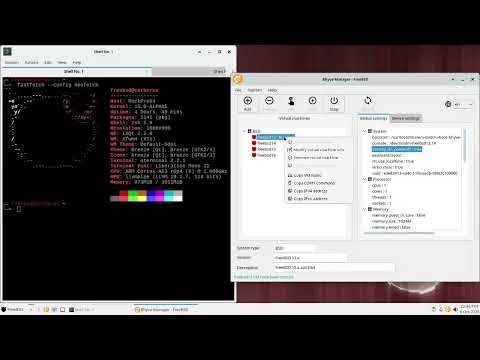](https://www.youtube.com/watch?v=PagnKjWE_Uw)
### On FreeBSD amd64
[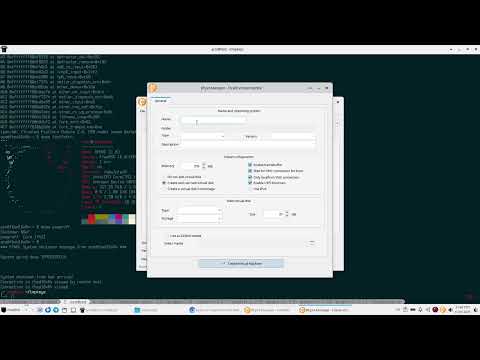](https://www.youtube.com/watch?v=B-GPRHfnZsc)
[Bhyvemgr Wiki](https://github.com/alonsobsd/bhyvemgr/wiki) contains guides about how use bhyvemgr in some use cases. Enjoy creating and testing your virtual machines on FreeBSD