https://github.com/alper-han/CrossMacro
Cross-platform desktop automation app with macro recording, playback, scheduling, text expansion, CLI tools, and Wayland/X11-aware Linux support.
https://github.com/alper-han/CrossMacro
autoclicker automation avalonia cli cross-platform desktop-automation dotnet keyboard linux macos macro macro-editor macro-recorder mouse scheduling shortcuts text-expansion wayland windows x11
Last synced: about 2 months ago
JSON representation
Cross-platform desktop automation app with macro recording, playback, scheduling, text expansion, CLI tools, and Wayland/X11-aware Linux support.
- Host: GitHub
- URL: https://github.com/alper-han/CrossMacro
- Owner: alper-han
- License: gpl-3.0
- Created: 2025-11-30T11:02:06.000Z (8 months ago)
- Default Branch: main
- Last Pushed: 2026-06-06T20:39:03.000Z (about 2 months ago)
- Last Synced: 2026-06-06T22:13:42.021Z (about 2 months ago)
- Topics: autoclicker, automation, avalonia, cli, cross-platform, desktop-automation, dotnet, keyboard, linux, macos, macro, macro-editor, macro-recorder, mouse, scheduling, shortcuts, text-expansion, wayland, windows, x11
- Language: C#
- Homepage: https://github.com/alper-han/CrossMacro#readme
- Size: 55.2 MB
- Stars: 247
- Watchers: 3
- Forks: 7
- Open Issues: 5
-
Metadata Files:
- Readme: README.md
- Contributing: CONTRIBUTING.md
- License: LICENSE
- Code of conduct: CODE_OF_CONDUCT.md
- Security: SECURITY.md
Awesome Lists containing this project
- awesome-linux-apps - CrossMacro - Cross-platform mouse and keyboard macro recorder, player, editor, and text expansion tool with Wayland and X11 support. 👏 (Utilities)
README
# CrossMacro



[](https://flathub.org/en/apps/io.github.alper_han.crossmacro)
[](https://github.com/alper-han/CrossMacro/releases)
[](https://discord.gg/QUBuND5TvM)
[](https://github.com/alper-han/CrossMacro/actions/workflows/ci.yml)

CrossMacro is a cross-platform desktop automation app for recording, editing,
scheduling, and replaying mouse/keyboard workflows. It combines a polished
Avalonia GUI, scriptable CLI, text expansion, shortcuts, and a GUI-less desktop
runtime in one app.
- Linux-first support for Wayland and X11, with daemon-backed/direct-device
input modes and compositor-aware cursor positioning
- Windows support through Microsoft Store, winget, MSIX, and portable binaries
- macOS support through Apple Silicon and Intel DMG packages
## Contents
- [Features](#features)
- [Why CrossMacro?](#why-crossmacro)
- [Screenshots](#screenshots)
- [Quick Start](#quick-start)
- [Installation](#installation)
- [CLI Usage](#cli-usage)
- [Diagnostics and Troubleshooting](#diagnostics-and-troubleshooting)
- [Support and Project Links](#support-and-project-links)
- [Contributors](#contributors)
- [Star History](#star-history)
- [License](#license)
- [Community](#community)
## Features
### Record and replay
- Mouse recording for clicks, movement, and scrolling
- Keyboard recording and macro playback with pause/resume
- Playback speed control from `0.1x` to `10.0x`
- Loop mode, repeat count, fixed repeat delay, and randomized repeat-delay ranges
- Customizable global hotkeys:
- `F8` start/stop recording
- `F9` start/stop playback
- `F10` pause/resume playback
### Edit and organize
- Files tab for loading, saving, sequencing, and replaying `.macro` files
- Macro editor with undo/redo, coordinate capture, action reordering, filtering,
variables, loops, conditionals, text input, and delay editing
### Automate and trigger
- Shortcut-bound macro execution with keyboard shortcuts and key combinations
- Shortcut modes for press-to-start/stop and run-while-held playback
- Scheduled task execution with interval, random interval, one-time, weekly, and
custom weekday options
- CLI playback, recording, validation, settings, schedules, shortcuts, and inline
`run` steps
- GUI-less desktop runtime for hotkeys, scheduler, shortcuts, and text expansion
### Text expansion and desktop polish
- Text expansion shortcuts with per-entry enable/disable and insertion-mode controls
- Optional system tray controls where the desktop session supports tray icons
- Theme support: Classic, Latte, Mocha, Dracula, Nord, Everforest, Gruvbox,
Solarized, Crimson
- Language selection, runtime log-level control, and update-check settings
Some features require platform permissions, such as Linux input device or daemon
access, macOS Input Monitoring/Accessibility, or desktop-session tray support.
## Why CrossMacro?
CrossMacro is built for people who want desktop automation without stitching
together separate recorders, hotkey tools, text expanders, and platform-specific
scripts.
- **One workflow across platforms:** a polished Avalonia GUI with packaged builds
for Linux, Windows, and macOS.
- **Modern Linux support:** Wayland and X11 are first-class targets, with
daemon-backed/direct-device input paths and compositor-aware cursor positioning
where the desktop exposes it.
- **GUI when you want it, CLI when you need it:** record and edit visually, run
macros from scripts, or keep automation available with a GUI-less desktop
runtime.
- **More than playback:** shortcuts, schedules, text expansion, files, themes,
and editor tools live in the same app.
## Screenshots
| Playback | Text Expansion | Shortcuts |
| :---: | :---: | :---: |
|  |  |  |
| **Scheduled Tasks** | **Editor** | **Settings** |
|  |  |  |
## Quick Start
1. Install CrossMacro for your platform.
2. Launch the app and grant any platform permissions it requests.
3. Press `F8` to start/stop recording.
4. Press `F9` to start/stop playback.
5. Press `F10` to pause/resume playback.
6. Save your macro, edit it if needed, and optionally bind it to a shortcut or schedule.
If setup or playback does not work, run:
```bash
crossmacro doctor --json --verbose
```
## Installation
Download page for all release binaries:
- [GitHub Releases](https://github.com/alper-han/CrossMacro/releases)
### Quick Install Matrix
| Platform | Channel | Command / Link | Notes |
| --- | --- | --- | --- |
| [](https://flathub.org/en/apps/io.github.alper_han.crossmacro) | Flathub | [Store](https://flathub.org/en/apps/io.github.alper_han.crossmacro)
`flatpak install flathub io.github.alper_han.crossmacro` | Sandboxed install; daemon or Quick Setup on Wayland |
| [](https://github.com/alper-han/CrossMacro/releases) | `.deb` | `sudo apt install ./crossmacro*.deb` | Daemon-backed Linux package |
| [](https://github.com/alper-han/CrossMacro/releases) | `.rpm` | `sudo dnf install ./crossmacro*.rpm` | Daemon-backed Linux package |
| [](https://aur.archlinux.org/packages/crossmacro) | AUR | `yay -S crossmacro`
`paru -S crossmacro` | Community daemon-backed package |
| [](https://github.com/alper-han/CrossMacro/releases) | AppImage | [Releases](https://github.com/alper-han/CrossMacro/releases) | Portable `x86_64` and `aarch64`; Quick Setup may prompt on Wayland |
| [](https://search.nixos.org/options?channel=unstable&query=services.crossmacro) | nixpkgs module | `services.crossmacro = { enable = true; users = [ "you" ]; };` | Daemon-backed setup with service, uinput, polkit, group, and users |
| [](https://apps.microsoft.com/detail/9n1qp1d6js70) | Store | [Store](https://apps.microsoft.com/detail/9n1qp1d6js70) | Managed updates |
|  | winget | `winget install AlperHan.CrossMacro` | Stable updates may lag behind GitHub Releases |
| [](https://github.com/alper-han/CrossMacro/releases) | MSIX | [Releases](https://github.com/alper-han/CrossMacro/releases) | App package for `x64` and `arm64` |
| [](https://github.com/alper-han/CrossMacro/releases) | Portable EXE | [Releases](https://github.com/alper-han/CrossMacro/releases) | Self-contained `x64` and `arm64` binaries |
| [](https://github.com/alper-han/CrossMacro/releases) | `.dmg` | [Releases](https://github.com/alper-han/CrossMacro/releases) | Choose `osx-arm64` for Apple Silicon or `osx-x64` for Intel |
### First-run notes
- **Linux daemon packages (`.deb`, `.rpm`, AUR):** package scripts try to set up
`crossmacro.service` and the `crossmacro` group. Log out and back in, or
reboot, if your user was added to that group.
- **Flatpak/AppImage on Wayland:** CrossMacro may show a setup dialog and run
Quick Setup for temporary direct device permissions.
- **NixOS:** use the nixpkgs module for a complete daemon-backed setup. Enable
`services.crossmacro` and set `services.crossmacro.users` for your desktop
users.
- **Windows:** Store and winget are the easiest update paths. Portable EXE users
run the downloaded binary directly unless they add it to `PATH`.
- **macOS:** requires macOS 10.15 or newer. Grant permissions when prompted; if
macOS blocks a GitHub DMG on first launch after dragging the app to
Applications, run `xattr -cr /Applications/CrossMacro.app`.
### Platform-specific setup
- Linux setup, runtime modes, Wayland notes, NixOS, and daemon/direct-device
troubleshooting: [docs/linux.md](docs/linux.md)
- Windows Store and winget provide managed updates. GitHub Releases include MSIX
packages and self-contained portable EXE files for `x64` and `arm64`.
- macOS install, Gatekeeper, Input Monitoring, and Accessibility setup:
[docs/macos.md](docs/macos.md)
## CLI Usage
Use the platform app executable as `crossmacro` when your install channel places
it on `PATH`. Portable builds may require running the executable directly from
its download folder.
```bash
crossmacro --help
crossmacro --version
crossmacro --start-minimized
crossmacro play ./demo.macro --speed 1.25 --repeat 3 --repeat-delay-ms 500
crossmacro macro validate ./demo.macro
crossmacro macro info ./demo.macro
crossmacro doctor --json --verbose
crossmacro settings get
crossmacro settings get playback.speed
crossmacro settings set playback.speed 1.25
crossmacro schedule list
crossmacro shortcut list
crossmacro run --step "move abs 800 400" --step "click left" --dry-run
```
For command syntax, direct-run steps, log levels, and GUI-less desktop runtime
notes, see [docs/cli.md](docs/cli.md). The `headless` commands still require a
desktop session; they are not intended for display-less server automation.
## Diagnostics and Troubleshooting
Start with doctor instead of guessing from manual commands:
```bash
crossmacro doctor --json --verbose
```
On Linux, doctor reports daemon-backed readiness separately from direct device
readiness. Direct input checks can pass while daemon IPC still warns or fails,
for example when `/run/crossmacro/crossmacro.sock` exists but the current login
session has not picked up `crossmacro` group membership. Direct device readiness
does not grant access to the daemon socket.
When opening an issue, include your platform, install channel, relevant logs, and
`crossmacro doctor --json --verbose` output.
Linux setup and troubleshooting details are in [docs/linux.md](docs/linux.md).
For Windows or macOS capture/playback issues, restart CrossMacro after changing
permissions or switching sessions, and pause other automation, overlay, or
security tools before retesting.
## Support and Project Links
- Contribution guide: [CONTRIBUTING.md](CONTRIBUTING.md)
- Security policy: [SECURITY.md](SECURITY.md)
- Linux setup and troubleshooting: [docs/linux.md](docs/linux.md)
- CLI usage and run syntax: [docs/cli.md](docs/cli.md)
- Issues:
- Discussions:
- Private vulnerability reporting:
- Packaged CLI manpage: [`docs/man/crossmacro.1`](docs/man/crossmacro.1)
## Contributors
Thanks to everyone who contributes to CrossMacro.
[](https://github.com/alper-han/CrossMacro/graphs/contributors)
## Star History
[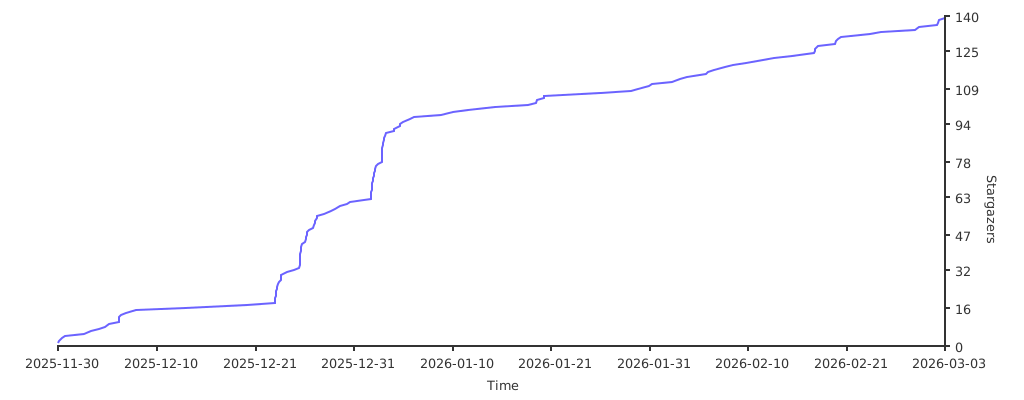](https://starchart.cc/alper-han/CrossMacro)
## License
Licensed under GPL-3.0-only. See [LICENSE](LICENSE).
## Community
