https://github.com/alphatwirl/atpbar
Progress bars for threading and multiprocessing tasks on terminal and Jupyter Notebook
https://github.com/alphatwirl/atpbar
jupyter-notebook multiprocessing progress-bars terminal-based threading
Last synced: 2 months ago
JSON representation
Progress bars for threading and multiprocessing tasks on terminal and Jupyter Notebook
- Host: GitHub
- URL: https://github.com/alphatwirl/atpbar
- Owner: alphatwirl
- License: mit
- Created: 2019-02-17T02:15:54.000Z (over 7 years ago)
- Default Branch: main
- Last Pushed: 2026-04-26T20:31:00.000Z (2 months ago)
- Last Synced: 2026-04-26T20:32:12.763Z (2 months ago)
- Topics: jupyter-notebook, multiprocessing, progress-bars, terminal-based, threading
- Language: Python
- Homepage: https://alphatwirl.github.io/atpbar/
- Size: 1.19 MB
- Stars: 98
- Watchers: 1
- Forks: 9
- Open Issues: 11
-
Metadata Files:
- Readme: README.md
- License: LICENSE
Awesome Lists containing this project
README
[](https://pypi.org/project/atpbar)
[](https://pypi.org/project/atpbar)
[](https://anaconda.org/conda-forge/atpbar)
[](https://doi.org/10.5281/zenodo.2567283)
[](https://github.com/alphatwirl/atpbar/actions/workflows/unit-test.yml)
[](https://github.com/alphatwirl/atpbar/actions/workflows/type-check.yml)
[](https://codecov.io/gh/alphatwirl/atpbar)
# atpbar
_Progress bars_ for threading and multiprocessing tasks on the terminal and
Jupyter Notebook.

_atpbar_ can display multiple progress bars simultaneously growing to show the
progress of each iteration of loops in
[threading](https://docs.python.org/3/library/threading.html) or
[multiprocessing](https://docs.python.org/3/library/multiprocessing.html)
tasks. _atpbar_ can display progress bars on the terminal and [Jupyter
Notebook](https://jupyter.org/).
## Quick Start
This short tutorial shows the basic usage of _atpbar_ with simple examples.
### Installation
You can use `pip` to install `atpbar`:
```bash
pip install atpbar
```
### How to use
#### Start Python
You can try the examples in this tutorial in the Python interactive shell.
```bash
$ python
Python 3.13.9 (...)
...
...
>>>
```
#### Import packages
Import `atpbar` and other objects that we will use in the examples.
```python
from random import randint
from time import sleep
from atpbar import atpbar
```
#### One loop
The `atpbar` can wrap an iterable to show a progress bar for the iterations.
```python
n = randint(1000, 10000) # Random number of iterations
for _ in atpbar(range(n)):
sleep(0.001)
```
This example randomly selects the number of iterations and, in each iteration,
sleeps for a short time.
The progress bar will be shown as the loop progresses.
```plaintext
51.25% :::::::::::::::::::: | 4132 / 8062 |: range(0, 8062)
```
Note: `atpbar` won't show a progress bar if the length of the iterable cannot be
obtained by `len()`.
#### Nested loops
The `atpbar` can show progress bars for nested loops.
```python
for i in atpbar(range(4), name='Outer'):
n = randint(1000, 10000)
for _ in atpbar(range(n), name=f'Inner {i}'):
sleep(0.001)
```
This example iterates over an outer loop four times. In each iteration, it
iterates over an inner loop. The progress bars for both the outer and inner
loops are shown.
```plaintext
100.00% :::::::::::::::::::::::::::::::::::::::: | 3287 / 3287 |: Inner 0
100.00% :::::::::::::::::::::::::::::::::::::::: | 5850 / 5850 |: Inner 1
50.00% :::::::::::::::::::: | 2 / 4 |: Outer
34.42% ::::::::::::: | 1559 / 4529 |: Inner 2
```
In the snapshot of the progress bars above, the outer loop is in its third
iteration. The inner loop has been completed twice and is running the third.
The progress bars for the completed tasks move up. The progress bars for the
active tasks are growing at the bottom.
#### Threading
As the last example, we show how to use `atpbar` with threading. We will use
the
[`ThreadPoolExecutor`](https://docs.python.org/3/library/concurrent.futures.html#threadpoolexecutor)
from the
[`concurrent.futures`](https://docs.python.org/3/library/concurrent.futures.html)
module.
Import `ThreadPoolExecutor` and also `flushing` from `atpbar`.
```python
from concurrent.futures import ThreadPoolExecutor
from atpbar import flushing
```
Define a function that will be executed by the threads.
```python
def func(n, name):
for _ in atpbar(range(n), name=name):
sleep(0.001)
```
We will submit ten jobs each runs the `func` function to five threads.
```python
n_workers = 5
n_jobs = 10
with flushing(), ThreadPoolExecutor(max_workers=n_workers) as executor:
for i in range(n_jobs):
n = randint(1000, 10000)
executor.submit(func, n, name=f'Job {i}')
```
The context manager `flushing()` exits after the progress bars have finished
updating.
The progress bars will be simultaneously updated for concurrent jobs.
```plaintext
100.00% :::::::::::::::::::::::::::::::::::::::: | 2326 / 2326 |: Job 0
100.00% :::::::::::::::::::::::::::::::::::::::: | 2971 / 2971 |: Job 1
100.00% :::::::::::::::::::::::::::::::::::::::: | 1386 / 1386 |: Job 6
100.00% :::::::::::::::::::::::::::::::::::::::: | 5316 / 5316 |: Job 3
100.00% :::::::::::::::::::::::::::::::::::::::: | 7786 / 7786 |: Job 4
100.00% :::::::::::::::::::::::::::::::::::::::: | 5500 / 5500 |: Job 5
91.33% :::::::::::::::::::::::::::::::::::: | 8188 / 8965 |: Job 2
39.85% ::::::::::::::: | 3842 / 9642 |: Job 7
34.89% ::::::::::::: | 2882 / 8260 |: Job 8
29.11% ::::::::::: | 414 / 1422 |: Job 9
```
#### Jupyter Notebook
On Jupyter Notebook, progress bars based on
[ipywidgets](https://pypi.org/project/ipywidgets/) are displayed.
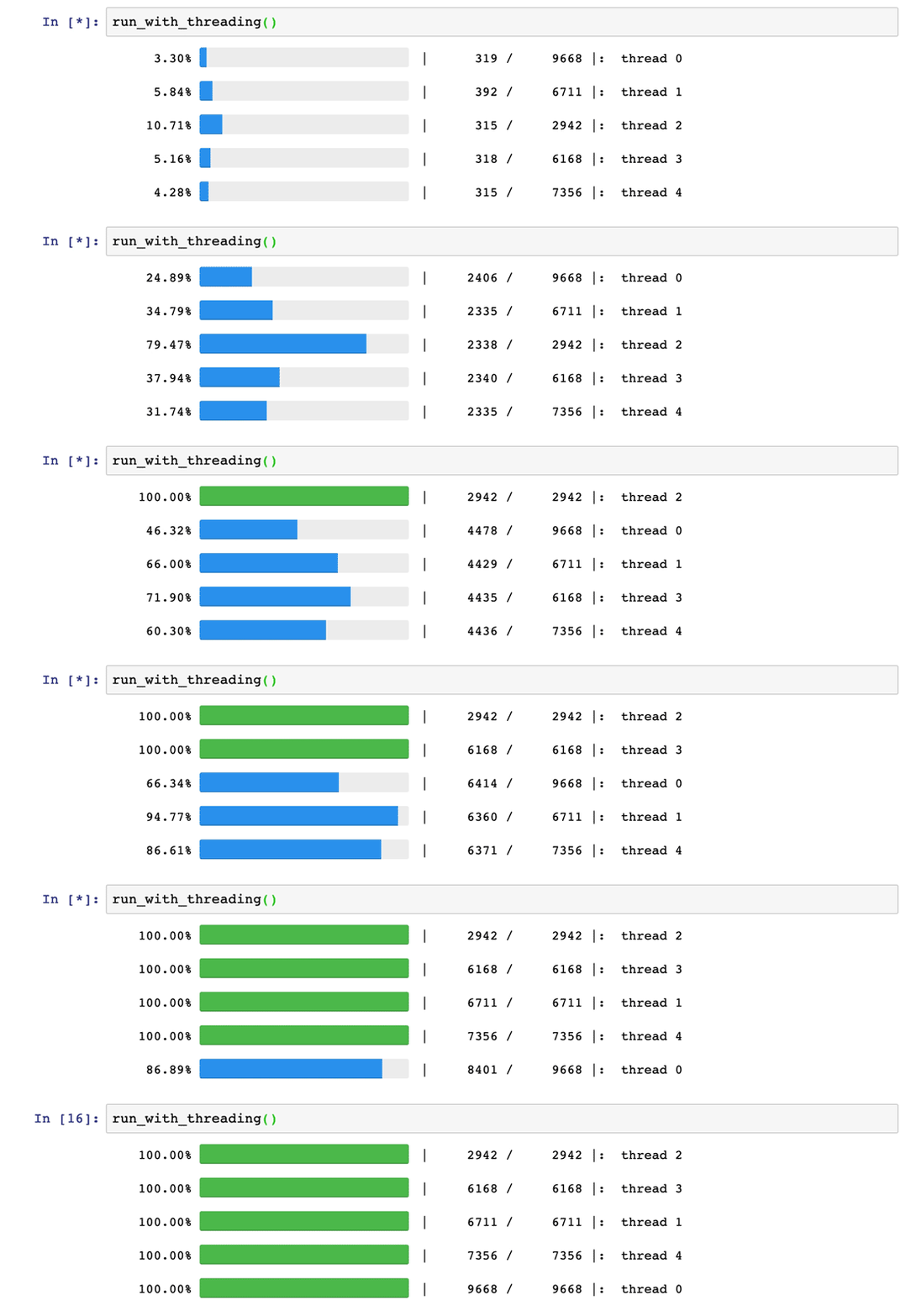
You can try interactively online:
[](https://mybinder.org/v2/gh/alphatwirl/notebook-atpbar-001/master?filepath=atpbar.ipynb)
### For more information
This is the end of the quick start tutorial. For more information, see
[the Users Guide](https://alphatwirl.github.io/atpbar/guide/index.html).