https://github.com/altherneum/server
Configuration serveur
https://github.com/altherneum/server
apache2 azuriom discord minecraft setup shell ubuntu
Last synced: about 2 months ago
JSON representation
Configuration serveur
- Host: GitHub
- URL: https://github.com/altherneum/server
- Owner: Altherneum
- Created: 2024-04-07T16:34:09.000Z (about 2 years ago)
- Default Branch: main
- Last Pushed: 2026-05-08T09:41:32.000Z (about 2 months ago)
- Last Synced: 2026-05-08T11:36:27.010Z (about 2 months ago)
- Topics: apache2, azuriom, discord, minecraft, setup, shell, ubuntu
- Language: Shell
- Homepage: https://git.altherneum.fr/altherneum/server
- Size: 35.2 MB
- Stars: 1
- Watchers: 0
- Forks: 0
- Open Issues: 21
-
Metadata Files:
- Readme: README.md
Awesome Lists containing this project
README
# Badges














## Organisation



# server
- Server configuration files
# Github
- [Repository](https://github.com/Altherneum/server)
- [Tableau](https://github.com/orgs/Altherneum/projects/5/)
- [Issues](https://github.com/Altherneum/server/issues)
- [Commits](https://github.com/Altherneum/server/commits/main)
- Git origin : [git.altherneum.fr/altherneum/](git.altherneum.fr/altherneum/)
# Applications
- Liste des repo d'applications rattachés [github.com /.github /profile /README.md #libs-externes](https://github.com/Altherneum/.github/blob/main/profile/README.md#libs-externes)
- Liste des librairies utilisés dans les applications [github.com /Altherneum /.github /profile /README.md #repo](https://github.com/Altherneum/.github/blob/main/profile/README.md#repo)
# Setup
## Préparation du DNS
- Créer la zone DNS : [DNS routing](#DNS-routing)
## Préparation du VPS
- Créer un VPS
- Obtenir l'adresse IP
- Obtenir le mot de passe
## Préparation du bot Discord
- Créer un bot Discord sur [discord.com /developers /applications](https://discord.com/developers/applications)
- Changez le nom, photo, description, et tags dans `discord.com/developers/applications//information`
- Ensuite rendez-vous dans `discord.com/developers/applications//bot`
- Ajouter `Presence Intent`, `Server Members Intent`, `Message Content Intent`
- Copiez le token / jeton
- Via `Réinitialiser le token`
- `Pour des raisons de sécurité, les tokens ne peuvent être consultés qu'une seule fois [...], merci d'en régénérer un nouveau.`
- Puis dans `discord.com/developers/applications//oauth2`
- `Champs d'application` : Ajoutez `bot`
- `Permissions du bot` : Ajoutez `Administrateur` ou rien suivant le type de bot
- Copiez l'URL généré, exemple : `discord.com/oauth2/authorize?client_id=&permissions=0&integration_type=0&scope=bot` pour ajouter le bot sur un serveur
- Retournez au besoin une fois fini dans `discord.com/developers/applications//bot` pour retirer `Bot public` afin de le rendre privé
### Description à copier
```
:globe_with_meridians: https://Altherneum.fr
:globe_with_meridians: https://doc.Altherneum.fr
:trident: https://doc.Altherneum.fr/discord
:video_game: mc.Altherneum.fr
```
## Se connecter
- `ssh root@altherneum.fr`
- Valider avec le mot de passe
### Prochaines connections
- Les prochaines connexions devront se faire depuis le compte `admin`, La connexion depuis SSH au compte root étant désactivée par la suite dans [#Configuration](#Configuration)
- `ssh admin@altherneum.fr` puis `su - root` pour escalader en tant que super user
## Lancer l'installation
```
wget -O /setup.sh -L 'https://raw.githubusercontent.com/Altherneum/server/main/setup.sh'
chmod +x /setup.sh
/setup.sh
```
## Configuration
- [MySQL password](/scripts/sh/setup.mysql.sh)
- [Discord token](/DiscordBot/data/tokens.yml)
- [Minecraft Discord token](/Serveurs/DataFolder/tokens.yml)
- [Minecraft RCON Password](/Serveurs/SERVERNAME/server.properties) | [exemple](/Serveurs/Hub/server.properties)
- [Admin account Password](/scripts/sh/setup.system.user.sh)
- [SSH WebHook](/etc/ssh/sshrc)
- [profile.d Discord WebHook](/etc/profile.d/discord-webhook.sh)
- [SendMail](/scripts/sh/setup.sendmail.sh) `/etc/aliases`
- [Code-Server Apache Password](/scripts/sh/setup.code-server.sh)
- [Forgejo Apache Password](/scripts/sh/setup.forgejo.sh)
- Une fois Forgejo installé
- ~~Créer les repository (Cloner ou mirror)~~
- Créer un jeton sur l'interface pour forgejo runner
- [Forgejo action runner token](/scripts/sh/setup.forgejo.action.sh)
- [KeeWeb Apache Password](/scripts/sh/setup.keeweb.sh)
- Déplacer une base `.kdbx` vers `/webdav/kdbx.kdbx`
- Déplacer le dossier `backup` `/tmp/backup/`
- Obtenu via `/scripts/sh/backup-manager.sh`
- Permet d'installer les repos sur Forgejo
- Permet d'ajouter les repos sur Code-Server
## Lancer l'installation
`/install.sh`
## Installer Azuriom
Connectez vous à la page HTTP de votre serveur en tapant l'adresse IP
### Configuration Azuriom conseillé
- **IP** : 127.0.0.1
- **Base de donnée** : site
- **Mot de passe** complexe définit dans la partie [#Configuration](#Configuration)
- Utilisation de comptes Microsoft pour se connecter
### Ajouter le thème et plugins
- [mc.altherneum.fr/admin/themes](https://mc.altherneum.fr/admin/themes)
- Prism
- [mc.altherneum.fr/admin/plugins](https://mc.altherneum.fr/admin/plugins)
- Shop
- DedipassPayment
### Mettre à jour la base de donnée MySQL d'azuriom
`/scripts/sh/setup.azuriom-db.sh`
### Nettoyer le cache
- Connectez vous au CMS Azuriom
- Rendez vous dans les paramètres : [mc.altherneum.fr/admin/settings/performance](https://mc.altherneum.fr/admin/settings/performance)
- Cliquer sur "Vider le cache"
## Utilisation de PhPMyAdmin
- [mc.altherneum.fr/phpmyadmin](https://mc.altherneum.fr/phpmyadmin)
- Utilisateur et mot de passe configuré lors de l'installation dans le fichier de [#Configuration](#Configuration)
# Start
## Lancer via le script
### Tout lancer
`start.sh`
### Discord start
`DiscordBot/start.sh`
### Minecraft start
#### Lancer tout les serveurs
- `Serveurs/DataFolder/start.sh`
#### Lancer les serveurs par défaut
- `Serveurs/DataFolder/start-auto.sh`
## Lancer via un service
### Service Apache2
- `service apache2 start`
### Service MySQL
- `service mysql start`
### Service Discord
- [/scripts/discord.service](https://github.com/Altherneum/server/blob/main/scripts/discord.service)
- `service discord start`
### Service Minecraft
- [scripts/minecraft.service](https://github.com/Altherneum/server/blob/main/scripts/minecraft.service)
- `service minecraft start`
### Service Code-Server
- `service code-server@vscode start`
# Update et lancer le service
## Tout mettre à jour et lancer
`/update-start.sh`
## Discord start & update
`DiscordBot/update-start.sh`
## Minecraft start & update
`Serveurs/DataFolder/update-start.sh`
## Code-server stop & start & update
- Stoper Code-Server [# Code-Server stop](#Code-Server-Stop)
- Update Code-Server [# Code-Server update](#Code-Server-Update)
- Lancer Code-Server [# Service Code-Server](#Service-Code-Server)
# Update
## Force update all
```
wget -O /update.sh -L 'https://raw.githubusercontent.com/Altherneum/server/main/update.sh'
chmod +x /update.sh
/update.sh
```
## Update all
`/update.sh`
## Discord update
`/DiscordBot/update.sh`
## Minecraft update
`/Serveurs/DataFolder/update.sh`
## Code-Server update
- Changer le numéro de version à la ligne n°1
- Exemple : `VERSION=1.0.0` passe vers `VERSION=4.100.3`
- Lancer les 3 commandes [# commandes Code-Server update](#Commandes-Code-Server-Update)
```
VERSION=4.100.3
curl -fOL https://github.com/coder/code-server/releases/download/v$VERSION/code-server_${VERSION}_amd64.deb
sudo dpkg -i code-server_${VERSION}_amd64.deb
```
- Scripts d'installation automatique utilisé par le serveur utilisant le même extrait de code : [/scripts/sh/setup.code-server.sh](https://github.com/Altherneum/server/tree/main/scripts/sh/setup.code-server.sh)
# Stop
## Tout arrêter
`stop.sh`
## Discord stop
`DiscordBot/stop.sh`
## Minecraft stop
`Serveurs/DataFolder/stop.sh`
## Code-Server stop
- `service code-server@vscode stop`
# Screen
- `su - root` Passer en root
## Minecraft screen
- `su minecraft` Passer sur l'utilisateur `Minecraft`
## Discord screen
`su discord` Passer sur l'utilisateur `Discord`
## Commandes screen
Voire le cours sur [screen](/cours/linux#screen)
# Fichiers utiles
## Dossiers services
### Discord
- Utilisateur `discord`
- Dossier : `/DiscordBot`
- Permissions : `d rwx --- ---`
### Minecraft
- Utilisateur `minecraft`
- Dossier : `/Serveurs`
- Permissions : `d rwx --- ---`
### Azuriom
- Utilisateur `www-data`
- Dossier : `/var/www/html/`
- Permissions : `d rwx r-x r-x`
- SQL
## .bash_history
- `/home/admin/.bash_history`
- `/home/vscode/.bash_history`
- `/DiscordBot/.bash_history`
- `/Serveurs/.bash_history`
- `/root/.bash_history`
## Logs
- VScode :
- `/var/log/apache2/vscode.error_log`
- `/var/log/apache2/vscode.access_log`
- Forgejo :
- `/var/log/apache2/forgejo.error.log`
- `/var/log/apache2/forgejo.access_log`
- Apache2 :
- `/var/log/apache2/access.log`
- `/var/log/apache2/error.log`
- `/var/log/apache2/other_vhosts_access.log`
- SSHD : `/var/log/auth.log`
- Minecraft :
- `/Serveurs//logs/latest.log`
- Exemple : `/Serveurs/Survie/logs/latest.log`
- Discord :
- Channel URL :
- [AutoMod](https://discord.com/channels/1081921426333909072/1081947188722155601)
- [Message](https://discord.com/channels/1081921426333909072/1081947413226455163)
- [Profile.d](https://discord.com/channels/1081921426333909072/1407394560186912789)
- [Web](https://discord.com/channels/1081921426333909072/1332057126155063336)
- Data files
- `/DiscordBot/Data/`
- Exemple : `/DiscordBot/Data/748530290917638165`
- `/DiscordBot/Data/`
- `/DiscordBot/Data/BanqueRoute`
- `/DiscordBot/Data/event`
- `/DiscordBot/Data/globalInvites`
# Backup
## Map & Spawn backup
- via l'utilisateur `root` ou `sudo `
- Se déplacer à la racine : `cd /`
- Ziper le monde à sauvegarder vers le repo `server` via : `tar -acf /home/vscode/repo/server/Serveurs//Spawn.zip /Serveurs//Spawn/`
- Exemple : `tar -acf /home/vscode/repo/server/Serveurs/Hub/Spawn.zip Serveurs/Hub/Spawn/`
- Se rendre sur le code-server via : [code.altherneum.fr](https://code.altherneum.fr) sur le repo [server](https://code.altherneum.fr/?folder=/home/vscode/repo/server)
- Commit et Push le changement de fichier dans le repo 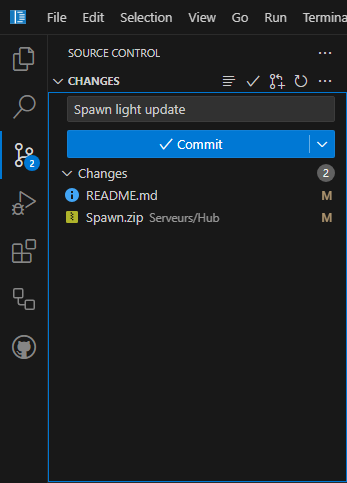
## Backup manager
- `/scripts/sh/backup-manager.sh` via `root`, ou `sudo /scripts/sh/backup-manager.sh`
- Copie les repository via `forgejo dump`
- Copie les dossiers importants (`/Serveurs` et `/DiscordBot`)
- Copie les repository dans `/home/vscode/repo/`
- Télécharger en suite les backups sur votre machine : `scp -r admin@altherneum.fr:/tmp/backup/ /home/admin/backup`
- Déposer une backup vers le serveur via `scp -r /home/admin/backup admin@altherneum.fr:/tmp/backup/`
## Obsolète
## Backup targeted
- `/backup/backuptarget.sh`
- Cible `/Serveurs` et `/DiscordBot`
### Backup full
- `/backup/backupfull.sh`
- Cible tout sauf le fichier `/backup.tar.gz`
### Backup SRV
- `/backup/backupsrv.sh`
- Cible tout, sauf les dossiers systèmes (ex : `/srv`, `/home`, `/var`, `/etc`, ...)
### Backup vanilla
- `/backup/backup.sh`
- Cible presque de la même manière tout, sauf les dossiers systèmes
# DNS routing
## TXT DNS
```
_gh-Altherneum-o
3600
TXT
2bdece4caf
```
```
_github-pages-challenge-Altherneum
3600
TXT
9c22d2141475847bf5ec793a131c9b
```
```
_gh-Altherneum-o.doc
3600
TXT
060d5899eb
```
```
_github-pages-challenge-Altherneum.doc
3600
TXT
f9a588a7a48398e4fd0b367f822131
```
## CNAME DNS
```
www
3600
CNAME
Altherneum.fr.
```
```
mc
3600
CNAME
Altherneum.fr.
```
```
play
3600
CNAME
Altherneum.fr.
```
```
*
3600
CNAME
Altherneum.fr.
```
## Doc DNS
```
doc
3600
CNAME
Altherneum.github.io.
```
[github.com/Altherneum/Altherneum.github.io/ ... /CNAME](https://github.com/Altherneum/Altherneum.github.io/blob/main/CNAME)
## MC DNS
```
_minecraft._tcp.@
3600
SRV
0 5 25500 mc.Altherneum.fr.
```
```
_minecraft._tcp.play
3600
SRV
0 5 25500 mc.Altherneum.fr.
```
```
_minecraft._tcp.mc
3600
SRV
0 5 25500 mc.Altherneum.fr.
```
```
_minecraft._tcp
3600
SRV
0 5 25500 mc.Altherneum.fr.
```
```
_minecraft._tcp.hub
3600
SRV
0 5 25500 mc.Altherneum.fr.
```
```
_minecraft._tcp.creatif
3600
SRV
0 5 25501 mc.Altherneum.fr.
```
```
_minecraft._tcp.rpg
3600
SRV
0 5 25502 mc.Altherneum.fr.
```
```
_minecraft._tcp.skyblock
3600
SRV
0 5 25503 mc.Altherneum.fr.
```
```
_minecraft._tcp.anarchie
3600
SRV
0 5 25504 mc.Altherneum.fr.
```
```
_minecraft._tcp.survie
3600
SRV
0 5 25505 mc.Altherneum.fr.
```
```
_minecraft._tcp.opprison
3600
SRV
0 5 25506 mc.Altherneum.fr.
```
```
_minecraft._tcp.test
3600
SRV
0 5 25507 test.altherneum.fr
```
## IP DNS
```
vps
3600
A
45.159.229.139
```
## Root DNS
### Root entry
`@` = `altherneum.fr`
```
@
3600
A
45.159.229.139
```
### Any entry
`*` = `*.altherneum.fr`
```
*
3600
CNAME
Altherneum.fr.
```
## Mail DNS
### DKIM
```
default._domainkey
300
TXT
"v=DKIM1; h=sha256; k=rsa; " "p=MIIBIjANBgkqhkiG9w0BAQEFAAOCAQ8AMIIBCgKCAQEArEKm3c4iVpWbRwK2yoGguBNIeG70zx9NI9H7Z5mjlVXX9gasCnA6pJFoOaw0akQ4mQYf1qpHNs8P6on+mus66M5E1O05g1b6hzDTNMSnc9ZTJZnUBJ+cZbNVa94JD7Lf+aV3E6pveHU2nfO1vMUeiQXNXy1ZTHnA/CyWN6RXaEGNdaRSYbQutK4DxdJozceLxjl9KlhyjdrtyT" "4U3ZyIcUwulTmUYAJrDhhClPOhE6mRvx13dDA0SJiWarma/onuyIRKpCSEioJpp74aDWL1PKUHCKIq+aRX9rJC24rK50Qw1/Z1rJiBD+BPBo3/BM11Jlc25HV3fi9017JeHZL0ywIDAQAB"
```
### SPF
```
@
3600
TXT
v=spf1 a mx ip4:45.159.229.139 include:contabo.com ~all
```
### DMARC
```
_dmarc
3600
TXT
v=DMARC1; p=none; rua=mailto:root@altherneum.fr; adkim=r; aspf=r
```
### MX
```
@
3600
MX
1 mail
```
### mail.altherneum.fr
```
mail
3600
A
45.159.229.139
```
## Apache2 redirection
**__[ < OUTDATED > ]__**
### Doc.altherneum.fr
- [altherneum.fr](https://altherneum.fr)
- [doc.altherneum.fr](https://doc.altherneum.fr)
- [docs.altherneum.fr](https://docs.altherneum.fr)
- [wiki.altherneum.fr](https://wiki.altherneum.fr)
- [info.altherneum.fr](https://info.altherneum.fr)
### Github.com/altherneum
- [github.altherneum.fr](https://github.altherneum.fr)
### Forgejo
- [git.altherneum.fr](https://git.altherneum.fr)
- [repo.altherneum.fr](https://repo.altherneum.fr)
### Code-Server
- [code.altherneum.fr](https://code.altherneum.fr)
- [vscode.altherneum.fr](https://code.altherneum.fr)
- [3000.code.altherneum.fr](https://3000.code.altherneum.fr) (Live HTML preview server)
### Youtube.com/watch?v=2zpCOYkdvTQ
- [windows.altherneum.fr](https://windows.altherneum.fr)
- [microsoft.altherneum.fr](https://microsoft.altherneum.fr)
- [fuckwindows.altherneum.fr](https://windows.altherneum.fr)
- [fuckmicrosoft.altherneum.fr](https://microsoft.altherneum.fr)
### Minecraft
- [play.altherneum.fr](https://play.altherneum.fr)
- [mc.altherneum.fr](https://mc.altherneum.fr)
- [minecraft.altherneum.fr](https://minecraft.altherneum.fr)
### Arch
- [arch.altherneum.fr](https://arch.altherneum.fr)
- [archterneum.altherneum.fr](https://archterneum.altherneum.fr)
- [git.arch.altherneum.fr](https://git.arch.altherneum.fr)
### KeeWeb
- [keeweb.altherneum.fr](https://keeweb.altherneum.fr)
- [keepass.altherneum.fr](https://keepass.altherneum.fr)
- [keys.altherneum.fr](https://keys.altherneum.fr)
- [key.altherneum.fr](https://key.altherneum.fr)
### Brave
#### Brave Search
- [search.altherneum.fr](https://search.altherneum.fr)
- [lost.altherneum.fr](https://lost.altherneum.fr)
- [\* .altherneum.fr](https://*.altherneum.fr) : [# Wildcard](#wildcard)
#### Brave Ask
- [ask.altherneum.fr](https://ask.altherneum.fr)
- [ai.altherneum.fr](https://ai.altherneum.fr)
- [ia.altherneum.fr](https://ia.altherneum.fr)
### Wildcard
- [\* .altherneum.fr](https://\*.altherneum.fr) (Toutes les URLs ne respectant pas les condtions au dessus)
- Redirection : [search.brave.com](https://search.brave.com/)