https://github.com/alyibrahim1/claude-statusline
Fast Rust-based Claude Code statusline — Displays model, git branch, commits, context bar, rate limits, session cost, tokens. Rust binary, zero dependencies.
https://github.com/alyibrahim1/claude-statusline
anthropic binary claude claude-code cli developer-tools git linux nodejs npm open-source rust script statusline terminal-based tui usage-tracking
Last synced: 3 months ago
JSON representation
Fast Rust-based Claude Code statusline — Displays model, git branch, commits, context bar, rate limits, session cost, tokens. Rust binary, zero dependencies.
- Host: GitHub
- URL: https://github.com/alyibrahim1/claude-statusline
- Owner: AlyIbrahim1
- License: mit
- Created: 2026-03-25T01:36:22.000Z (4 months ago)
- Default Branch: main
- Last Pushed: 2026-04-11T12:57:34.000Z (3 months ago)
- Last Synced: 2026-04-11T13:20:46.470Z (3 months ago)
- Topics: anthropic, binary, claude, claude-code, cli, developer-tools, git, linux, nodejs, npm, open-source, rust, script, statusline, terminal-based, tui, usage-tracking
- Language: JavaScript
- Homepage:
- Size: 742 KB
- Stars: 2
- Watchers: 1
- Forks: 0
- Open Issues: 0
-
Metadata Files:
- Readme: README.md
- License: LICENSE
Awesome Lists containing this project
README

[](https://github.com/AlyIbrahim1/claude-statusline/actions/workflows/ci.yml)
[](https://www.npmjs.com/package/@alyibrahim/claude-statusline)
[](https://www.npmjs.com/package/@alyibrahim/claude-statusline)
[](LICENSE)
**A rich, fast statusline for [Claude Code](https://claude.ai/code)** — shows model, git branch, context usage, rate limits, session cost, and split input/output token counts after every response.
Runs as a **compiled Rust binary** (~5ms startup vs ~100ms for Node.js). Zero shell dependencies. One install command.

---
## Install
```bash
npm install -g @alyibrahim/claude-statusline
```
Done. The statusline configures itself automatically. Restart Claude Code to see it.
> If auto-setup didn't run: `claude-statusline setup`
**Plugin install (Claude Code marketplace):** Search for `claude-statusline` in the Claude Code plugin browser. The plugin auto-configures during installation. To get the native Rust binary after a plugin install, run:
```bash
claude-statusline download-binary
claude-statusline setup
```
---
## What you get
**Line 1** — Model name · Effort level · Active subagents · Current task · Directory `(branch +commits)` · Context bar
**Line 2** — Weekly token usage · 5h usage · Reset countdown *(Pro/Max)* — or — Session cost *(API key)* · Session tokens `X↓ Y↑`
| Feature | Details |
|---|---|
| Context bar | Normalized to usable % — accounts for the auto-compact buffer |
| Rate limits | Shows 5h and weekly usage with color-coded thresholds |
| Session cost | Displayed only for API key users, hidden for subscribers |
| Session tokens | Real-time via JSONL offset caching — split input/output display (`X↓ Y↑`), formatted as `k` or `M` for large counts |
| Active agents | Counts running subagents from your `~/.claude/todos/` directory |
| Effort level | Reads `CLAUDE_CODE_EFFORT_LEVEL` env var or `settings.json` |
| Git branch | Detected automatically, silently absent if not a git repo |
| Session commits | Shows `+N` next to the branch for commits made during the current session |
| Directory label | Displays as `~/parent/dir` so you always know which project you're in |
| Terminal wrapping | Lines wrap to fit terminal width — reads `COLUMNS` or `stdout.columns` automatically |
---
## Session History
Track token usage, cost, and duration across every Claude Code session. Choose between a **terminal-native TUI** or a **browser dashboard** — your preference is saved automatically.
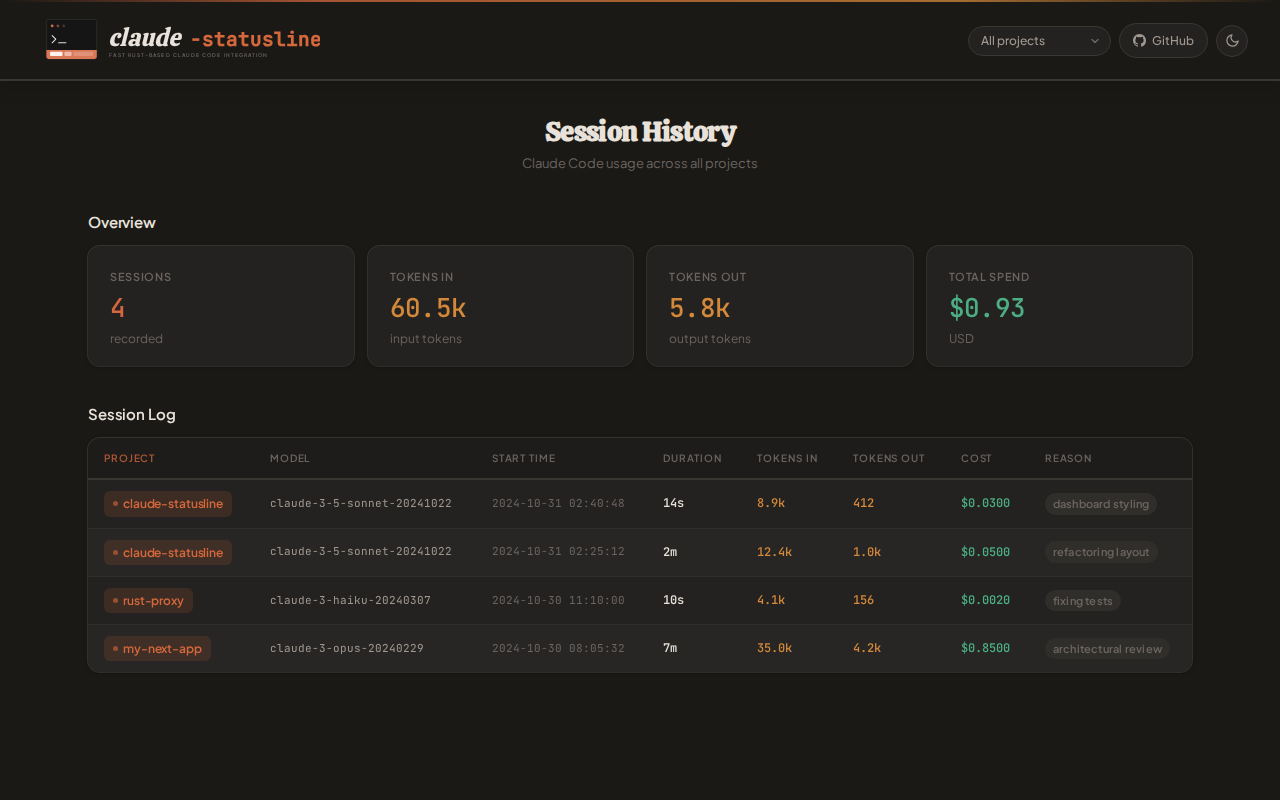
Session history is **enabled by default** on setup. Each session records:
| Field | Details |
|---|---|
| Project | Directory name and path |
| Model | Which Claude model was used |
| Tokens | Input and output counts |
| Cost | USD cost (API key users) |
| Duration | Session length in seconds |
| Exit reason | How the session ended |
**Commands:**
```bash
claude-statusline history # Open dashboard in saved mode (default: web)
claude-statusline history --mode terminal # Switch to terminal TUI (persisted)
claude-statusline history --mode web # Switch to browser dashboard (persisted)
claude-statusline enable-history # Enable session tracking
claude-statusline disable-history # Disable session tracking
```
Data is stored at `~/.claude/statusline-history.jsonl`.
### Claude Code slash commands
Commands are also available directly inside Claude Code as slash commands:
- `/history`
- `/history-enable`
- `/history-disable`
- `/history-mode `
- `/download-binary`
Project contributors get these from the repo at `.claude/commands/`.
Global npm installs copy them to `~/.claude/commands/` automatically.
Plugin installs include them via the plugin's `commands/` directory.
### Terminal TUI
`--mode terminal` opens an interactive full-screen dashboard directly in your terminal — no browser required. Requires the native Rust binary (falls back to web dashboard with a warning if unavailable).
```
┌─ claude-statusline history ──────────────────────────────────────────────┐
│ Sessions: 42 Tokens: 8.3M Cost: $12.47 │
└──────────────────────────────────────────────────────────────────────────┘
┌──────────────────────────────────────────────────────────────────────────┐
│ Filter: [All Projects ▾] │
└──────────────────────────────────────────────────────────────────────────┘
┌──────────────────────────────────────────────────────────────────────────┐
│ Project Model Started Dur Tok Cost│
│ │
│> my-web-app claude-sonnet-4-6 2026-04-02 14: 32m 842k $2.14│
│ cli-tool claude-opus-4-6 2026-04-01 09: 1h4m 1.2M $5.60│
│ data-pipeline claude-haiku-4-5 2026-03-31 17: 18m 220k $0.44│
│ my-web-app claude-sonnet-4-6 2026-03-30 11: 45m 990k $2.89│
│ api-server claude-sonnet-4-6 2026-03-29 08: 2h1m 2.1M $8.33│
│ │
└──────────────────────────────────────────────────────────────────────────┘
┌──────────────────────────────────────────────────────────────────────────┐
│ up/down or j/k: move f: filter Enter: apply Esc: close q: quit │
└──────────────────────────────────────────────────────────────────────────┘
```
Press `f` to open the project filter popup:
```
┌─ Filter by Project ──────────┐
│ ██ All Projects ██ │
│ api-server │
│ cli-tool │
│ data-pipeline │
│ my-web-app │
└──────────────────────────────┘
```
Rows are color-coded by exit reason: green = normal, yellow = interrupted, orange = pending.
### Web Dashboard
`--mode web` (the default) opens a browser-based dashboard with project filtering and light/dark theme toggle.
---
## Realtime Renderer
An optional background process that maintains a persistent Unix socket per terminal, enabling terminal-resize awareness and faster state access. **Disabled by default.**
**Enable** by setting the environment variable (add to your shell profile to persist):
```bash
export CLAUDE_STATUSLINE_REALTIME=1
```
Accepted values: `1`, `true`, `TRUE`.
When enabled, the native binary auto-spawns a renderer process the first time it runs in a terminal session. The renderer listens on a Unix socket and persists state to `~/.claude/statusline-state-{tty}.json`. It exits automatically on `session_end` or when explicitly stopped.
**Terminal identification**
Each terminal gets its own renderer, identified by a *TTY slug* derived in priority order from:
1. `CLAUDE_STATUSLINE_TTY` — set this explicitly for a stable, human-readable slug
2. `TERM_SESSION_ID` — used automatically by terminal emulators that set it
3. `pid-{PID}` — fallback, changes on each shell restart
**Commands:**
```bash
claude-statusline realtime-status # Show renderer state and paths for current terminal
claude-statusline realtime-stop # Request renderer shutdown for current terminal
```
> The realtime renderer is Unix-only. On Windows, the feature flag is silently ignored.
---
## Platform support
Pre-built Rust binaries are available for **Linux x64/arm64, macOS x64/arm64, and Windows x64**. All Linux distributions (Ubuntu, Arch, Fedora, etc.) are supported. Any other platform falls back to the JS implementation automatically — no action needed.
Plugin installs skip `npm install`, so the binary is not downloaded automatically. Run `claude-statusline download-binary` once to get it.
See [PLATFORMS.md](PLATFORMS.md) for the full compatibility guide, per-platform install instructions, and feature availability table.
---
## Why this one
| | claude-statusline | Others |
|---|---|---|
| Startup time | ~5ms (Rust binary) | ~100ms (Node.js cold-start every prompt) |
| Shell dependencies | None | Require `jq`, `bc`, or `ccusage` |
| API calls | None — reads Claude's stdin directly | Poll OAuth endpoint, risk rate limits |
| Subscription-aware | Shows usage/resets for Pro/Max, cost for API | Treat everyone as API user |
| Context bar | Usable % after auto-compact buffer | Raw remaining % |
| Subagent counter | Counts active agents from todos dir | — |
| Session tokens | Real-time via JSONL offset cache, split I/O (`X↓ Y↑`) | Stale stdin snapshot or none |
| Session commits | Tracks git commits made this session | — |
| Session history | Terminal TUI + browser dashboard, per-project filtering, zero dependencies | — |
---
## Requirements
- **Node.js ≥16** — for install/uninstall scripts only (not needed at runtime on supported platforms)
- **git** — optional, enables branch display
---
## Uninstall
```bash
claude-statusline uninstall
npm uninstall -g @alyibrahim/claude-statusline
```
> Always run `claude-statusline uninstall` first — it removes the `statusLine` entry from `~/.claude/settings.json` before the files are deleted.
`npm uninstall -g @alyibrahim/claude-statusline` also removes the four history slash command files installed by this package from `~/.claude/commands/`, without touching other custom commands.
---
## Notes
- Settings are written only to the `statusLine` key — all other `~/.claude/settings.json` keys are untouched
- Respects `$CLAUDE_CONFIG_DIR` if set
- Switched Node versions on an unsupported platform? Re-run `claude-statusline setup`
## License
MIT