https://github.com/amaurioliveira/serverless-localstack
Palestra sobre localstack e serverless
https://github.com/amaurioliveira/serverless-localstack
aws-lambda bash javascript localstack serverless
Last synced: 3 months ago
JSON representation
Palestra sobre localstack e serverless
- Host: GitHub
- URL: https://github.com/amaurioliveira/serverless-localstack
- Owner: AmauriOliveira
- Created: 2021-06-18T18:39:32.000Z (about 5 years ago)
- Default Branch: master
- Last Pushed: 2021-07-26T18:22:54.000Z (almost 5 years ago)
- Last Synced: 2025-03-22T02:22:17.569Z (over 1 year ago)
- Topics: aws-lambda, bash, javascript, localstack, serverless
- Language: JavaScript
- Homepage:
- Size: 115 KB
- Stars: 0
- Watchers: 1
- Forks: 0
- Open Issues: 0
-
Metadata Files:
- Readme: readme.md
Awesome Lists containing this project
README
# LocalStack
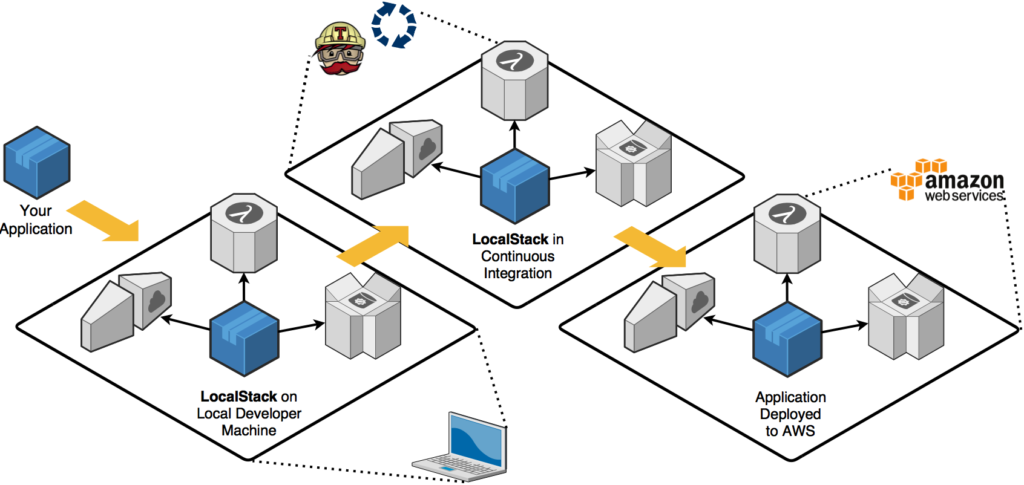
[TOC]
## Serverless
> framework
> open source
[Site Oficial](https://www.serverless.com/)
Desenvolvimento e implantação fáceis de YAML + CLI para AWS, Azure, Google Cloud, Knative e muito mais.
### Instalando Serverless
```bash
npm install -g serverless
```
### Iniciando um projeto com serverless
```bash
sls
```
### Respostas
Serverless: No project detected. Do you want to create a new one? **Yes**
Serverless: What do you want to make? **AWS Node.js**
Serverless: What do you want to call this project? **nome-projeto**
Project successfully created in 'nome-projeto' folder.
Serverless: Would you like to enable this? **No**
Entra no pasta e inicia um projeto node
```bash
cd nome-projeto
yarn init -y
```
> serverless.yml
```yml
functions:
hello:
handler: handler.hello
events:
- http:
method: get
path: hello
```
Instalando as dependências
```bash
yarn add serverless nodemon serverless-offline -D
```
> serverless.yml
```yml
plugins:
- serverless-offline
# Documentação recomenda deixar Serverless-offline para o fim
```
Levantando end point
```bash
sls offline
```
Acessando o end point
```bash
url http://localhost:3000/dev/hello
```
Ativando nodemom
> package.json
```json
"scripts": {
"start": "npx nodemon --exec npm run offline",
"offline": "npx sls offline start --host 0.0.0.0",
"invoke-local:sqs": "npx sls invoke local -f sqsListener --path mocks/sqs-event.json",
"invoke-local:sqs-clear": "npx sls invoke local -f sqsClean",
"invoke-local:s3": "npx sls invoke local -f s3Listener --path mocks/s3-insert.json"
},
```
Agora esta com nodemon ativo
Instalando o mocha
```bash
yarn add -D serverless-mocha-plugin
```
> serverless.yml
```yml
- serverless-mocha-plugin
```
Criando o teste
```bash
sls create test -f hello
```
> package.json
```json
"test": "npx sls invoke test --path test",
```
para rodar
```bash
yarn test
```
## Localstack
### O que é Localstack?
Localstack é um projeto de código aberto lançado pela **Atlassian** que simula cada recurso da AWS em sua máquina local. **Uma grande parte é gratuita**, como Cloudformation, Dynamo, EC2, Kinesis, S3, mas uma ótima IU e alguns serviços precisam da versão PRO de localstack como EMR, docker lambda, Athena.
> Para o exemplo vamos utilizar com o pacote docker
### Docker-Compose
> exemplo
```yml
version: '2.1'
services:
localstack:
container_name: 'localstack'
image: localstack/localstack
network_mode: bridge
ports:
- '4566:4566'
- '4567:4567'
- '4574-4576:4574-4576'
- '8080:8080'
environment:
- SERVICES=apigateway:4567,lambda:4574,sns:4575,sqs:4576
- DEFAULT_REGION=us-east-1
- AWS_XRAY_SDK_ENABLED=true
- LAMBDA_EXECUTOR=docker
- LAMBDA_REMOTE_DOCKER=true
- DOCKER_HOST=unix:///var/run/docker.sock
volumes:
- '${TMPDIR:-/tmp/localstack}:/tmp/localstack'
- '/var/run/docker.sock:/var/run/docker.sock'
```
Como o docker cria seu próprio ambiente, precisamos precisar quais portas locais estão vinculadas a quais portas de contêiner. Por exemplo, vinculamos as portas de 4566 a 4620 de sua máquina à mesma do contêiner.
Algumas variáveis de ambiente são necessárias para fazer isso funcionar:
DEBUG = 1 é usado para fornecer mais registros dentro do contêiner
SERVIÇOS = s3, sqs, lambda, sns lista os serviços que você deseja implantar
DEFAULT_REGION = us-east-1 especifica a região de destino de seus recursos
LAMBDA_EXECUTOR = docker diz ao localstack para usar o contêiner docker dedicado para executar suas funções lambda (parece ser a melhor maneira de reproduzir uma infraestrutura real da AWS)
LAMBDA_REMOTE_DOCKER = true e LAMBDA_REMOVE_CONTAINERS = true são configurações adicionais para execução do lambda docker
DATA_DIR = / tmp / localstack / data é o caminho da pasta dedicado usado por localstack para salvar seus próprios dados
DOCKER_HOST = unix: ///var/run/docker.sock
Os volumes são necessários, pois o docker não armazena nenhum estado. Usá-los permitirá dados persistentes e evitará construir tudo cada vez que você lançar sua pilha.
#### Portas e seu serviços
API Gateway:
Kinesis:
DynamoDB:
DynamoDB Streams:
Elasticsearch:
S3:
Firehose:
Lambda:
SNS:
SQS:
Redshift:
ES (Elasticsearch Service):
SES:
Route53:
CloudFormation:
CloudWatch:
SSM:
### Ver status geral
>
#### links
[Site Oficial](https://localstack.cloud/)
[GitHub Oficial](https://github.com/localstack)
### Docker-Compose do projeto
Criando o docker compose
> docker-compose.yml
```yml
version: '3'
services:
localstack:
container_name: 'localstack'
image: localstack/localstack
network_mode: bridge
environment:
- AWS_DEFAULT_REGION=us-east-1
- EDGE_PORT=4566
- SERVICES=sqs,sns,ssm,s3,apigateway,lambda
- LAMBDA_EXECUTOR=local
- LAMBDA_REMOTE_DOCKER=false
- DOCKER_HOST=unix:///var/run/docker.sock
- DEBUG=1
ports:
- 4566:4566
- 4567:4567
- 4572:4572
- 4574:4574
- 4575:4575
- 4576:4576
- 4583:4583
volumes:
- '${TEMPDIR:-/tmp/localstack}:/temp/localstack'
- '/var/run/docker.sock:/var/run/docker.sock'
```
### Levantando o container
Para executar o docker-compose e criar o contêiner
```bash
docker-compose up -d localstack
```
Vendo o ID do container
```bash
docker ps
```
Pega o container
```bash
docker logs containerID -f
```
### SH do bucket S3
> create-bucket.sh
```bash
#pega pelo terminal o nome do bucket
BUCKET_NAME=$1
# cria o bucket
aws --endpoint-url=http://localhost:4566 s3 mb s3://$BUCKET_NAME
# lista o bucket
aws --endpoint-url=http://localhost:4566 s3 ls
# exemplo do uso 'bash scripts/s3/create-bucket.sh meu-bucket'
```
> upload-file.sh
```bash
#pega pelo terminal o nome do bucket
BUCKET_NAME=$1
#pega o caminho do arquivo
FILE_PATH=$2
#faz upload do arquivo
aws --endpoint-url=http://localhost:4566 s3 cp $FILE_PATH s3://$BUCKET_NAME
# lista o bucket
aws --endpoint-url=http://localhost:4566 s3 ls
# exemplo do uso 'scripts/s3/upload-file.sh meu-bucket test.txt'
```
### SH do queue SQS
> create-queue.sh
```bash
#pega pelo terminal o nome do bucket
QUEUE_NAME=$1
# criando queue
aws --endpoint-url=http://localhost:4566 sqs create-queue --queue-name $QUEUE_NAME
# listando queue
aws --endpoint-url=http://localhost:4566 sqs list-queues
# exemplos 'bash scripts/sqs/create-queue.sh amauri'
```
> send-message.sh
```bash
#pegando a url
QUEUE_URL=$1
MESSAGE=$2
# Send msg to SQS
aws --endpoint-url=http://localhost:4566 sqs send-message --queue-url $QUEUE_URL --message-body "$MESSAGE"
# Receive msg from SQS
aws --endpoint-url=http://localhost:4566 sqs receive-message --queue-url $QUEUE_URL
# Exemplo 'bash scripts/sqs/send-message.sh http://localhost:4566/000000000000/amauri TokenLab'
```
### Criando Dockerfile
> Dockerfile
```yml
FROM lambci/lambda:build-nodejs12.x
WORKDIR /src/
COPY package.json yarn.lock /src/
RUN npm install
COPY . .
CMD npm start
```
> docker-compose.yml
```yml
app:
build: .
volumes:
- .:/src
- nodemodules:/src/node_modules
restart: on-failure
ports:
- 3000:3000
links:
- localstack
depends_on:
- localstack
environment:
LOCALSTACK_HOST: localhost
S3_PORT: 4566 # 4572
SQS_PORT: 4566 # 4576
volumes:
nodemodules: {}
```
### Instalando SDK
Instalando AWS-SDK
```bash
yarn add aws-sdk csvtojson
```
Instalando serverless-localstack
```bash
yarn add -D serverless-localstack
```
Adicione o serverless-localstack ao serverless.yml
> serverless.yml
```yml
plugins:
- serverless-localstack
- serverless-mocha-plugin
- serverless-offline
# Documentação recomenda deixar Serverless-offline para o fim
custom:
serverless-offline: useChildProcesses:true
```
Realizando o build
```bash
docker-compose up --build
```
Teste do Build
```bash
curl http://localhost:3000/dev/hello
```
> handler.js
```js
'use strict';
const AWS = require('aws-sdk');
const host = process.env.LOCALSTACK_HOST || 'localhost';
const s3Port = process.env.S3_PORT || '4566';
const s3config = {
apiVersion: '2006-03-01',
s3ForcePathStyle: true,
endpoint: new AWS.Endpoint(`http://${host}:${s3Port}`),
};
const S3 = new AWS.S3(s3config);
module.exports.hello = async event => {
return {
statusCode: 200,
body: JSON.stringify(
{
message: 'Go Serverless v1.0!',
input: event,
},
null,
2
),
};
};
```
#### Adicionando estagio nas config
> serverless.yml
```yml
custom:
sqsArn:
Fn::GetAtt:
- SQSQueue
- Arn
localstack:
stage:
- local
autostart: false
serverless-offline:
useChildProcesses: true
provider:
name: aws
runtime: nodejs12.x
lambdaHashingVersion: 20201221
stage: ${opt:stage, 'dev'}
environment:
BUCKET_NAME: Amauri-Oliveira-TokenLab
SQS_QUEUE: file-queue
```
Criando recurso
> serverless.yml
```yml
resources:
Resources:
SQSQueue: #Nome é livre
Type: AWS::SQS::Queue
Properties:
QueueName: ${self:provider.environment.SQS_QUEUE}
# nunca coloque valor 0 senão gera loop infinito, é o tempo que a fila espera e resposta da lambda
VisibilityTimeout: 60
```
Avisando que cada lambda vai ser individual
> serverless.yml
```yml
package:
individually: true
excludeDevDependencies: true
```
Criando mais lambdas
> serverless.yml
```yml
s3Listener:
handler: src/index.s3Listener
events:
- s3:
bucket: ${self:provider.environment.BUCKET_NAME}
event: s3:ObjectCreated:*
rules:
- suffix: .csv
sqsListener:
handler: src/index.sqsListener
events:
- sqs:
batchSize: 1
arn: ${self:custom.sqsArn}
sqsClean:
handler: src/index.sqsClean
events:
- http:
method: get
path: clean
```
> src/index.js
```js
module.exports = {
s3Listener: require('./s3.listener'),
sqsListener: require('./sqs.listener'),
sqsClean: require('./sqs.clear'),
};
```
> base das lambdas
```js
class Handler {
async main(event) {
try {
return {
statusCode: 200,
body: 'Hello',
};
} catch (error) {
console.log('ERROR ', error.stack);
return {
statusCode: 500,
body: 'Internal Error',
};
}
}
}
const handler = new Handler();
module.exports = handler.main.bind(handler);
```
> serverless.yml
```yml
iamRoleStatements:
- Effect: Allow
Action:
- sqs:SendMessage
- sqs:GetQueueUrl
- sqs:CreateQueue
- sqs:ReceiveMessage
Resource: ${self:custom.sqsArn}
- Effect: Allow
Action:
- s3:*
Resource:
- arn:aws:s3:::${self:provider.environment.BUCKET_NAME}/*
- arn:aws:s3:::${self:provider.environment.BUCKET_NAME}
```
Testando as Lambdas
```bash
file
sls invoke local -f sqsListener
```
Criando o CSV
> test.csv
```csv
name,age
Huguinho,12
Zezinho,14
Luisinho,13
```
Trabalhando com o CSV
```bash
# criando o bucket
bash scripts/s3/create-bucket.sh amauri-oliveira-tokenlab
# criando a fila sqs
bash scripts/sqs/create-queue.sh file-queue
# fazendo o upload do arquivo para o s3
bash scripts/s3/upload-file.sh amauri-oliveira-tokenlab scripts/s3/test.csv
# lendo o csv do s3
yarn invoke-local:s3
# rodando um mock da trigger para chamar a fila
yarn invoke-local:sqs
# lendo e removendo msg da fila
yarn invoke-local:sqs-clear
```
#### s3.listener.js
> s3.listener.js
```js
const AWS = require('aws-sdk');
const { Writable, pipeline } = require('stream');
const csvtojson = require('csvtojson');
class Handler {
constructor({ s3Svc, sqsSvc }) {
this.s3Svc = s3Svc;
this.sqsSvc = sqsSvc;
this.queueName = process.env.SQS_QUEUE;
}
static getSdks() {
const host = process.env.LOCALSTACK_HOST || 'localhost';
const s3port = process.env.S3_PORT || '4566';
const sqsPort = process.env.SQS_PORT || '4566';
const isLocal = process.env.IS_LOCAL;
const s3endpoint = new AWS.Endpoint(`http://${host}:${s3port}`);
const s3config = {
endpoint: s3endpoint,
s3ForcePathStyle: true,
};
const sqsEndpoint = new AWS.Endpoint(`http://${host}:${sqsPort}`);
const sqsConfig = {
endpoint: sqsEndpoint,
};
if (!isLocal) {
delete s3config.endpoint;
delete sqsConfig.endpoint;
}
return {
s3: new AWS.S3(s3config),
sqs: new AWS.SQS(sqsConfig),
};
}
async getQueueUrl() {
const { QueueUrl } = await this.sqsSvc
.getQueueUrl({
QueueName: this.queueName,
})
.promise();
return QueueUrl;
}
processDataOnDemand(queueUrl) {
const writableStream = new Writable({
write: (chunk, encoding, done) => {
const item = chunk.toString();
console.log('sending..', item, 'at', new Date().toISOString());
this.sqsSvc.sendMessage(
{
QueueUrl: queueUrl,
MessageBody: item,
},
done
);
},
});
return writableStream;
}
async pipefyStreams(...args) {
return new Promise((resolve, reject) => {
pipeline(...args, error => (error ? reject(error) : resolve()));
});
}
async main(event) {
const [
{
s3: {
bucket: { name },
object: { key },
},
},
] = event.Records;
console.log('processing.', name, key);
try {
console.log('getting queueURL...');
const queueUrl = await this.getQueueUrl();
const params = {
Bucket: name,
Key: key,
};
await this.pipefyStreams(
this.s3Svc.getObject(params).createReadStream(),
csvtojson(),
this.processDataOnDemand(queueUrl)
);
console.log('process finished...', new Date().toISOString());
return {
statusCode: 200,
body: 'Process finished with success!',
};
} catch (error) {
console.log('ERROR ', error.stack);
return {
statusCode: 500,
body: 'Internal Error',
};
}
}
}
const { s3, sqs } = Handler.getSdks();
const handler = new Handler({
sqsSvc: sqs,
s3Svc: s3,
});
module.exports = handler.main.bind(handler);
```
#### sqs.listener.js
> sqs.listener.js
```js
class Handler {
async main(event) {
const [{ body, messageId }] = event.Records;
const item = JSON.parse(body);
console.log(
'***event',
JSON.stringify(
{
...item,
messageId,
at: new Date().toISOString(),
},
null,
2
)
);
try {
return {
statusCode: 200,
body: 'Hello',
};
} catch (error) {
console.log('***error', error.stack);
return {
statusCode: 500,
body: 'Internal Error',
};
}
}
}
const handler = new Handler();
module.exports = handler.main.bind(handler);
```
#### sqs.clear.js
> sqs.clear.js
```js
const AWS = require('aws-sdk');
const { promisify } = require('util');
AWS.config.update({ region: 'us-east-1' });
const sqs = new AWS.SQS({ endpoint: '' });
sqs.receiveMessage = promisify(sqs.receiveMessage);
const QueueUrl = 'http://localhost:4566/000000000000/file-queue';
const receiveParams = {
QueueUrl,
MaxNumberOfMessages: 1,
};
class Handler {
async receive() {
try {
const queueData = await sqs.receiveMessage(receiveParams);
if (queueData && queueData.Messages && queueData.Messages.length > 0) {
const [firstMessage] = queueData.Messages;
console.log('RECEIVED: ', firstMessage);
const deleteParams = {
QueueUrl,
ReceiptHandle: firstMessage.ReceiptHandle,
};
sqs.deleteMessage(deleteParams);
} else {
console.log('Queue Vazia');
}
} catch (e) {
console.log('ERROR: ', e);
}
}
async main(event) {
try {
await this.receive();
return {
statusCode: 200,
body: 'OK',
};
} catch (error) {
console.log('***error', error.stack);
return {
statusCode: 500,
body: 'Internal Error',
};
}
}
}
const handler = new Handler();
module.exports = handler.main.bind(handler);
```
Invocando a Lambda
```bash
# A lambda vai ler o S3 e colocar as msg na fila
yarn invoke-local:s3
# A lambda vai ler a fila e fazer um print na tela
yarn invoke-local:sqs
```
## Outros
### Exemplos com Lambda
```bash
# cria a pasta de log
mkdir logs
# criar arquivo com conteúdo e faz um .zip
zip function.zip index.js
# cria a lambda no local stack
aws --endpoint-url=http://localhost:4566 lambda create-function --function-name hello-cli --zip-file fileb://function.zip --handler index.handler --role arn:aws:iam::123456:role/irrelevant --runtime nodejs12.x | tee logs/lambda-create.log
# invoke lambda
aws --endpoint-url=http://localhost:4566 lambda invoke --function-name hello-cli --log-type Tail logs/lambda-exec.log
#upgrade
# zip
zip function.zip index.js
# upload
aws --endpoint-url=http://localhost:4566 lambda update-function-code --zip-file fileb://function.zip --function-name hello-cli --publish | tee logs/lambda-update.log
# remove a lambda
aws --endpoint-url=http://localhost:4566 lambda delete-function --function-name hello-cli
```
### SNS
```bash
# Cria um tópico SNS
aws sns create-topic --name local_sns --endpoint-url=http://localhost:4566
# Subscribing to SNS to SQS
aws --endpoint-url=http://localhost:4566 sns subscribe --topic-arn arn:aws:sns:us-east-1:000000000000:local_sns --protocol sqs --notification-endpoint http://localhost:4566/queue/local_queue
# Send message.txt to SNS topic
aws --endpoint-url=http://localhost:4566 sns publish --topic-arn arn:aws:sns:us-east-1:000000000000:local_sns --message file://message.txt
```
### SQS
```bash
# create SQS
aws sqs create-queue --endpoint-url=http://localhost:4566 --queue-name local_queue;
# Send msg to SQS
aws --endpoint-url=http://localhost:4566 sqs send-message --queue-url http://localhost:4566/000000000000/local_queue --message-body "Mensagem de teste"
# Receive msg from SQS
aws --endpoint-url=http://localhost:4566 sqs receive-message --queue-url http://localhost:4566/000000000000/local_queue
```
### Limpando o docker
```bash
# desligando o que foi criado com dockerconposer
docker-compose down
# listando todos pacotes ativos e não
docker ps -a
#removendo um pacote pelo nome ou ID
docker rm -f ID or NAME
# removendo todos pacotes em sua maquina
docker rm -f $(docker ps -a -q)
# listando todos volumes
docker volume ls
#apagando um volume por nome
docker volume rm ID or NAME
# removendo todos volumes
docker volume rm $(docker volume ls -q)
```
### Handler base
```js
class Handler {
async main(event) {
try {
return {
statusCode: 200,
body: 'Hello',
};
} catch (error) {
console.log('ERROR ', error.stack);
return {
statusCode: 500,
body: 'Internal Error',
};
}
}
}
const handler = new Handler();
module.exports = handler.main.bind(handler);
```
### Recomendado
[BLOG](https://danieldcs.com/simulando-aws-local-com-localstack-e-node-js/)
[VIDEO](https://www.youtube.com/watch?v=fIG8Wc_zg0w)
### Agradecimentos
Gustavo Valim
### Palestrante
Amauri Oliveira