https://github.com/ameshkov/safari-blocker
Simple app for iOS/macOS to test Safari content blocking
https://github.com/ameshkov/safari-blocker
Last synced: about 1 year ago
JSON representation
Simple app for iOS/macOS to test Safari content blocking
- Host: GitHub
- URL: https://github.com/ameshkov/safari-blocker
- Owner: ameshkov
- Created: 2024-12-10T08:47:57.000Z (over 1 year ago)
- Default Branch: master
- Last Pushed: 2025-04-22T06:42:35.000Z (about 1 year ago)
- Last Synced: 2025-04-22T07:47:01.773Z (about 1 year ago)
- Language: JavaScript
- Homepage:
- Size: 5.74 MB
- Stars: 1
- Watchers: 1
- Forks: 0
- Open Issues: 1
-
Metadata Files:
- Readme: README.md
Awesome Lists containing this project
README
# Safari Content Blocker
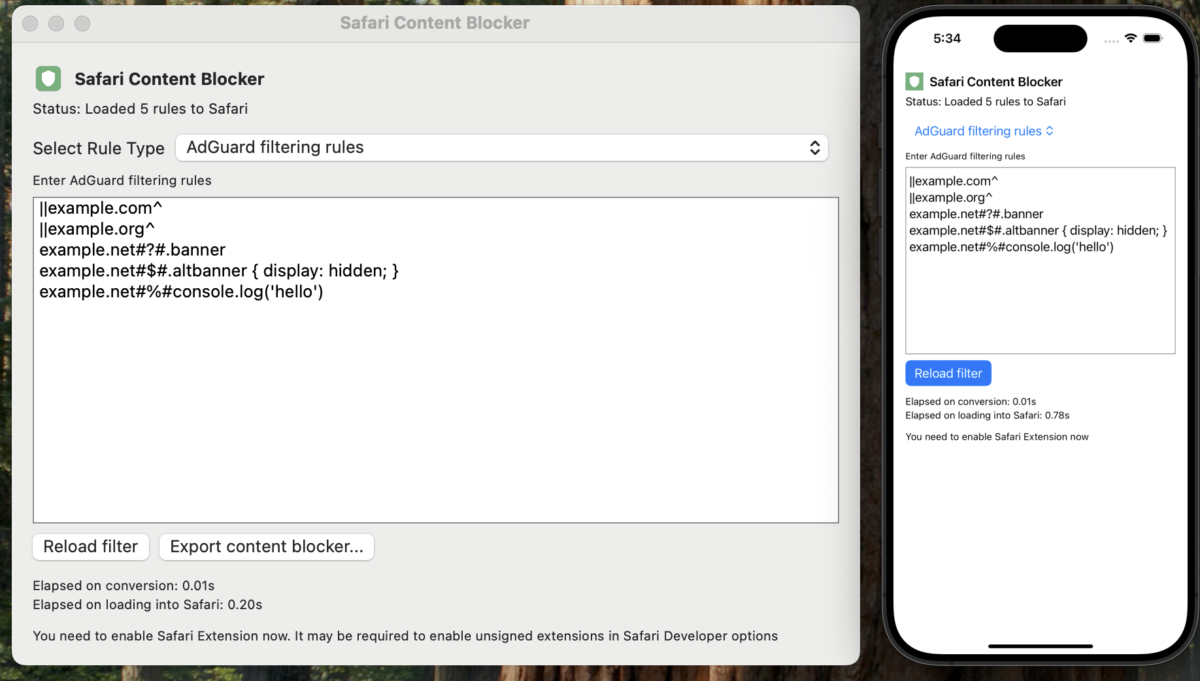
Very simple macOS and iOS apps for debugging Safari content blocking rules.
This is also a showcase of how to use [SafariConverterLib][converter] to build
a Safari content blocker.
[converter]: https://github.com/AdguardTeam/SafariConverterLib
## Prepare
> [!WARNING]
> Note, that in this example we're linking directly with SafariConverterLib
> instead of using it as a library (npm dependency + proper Swift dependency).
> Don't do that in production, just add normal dependencies.
1. XCode 16.3 or newer is required to build it.
2. Change "Development Team" in the Project settings.
3. Change bundle IDs of each target and app groups, i.e. replace all
occurrences in all files: `dev.ameshkov` -> `dev.yourname`.
4. Edit the file `filters/filter.txt` and put the rules you'd like to test
there.
If you're using the `local` branch and link with [SafariConverterLib][converter]
directly, please do the following:
1. Checkout the `local` branch: `git checkout local`
2. Clone the [SafariConverterLib][converter] project to `/safari-converter-lib`:
```sh
git clone https://github.com/AdguardTeam/SafariConverterLib.git safari-converter-lib
```
3. Run `cd safari-converter-lib/Extension && pnpm install && pnpm build` to
build the extension.
### macOS app
1. In order to use the app on macOS, enable [developer mode][safaridevelop] in
Safari and [allow unsigned extensions][unsigned] in Developer Options.
2. Build and run the app, target `safari-blocker`.
[safaridevelop]: https://developer.apple.com/documentation/safari-developer-tools/enabling-developer-features
[unsigned]: https://developer.apple.com/documentation/safariservices/running-your-safari-web-extension#3744467
### iOS app
1. If you use a Simulator, it will be enough to build and run `safari-blocker-ios`.
## Development
### Prerequisites
- Swift 6 or newer.
- Install [Node.js][nodejs]: recommend to use [nvm][nvm] for that.
- Install [pnpm][pnpm]: `brew install pnpm`.
- Install [SwiftLint][swiftlint]: `brew install swiftlint`.
- Install [xcbeautify][xcbeautify]: `brew install xcbeautify`.
- Install [markdownlint-cli][markdownlint]: `npm install -g markdownlint-cli`.
[nodejs]: https://nodejs.org/
[nvm]: https://github.com/nvm-sh/nvm
[pnpm]: https://pnpm.io/
[swiftlint]: https://github.com/realm/SwiftLint
[xcbeautify]: https://github.com/cpisciotta/xcbeautify
[markdownlint]: https://www.npmjs.com/package/markdownlint-cli
Run `make init` to setup pre-commit hooks.
### Building
Use XCode 16.3 or newer to build and run the apps.
- `safari-blocker` - the macOS version.
- `safari-blocker-ios` - the iOS version.
To build the browser extensions code, run `make js-build`.
### Developer documentation
Please refer to [./DEVELOPMENT.md][devdoc] for developer documentation and
guidelines.
If you're using an AI-enabled IDE (Windsurf/Cursor/Copilot/etc), use this
document as a rules file, for example:
```sh
ln -s ./DEVELOPMENT.md .windsurfrules
```
For the browser extensions, please refer to their respective README files:
- [appext/README.md](./appext/README.md)
- [webext/README.md](./webext/README.md)
[devdoc]: ./DEVELOPMENT.md