https://github.com/amiad/gnome-hdate
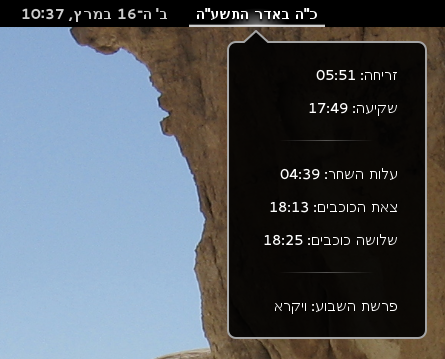
Show Hebrew date in gnome-shell panel
https://github.com/amiad/gnome-hdate
gnome-shell gnome-shell-extension
Last synced: about 1 year ago
JSON representation
Show Hebrew date in gnome-shell panel
- Host: GitHub
- URL: https://github.com/amiad/gnome-hdate
- Owner: amiad
- Created: 2012-12-03T15:36:10.000Z (over 13 years ago)
- Default Branch: master
- Last Pushed: 2024-06-30T14:26:19.000Z (about 2 years ago)
- Last Synced: 2025-03-31T12:11:11.543Z (over 1 year ago)
- Topics: gnome-shell, gnome-shell-extension
- Language: JavaScript
- Homepage: https://extensions.gnome.org/extension/554/gnome-hdate/
- Size: 309 KB
- Stars: 9
- Watchers: 4
- Forks: 3
- Open Issues: 1
-
Metadata Files:
- Readme: README.md
Awesome Lists containing this project
README
# gnome-hdate
Gnome-shell extension for show Hebrew date in the panel.
## Dependencies
* vala
* [libhdate](http://libhdate.sourceforge.net/)>=1.6 - Existing in repositories of most distributions.
* [libhdate-glib](http://libhdate-glib.googlecode.com/)>=0.5 - Arch: [AUR](https://aur.archlinux.org/packages/libhdate-glib/), Debian/Ubuntu: [64 bit](http://code.google.com/p/libhdate-glib/downloads/detail?name=libhdate-glib_0.5.0-1_amd64.deb&can=2&q=).
[How install the dependencies on Ubuntu from whatsup forum](https://whatsup.org.il/index.php?name=PNphpBB2&file=viewtopic&p=430129#430129) (thanks to Nachum).
## Installation
Install from [GNOME Shell extensions site](https://extensions.gnome.org/extension/554/gnome-hdate/).
OR
Download [master.zip](https://github.com/amiad/gnome-hdate/archive/master.zip), unzip it, rename the directory to `hdate@hatul.info` and move it to `~/.local/share/gnome-shell/extensions`.
OR
Archlinux users: Install [gnome-shell-extension-gnome-hdate-git](https://aur.archlinux.org/packages/gnome-shell-extension-gnome-hdate-git/) from AUR.
## Troubleshooting
Arch users may need to rebuild the libhdate-glib every new version of Gnome.
## Thanks
Kobi Zamir