https://github.com/aminezouitine/volumelist-cpp
🗄Make a list that has a notion of volume 🗄
https://github.com/aminezouitine/volumelist-cpp
cpp data-structures
Last synced: 4 months ago
JSON representation
🗄Make a list that has a notion of volume 🗄
- Host: GitHub
- URL: https://github.com/aminezouitine/volumelist-cpp
- Owner: AmineZouitine
- Created: 2022-03-27T00:59:20.000Z (over 4 years ago)
- Default Branch: main
- Last Pushed: 2022-04-06T03:05:41.000Z (over 4 years ago)
- Last Synced: 2025-06-25T06:42:44.267Z (about 1 year ago)
- Topics: cpp, data-structures
- Language: C++
- Homepage:
- Size: 7.72 MB
- Stars: 7
- Watchers: 2
- Forks: 0
- Open Issues: 0
-
Metadata Files:
- Readme: README.md
Awesome Lists containing this project
README
# 🗄 VolumeList-Cpp 🗄

## What this is ?
This project allows to add a notion of **volume** in contiguous containers in memory.
An interesting example of use would be a timetable application.
## Usage 📜
### Essential methods ⭐
```cc
VolumeList(size_t max_volume, bool is_dynamic_size = false); // Constructor
void append(T& element, size_t volume);
void insert(T& element, size_t min_position, size_t volume);
void remove(size_t index);
```
### Creation

Creation of a **VolumeList** of type string, with a maximum volume of **100** units and a **non dynamics size**.
```cc
auto volume_list = VolumeList{100}; // type can be anything.
```
### Append
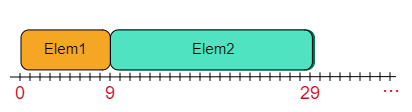
The **append** method takes the **element** to be added at the **end** of the list and its **volume**.
Here we add a string with a volume of **10** to our list and a string with a volume of **20**.
**Exemple**
```cc
auto elem1 = std::string("Hi there!");
auto elem2 = std::string("I hope you enjoy it");
volume_list.append(elem1, 10);
volume_list.append(elem2, 20);
```
**List status** *(std::cout << volume_list)*:
```
-------[0]-------
Element: Hi there!
Position: [0, 9]
Volume: 10
-------[1]-------
Element: I hope you enjoy it
Position: [9, 29]
Volume: 20
```
### Insert

The **insert** method takes the **element** to insert, its **volume**, and the place where it **starts** in the volume list.
If there is already an element at this position, it is **shifted**.
**Exemple**
```cc
auto elem1 = std::string("First");
auto elem2 = std::string("Second");
auto elem3 = std::string("Third");
auto elem4 = std::string("Fourth");
volune_list.insert(elem1, 0, 10);
volume_list.insert(elem2, 2, 7);
volume_list.insert(elem3, 2, 9);
volune_list.insert(elem4, 0, 5);
```
**List status** *(std::cout << volume_list)*:
```
-------[0]-------
Element: Fourth
Position: [0, 4]
Volume: 5
-------[1]-------
Element: Third
Position: [4, 13]
Volume: 9
-------[2]-------
Element: Second
Position: [13, 20]
Volume: 7
-------[3]-------
Element: First
Position: [20, 30]
Volume: 10
```
### Remove

The **remove** function allows to remove an element from the list with its **index**, **it works like a classic remove**.
***Exemple***
```cc
auto elem1 = std::string("Bye you :c");
auto elem2 = std::string("Hi there !");
volume_list.append(elem1, 10);
volune_list.append(elem2, 10);
volume_list.remove(0);
```
**List status** *(std::cout << volume_list)*:
```
-------[0]-------
Element: Hi there !
Position: [9, 19]
Volume: 10
```
### Methods that may be useful to you 🌟
```cc
T& operator[](size_t index);
VolumeWrapper& get_volume_at(size_t index);
size_t get_max_volume() const;
size_t get_current_volume() const;
size_t get_element_number() const;
size_t get_remaining_volume() const;
bool get_is_dynamic_size() const;
std::vector>::const_iterator begin() const;
std::vector>::iterator begin();
std::vector>::const_iterator end() const;
std::vector>::iterator end();
```
## Essential Methods -- VolumeWrapper ⭐
```cc
VolumeWrapper(std::shared_ptr element, size_t min_position, size_t volume);
T& get_element() const;
size_t get_min_position() const;
size_t get_max_position() const;
size_t get_volume() const;
```
## Code documentation -- WORK IN PROGRESS 👨💻