https://github.com/aminography/primeadapter
PrimeAdapter makes working with RecyclerView easier.
https://github.com/aminography/primeadapter
adapter android annotations builder kotlin recyclerview recyclerview-adapter
Last synced: 11 months ago
JSON representation
PrimeAdapter makes working with RecyclerView easier.
- Host: GitHub
- URL: https://github.com/aminography/primeadapter
- Owner: aminography
- License: apache-2.0
- Created: 2018-09-17T07:33:59.000Z (almost 8 years ago)
- Default Branch: master
- Last Pushed: 2019-12-20T11:54:22.000Z (over 6 years ago)
- Last Synced: 2023-04-25T11:49:26.616Z (about 3 years ago)
- Topics: adapter, android, annotations, builder, kotlin, recyclerview, recyclerview-adapter
- Language: Kotlin
- Size: 3.94 MB
- Stars: 54
- Watchers: 7
- Forks: 8
- Open Issues: 0
-
Metadata Files:
- Readme: README.md
- License: LICENSE.md
Awesome Lists containing this project
README
# `PrimeAdapter` :zap:
[]( https://android-arsenal.com/details/1/7178)
[](https://android-arsenal.com/api?level=11)
[ ](https://bintray.com/aminography/maven/PrimeAdapter/_latestVersion)
**`PrimeAdapter`** makes working with `RecyclerView` easier by separating required code in a few simple and well-structured classes.
It brings simplicity when you have multiple view types in a `RecyclerView`.
By using annotation processing, it generates unique view types automatically to make the code more clear.
You can use **`PrimeAdapter`** in both [Kotlin](https://github.com/aminography/PrimeAdapter/tree/master/sample-app) and [Java](https://github.com/aminography/PrimeAdapter/tree/master/java-sample-app) Android projects as the sample apps are written.

| Custom Divider | Draggability | Expandability |
| --- | --- | --- |
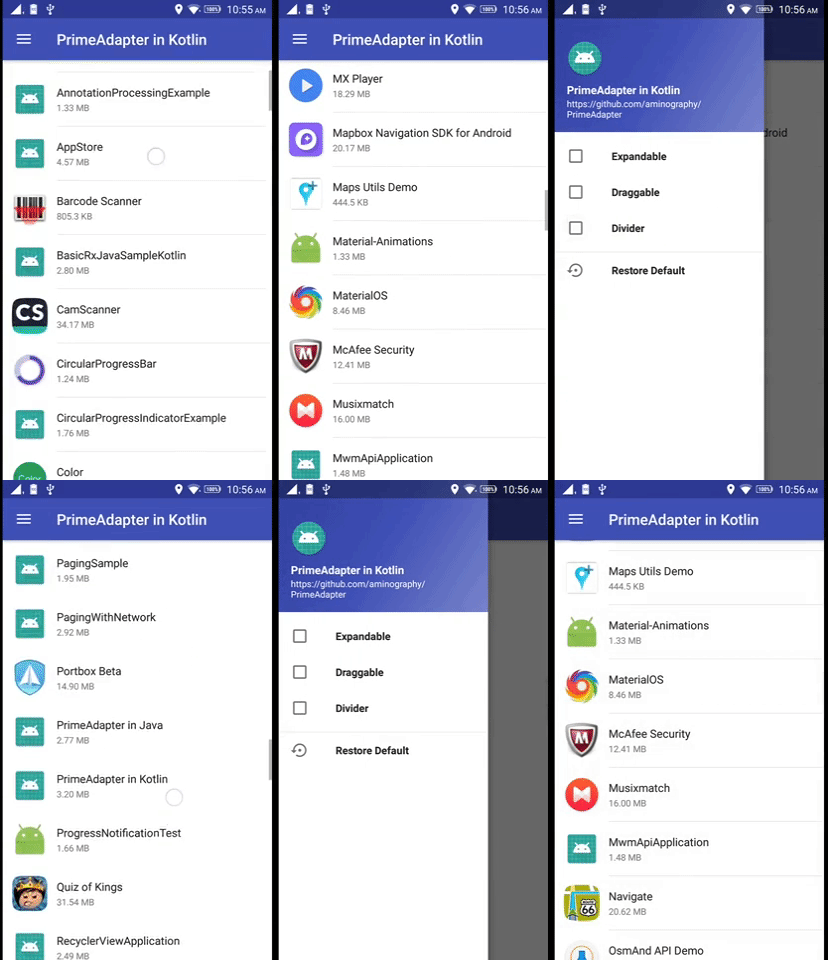 | 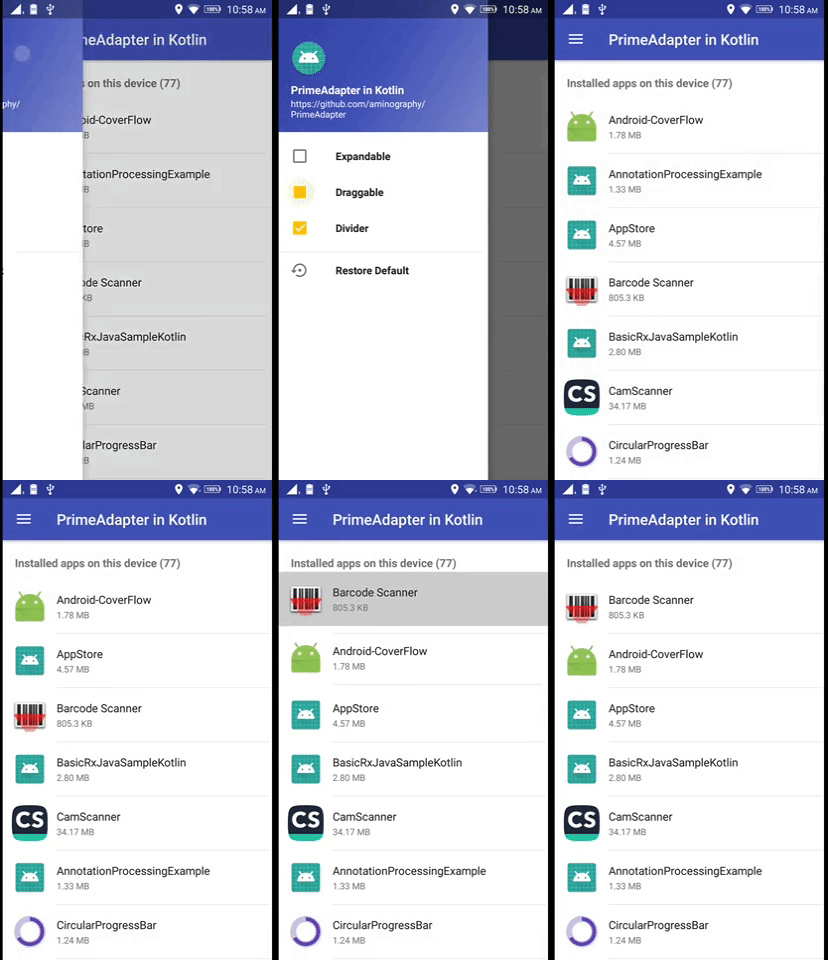 | 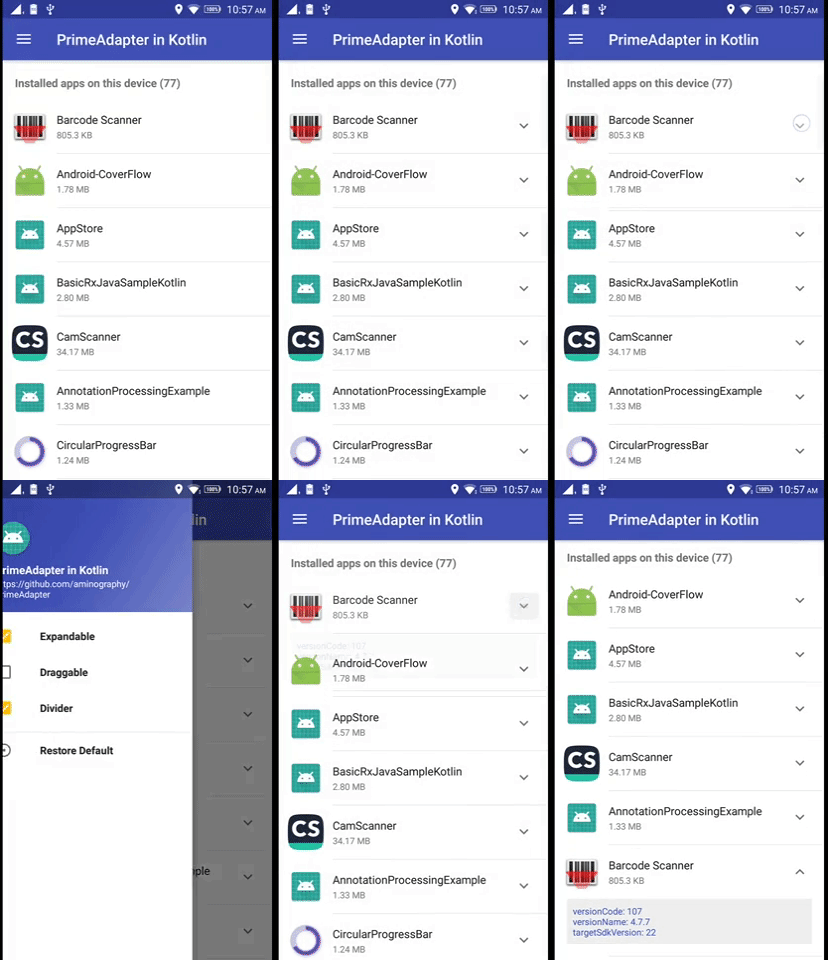 |
Download
--------
Add the following lines to your `build.gradle` file:
```gradle
apply plugin: 'kotlin-android'
apply plugin: 'kotlin-android-extensions'
apply plugin: 'kotlin-kapt'
repositories {
jcenter()
}
dependencies {
implementation 'com.aminography:primeadapter:1.0.14'
compileOnly 'com.aminography:primeadapter-annotation:1.0.14'
kapt 'com.aminography:primeadapter-processor:1.0.14'
}
```
* If you write code in Java, you should also add kotlin dependency too:
```gradle
dependencies {
implementation 'org.jetbrains.kotlin:kotlin-stdlib-jdk8:1.3.50'
}
```
How to use `PrimeAdapter`?
--------
You should create both **data holder** and **view holder** classes for each type of view that you want to show in `RecyclerView`.
**1.** It's necessary to add [`@DataHolder`](https://github.com/aminography/PrimeAdapter) annotation above all data holder classes which inherits from `PrimeDataHolder`:
```kotlin
@DataHolder
data class ActorDataHolder(
val name: String
) : PrimeDataHolder()
```
**2.** Each view holder class should inherit from `PrimeViewHolder` and specify related data holder as a type parameter like following:
```kotlin
class ActorViewHolder(
delegate: PrimeDelegate
) : PrimeViewHolder(delegate, R.layout.list_item) {
override fun bindDataToView(dataHolder: ActorDataHolder) {
with(itemView) {
nameTextView.text = dataHolder.name
}
}
}
```
**3.** Your custom adapter class must inherit from **`PrimeAdapter`** that decides to make view holder instance based on data holder type.
Follow this pattern:
```kotlin
class ActorAdapter : PrimeAdapter() {
override fun makeViewHolder(dataHolderClass: Class<*>?): PrimeViewHolder<*>? {
return when (dataHolderClass) {
ActorDataHolder::class.java -> ActorViewHolder(this)
else -> null
}
}
}
```
**4.** Finally, you can instantiate your custom adapter using **`PrimeAdapter`** builder mechanism.
```kotlin
override fun onCreate(savedInstanceState: Bundle?) {
super.onCreate(savedInstanceState)
setContentView(R.layout.activity_main)
val adapter = PrimeAdapter.with(recyclerView)
.setLayoutManager(LinearLayoutManager(activity))
.set()
.build(ActorAdapter::class.java)
val dataList = mutableListOf()
dataList.add(ActorDataHolder("Tom Hanks"))
dataList.add(ActorDataHolder("Morgan Freeman"))
dataList.add(ActorDataHolder("Robert De Niro"))
adapter.replaceDataList(dataList)
}
```
Extra Features
--------
### Handling Item Clicks
**`PrimeAdapter`** helps you handle `RecyclerView` items click events,
simply by `setItemClickListener()` with an `OnRecyclerViewItemClickListener` argument when you're building an adapter instance or later:
```kotlin
val onRecyclerViewItemClickListener = object: OnRecyclerViewItemClickListener{
override fun onItemClick(primeDataHolder: PrimeDataHolder) {
// do something
}
override fun onItemLongClick(primeDataHolder: PrimeDataHolder) {
// do something
}
}
// In builder pattern:
val adapter = PrimeAdapter.with(recyclerView)
...
.setItemClickListener(onRecyclerViewItemClickListener)
...
.build(ActorAdapter::class.java)
// or after adapter instantiation:
adapter.setItemClickListener(onRecyclerViewItemClickListener)
```
### Draggability
**`PrimeAdapter`** helps you make the `RecyclerView` items draggable.
It would be activated/deactivated by calling `setDraggable(true)`/`setDraggable(false)` on a builder or an adapter instance.
Optionally, you can get notified about item movements by calling `setItemDragListener()` and passing an `OnRecyclerViewItemDragListener` instance to it.
```kotlin
adapter.setDraggable(true)
adapter.setItemDragListener(object: OnRecyclerViewItemDragListener{
override fun onItemMoved(fromPosition: Int, toPosition: Int) {
// do something
}
})
```
It is necessary to introduce a view as handle of dragging in view holders which are going to be draggable:
```kotlin
class ActorViewHolder(
delegate: PrimeDelegate
) : PrimeViewHolder(delegate, R.layout.list_item) {
init {
setDragHandle(itemView)
}
...
}
```
### Expandability
Another feature of **`PrimeAdapter`** is making the implementation of `RecyclerView` items expansion easier.
Calling the `setExpandable(true)`/`setExpandable(false)` on a builder or on adapter instance changes its activation.
```kotlin
adapter.setExpandable(true)
```
To see how to implement it, please check the [related example code][2].
### Custom Skippable Divider
Showing custom divider lines is a good feature that **`PrimeAdapter`** provides.
Calling the `setDivider()` on a builder or on adapter instance leads to show default divider line between items.
It's possible to pass it a custom `Drawable` instance or simply a color to change the divider looking.
Also we can set inset for divider drawables in pixels.
```kotlin
//----- default divider:
adapter.setDivider()
//----- divider with custom drawable:
adapter.setDivider(ContextCompat.getDrawable(context, R.drawable.divider))
//----- divider with custom color:
adapter.setDivider(Color.RED)
//----- divider with custom color and custom inset:
adapter.setDivider(Color.RED, insetLeft = 16, insetRight = 16)
//----- deactivate dividers:
adapter.setDivider(null)
```
By default dividers are shown for all items except the last one.
It's easy to skip some items divider by setting `hasDivider` property to `false` on their data holder instances.
```kotlin
adapter.getItem(position).hasDivider = false
adapter.notifyDataSetChanged()
```
ProGuard
--------
If you want to create a release version of your app, you need to include the following lines in the app level proguard file:
```pro
-keep class com.aminography.primeadapter.ViewTypeManager { *; }
-keepclassmembers class ** {
@com.aminography.primeadapter.annotation.DataHolder *;
}
```
License
--------
```
Copyright 2018 Mohammad Amin Hassani.
Licensed under the Apache License, Version 2.0 (the "License");
you may not use this file except in compliance with the License.
You may obtain a copy of the License at
http://www.apache.org/licenses/LICENSE-2.0
Unless required by applicable law or agreed to in writing, software
distributed under the License is distributed on an "AS IS" BASIS,
WITHOUT WARRANTIES OR CONDITIONS OF ANY KIND, either express or implied.
See the License for the specific language governing permissions and
limitations under the License.
```
[1]: https://github.com/aminography/PrimeAdapter/wiki
[2]: https://github.com/aminography/PrimeAdapter/blob/master/sample-app/src/main/java/com/aminography/primeadapter/sample/view/viewholder/InstalledAppListViewHolder.kt