https://github.com/amnuts/phperror-gui
View entries in the PHP error log file in a clear and readable way, which also allows for sorting and filtering.
https://github.com/amnuts/phperror-gui
Last synced: 4 months ago
JSON representation
View entries in the PHP error log file in a clear and readable way, which also allows for sorting and filtering.
- Host: GitHub
- URL: https://github.com/amnuts/phperror-gui
- Owner: amnuts
- Created: 2014-06-18T21:10:00.000Z (about 12 years ago)
- Default Branch: master
- Last Pushed: 2018-06-23T22:17:36.000Z (about 8 years ago)
- Last Synced: 2025-03-27T04:22:50.993Z (over 1 year ago)
- Language: PHP
- Homepage:
- Size: 27.3 KB
- Stars: 52
- Watchers: 6
- Forks: 17
- Open Issues: 1
-
Metadata Files:
- Readme: README.md
Awesome Lists containing this project
README
# phperror-gui
A clean and effective single-file GUI for viewing entries in the PHP error log, allowing for filtering by path and by type.
[](https://flattr.com/submit/auto?user_id=acollington&url=https://github.com/amnuts/phperror-gui&title=phperror-gui&language=&tags=github&category=software)
### getting started
There are two ways to getting started using this gui.
1. Simply to copy/paste or download the phperror-gui.php to your server.
2. Install via composer by running the command `composer require amnuts/phperror-gui`
### usage
Simply load the script up in your browser and it should show you the entries from the PHP log file. It will find the error log from the ini settings, though if you want to specify the log file you can change the `$error_log` variable to the path of your error log file.
You can select the types of errors you want displaying, sort in different ways or filter based on the path of the file producing the error (as recoded in the log).
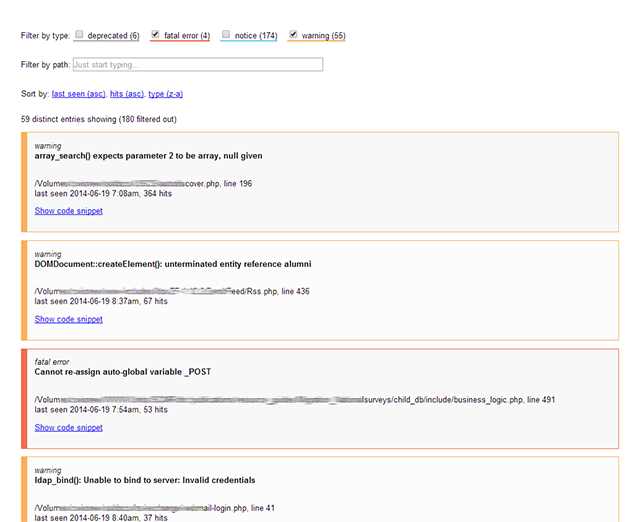
The interface will also attempt to show you the snippet of code where the error has occurred and also the stack trace if it's recorded in the log file.
### cache
There is a very rudimentary option to cache the results. This is set by using the $cache variable and setting it to the path of the cache file (must be a writable location). It will store the results of the file scan and then the position in the file it read up to. On subsequent reads of the file it will seek to that position and start to read the file. This works so long as you are not doing log rotation as the seek position could suddenly become much greater than the file size. So it's only recommended that you use the cache if you keep the one log file.
# License
MIT: http://acollington.mit-license.org/