https://github.com/anand-92/droidproxy
A native macOS menu bar app that proxies Claude Code authentication for use with Factory Droids
https://github.com/anand-92/droidproxy
anthropic claude droid factory macos menu-bar-app proxy swift
Last synced: 2 months ago
JSON representation
A native macOS menu bar app that proxies Claude Code authentication for use with Factory Droids
- Host: GitHub
- URL: https://github.com/anand-92/droidproxy
- Owner: anand-92
- License: mit
- Created: 2026-03-26T13:28:15.000Z (3 months ago)
- Default Branch: main
- Last Pushed: 2026-04-03T00:25:45.000Z (3 months ago)
- Last Synced: 2026-04-03T07:43:08.512Z (3 months ago)
- Topics: anthropic, claude, droid, factory, macos, menu-bar-app, proxy, swift
- Language: Swift
- Size: 715 MB
- Stars: 19
- Watchers: 1
- Forks: 1
- Open Issues: 0
-
Metadata Files:
- Readme: README.md
- Changelog: CHANGELOG.md
- License: LICENSE
- Agents: AGENTS.md
Awesome Lists containing this project
README
# DroidProxy

A native macOS menu bar app that proxies Claude Code, Codex, and Gemini authentication for use with AI coding tools like [ ](https://app.factory.ai) Droids. Built on [CLIProxyAPIPlus](https://github.com/router-for-me/CLIProxyAPIPlus).
## Download
Grab the latest release from [Releases](https://github.com/anand-92/droidproxy/releases/latest):
- **DroidProxy-arm64.dmg** -- Apple Silicon
- **DroidProxy-arm64.zip** -- ZIP alternative
All releases are code-signed and notarized by Apple. Existing installs auto-update via Sparkle.
## Features
- **One-click OAuth auth** -- Claude Code, Codex, and Gemini login from the menu bar, credential monitoring, auto-refresh
- **Adaptive thinking proxy** -- Injects `thinking: {"type":"adaptive"}` and per-model `output_config.effort` for Claude Opus 4.7 and Claude Sonnet 4.6 requests sent through `http://localhost:8317`
- **Codex reasoning controls** -- Injects `reasoning: {"effort":"..."}` for `gpt-5.3-codex` and `gpt-5.4` via the OpenAI-compatible `http://localhost:8317/v1` endpoint
- **Gemini thinking levels** -- Injects per-model thinking levels for `gemini-3.1-pro-preview` (`low` / `medium` / `high`) and `gemini-3-flash-preview` (`minimal` / `low` / `medium` / `high`) via model name suffix rewriting
- **Per-model effort controls** -- Configure Opus 4.7 (`low` / `medium` / `high` / `xhigh` / `max`), Sonnet 4.6 (`low` / `medium` / `high` / `max`), GPT 5.3 Codex (`low` / `medium` / `high` / `xhigh`), GPT 5.4 (`low` / `medium` / `high` / `xhigh`), Gemini 3.1 Pro (`low` / `medium` / `high`), and Gemini 3 Flash (`minimal` / `low` / `medium` / `high`) directly from the Settings window
- **Max Budget Mode** -- Nuclear launch button that forces maximum reasoning on Sonnet 4.6 requests: classic extended thinking with `budget_tokens: 63999`, `max_tokens: 64000`, and `effort: max`. Opus 4.7 is unaffected and continues to use its configured thinking effort slider. Full thinking power for Sonnet, your quota's problem.

- **Sparkle auto-updates** -- Checks daily, installs in the background
- **Factory integration** -- Use Claude models against `http://localhost:8317`, Codex/OpenAI models against `http://localhost:8317/v1`, and Gemini models against `http://localhost:8317/v1`
## Setup
See [SETUP.md](SETUP.md) for authentication and Factory configuration instructions.

## Requirements
- macOS 13.0+ (Ventura or later)
- Apple Silicon (M1/M2/M3/M4)
## Build from source
```bash
# Debug build
make build
# Release build + signed .app bundle
./create-app-bundle.sh
```
## Project Structure
```
src/
├── Sources/
│ ├── main.swift # App entry point
│ ├── AppDelegate.swift # Menu bar & window management
│ ├── ServerManager.swift # Server process control & auth
│ ├── SettingsView.swift # Main UI
│ ├── AuthStatus.swift # Auth file monitoring
│ ├── ThinkingProxy.swift # Thinking parameter injection proxy
│ ├── TunnelManager.swift # Network tunnel management
│ ├── IconCatalog.swift # Icon loading & caching
│ ├── NotificationNames.swift # Notification constants
│ └── Resources/
│ ├── cli-proxy-api-plus # CLIProxyAPIPlus binary
│ ├── config.yaml # Server config
│ ├── AppIcon.icns # App icon
│ ├── icon-active.png # Menu bar icon (active)
│ ├── icon-inactive.png # Menu bar icon (inactive)
│ ├── icon-claude.png # Claude service icon
│ ├── icon-codex.png # Codex service icon
│ └── icon-gemini.png # Gemini service icon
├── Package.swift
└── Info.plist
```
## Challenger Droids
DroidProxy ships with three devil's advocate code reviewer droids -- powered by Claude Opus 4.7, GPT 5.4, and Gemini 3.1 Pro. They challenge your code decisions, surface tradeoffs you may have missed, stress-test edge cases, and suggest concrete alternatives. Running multiple gives you a cross-model second opinion that catches blind spots a single reviewer might miss.
### Install
Copy the droid and command definitions into your personal Factory config:
```bash
mkdir -p ~/.factory/droids ~/.factory/commands
# Droids
cp .factory/droids/challenger-opus.md ~/.factory/droids/
cp .factory/droids/challenger-gpt.md ~/.factory/droids/
cp .factory/droids/challenger-gemini.md ~/.factory/droids/
# Slash commands
cp .factory/commands/challenge-opus.md ~/.factory/commands/
cp .factory/commands/challenge-gpt.md ~/.factory/commands/
cp .factory/commands/challenge-gemini.md ~/.factory/commands/
```
### Usage
In any Droid session, use the slash commands:
- `/challenge-opus` -- summon the Claude Opus 4.7 challenger
- `/challenge-gpt` -- summon the GPT 5.4 challenger
- `/challenge-gemini` -- summon the Gemini 3.1 Pro challenger
Both droids are read-only (no file edits) and return a structured verdict with challenges, edge cases, and acknowledgements of what's solid.
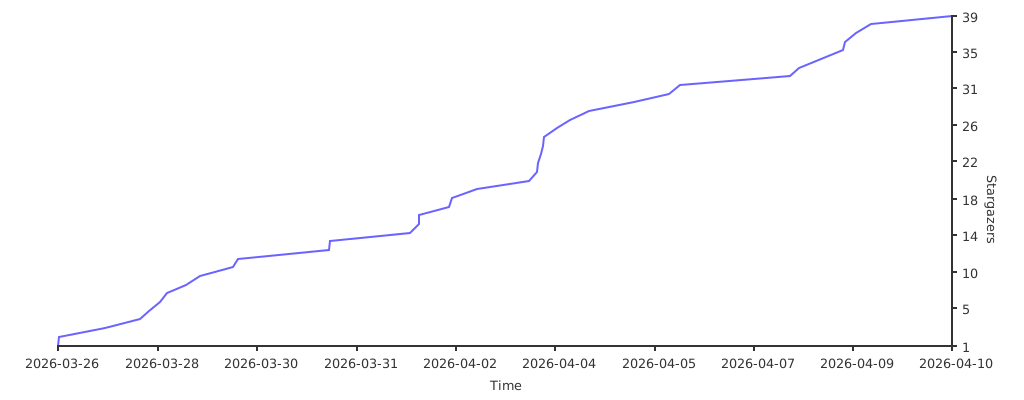
## Star History
## License
MIT