https://github.com/ananthb/ht32-panel
Front-panel display and LED control for mini PCs with HT32-based LCD and RGB LEDs (AceMagic S1, Skullsaints Agni, etc.).
https://github.com/ananthb/ht32-panel
Last synced: 3 months ago
JSON representation
Front-panel display and LED control for mini PCs with HT32-based LCD and RGB LEDs (AceMagic S1, Skullsaints Agni, etc.).
- Host: GitHub
- URL: https://github.com/ananthb/ht32-panel
- Owner: ananthb
- License: agpl-3.0
- Created: 2026-01-25T07:18:27.000Z (5 months ago)
- Default Branch: main
- Last Pushed: 2026-04-14T20:32:04.000Z (3 months ago)
- Last Synced: 2026-04-14T21:07:49.743Z (3 months ago)
- Language: Rust
- Homepage: https://ananthb.github.io/ht32-panel/
- Size: 1.48 MB
- Stars: 6
- Watchers: 0
- Forks: 4
- Open Issues: 0
-
Metadata Files:
- Readme: README.md
- License: LICENSE
Awesome Lists containing this project
README
# HT32 Panel
[](https://github.com/ananthb/ht32-panel/actions/workflows/release.yml)
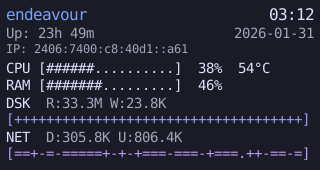
Front-panel display and LED control for mini PCs with HT32-based LCD and RGB LEDs ([Skullsaints Agni](https://www.electroniksindia.com/products/agni-by-skullsaints-mini-pc-intel-twin-lake-n150-vibrant-lcd-screen-m-2-ssd-mini-tower-with-rgb-lights-wifi-6-4k-uhd-dual-lan-for-home-and-office), [AceMagic S1](https://acemagic.com/products/acemagic-s1-12th-alder-laker-n95-mini-pc), etc.).
- **Daemon** (`ht32paneld`): D-Bus service with HTMX web UI
- **CLI** (`ht32panelctl`): D-Bus client for daemon control
- **Applet**: System tray for GNOME/KDE
- **Web UI**: Monitor and control the panel from a browser
## Install
See the [installation guide](https://ananthb.github.io/ht32-panel/install.html) for all options (deb, rpm, AppImage, NixOS, from source).
### Quick start
```bash
# Debian/Ubuntu
curl -LO https://github.com/ananthb/ht32-panel/releases/latest/download/ht32-panel_0.8.0_amd64.deb
sudo dpkg -i ht32-panel_*.deb
sudo apt update
# Fedora
curl -LO https://github.com/ananthb/ht32-panel/releases/latest/download/ht32-panel-0.8.0-1.x86_64.rpm
sudo dnf install ./ht32-panel-*.rpm
# NixOS
nix run github:ananthb/ht32-panel
```
## Documentation
- [Installation](https://ananthb.github.io/ht32-panel/install.html)
- [Configuration](https://ananthb.github.io/ht32-panel/config.html)
- [API Reference](https://ananthb.github.io/ht32-panel/api/)
## Acknowledgement
My thanks for the ideas and source code from [github.com/tjaworski/AceMagic-S1-LED-TFT-Linux](https://github.com/tjaworski/AceMagic-S1-LED-TFT-Linux/commit/2971f2b0703bd3170a3f714867652f7e085ec447).
## License
AGPL-3.0-or-later. See [LICENSE](LICENSE).
Copyright © Ananth Bhaskararaman 2026